logo-darklogo-darklogo-darklogo-dark
  • Tool Categories
    • 🎨Art & Creative Design505
    • 🏢Business Management644
    • 💻Coding & Development515
    • 👮Detection83
    • 🧠General Use727
    • 🏥Health & Wellness55
    • 📷Image & Photo Analysis100
    • 🖼️Image Generation & Editing618
    • 📐Interior & Architectural Design37
    • 🎓Learning & Education483
    • ⚖️Legal & Finance90
    • 🎭Lifestyle & Entertainment236
    • 📢Marketing & Advertising627
    • 🎧Music & Audio138
    • 👔Office & Workplace1,014
    • 🔬Research & Data Analysis372
    • 👥Social Media245
    • 🎥Video Generation & Editing426
    • 👧🏻Virtual Companion135
    • 🎤Voice Generation & Editing381
    • ✍️Writing & Editing808
    • All Categories
    • AI Use Cases
  • News
  • Events
    • Academic Conferences
    • Developer Conferences
    • Expos / Trade Shows
    • Industry Summits
    • Workshops / Training
    • All Events
    • Past Events
  • Saved Tools
  • Suggest a Tool
✕
Home › Image Generation & Editing › Avatar Generation› PortraitArt
PortraitArt

PortraitArt

Transforms photos into artistic styles like oil paintings, cartoons, sketches using AI

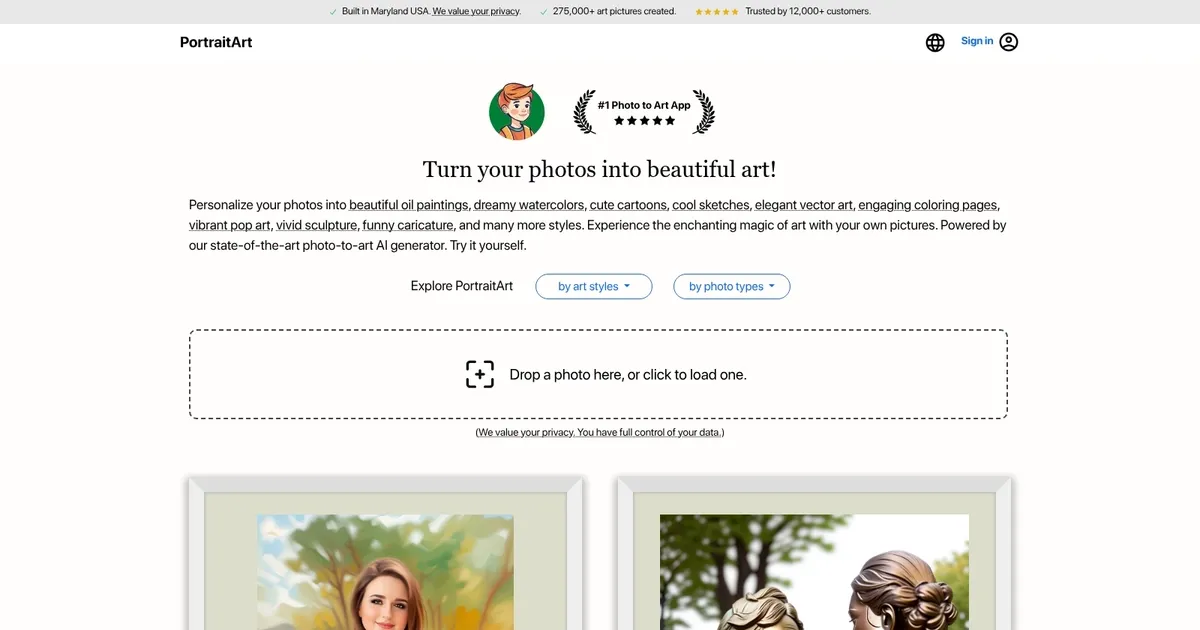
PortraitArt is an AI-powered platform that transforms your photos into stunning artworks across different styles. By uploading your images, you can generate personalized pieces such as oil paintings, watercolors, cartoons, sketches, vector art, coloring pages, pop art, sculptures, caricatures, and more. In other words, the service allows users to experience the magic of art through their own pictures — offering a creative way to preserve memories.

PortraitArt is designed to handle a range of photo types, including individual portraits, family and group photos, wedding pictures, children’s portraits, sports images, house and pet photos, car portraits, and scenic landscapes. To achieve the best results, it is recommended to use high-resolution photos with good lighting and a clean, uncluttered background.

PortraitArt claims that all uploaded photos are securely processed and used solely for creating your artwork. It will not store, share, or use your photos for any other purposes without your consent. In addition, all data transmission is encrypted to protect your personal information, and you have the option to delete your data after creating and downloading your art pieces.

PortraitArt can be tried for free, allowing users to test the service before spending their hard-earned cash. During the trial period, you can see previews of your photos transformed into various art styles, helping you decide which style best suits your needs.

Ultimately, the platform’s user-friendly interface and advanced AI tech make it accessible for anyone looking to create personalized art from their photos. Check it out.

Visit PortraitArt ↗
Categories
🖼️ Image
🧑‍🎤 Avatar Generation 📸 Headshot Generation 👤 Profile Picture Generation 🖼️ Image Generation 🧍 Person Generation
🎨 Art
🎨 Art Generation 🌅 Illustration Generation
👥 Social
💼 Linkedin Headshot

Homepage Screenshot 📸

PortraitArt screenshot

What are the key features? ✨

  • More than 80 Art Styles: Select from oil painting, watercolor, sketch, cartoon, pop art, caricature, coloring page, sculpture, Chinese ink, and additional options for varied transformations.
  • Flexible Photo Handling: Supports portraits, groups, pets, landscapes, architecture while maintaining original layout.
  • Strong Privacy Measures: Encrypts data in transit and lets users delete photos after artwork creation.
  • Intuitive Upload Process: Simple drag-and-drop or click interface, plus email alerts for queued jobs.
  • Multilingual Support: Accessible in English, Simplified Chinese, Traditional Chinese, Indonesian, Portuguese, Arabic, and more.

Who is it for? 🤔

PortraitArt suits everyday users, families, pet lovers, teachers creating classroom materials, social media posters, and gift seekers who desire quick artistic versions of photos without advanced editing knowledge or high costs. It's ideal for custom prints, holiday cards, avatars, decor ideas, or fun projects with people, animals, or places.

Examples of what you can use it for 💡

  • Family member: Generates oil painting or watercolor versions of group photos for wall art or holiday gifts.
  • Teacher or parent: Produces coloring pages from kid or pet photos for fun learning activities.
  • Social media user: Converts selfies into pop art or caricature styles for engaging profiles and posts.
  • Pet enthusiast: Creates cartoon or sketch renditions of animal pictures for sharing or custom items.
  • Creative hobbyist: Applies vintage or illustration effects to landscapes for mood boards or concepts.

Pros & Cons ⚖️

  • Extensive style options
  • Very user-friendly
  • Privacy emphasis
  • Non-portrait support
  • Depends on photo quality
  • No deep editing tools

FAQs 💬

What photos perform best in PortraitArt?
High-resolution images with clear lighting and simple backgrounds produce the cleanest, most detailed artistic outputs.
Is PortraitArt limited to faces only?
No, it processes group shots, pets, scenery, buildings, and more, preserving the full scene.
How many styles are actually available?
More than 80, featuring oil painting, watercolor, sketches, cartoons, pop art, caricatures, coloring pages, and others.
How private is my data with PortraitArt?
Uploads are encrypted, used only for generation, and you can delete them immediately after downloading.
Do I need to sign up?
No account required for basic trials, but email helps track longer processing times.
How does it compare to commissioning real art?
It delivers personalized results far quicker and cheaper than hiring an artist.
Can outputs be used commercially?
Primarily for personal use like prints or shares; review terms for specifics.
What if there's a wait during generation?
Email notification arrives once your artwork completes if a queue forms.

Ready to try PortraitArt?

Transforms photos into artistic styles like oil paintings, cartoons, sketches using AI

Visit PortraitArt ↗

PortraitArt alternatives 🔗

  1. Midjourney Midjourney Generates high-quality images from text prompts using AI.
  2. DALL-E DALL-E Generates detailed images from text prompts with enhanced nuance and safety features
  3. SeaArt SeaArt An AI-driven art creation platform with features including various styles, face swaps, and image upscaling.
  4. OurDream.ai OurDream.ai Creates personalized AI companions for chat, voice, and media generation
  5. Fotor Fotor Enhances and edits photos with AI-powered tools and creative features
  6. Cutout.Pro Cutout.Pro An AI-powered automatic visual design platform that saves time & money
Share
PortraitArt screenshot enlarged
Promote PortraitArt
light badge
Copy Embed Code
dark badge
Copy Embed Code
neutral badge
Copy Embed Code
Best AI Tools

Discover the best AI tools for any use case

Explore
  • Tool Categories
  • AI Use Cases
  • AI Events
  • AI News
  • Saved Tools
Company
  • About Us
  • Contact Us
  • Media & Partnerships
  • Suggest a Tool
Legal
  • Privacy Policy
  • Terms of Service
Copyright © 2026 Best AI Tools 415 Mission Street, 37th Floor, San Francisco, CA 94105