logo-darklogo-darklogo-darklogo-dark
  • Tool Categories
    • 🎨Art & Creative Design505
    • 🏢Business Management644
    • 💻Coding & Development514
    • 👮Detection83
    • 🧠General Use728
    • 🏥Health & Wellness55
    • 📷Image & Photo Analysis100
    • 🖼️Image Generation & Editing618
    • 📐Interior & Architectural Design37
    • 🎓Learning & Education483
    • ⚖️Legal & Finance90
    • 🎭Lifestyle & Entertainment236
    • 📢Marketing & Advertising627
    • 🎧Music & Audio138
    • 👔Office & Workplace1,014
    • 🔬Research & Data Analysis373
    • 👥Social Media245
    • 🎥Video Generation & Editing426
    • 👧🏻Virtual Companion135
    • 🎤Voice Generation & Editing381
    • ✍️Writing & Editing808
    • All Categories
    • AI Use Cases
  • News
  • Events
    • Academic Conferences
    • Developer Conferences
    • Expos / Trade Shows
    • Industry Summits
    • Workshops / Training
    • All Events
    • Past Events
  • Saved Tools
  • Suggest a Tool
✕
Home › Art & Creative Design › Thumbnail Generation› Thumbly
Thumbly

Thumbly

Generates AI-powered thumbnails and titles for YouTube videos

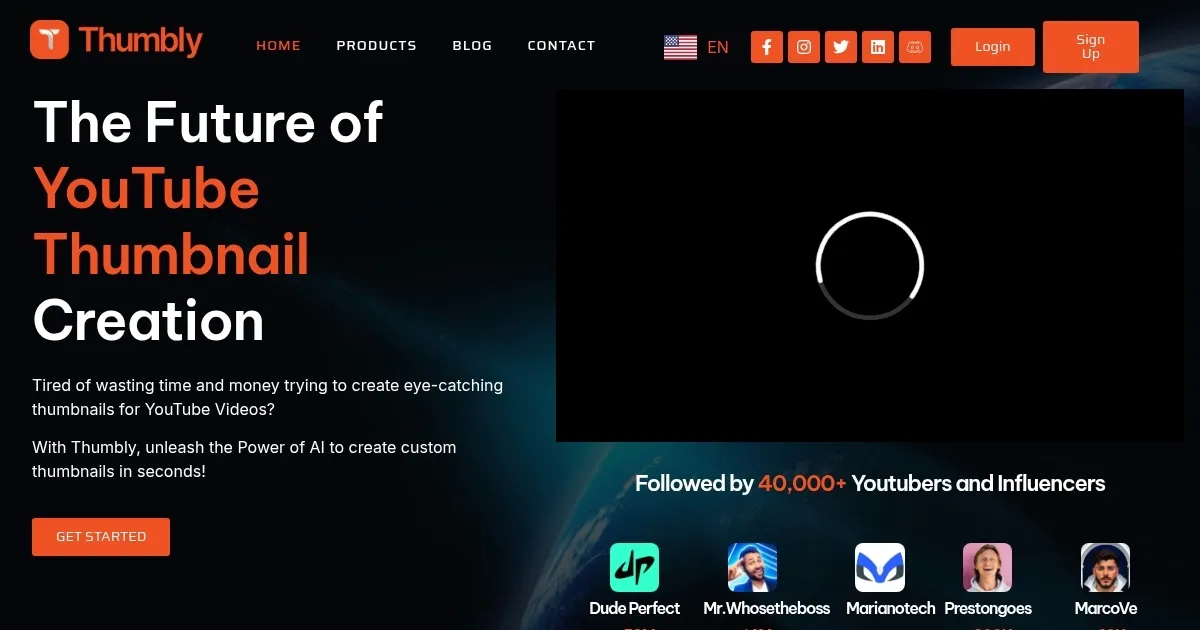
Thumbly is an AI-powered platform designed for YouTube creators to generate thumbnails, titles, and analyze thumbnail performance. It uses a dataset from YouTube videos to produce designs that align with high-engagement patterns. The tool supports users without design experience through a simple web interface.

The Thumbnail Generator creates multiple options based on user prompts or uploaded images. It focuses on elements like high contrast, emotional expressions, and clear text overlays. Generation takes under ten seconds per set. Customization includes adjustments to colors, fonts, and layout elements.

The Title Generator produces SEO-friendly suggestions that match video content. It emphasizes curiosity-driven phrasing while incorporating keywords. Outputs come in batches of five to ten, with options to regenerate for variety.

The Thumbnail Analysis Tool evaluates uploads on a scale of one to ten. It assesses factors such as visual clarity, emotional impact, and mobile compatibility. Results include specific improvement recommendations.

Thumbly integrates with YouTube workflows for direct uploads. Competitors include Canva for general design versatility and vidIQ for analytics depth. Thumbly excels in YouTube-specific optimization. Paid plans offer unlimited generations, while the free tier limits to basic analysis.

Visit Thumbly ↗
Categories
🎨 Art
🖼️ Thumbnail Generation
👥 Social
🖼️ Youtube Thumbnail Generation ▶️ YouTube
🖼️ Image
🖼️ Image Generation

Homepage Screenshot 📸

Thumbly screenshot

Video Overview 🎬

Thumbly - Video Overview

What are the key features? ✨

  • Thumbnail Generator: Creates custom, high-engagement thumbnails from prompts or images in seconds using YouTube-trained AI.
  • Title Generator: Suggests optimized, click-worthy titles tailored to video content for better discoverability.
  • Thumbnail Analysis Tool: Rates and provides feedback on thumbnail effectiveness to improve viewer clicks.
  • AI Customization: Allows edits to colors, text, and elements for personalized designs.
  • YouTube Integration: Supports direct uploads and workflow streamlining for creators.

Who is it for? 🤔

Thumbly suits YouTube creators at any level, from beginners lacking design skills who need quick, professional visuals to boost early views, to seasoned vloggers and educators aiming to refine thumbnails for higher engagement without time sinks. Digital marketers and small business owners using video content for promotion also benefit, as it streamlines production while aligning with platform algorithms. Even graphic pros might use it for rapid ideation in fast-paced niches like gaming or tutorials.

Examples of what you can use it for 💡

  • Beginner Vlogger: Generates eye-catching thumbnails and titles for personal story videos to attract initial subscribers.
  • Educational Creator: Analyzes draft thumbnails for tutorials, ensuring clarity and appeal to learning audiences.
  • Gaming Streamer: Creates dynamic, action-packed designs from gameplay clips to spike click-through rates.
  • Business Marketer: Produces branded title and thumbnail sets for product demos, enhancing promotional reach.
  • Tech Reviewer: Tests multiple variations to optimize unboxing video hooks for tech-savvy viewers.

Pros & Cons ⚖️

  • Fast generation
  • User-friendly interface
  • YouTube data optimized
  • Free analysis tool
  • Affordable scaling
  • Limited free tier
  • Trend-heavy defaults

FAQs 💬

What makes Thumbly different from general design tools?
Thumbly specializes in YouTube thumbnails using a dedicated dataset, unlike broader tools that lack platform-specific optimizations.
Can I customize generated thumbnails?
Yes, users can adjust colors, fonts, text, and elements post-generation for a personalized touch.
Is there a free version of Thumbly?
The free tier includes the Thumbnail Analysis Tool and limited generations to test the platform.
How does the Title Generator work?
It analyzes your video description and suggests SEO-optimized titles designed to increase clicks and search visibility.
Does Thumbly integrate with YouTube?
It supports direct uploads to YouTube, streamlining the workflow from creation to publishing.
What if I'm new to graphic design?
No skills required; the intuitive interface guides users through prompts and simple edits.
How accurate is the analysis tool?
It scores based on engagement factors like contrast and emotion, proven effective by user-reported view increases.
Can I generate thumbnails for other platforms?
Primarily YouTube-focused, but outputs work for similar video sites with aspect ratio adjustments.
What payment options does Thumbly offer?
Subscriptions via major cards, with credit-based pay-as-you-go for flexible usage.
How quickly does it generate results?
Thumbnails and titles appear in under ten seconds, ideal for tight production schedules.

Ready to try Thumbly?

Generates AI-powered thumbnails and titles for YouTube videos

Visit Thumbly ↗

Thumbly alternatives 🔗

  1. VidIQ VidIQ Boosts YouTube channel growth with AI-driven analytics and optimization tools
  2. TubeBuddy TubeBuddy An AI tool that will help you create, manage, and grow your YouTube channel
  3. Spotter Studio Spotter Studio An AI-powered ideation for brainstorming, researching, and planning videos for YouTube
  4. Imagen Imagen Generates photorealistic images from detailed text prompts
  5. Black Forest Labs Black Forest Labs Generates high-quality images from text prompts with precision and speed
  6. Kling AI Kling AI Generates cinematic videos from text or images with realistic motion
Share
Thumbly screenshot enlarged
Promote Thumbly
light badge
Copy Embed Code
dark badge
Copy Embed Code
neutral badge
Copy Embed Code
Best AI Tools

Discover the best AI tools for any use case

Explore
  • Tool Categories
  • AI Use Cases
  • AI Events
  • AI News
  • Saved Tools
Company
  • About Us
  • Contact Us
  • Media & Partnerships
  • Suggest a Tool
Legal
  • Privacy Policy
  • Terms of Service
Copyright © 2026 Best AI Tools 415 Mission Street, 37th Floor, San Francisco, CA 94105