uPass
Transforms AI-generated text into undetectable, human-like content for academic use
I spent a few days testing out uPass AI, and let me tell you, it’s like slipping a disguise over your AI-generated text. As a student racing against deadlines, I fed it a ChatGPT-drafted essay on climate change, hit ‘Humanize,’ and watched it weave its magic. The result? A polished piece that felt less like a robot’s output and more like something I might’ve written on a good day. But does this slick tool live up to its hype? Here’s my take, fresh from a few hours of hands-on testing.
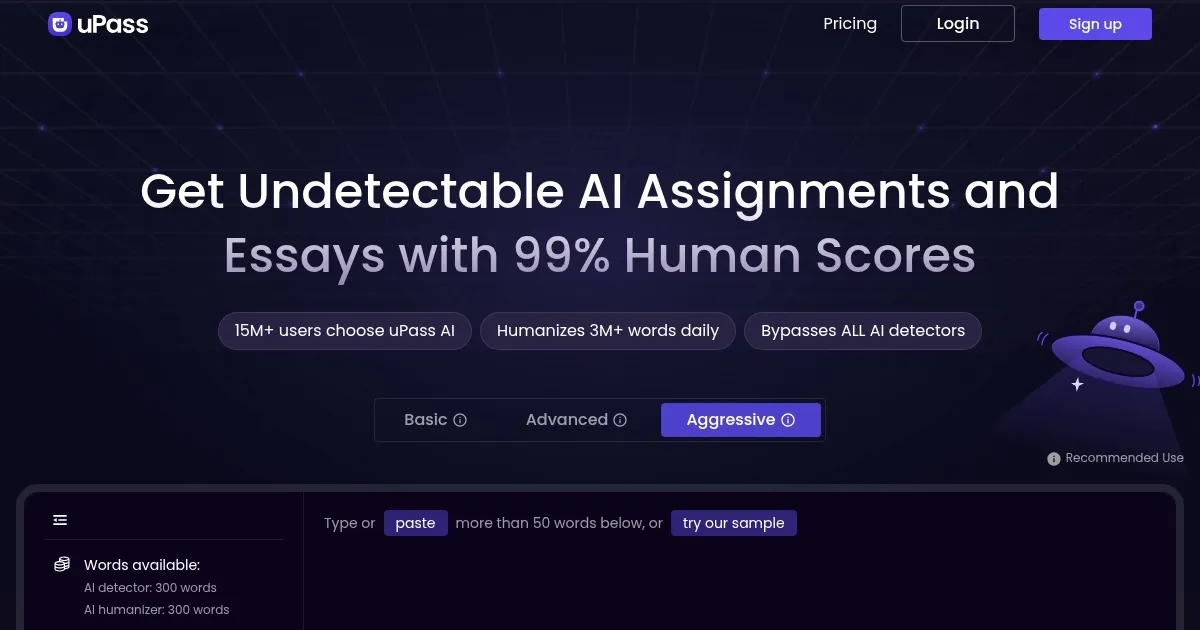
uPass AI’s interface is clean, almost too simple, with a drag-and-drop box for your text and three rewriting modes: Basic, Advanced, and Aggressive. I went with Advanced, figuring it’d strike a balance between readability and stealth. The tool’s algorithms — powered by what they call ‘industry-leading LLMs’ — rephrased my essay, swapping stiff AI phrasing for more natural flow. It kept the core ideas intact, which was a relief, since I didn’t want my climate stats mangled. The built-in AI detector was a pleasant surprise, spitting out scores from Turnitin, GPTZero, and others in one go. My rewritten essay scored 90% human on ZeroGPT, which felt like a small victory. I also liked that it supports over 50 languages, a boon for multilingual writers.
What’s not to love? Well, my test run wasn’t flawless. The Advanced mode introduced a few clunky sentences — like a metaphor about ‘carbon footprints dancing on the planet’s edge’ that sounded more poetic than I’d ever manage. It was charming but didn’t quite fit my voice. I also ran the output through Originality.ai, and it flagged 50% AI, which was a letdown for a tool promising undetectability. The free plan’s 300-word limit is stingy for anything longer than a paragraph, so you’ll likely need a paid plan for serious use. Compared to StealthGPT, which some Reddit users swear by for cleaner outputs, uPass feels a bit hit-or-miss.
The real kicker? The time it saves. Instead of manually rewriting AI drafts to dodge detectors, uPass AI does the heavy lifting in seconds. It’s like having a co-writer who’s obsessed with beating Turnitin. But here’s the rub: it’s not foolproof. Some detectors, like Originality.ai, are just too smart. My advice? Use uPass AI as a starting point, then polish the output yourself. Add a personal story or tweak awkward phrases to make it truly yours. And always, always check the final draft with a free detector like Sapling before submitting. It’s a powerful tool, but it’s not a magic wand — use it wisely.
Homepage Screenshot 📸
What are the key features? ✨
- AI Rewriter: Transforms AI-generated text into human-like content using three modes: Basic, Advanced, and Aggressive.
- AI Detector: Checks text against multiple detectors like Turnitin and GPTZero simultaneously for quick risk assessment.
- Multi-Language Support: Handles over 50 languages, ideal for international students and diverse academic needs.
- Plagiarism-Free Outputs: Ensures rewritten content passes plagiarism checks like Copyleaks and Grammarly.
- User-Friendly Interface: Simplifies the process of uploading, rewriting, and downloading text for all skill levels.
Who is it for? 🤔
Examples of what you can use it for 💡
- Literature Student: Rewrites AI-drafted essays to pass Turnitin detection for authentic submissions.
- Journalism Student: Humanizes AI-generated articles to ensure compliance with editorial standards.
- Computer Science Student: Converts technical AI drafts into undetectable content for project reports.
- International Student: Uses multi-language support to refine AI-generated papers in non-English courses.
- Graduate Researcher: Ensures AI-assisted thesis drafts are plagiarism-free and human-like for submission.
Pros & Cons ⚖️
- Supports over 50 languages for versatility.
- Built-in detector saves time on checks.
- Plagiarism-free outputs ensure originality.
- Struggles with Originality.ai detection.
- Aggressive mode may reduce readability.
FAQs 💬
Ready to try uPass?
Transforms AI-generated text into undetectable, human-like content for academic use
Visit uPassuPass alternatives 🔗