logo-darklogo-darklogo-darklogo-dark
  • Tool Categories
    • 🎨 Art
    • 🏢 Business
    • 💻 Coding
    • 👮 Detection
    • 🧠 General
    • 🏥 Health
    • 📷 Image Analysis
    • 🖼️ Image
    • 📐 Architecture
    • 🎓 Education
    • ⚖️ Legal/Finance
    • 🎭 Lifestyle
    • 📢 Advertising
    • 🎧 Music
    • 👔 Work
    • 🔬 Research
    • 👥 Social
    • 🎥 Video
    • 👧🏻 Companion
    • 🎤 Voice
    • ✍️ Writing
    • All Categories
    • AI Use Cases
  • News
  • Events
    • Academic Conferences
    • Developer Conferences
    • Expos / Trade Shows
    • Industry Summits
    • Workshops / Training
    • All Events
    • Past Events
  • Saved Tools
  • Suggest a Tool
✕
Home › Video Generation & Editing › Video Generation› VideoGen
VideoGen

VideoGen

An AI-powered video generator that helps users create professional-quality videos quickly

VideoGen is an AI-powered video generator that helps users create professional-quality videos quickly and efficiently. With its one-click video creation feature, users can generate videos in seconds rather than hours or even days.

Because of this “AI magic,” the platform is ideal for marketers, creators, and businesses. It provides users with access to over three million copyright-free assets and supports commercial use. This, in turn, means that users have a broad range of resources at their disposal.

VideoGen also includes advanced text-to-speech technology with over 150 unique voices in more than 40 languages. This eliminates the need for repeated recordings, saving users time and effort.

In addition, VideoGen’s optimized video editor offers a smooth editing experience with keyboard shortcuts and in-browser editing capabilities. As a result, the finishing touches are easy to apply.

VideoGen also supports A/B testing of creatives and iterating quickly, helping improve messaging and engagement. The platform emphasizes ROI, performance, and scalability — promising to increase the efficiency of the video production process.

Speaking of which (video creation process), VideoGen helps users produce high-quality content rapidly and effectively and is applicable to diverse video marketing and communication needs. Check it out.

Visit VideoGen ↗
Categories
🎥 Video
📹 Video Generation 📝 Text to Video 📜 Script To Video Generation 📲 Short Video Generation ✏️ Video Editing 🤖 Avatar Video Generation ▶️ YouTube Video Generation

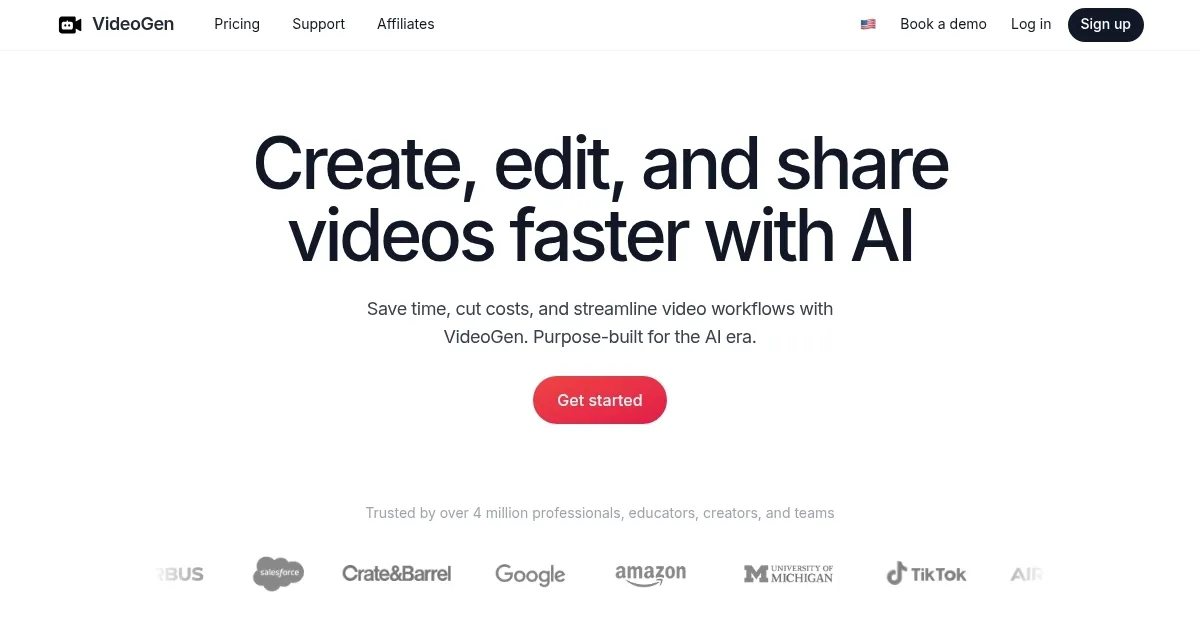
Screenshot 📸

VideoGen screenshot

Video Overview 🎬

VideoGen - Video Overview

What are the key features? ✨

  • AI-powered video generation: VideoGen creates videos with a single click, using AI to streamline the entire video creation process from brainstorming to final editing.
  • Text-to-speech: The platform offers over 150 unique voices in 40+ languages and accents, generating human-like narration for videos.
  • Asset library: With VideoGen, users get access to over 3 million copyright-free assets, ensuring a wide variety of high-quality content for their videos.
  • Browser-based editing: The built-in video editor is fully integrated into the browser, allowing for quick and easy editing with keyboard shortcuts.
  • Optimized for ROI: VideoGen is designed to save costs and time while increasing video engagement and performance.

Who is it for? 🤔

VideoGen targets marketers, content creators, businesses, and professionals who need to quickly and efficiently create high-quality videos. It is particularly beneficial for those looking to streamline video production, reduce costs, and enhance engagement across different digital platforms. VideoGen is easy to use and offers extensive features that make it ideal for both beginners and experienced video creators.

Examples of what you can use it for 💡

  • Quickly create engaging marketing videos to promote products and services across different platforms
  • Generate content for platforms like TikTok, Instagram, and YouTube
  • Produce high-quality training materials and educational videos with minimal effort
  • Rapidly create and test different video creatives to find the most effective messaging
  • Develop internal communications and corporate videos efficiently

Pros & Cons ⚖️

  • Anyone can create a fancy video
  • Text-to-speech in 40+ languages
  • Asset library alone is worth the price
  • Video production pros will find it limiting

FAQs 💬

What does VideoGen actually do?
VideoGen turns text prompts into full professional videos with AI-generated voiceovers, captions, stock footage, and optional AI avatars. It aims to make video creation fast and simple.
How easy is it to use for beginners?
It's designed to be user-friendly with a simple interface, so even people without editing experience can generate videos in just a few clicks.
What types of videos can I create with it?
You can make short-form content for TikTok, Instagram Reels, YouTube Shorts, plus business videos, product promos, educational tutorials, explainers, training materials, and event promos.
Does it support multiple languages?
Yes, it offers over 200 AI voices in more than 50 languages, with one-click translation and localization features.
Can I add my own voice or customize voiceovers?
You can record your own voice, or use the hyper-realistic AI voices, though some users note the AI voices might not always sound perfect.
Is the video quality good enough for professional use?
Many users find it produces high-quality, copyright-free videos suitable for marketing or social media, but results can vary, with some reporting occasional repetition or lower quality in complex prompts.
How fast does it generate videos?
It typically creates videos in minutes, which is a big time-saver compared to traditional editing.
What kind of input do I need to start?
Just provide a text prompt or script, and the AI handles the rest, including visuals, voice, and edits.
Does it include editing features after generation?
Yes, you can easily edit clips, regenerate scenes, or tweak elements like captions and music.
Is it good for social media content specifically?
Absolutely, it's optimized for quick short-form videos on platforms like TikTok, Instagram, and YouTube Shorts, with aspect ratio support for vertical formats.

Ready to try VideoGen?

An AI-powered video generator that helps users create professional-quality videos quickly

Visit VideoGen ↗

VideoGen alternatives 🔗

  1. Kling AI Kling AI Generates cinematic videos from text or images with realistic motion
  2. Veo Veo Generates high-quality videos with audio from text or image prompts
  3. Runway Runway Generates and edits AI-powered videos from text prompts
  4. Sora Sora Generates hyperrealistic videos from text prompts with synchronized audio
  5. Adobe Firefly Adobe Firefly Generates images, videos, audio, and vectors using AI.
  6. Google AI Studio Google AI Studio Prototypes AI solutions using Gemini models in a browser-based IDE
Share
VideoGen screenshot enlarged
Promote VideoGen
light badge
Copy Embed Code
dark badge
Copy Embed Code
neutral badge
Copy Embed Code
Best AI Tools

Discover the best AI tools for any use case

About Us | Contact Us | Suggest an AI Tool
Privacy Policy | Terms of Service
Copyright © 2026 Best AI Tools 415 Mission Street, 37th Floor, San Francisco, CA 94105