logo-darklogo-darklogo-darklogo-dark
  • Tool Categories
    • 🎨Art & Creative Design505
    • 🏢Business Management644
    • 💻Coding & Development515
    • 👮Detection83
    • 🧠General Use727
    • 🏥Health & Wellness55
    • 📷Image & Photo Analysis100
    • 🖼️Image Generation & Editing618
    • 📐Interior & Architectural Design37
    • 🎓Learning & Education483
    • ⚖️Legal & Finance90
    • 🎭Lifestyle & Entertainment236
    • 📢Marketing & Advertising627
    • 🎧Music & Audio138
    • 👔Office & Workplace1,014
    • 🔬Research & Data Analysis372
    • 👥Social Media245
    • 🎥Video Generation & Editing426
    • 👧🏻Virtual Companion135
    • 🎤Voice Generation & Editing381
    • ✍️Writing & Editing808
    • All Categories
    • AI Use Cases
  • News
  • Events
    • Academic Conferences
    • Developer Conferences
    • Expos / Trade Shows
    • Industry Summits
    • Workshops / Training
    • All Events
    • Past Events
  • Saved Tools
  • Suggest a Tool
✕
Home › Video Generation & Editing › Video Editing› Videoleap
Videoleap

Videoleap by Lightricks

Edit video clips with this powerful, creative video editor powered by AI

Videoleap by Lightricks is a powerful video editing software made for both beginners and professionals. It offers an array of editing tools and features — including special effects and layer-based editing — making the process of creating high-quality video content straightforward and enjoyable.

The platform also allows users to explore various artistic possibilities with their videos, whether for personal projects, social media, or professional presentations.

The built-in AI is meant to simplify complex editing tasks like object removal and background replacement. It not only saves time but also enhances the quality of the output, making professional-grade video editing accessible to a broader audience.

Furthermore, Videoleap’s cross-platform availability ensures that users can work on their projects from various devices. This approach acknowledges the evolving nature of content creation, where mobility and convenience are increasingly important.

In summary, Videoleap’s blend of advanced features, ease of use, and accessibility makes it a solid option for anyone looking to create engaging video content.

Visit Videoleap ↗
Categories
🎥 Video
✏️ Video Editing 📹 Video Generation 📲 Short Video Generation ✨ Video Enhancing 📱 Reel Generation
👥 Social
🎵 TikTok

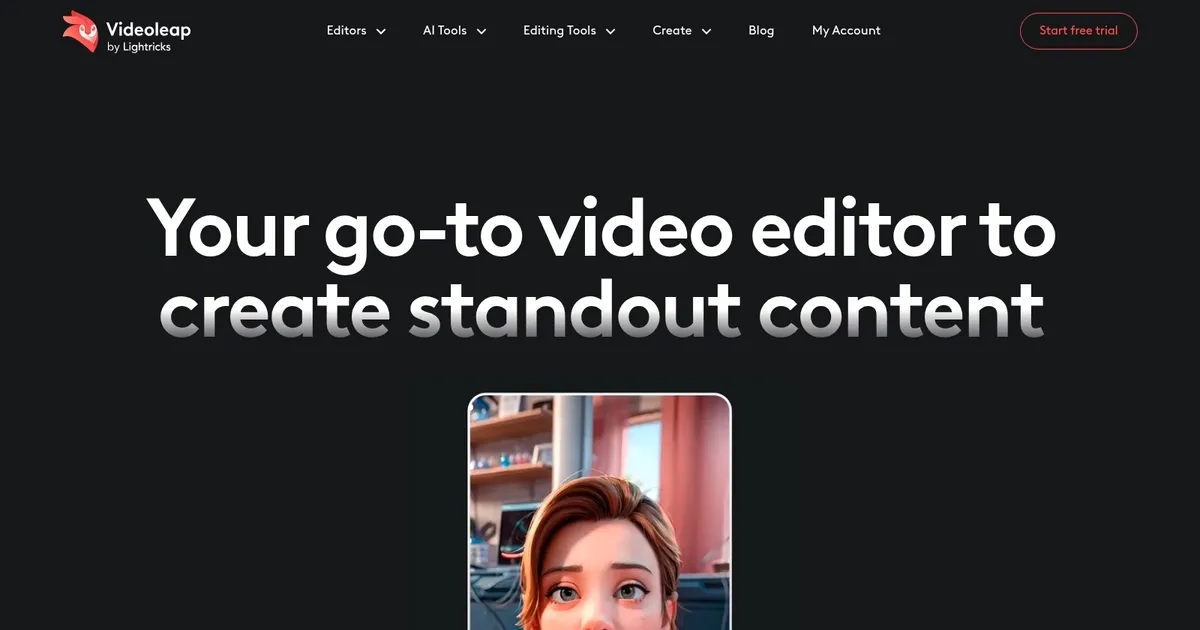
Homepage Screenshot 📸

Videoleap screenshot

What are the key features? ✨

  • AI Infinite Zoom: Creates extended zoom videos from a single image for dynamic storytelling.
  • Remove Object from Video: Uses AI to erase unwanted objects from clips seamlessly.
  • AI Subtitle Generator: Automatically adds accurate, timed captions to boost engagement.
  • AI Effects and Filters: Transforms video styles with custom text prompts for unique looks.
  • Video Templates: Offers thousands of ready-made, customizable templates for social media trends.

Who is it for? 🤔

Videoleap suits social media creators, influencers, small business owners, and casual users who want to produce engaging short-form videos quickly without advanced technical skills. It's especially helpful for people making TikToks, Instagram Reels, YouTube Shorts, promotional clips, or tutorials, as the AI tools and templates speed up the process while delivering polished results on mobile devices.

Examples of what you can use it for 💡

  • Social media influencer: Quickly edits trendy Reels or TikToks using AI effects and templates to boost engagement.
  • Small business owner: Creates promotional videos for products with AI background removal and subtitles for better reach.
  • Content creator: Turns photos into slideshows or adds infinite zoom for captivating travel or lifestyle Shorts.
  • Beginner video editor: Experiments with AI tools like object removal and style transfers to learn editing fast.
  • Marketer: Produces tutorial or ad clips with auto-captions and music to drive audience interaction and sales.

Pros & Cons ⚖️

  • Intuitive mobile interface
  • Powerful AI features
  • Creative templates
  • Fast on-device editing
  • Watermarks in free version
  • Occasional AI glitches

FAQs 💬

What platforms does Videoleap work on?
Videoleap is available as mobile apps for iPhone and Android, with some features accessible online via the website.
Is Videoleap completely free to use?
It offers a free version with core editing tools, but exports include watermarks, and full AI features require a paid plan.
What are the standout AI tools in Videoleap?
Key AI tools include Infinite Zoom, Remove Object, AI Subtitle Generator, AI Effects for style transfer, and AI Text to Image.
Can Videoleap handle green screen editing?
Yes, it supports chroma key compositing for green screen effects, similar to professional software.
Does Videoleap have templates for social media?
It provides thousands of premade templates optimized for TikTok, Instagram Reels, YouTube Shorts, and other platforms.
How accurate is the AI subtitle generator?
It performs well for clear speech, though manual tweaks may be needed for accents or noisy audio.
Is Videoleap suitable for beginners?
Yes, its intuitive design and templates make it beginner-friendly while offering advanced tools for growth.
Can I add my own music to videos?
You can upload personal tracks or choose from the royalty-free library included in the app.
What competitors are similar to Videoleap?
Popular alternatives include CapCut for templates, VEED for web-based editing, and Adobe Premiere Rush for cross-device work.
Does Videoleap support high-resolution exports?
Yes, it allows high-quality exports suitable for social platforms, depending on your device and plan.

Ready to try Videoleap?

Edit video clips with this powerful, creative video editor powered by AI

Visit Videoleap ↗

Videoleap alternatives 🔗

  1. Runway Runway Generates and edits AI-powered videos from text prompts
  2. Canva Magic Design Canva Magic Design Generates custom, on-brand designs from text prompts or uploaded media in seconds.
  3. Adobe Express Adobe Express Creates on-brand content with AI-driven design and video tools
  4. Vimeo AI Vimeo AI Creates polished videos from single recordings using AI edits and scripts
  5. CapCut Creative Suite CapCut Creative Suite Online creative suite for everyone to create stunning images and videos
  6. Loom AI Loom AI Record better video messages with automatic titles, summaries, share messages, and more
Share
Videoleap screenshot enlarged
Promote Videoleap
light badge
Copy Embed Code
dark badge
Copy Embed Code
neutral badge
Copy Embed Code
Best AI Tools

Discover the best AI tools for any use case

Explore
  • Tool Categories
  • AI Use Cases
  • AI Events
  • AI News
  • Saved Tools
Company
  • About Us
  • Contact Us
  • Media & Partnerships
  • Suggest a Tool
Legal
  • Privacy Policy
  • Terms of Service
Copyright © 2026 Best AI Tools 415 Mission Street, 37th Floor, San Francisco, CA 94105