logo-darklogo-darklogo-darklogo-dark
  • Tool Categories
    • 🎨Art & Creative Design505
    • 🏢Business Management644
    • 💻Coding & Development515
    • 👮Detection83
    • 🧠General Use727
    • 🏥Health & Wellness55
    • 📷Image & Photo Analysis100
    • 🖼️Image Generation & Editing618
    • 📐Interior & Architectural Design37
    • 🎓Learning & Education483
    • ⚖️Legal & Finance90
    • 🎭Lifestyle & Entertainment236
    • 📢Marketing & Advertising627
    • 🎧Music & Audio138
    • 👔Office & Workplace1,014
    • 🔬Research & Data Analysis372
    • 👥Social Media245
    • 🎥Video Generation & Editing426
    • 👧🏻Virtual Companion135
    • 🎤Voice Generation & Editing381
    • ✍️Writing & Editing808
    • All Categories
    • AI Use Cases
  • News
  • Events
    • Academic Conferences
    • Developer Conferences
    • Expos / Trade Shows
    • Industry Summits
    • Workshops / Training
    • All Events
    • Past Events
  • Saved Tools
  • Suggest a Tool
✕
Home › General Use › Assistant› Voila
Voila

Voila

Personal AI assistant for supercharged productivity, use ChatGPT on any website

Voilà is an AI-powered browser assistant that boosts productivity by enabling users to create high-quality content, conduct deep research, and efficiently manage writing tasks across various domains. It features a library of expertly curated, battle-tested prompts designed to assist in the generation of a wide array of content types — including ad campaigns, blog posts, resumes, social media content, email replies, and more.

In addition, Voilà allows users to effectively manage their email inbox with AI-powered instant reply suggestions, and improve their writing quality across languages. It supports many different tasks, from summarizing web pages to creating compelling ad copies or detailed market research reports.

The tool’s creators emphasize user privacy, ensuring that content and AI interactions are not stored or used for AI training — aligning with GDPR and CCPA standards.

Finally, you’d like to know that Voilà seamlessly integrates with popular browsers such as Chrome, Edge, Firefox, and Safari — and is also available for iOS and Android devices.

Visit Voila ↗
Categories
🧠 General
🤖 Assistant 💬 Chatbot
✍️ Writing
🤖 Writing Assistant ✉️ Email Writing 📝 Summarizer 🔤 Grammar Checking 🔁 Rewriting
👔 Work
✉️ Email Assistant ⚡ Work Productivity
🎓 Education
🈸 Translation

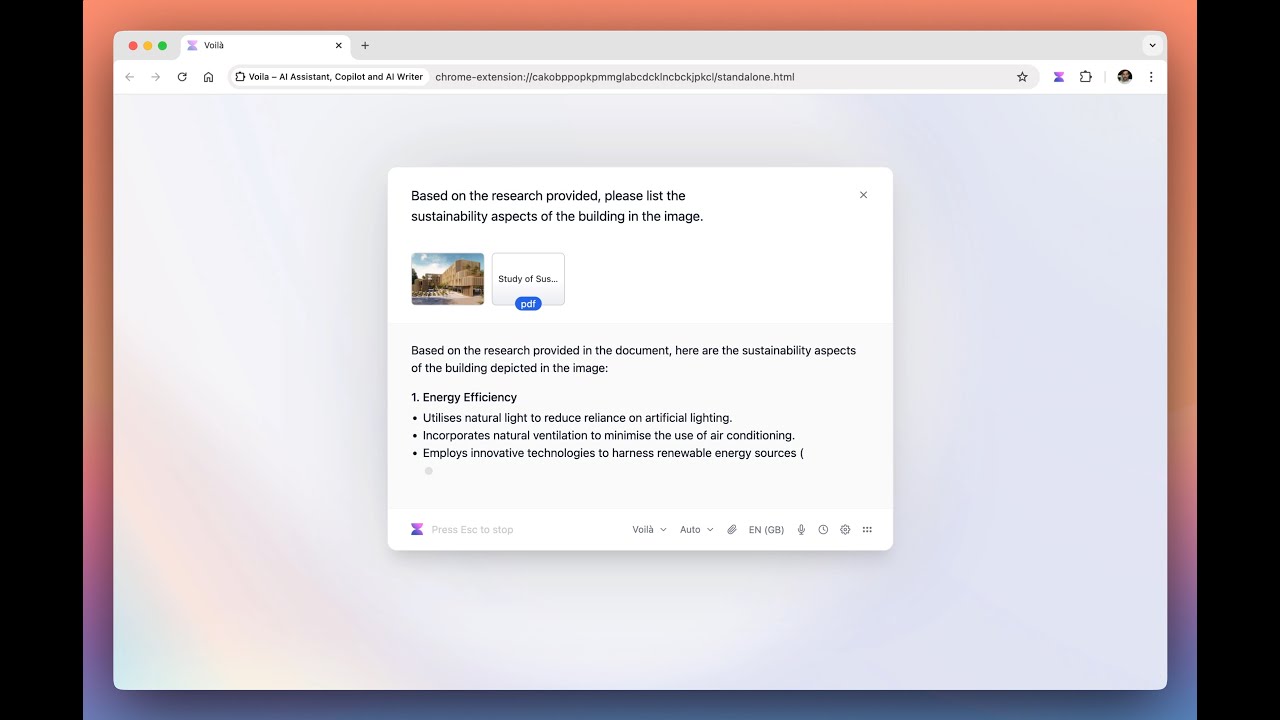
Homepage Screenshot 📸

Voila screenshot

Video Overview 🎬

Voila - Video Overview

What are the key features? ✨

  • Context-Aware Assistance: Interacts directly with the current webpage, document, or email for relevant responses without manual copying.
  • Expert Prompt Library: Provides battle-tested templates for content creation, plus the ability to save and organize custom prompts.
  • Email Drafting & Instant Reply: Generates professional email responses and drafts based on full thread context.
  • Research with Reliable Sources: Delivers real-time answers and insights from credible web sources with citations.
  • Multi-Device Support: Available as browser extension, desktop apps (Mac/Windows), and mobile apps (iOS/Android).

Who is it for? 🤔

Voilà suits busy professionals, content creators, marketers, researchers, salespeople, and anyone who spends significant time online and wants to streamline writing, email handling, summarization, and quick research without switching tools or tabs constantly.

Examples of what you can use it for 💡

  • Content Creator: Uses expert prompts and rewriting tools to draft blog posts, social media content, or ad copy efficiently from web research.
  • Busy Professional: Summarizes long articles, emails, or documents instantly and drafts quick, professional replies to stay on top of inbox.
  • Researcher/Student: Asks questions about any topic or webpage, gets cited answers from reliable sources, and analyzes uploaded PDFs or images.
  • Marketer/SEO Specialist: Generates domain-specific content, improves copy tone, and researches trends directly on competitor sites.
  • Team Collaborator: Shares custom workflows and prompts with colleagues for consistent output across projects.

Pros & Cons ⚖️

  • Seamless browser integration
  • Strong privacy focus
  • Multi-device availability
  • Occasional prompt inconsistencies
  • Limited free tier requests

FAQs 💬

What is Voilà mainly used for?
Voilà serves as an all-in-one productivity assistant for writing, summarizing, researching, emailing, and creating content directly in your browser or apps.
Does Voilà work on any browser?
It supports Chrome, Firefox, and Edge, with full features available through the extension.
Is my data private with Voilà?
Yes, your content and conversations are never stored on servers or used for AI training, and it complies with GDPR and CCPA.
Can I use Voilà on mobile devices?
Yes, dedicated apps exist for iOS and Android, plus desktop versions for Mac and Windows.
How does the free plan compare to paid ones?
The free plan offers limited requests, while paid plans provide more usage, advanced models, priority access, and team features.
Does it support image generation?
Yes, it includes text-to-image generation for quick visuals.
Can I chat with documents or images?
Absolutely, upload PDFs, docs, or pictures to summarize, analyze, or rewrite content.
How does it handle email?
It offers Instant Reply and templates to draft or improve responses right in your inbox.
What models power Voilà?
It uses advanced models including options like GPT-5 and others for high-quality output.
Is there team collaboration support?
Yes, shared workflows, templates, and team plans make it suitable for groups.

Ready to try Voila?

Personal AI assistant for supercharged productivity, use ChatGPT on any website

Visit Voila ↗

Voila alternatives 🔗

  1. ChatGPT ChatGPT All-round AI assistant generating human-like responses to user queries and tasks
  2. Gemini Gemini Generates responses from text, images, audio, and video inputs using advanced multimodal AI
  3. Claude Claude Assists users in reasoning, coding, writing, and analyzing data with advanced AI models
  4. Grok Grok Delivers witty, real-time AI responses with advanced reasoning and image generation
  5. DeepSeek DeepSeek Delivers advanced AI models for coding and reasoning at low costs
  6. Perplexity Perplexity Delivers cited AI answers from web searches instantly
Share
Voila screenshot enlarged
Promote Voila
light badge
Copy Embed Code
dark badge
Copy Embed Code
neutral badge
Copy Embed Code
Best AI Tools

Discover the best AI tools for any use case

Explore
  • Tool Categories
  • AI Use Cases
  • AI Events
  • AI News
  • Saved Tools
Company
  • About Us
  • Contact Us
  • Media & Partnerships
  • Suggest a Tool
Legal
  • Privacy Policy
  • Terms of Service
Copyright © 2026 Best AI Tools 415 Mission Street, 37th Floor, San Francisco, CA 94105