logo-darklogo-darklogo-darklogo-dark
  • Tool Categories
    • ๐ŸŽจ Art
    • ๐Ÿข Business
    • ๐Ÿ’ป Coding
    • ๐Ÿ‘ฎ Detection
    • ๐Ÿง  General
    • ๐Ÿฅ Health
    • ๐Ÿ“ท Image Analysis
    • ๐Ÿ–ผ๏ธ Image
    • ๐Ÿ“ Architecture
    • ๐ŸŽ“ Education
    • โš–๏ธ Legal/Finance
    • ๐ŸŽญ Lifestyle
    • ๐Ÿ“ข Advertising
    • ๐ŸŽง Music
    • ๐Ÿ‘” Work
    • ๐Ÿ”ฌ Research
    • ๐Ÿ‘ฅ Social
    • ๐ŸŽฅ Video
    • ๐Ÿ‘ง๐Ÿป Companion
    • ๐ŸŽค Voice
    • โœ๏ธ Writing
    • All Categories
    • AI Use Cases
  • News
  • Events
    • Academic Conferences
    • Developer Conferences
    • Expos / Trade Shows
    • Industry Summits
    • Online Events
    • Workshops / Training
    • All Events
    • Past Events
  • Saved Tools
  • Suggest a Tool
โœ•
Home › Image Generation & Editing › Photo Editing› AirBrush
AirBrush

AirBrush

Enhances photos and videos with AI-powered editing tools for professional results

AirBrush is an AI-powered photo and video editing tool, designed to enhance media with features like retouching, upscaling, and background removal. It offers a user-friendly interface for both web and mobile, targeting creators seeking professional-quality results with minimal effort. The tool supports a range of tasks, from smoothing skin to upscaling videos to 4K, making it versatile for personal and business use.

Key features include the AI Image Enhancer, which improves photo clarity, color, and resolution with one click. The AI Video Enhancer upscales videos to 4K, reducing noise and sharpening details. The Background Remover deletes unwanted elements from images, while the AI Avatar Generator creates stylized digital portraits from selfies. The Camera Online tool mimics a photo booth, offering customizable layouts and filters for photo strips. Most features are available in the free version, but advanced tools like bulk editing require a Pro subscription.

Compared to Luminar Neo and Photoleap, AirBrush prioritizes automation over manual control. Luminar Neo offers more advanced photo editing for photographers, while Photoleap focuses on creative effects for mobile users. AirBrush’s pricing is competitive, sitting in the mid-range, though specific costs are detailed on their website. User reviews, averaging 4.8 stars from 172.8K ratings on the App Store, praise its ease of use, but some Reddit threads note occasional slowdowns with high-resolution files.

Limitations include restricted access to premium features without a subscription and less manual control compared to competitors. The tool excels for quick, automated edits but may not suit users needing precise adjustments. Processing speeds can lag for larger files, as noted in user feedback on X. The AI Avatar Generator stands out, creating unique avatars in seconds, a feature less common among competitors.

To get started, visit Airbrush’s website and try the free tools with a small image or video. Test the basic features before considering a Pro subscription for advanced options. Monitor processing times for larger files to ensure smooth performance.

Visit AirBrush ↗

Categories

๐Ÿ–ผ๏ธ Image

โœ๏ธ Photo Editing ๐ŸŒŸ Photo Enhancing ๐ŸŽž๏ธ Photo Filtering ๐Ÿ’Ž Image Enhancing ๐Ÿงน Object Removal

๐ŸŽจ Art

๐Ÿ’„ Beauty ๐Ÿ’‡ Hairstyling

๐ŸŽญ Lifestyle

๐Ÿ‘” Outfit Generation

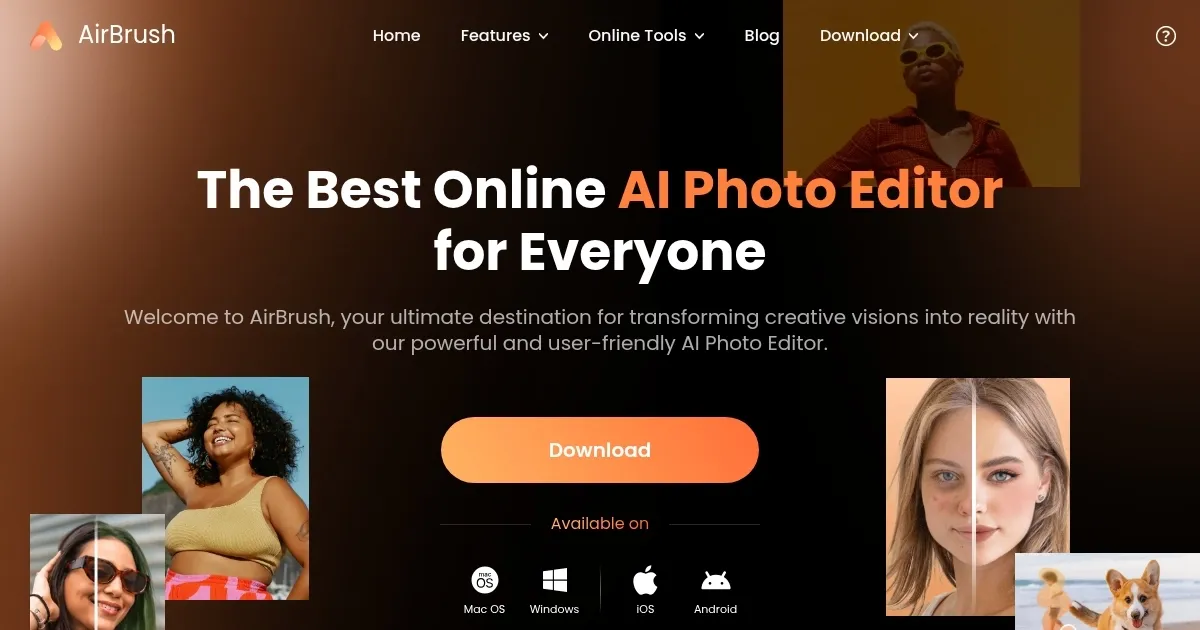
Screenshot 📸

AirBrush screenshot

What are the key features? ✨

  • AI Image Enhancer: Improves photo clarity, color, and resolution in one click.
  • AI Video Enhancer: Upscales videos to 4K, reducing noise and sharpening details.
  • Background Remover: Deletes unwanted objects or backgrounds from images.
  • AI Avatar Generator: Creates stylized digital avatars from uploaded selfies.
  • Camera Online: Mimics a photo booth with customizable layouts and filters.

Who is it for? 🤔

AirBrush is (literally) designed for social media enthusiasts, small business owners, and casual creators who want quick, professional-quality photo and video edits without steep learning curves. It suits influencers crafting polished selfies, e-commerce sellers enhancing product images, or hobbyists creating fun photo strips for personal projects.

Examples of what you can use it for 💡

  • Influencer: Enhances selfies with AI Makeup Editor for flawless social media posts.
  • Small Business Owner: Upscales product photos for e-commerce listings using AI Image Enhancer.
  • Hobbyist: Creates retro photo strips with Camera Online for personal keepsakes.
  • Content Creator: Removes watermarks from videos with AI Videomark Remover for clean edits.
  • Photographer: Restores old family photos with Photo Restoration for vibrant results.

Pros & Cons ⚖️

  • Fast AI-driven edits
  • Free version is robust
  • High-quality video upscaling
  • Premium features locked
  • Limited manual controls

FAQs 💬

Is AirBrush free to use?
AirBrush offers a free version with robust features, but advanced tools require a Pro subscription.
Can I use AirBrush on my phone?
Yes, AirBrush is available on iOS and Android, with apps for seamless mobile editing.
Does AirBrush support video editing?
Yes, tools like AI Video Enhancer upscale videos to 4K and remove watermarks.
How good is the Background Remover?
It effectively removes backgrounds, though complex edges like hair may have minor issues.
Can I create avatars with AirBrush?
The AI Avatar Generator creates stylized digital portraits from selfies in seconds.
Is AirBrush good for e-commerce?
Yes, it enhances product photos with clarity and color adjustments for professional listings.
Does AirBrush require a signup?
No signup is needed for basic web tools like Camera Online, but some features require an account.
How does AirBrush compare to Canva?
AirBrush focuses on AI photo and video edits, while Canva offers broader design templates.
Can I edit multiple images at once?
Bulk editing is available with the Pro subscription, not in the free version.
Is AirBrush suitable for beginners?
Its intuitive interface and one-click tools make it ideal for beginners.

Ready to try AirBrush?

Enhances photos and videos with AI-powered editing tools for professional results

Visit AirBrush ↗

AirBrush alternatives 🔗

  1. Imagen Imagen Generates photorealistic images from detailed text prompts
  2. Black Forest Labs Black Forest Labs Generates high-quality images from text prompts with precision and speed
  3. Stable Diffusion Stable Diffusion Generates high-quality images from text prompts with versatile styles
  4. Adobe Express Adobe Express Creates on-brand content with AI-driven design and video tools
  5. Adobe Firefly Adobe Firefly Generates images, videos, audio, and vectors using AI.
  6. Freepik AI Freepik AI Creates AI images and videos with fluid motion, detailed textures, and synced audio up to 1080p
Share
AirBrush screenshot enlarged
Promote AirBrush
light badge
Copy Embed Code
dark badge
Copy Embed Code
neutral badge
Copy Embed Code
Best AI Tools

Discover the best AI tools for any use case

About Us | Contact Us | Suggest an AI Tool
Privacy Policy | Terms of Service
Copyright © 2026 Best AI Tools 415 Mission Street, 37th Floor, San Francisco, CA 94105