logo-darklogo-darklogo-darklogo-dark
  • Tool Categories
    • ๐ŸŽจArt & Creative Design505
    • ๐ŸขBusiness Management644
    • ๐Ÿ’ปCoding & Development515
    • ๐Ÿ‘ฎDetection83
    • ๐Ÿง General Use727
    • ๐ŸฅHealth & Wellness55
    • ๐Ÿ“ทImage & Photo Analysis100
    • ๐Ÿ–ผ๏ธImage Generation & Editing618
    • ๐Ÿ“Interior & Architectural Design37
    • ๐ŸŽ“Learning & Education483
    • โš–๏ธLegal & Finance90
    • ๐ŸŽญLifestyle & Entertainment236
    • ๐Ÿ“ขMarketing & Advertising627
    • ๐ŸŽงMusic & Audio138
    • ๐Ÿ‘”Office & Workplace1,014
    • ๐Ÿ”ฌResearch & Data Analysis372
    • ๐Ÿ‘ฅSocial Media245
    • ๐ŸŽฅVideo Generation & Editing426
    • ๐Ÿ‘ง๐ŸปVirtual Companion135
    • ๐ŸŽคVoice Generation & Editing381
    • โœ๏ธWriting & Editing808
    • All Categories
    • AI Use Cases
  • News
  • Events
    • Academic Conferences
    • Developer Conferences
    • Expos / Trade Shows
    • Industry Summits
    • Workshops / Training
    • All Events
    • Past Events
  • Saved Tools
  • Suggest a Tool
โœ•
Home › General Use › Chatbot› Anakin
Anakin

Anakin

An easy way to create and customize AI applications for various needs

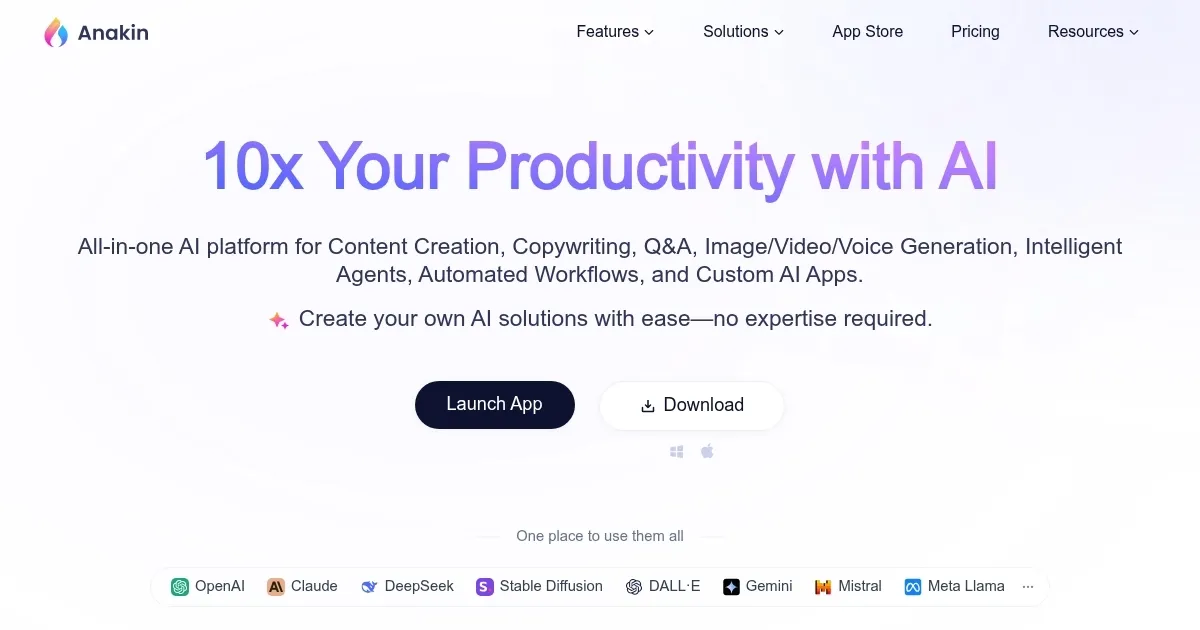
Anakin is a fancy platform that empowers users to create and customize AI applications for various needs. It offers many tools for generating content, images, videos, and voice — alongside crafting automated workflows and intelligent agents.

The platform supports over 1000 pre-built AI apps, enabling users to perform tasks such as content generation, document search, and process automation efficiently.

Perhaps the coolest feature of Anakin is its no-code AI app builder, which allows users to design unique AI applications without any programming knowledge. This includes text generators, image generators, chatbots, and more. The provided visual interface makes it easy to customize apps to meet specific requirements, enhancing both accessibility and productivity.

Anakin also excels in batch processing and workflow automation. Users can run AI apps on hundreds or thousands of records to generate content, classify data, extract information, and more. The drag-and-drop interface for creating workflows simplifies complex processes, making automation faster and smarter.

In other words, Anakin provides a powerful, user-friendly solution for harnessing AI’s capabilities. Its features and ease of use make it a solid choice for businesses and individuals looking to leverage AI for enhanced productivity and creativity.

Visit Anakin ↗
Categories
๐Ÿง  General
๐Ÿ’ฌ Chatbot ๐Ÿค– Assistant ๐Ÿง  Large Language Model
๐Ÿ’ป Coding
๐Ÿ“ฑ App Building
๐Ÿ‘” Work
๐Ÿ”— Agent
๐Ÿ–ผ๏ธ Image
๐Ÿ–ผ๏ธ Image Generation
โœ๏ธ Writing
๐Ÿ…ฐ๏ธ Text Generation
๐Ÿข Business
๐Ÿ”„ Workflow
๐ŸŽฅ Video
๐Ÿ“น Video Generation

Homepage Screenshot 📸

Anakin screenshot

Video Overview 🎬

Anakin - Video Overview

What are the key features? ✨

  • Content generation: Generate text, images, videos, and voice content using advanced AI models like GPT, and DALLยทE.
  • Custom AI apps: The platform lets you build custom AI applications without coding, using a visual interface to automate tasks and workflows.
  • Batch processing: Run AI applications on hundreds or thousands of records simultaneously to generate content or extract information.
  • Workflow automation: Create and manage complex workflows by dragging and dropping nodes and connecting them in order.
  • Integration: Seamlessly integrate AI applications with existing tools and services for better functionality.

Who is it for? 🤔

Anakin is made for businesses, developers, educators, and content creators looking to harness the power of AI for automation and content generation. Its no-code platform appeals to non-technical users, while advanced features cater to developers and businesses needing customized AI solutions. The tool is ideal for anyone seeking to enhance productivity and efficiency through AI-driven automation. Check it out.

Examples of what you can use it for 💡

  • Generate high-quality blog posts, social media content, and marketing materials
  • Automate data extraction and classification tasks for large datasets
  • Develop intelligent chatbots that can handle customer queries and provide support 24/7
  • Create personalized learning aids and educational content for students and teachers
  • Automate repetitive business processes, such as report generation and workflow management

Pros & Cons ⚖️

  • Combines multiple tools into a single package
  • Allows a broad audience to create their AI apps
  • Could help businesses automate parts of their operations
  • Could be pricey

FAQs 💬

What is Anakin, and who is it designed for?
Anakin is a no-code platform that lets users build and run custom AI apps for tasks like content creation, automation, and data processing, pulling from over 1,000 pre-built tools powered by models such as GPT-4, Claude, and Stable Diffusion. It targets beginners without coding skills, as well as teams in marketing, content, or development who want quick AI solutions without heavy setup. I think it's especially handy for small businesses looking to automate without hiring devs.
Does Anakin require any programming knowledge to get started?
No, it uses a drag-and-drop interface so anyone can create apps in minutes, from chatbots to workflows, without writing a single line of code. That said, advanced tweaks might involve basic prompt editing, but the platform guides you through it pretty well. Users on G2 often praise this accessibility for non-tech folks.
What kinds of AI models does Anakin support?
It integrates top models like ChatGPT, Google Gemini, xAI Grok-3, Claude, Qwen, and Mixtral for text, plus Stable Diffusion for images and more for video or voice tasks. This variety means you can switch models based on the job, like using Claude for deep analysis or Midjourney-style prompts for creative visuals. Recent reviews note it's great for experimenting without separate subscriptions.
Can I use Anakin to automate workflows or batch process data?
Absolutely, the workflow builder connects nodes visually to automate chains, like generating reports from spreadsheets, and batch mode handles large datasets for things like labeling or extraction. It's a time-saver for repetitive work, though some users mention a slight learning curve for complex setups. TechPoint Africa's 2025 test highlighted how this boosts efficiency by 10x for content teams.
Is there a free version of Anakin, and what are its limits?
Yes, the free tier gives access to basic apps and a handful of credits for testing models, perfect for dipping your toes in. Limits kick in on heavy usage or premium models, pushing upgrades for unlimited runs, but it's solid for casual users. Feedback from Reddit threads in early 2025 calls it generous for starters compared to Poe or Perplexity.
How does Anakin handle image or video generation?
Through built-in tools like AI Image Prompt Generator and Inpaint-web, it creates or edits visuals using models tuned for realism or art styles, with options to refine prompts easily. Videos and voice come via integrations like Qwen for multi-modal tasks. It's not the absolute best for pro editing yet, but 10Web's review says it's versatile enough for social media creators without extra software.
What makes Anakin different from tools like ChatGPT or Poe?
Unlike single-model chats, Anakin focuses on app-building and automation with 1,000+ templates, letting you chain tools into custom agents, while Poe is more for quick model switching. It's broader for workflows but might feel busier; G2 users prefer it for no-code depth over ChatGPT's simplicity. Slashdot comparisons in 2025 peg it as more collaborative for teams.
Is Anakin suitable for building custom chatbots?
Yes, the chatbot builder trains on your data for branded responses, adding tools like search or APIs, and it's drag-and-drop simple. Coming features like auto-agents will make it even smarter for tasks like customer support. Futurepedia notes it's a step up from basic bots, though you might need to tweak for niche accuracy.
Are there any mobile limitations with Anakin?
It's optimized for desktop due to the visual builders needing bigger screens, so mobile access is limited to basic app runs, not full creation. This frustrates some on-the-go users, per G2 feedback, but web access works okay for lighter tasks. They hint at mobile improvements soon, based on 2025 updates.
How reliable is Anakin for professional use, like in marketing?
Pretty solid for pros, with seamless API ties to existing tools and batch processing that cuts manual work, but watch for occasional bugs in complex chains. OpenTools.ai's December 2025 review says it's trustworthy for content scaling, though testing outputs is key since AI can hallucinate. Users report high uptime and quick community fixes.

Ready to try Anakin?

An easy way to create and customize AI applications for various needs

Visit Anakin ↗

Anakin alternatives 🔗

  1. ChatGPT ChatGPT All-round AI assistant generating human-like responses to user queries and tasks
  2. Gemini Gemini Generates responses from text, images, audio, and video inputs using advanced multimodal AI
  3. Claude Claude Assists users in reasoning, coding, writing, and analyzing data with advanced AI models
  4. Grok Grok Delivers witty, real-time AI responses with advanced reasoning and image generation
  5. DeepSeek DeepSeek Delivers advanced AI models for coding and reasoning at low costs
  6. Perplexity Perplexity Delivers cited AI answers from web searches instantly
Share
Anakin screenshot enlarged
Promote Anakin
light badge
Copy Embed Code
dark badge
Copy Embed Code
neutral badge
Copy Embed Code
Best AI Tools

Discover the best AI tools for any use case

Explore
  • Tool Categories
  • AI Use Cases
  • AI Events
  • AI News
  • Saved Tools
Company
  • About Us
  • Contact Us
  • Media & Partnerships
  • Suggest a Tool
Legal
  • Privacy Policy
  • Terms of Service
Copyright © 2026 Best AI Tools 415 Mission Street, 37th Floor, San Francisco, CA 94105