logo-darklogo-darklogo-darklogo-dark
  • Tool Categories
    • 🎨Art & Creative Design505
    • 🏢Business Management644
    • 💻Coding & Development515
    • 👮Detection83
    • 🧠General Use727
    • 🏥Health & Wellness55
    • 📷Image & Photo Analysis100
    • 🖼️Image Generation & Editing618
    • 📐Interior & Architectural Design37
    • 🎓Learning & Education483
    • ⚖️Legal & Finance90
    • 🎭Lifestyle & Entertainment236
    • 📢Marketing & Advertising627
    • 🎧Music & Audio138
    • 👔Office & Workplace1,014
    • 🔬Research & Data Analysis372
    • 👥Social Media245
    • 🎥Video Generation & Editing426
    • 👧🏻Virtual Companion135
    • 🎤Voice Generation & Editing381
    • ✍️Writing & Editing808
    • All Categories
    • AI Use Cases
  • News
  • Events
    • Academic Conferences
    • Developer Conferences
    • Expos / Trade Shows
    • Industry Summits
    • Workshops / Training
    • All Events
    • Past Events
  • Saved Tools
  • Suggest a Tool
✕
Home › Learning & Education › Video Translation› BlipCut
BlipCut

BlipCut

An online AI video translator that makes your content speak every language on earth

BlipCut, or BlipCut AI Video Translator, is an online AI video translator that makes your content speak every language on earth. Actually, it supports 130+ languages while relying on voice cloning via ElevenLabs to keep the voice real when dubbed. As a result, you can turn a Spanish vlog into flawless English or a Korean lecture into Mandarin in minutes.

The tool also auto‑generates subtitles, lip‑syncs the speech to match the speaker’s mouth, and even recognizes when more than one person is talking. BlipCut can even handle two presenters at once, tagging each speaker and giving them a consistent voice in the new language.

It also lets you process many videos at once. This means you can translate a batch of clips in one go — thus slashing hours of editing down to minutes. In fact, some users reported cost cuts of more than 70% in localization time and budget after switching.

Alas, BlipCut isn’t alone on this stage. Its competitors include tools like VideoDubber, Dubverse, Vizard, and Rask AI — but from what we can tell, it supports more languages out of the box.

The bottom line is – if you need massive language support and ultra-fast batch work for your videos, BlipCut is the tool for you. Check it out.

Visit BlipCut ↗
Categories
🎓 Education
🎬 Video Translation 🈸 Translation
🎥 Video
🎙️ Video Dubbing 👄 Lip Sync Generation
🎤 Voice
🎚️ Voice Dubbing 👯 Voice Cloning
✍️ Writing
💬 Subtitle Generation

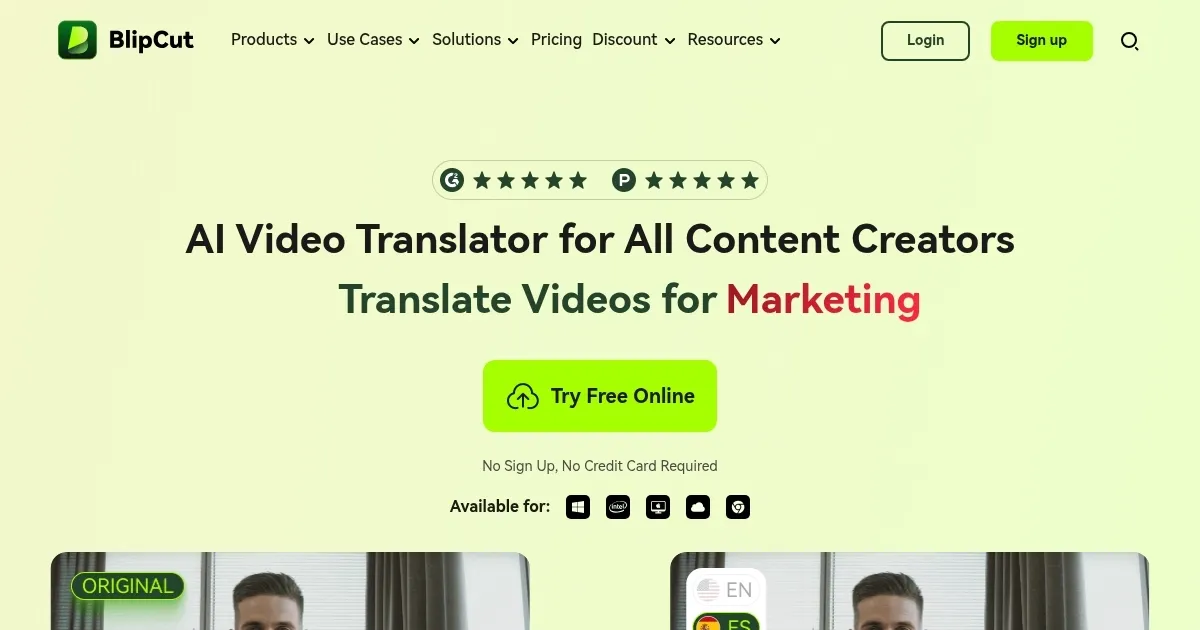
Homepage Screenshot 📸

BlipCut screenshot

Video Overview 🎬

What are the key features? ✨

  • Auto subtitle & lip‑sync magic: BlipCut writes subtitles and matches them to your speakers' lips. That keeps dubbed videos looking natural.
  • Voice cloning via ElevenLabs: Your voice stays yours while speaking new languages. It can clone tone, style, even unique quirks.
  • Bulk video processing: Upload a pile of files and translate them all at once, saving editing time along the way.
  • Multi‑speaker recognition: BlipCut can detect who's talking and gives each person a consistent voice clone. This makes it great for interviews or group lessons.
  • A web‑based tool: It works entirely in the browser on any device. You only need an internet connection.

Who is it for? 🤔

BlipCut's target audience spans creators, educators, podcasters, marketers and filmmakers. It is great for anyone who makes video or audio and wants to reach people in other languages. It is also ideal for teams needing fast, scalable global content. Ultimately, BlipCut helps learners, listeners and viewers feel local -- with no awkward AI glitch ruining the vibe.

Examples of what you can use it for 💡

  • Content creators can widen their audience beyond one language
  • Educators can turn lessons into multi‑language e‑learning
  • Podcasters can dub episodes for global listeners
  • Businesses can translate promo or demo videos
  • Filmmakers can create voice‑perfect international versions

Pros & Cons ⚖️

  • Ultra‑fast translations in minutes, even for many videos
  • Natural voice cloning keeps the original speaker's tone
  • Support for more than 130 languages
  • Output may need human proofing for perfect tone and nuance

FAQs 💬

What languages does BlipCut support for video translation?
It supports translation into more than 140 languages, including major ones like English, Spanish, French, Chinese, Japanese, German, Arabic, Hindi, and many others, with a full list available on their site.
Does BlipCut include AI lip syncing?
Yes, it uses AI lip syncing to make the speakers' mouth movements match the translated audio naturally, even in multi-speaker videos.
Can it clone voices for dubbing?
Yes, the tool offers AI voice cloning that replicates the original speaker's voice in the target language, preserving tone and style for realistic results.
Is multi-speaker recognition supported?
It recognizes multiple speakers in a video, clones each voice separately, and applies accurate dubbing and lip sync to each one.
Can I translate YouTube videos directly?
You can paste a YouTube link to transcribe and translate videos without downloading them first, which makes it convenient for creators.
Does it generate subtitles automatically?
Yes, it auto-generates and translates subtitles with high accuracy, and you can edit them freely along with styles and timing.
What kinds of videos work best with this tool?
It handles educational content, marketing videos, interviews, podcasts turned into video, news clips, and social media posts effectively.
Is batch processing available?
Yes, you can upload and translate multiple videos at the same time, which is great for scaling content across languages.
Do I need to install software?
No, it's entirely browser-based, so it works on any device without downloads or apps.
How accurate is the translation compared to human work?
It uses context understanding for coherent results, often close to human quality for general content, though complex idioms or technical terms might still benefit from manual tweaks.

Ready to try BlipCut?

An online AI video translator that makes your content speak every language on earth

Visit BlipCut ↗

BlipCut alternatives 🔗

  1. Immersive Translate Immersive Translate A browser extension designed to break down language barriers by offering bilingual translations
  2. Maestra Maestra A fancy platform that leverages AI to automate transcription, subtitling, and voiceover
  3. Smartcat Smartcat An AI-driven platform that provides multilingual translation and content generation solutions
  4. Rask AI Rask AI An AI-powered tool specialized in video localization and dubbing
  5. SubEasy SubEasy An AI tool that simplifies the process of converting audio and video into text and subtitles
  6. VideoDubber VideoDubber Automatically dub videos into multiple languages without the need for human voice actors
Share
BlipCut screenshot enlarged
Promote BlipCut
light badge
Copy Embed Code
dark badge
Copy Embed Code
neutral badge
Copy Embed Code
Best AI Tools

Discover the best AI tools for any use case

Explore
  • Tool Categories
  • AI Use Cases
  • AI Events
  • AI News
  • Saved Tools
Company
  • About Us
  • Contact Us
  • Media & Partnerships
  • Suggest a Tool
Legal
  • Privacy Policy
  • Terms of Service
Copyright © 2026 Best AI Tools 415 Mission Street, 37th Floor, San Francisco, CA 94105