logo-darklogo-darklogo-darklogo-dark
  • Tool Categories
    • ๐ŸŽจArt & Creative Design505
    • ๐ŸขBusiness Management644
    • ๐Ÿ’ปCoding & Development514
    • ๐Ÿ‘ฎDetection83
    • ๐Ÿง General Use728
    • ๐ŸฅHealth & Wellness55
    • ๐Ÿ“ทImage & Photo Analysis100
    • ๐Ÿ–ผ๏ธImage Generation & Editing618
    • ๐Ÿ“Interior & Architectural Design37
    • ๐ŸŽ“Learning & Education483
    • โš–๏ธLegal & Finance90
    • ๐ŸŽญLifestyle & Entertainment236
    • ๐Ÿ“ขMarketing & Advertising627
    • ๐ŸŽงMusic & Audio138
    • ๐Ÿ‘”Office & Workplace1,014
    • ๐Ÿ”ฌResearch & Data Analysis373
    • ๐Ÿ‘ฅSocial Media245
    • ๐ŸŽฅVideo Generation & Editing426
    • ๐Ÿ‘ง๐ŸปVirtual Companion135
    • ๐ŸŽคVoice Generation & Editing381
    • โœ๏ธWriting & Editing808
    • All Categories
    • AI Use Cases
  • News
  • Events
    • Academic Conferences
    • Developer Conferences
    • Expos / Trade Shows
    • Industry Summits
    • Workshops / Training
    • All Events
    • Past Events
  • Saved Tools
  • Suggest a Tool
โœ•
Home › Video Generation & Editing › Video Editing› Boolv
Boolv

Boolv

Polish your images in seconds with a set of AI-powered tools

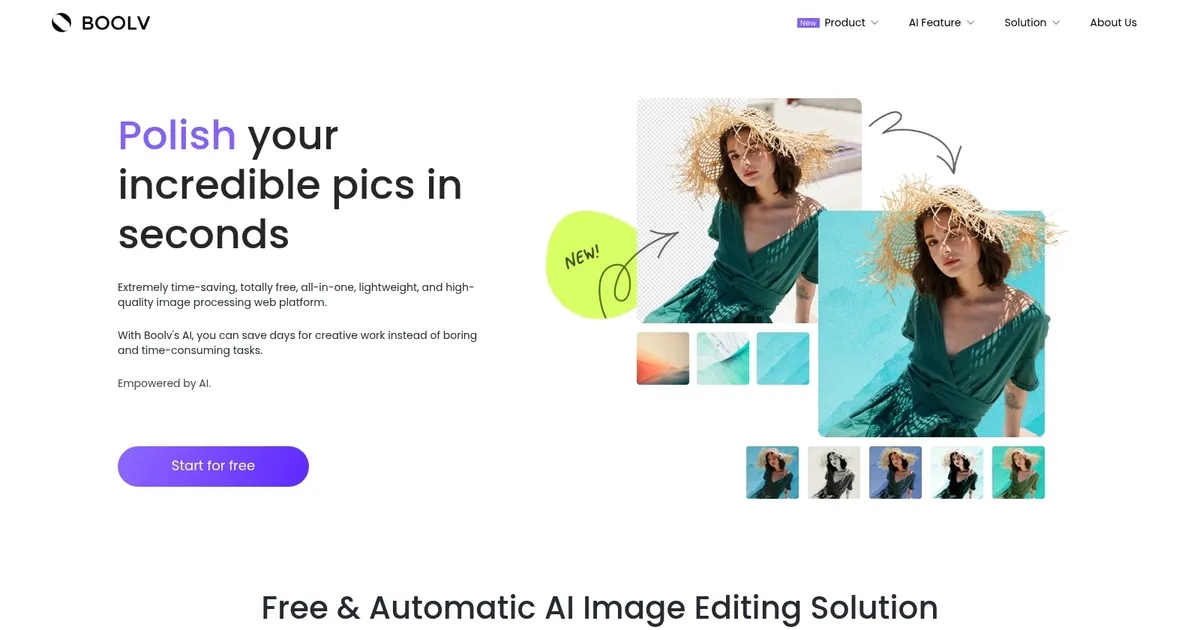
Boolv is an AI tool that lets you polish your incredible pics in seconds. It’s free to use and can save days for creative work instead of boring and time-consuming tasks.

You can use Boolv to remove and change the background in 5 seconds, which can be useful for โ€‹family albums, personalized invitations, โ€‹team photos and so on.

Or you can try one of Boolv’s photo effects and filters to quickly turn your pictures into masterpieces.

Better yet, there is an option to animate your static photos with a single click. No editing skills, codes, or complicated procedures required here.

In addition, Boolv lets you crop, resize and compress images.

But the best part is that Boolv is super-easy to use. Check it out and let us know how you like it.

Visit Boolv ↗
Categories
๐ŸŽฅ Video
โœ๏ธ Video Editing ๐Ÿ“น Video Generation ๐Ÿ“ฒ Short Video Generation ๐Ÿ–ผ๏ธ Image to Video
๐Ÿ“ข Advertising
๐ŸŽจ Ad Creative
๐Ÿ–ผ๏ธ Image
๐Ÿ–ผ๏ธ Image Generation โœ‚๏ธ Background Removal

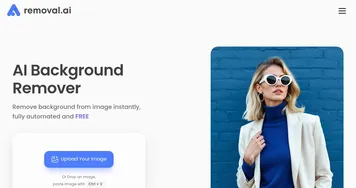
Homepage Screenshot 📸

Boolv screenshot

What are the key features? ✨

  • Background Remover & Changer: Automatically removes or replaces image backgrounds in seconds with high accuracy for clean cutouts and consistent visuals.
  • Object Eraser: Allows users to swipe away unwanted objects, people, defects, or watermarks for flawless photo results.
  • Photo Effects & Filters: Applies a variety of artistic filters and effects with one-click previews to turn ordinary images into styled masterpieces.
  • Photo Animation: Converts static photos into gently animated versions to add subtle motion and bring pictures to life effortlessly.
  • Image Resizer & Compressor: Resizes images to custom dimensions and reduces file sizes while maintaining quality for web, social, or print use.

Who is it for? 🤔

Boolv.Toolkit helps small business owners, e-commerce sellers, social media managers, content creators, and casual users who need quick, no-fuss AI photo edits without learning complex software. It's especially handy for anyone creating product images, promotional visuals, family albums, invitations, or social posts where speed and simplicity matter more than pro-level precision.

Examples of what you can use it for 💡

  • Small business owner: Removes backgrounds from product photos and adds professional filters to create clean visuals for online stores in minutes.
  • Social media creator: Erases distractions from lifestyle shots, animates portraits, and compresses images for fast posting without quality loss.
  • E-commerce seller: Processes batch product images by changing backgrounds and resizing them to fit platform requirements quickly and for free.
  • Event planner: Cleans up group photos by removing unwanted objects and applies consistent effects for invitations or thank-you cards.
  • Casual user: Enhances personal pictures with filters or animation to share better-looking memories on social platforms effortlessly.

Pros & Cons ⚖️

  • Completely free core tools
  • Very fast processing
  • Browser-based, no install
  • All-in-one editing suite
  • Limited advanced controls
  • Occasional edge artifacts

FAQs 💬

Is Boolv.Toolkit really completely free?
Yes, the main image editing tools like background remover, object eraser, filters, animation, resizer, and compressor are totally free with no required sign-up for basic use.
Do I need to download or install anything to use Boolv.Toolkit?
No, it's entirely browser-based so you just visit the site, upload your image, and start editing right away.
How accurate is the background remover in Boolv.Toolkit?
It performs well on most images with clean separation in about five seconds, though very complex scenes or fine hair might show minor artifacts that need another tool for perfection.
Can I use Boolv.Toolkit for commercial purposes?
Yes, the free tools allow commercial use for things like product photos, marketing visuals, or social media content.
What makes Boolv.Toolkit different from remove.bg?
Boolv.Toolkit combines background removal with object erasing, filters, animation, resizing, and compression in one free platform, while remove.bg focuses mainly on high-precision background cuts, sometimes with limits or credits on free tier.
Does Boolv.Toolkit work on mobile devices?
Yes, since it's web-based it functions on mobile browsers, though desktop offers a slightly better experience for detailed edits.
Is there a limit on how many images I can edit for free?
No strict limits are mentioned for the core Toolkit features; you can process as many as needed without hitting a paywall for basics.
Can Boolv.Toolkit animate any photo?
It adds subtle motion like gentle movement to elements in still photos with one click, best on portraits or simple scenes rather than highly detailed action shots.

Ready to try Boolv?

Polish your images in seconds with a set of AI-powered tools

Visit Boolv ↗

Boolv alternatives 🔗

  1. Runway Runway Generates and edits AI-powered videos from text prompts
  2. Canva Magic Design Canva Magic Design Generates custom, on-brand designs from text prompts or uploaded media in seconds.
  3. Adobe Express Adobe Express Creates on-brand content with AI-driven design and video tools
  4. Vimeo AI Vimeo AI Creates polished videos from single recordings using AI edits and scripts
  5. CapCut Creative Suite CapCut Creative Suite Online creative suite for everyone to create stunning images and videos
  6. Loom AI Loom AI Record better video messages with automatic titles, summaries, share messages, and more
Share
Boolv screenshot enlarged
Promote Boolv
light badge
Copy Embed Code
dark badge
Copy Embed Code
neutral badge
Copy Embed Code
Best AI Tools

Discover the best AI tools for any use case

Explore
  • Tool Categories
  • AI Use Cases
  • AI Events
  • AI News
  • Saved Tools
Company
  • About Us
  • Contact Us
  • Media & Partnerships
  • Suggest a Tool
Legal
  • Privacy Policy
  • Terms of Service
Copyright © 2026 Best AI Tools 415 Mission Street, 37th Floor, San Francisco, CA 94105