logo-darklogo-darklogo-darklogo-dark
  • Tool Categories
    • ๐ŸŽจArt & Creative Design505
    • ๐ŸขBusiness Management644
    • ๐Ÿ’ปCoding & Development515
    • ๐Ÿ‘ฎDetection83
    • ๐Ÿง General Use727
    • ๐ŸฅHealth & Wellness55
    • ๐Ÿ“ทImage & Photo Analysis100
    • ๐Ÿ–ผ๏ธImage Generation & Editing618
    • ๐Ÿ“Interior & Architectural Design37
    • ๐ŸŽ“Learning & Education483
    • โš–๏ธLegal & Finance90
    • ๐ŸŽญLifestyle & Entertainment236
    • ๐Ÿ“ขMarketing & Advertising627
    • ๐ŸŽงMusic & Audio138
    • ๐Ÿ‘”Office & Workplace1,014
    • ๐Ÿ”ฌResearch & Data Analysis372
    • ๐Ÿ‘ฅSocial Media245
    • ๐ŸŽฅVideo Generation & Editing426
    • ๐Ÿ‘ง๐ŸปVirtual Companion135
    • ๐ŸŽคVoice Generation & Editing381
    • โœ๏ธWriting & Editing808
    • All Categories
    • AI Use Cases
  • News
  • Events
    • Academic Conferences
    • Developer Conferences
    • Expos / Trade Shows
    • Industry Summits
    • Workshops / Training
    • All Events
    • Past Events
  • Saved Tools
  • Suggest a Tool
โœ•
Home › Business Management › Product Management› ChatPRD
ChatPRD

ChatPRD

Streamlines product requirements drafting and coaches product managers to excel

I spent a couple of days messing around with ChatPRD, and let me tell you, it’s like having a super-smart intern who never sleeps but occasionally needs a nudge. As a product manager, I’m always juggling deadlines, and PRDs are my kryptonite — necessary but tedious. So, when I stumbled across ChatPRD, created by Claire Vo, a CPO with a knack for automation, I was curious. Could this AI really cut my drafting time and make me look like a rockstar PM? Here’s what I found, with a bit of flair and a lot of honesty.

Logging into ChatPRD feels like stepping into a sleek, PM-focused cockpit. I started with the Document Mode, tossing in a vague idea about a user onboarding feature. In about 20 minutes, it churned out a PRD with clear sections: objectives, user stories, technical requirements, even a risks section. It was like watching a blank canvas turn into a half-decent painting. The PRD wasn’t perfect — some metrics felt generic, like “increase user retention” without specifics — but it gave me a solid starting point. I tweaked it using the AI’s suggestions, which felt like having a colleague whisper, “Hey, clarify this user story.” The Custom Profiles feature let me tailor the output to my startup’s vibe, which was a nice touch.

What surprised me was the Coaching Mode. I uploaded an old PRD, and ChatPRD flagged a missing dependency and suggested a better way to phrase my success metrics. It’s not just a tool; it’s like a mentor who doesn’t bill by the hour. I also played with the Templates Library, which includes community-sourced options from top PMs. It’s a goldmine for consistency, especially if your team’s PRDs look like they were written by different species. Exporting to Notion was seamless, though I wish the free version didn’t cap me at three documents. That limit hit faster than I expected.

Compared to ChatGPT or Aha!, ChatPRD feels purpose-built. ChatGPT’s PRDs need heavy editing to sound human, and Aha! is more about roadmapping than drafting. But ChatPRD isn’t flawless. The AI sometimes overcomplicates simple features, and I had to manually prune jargon. Pricing-wise, it’s affordable for solo PMs, but teams might need the pricier plan for collaboration features. X posts from users like Claire Vo highlight the tool’s 50,000+ user base, which adds a sense of community trust.

My advice? Start small. Use a template, input a clear feature idea, and let ChatPRD draft. Spend 10 minutes refining, then use the coaching feedback to level up your skills. It’s not a magic wand, but it’s a damn good shortcut.

Visit ChatPRD ↗
Categories
๐Ÿข Business
๐Ÿ“ฆ Product Management
๐Ÿ‘” Work
๐Ÿ“„ Document Generation ๐Ÿ“Š Report Generation ๐Ÿ’ผ Workplace Assistant
โœ๏ธ Writing
๐Ÿค– Writing Assistant
๐Ÿง  General
๐Ÿ’ฌ Chatbot

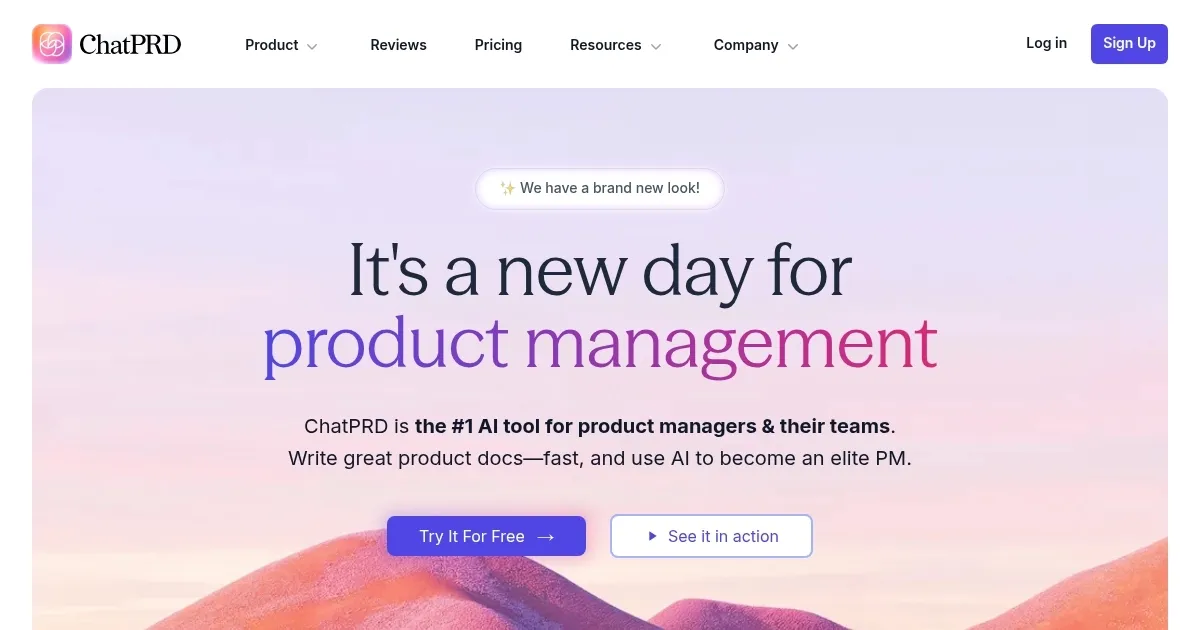
Homepage Screenshot 📸

ChatPRD screenshot

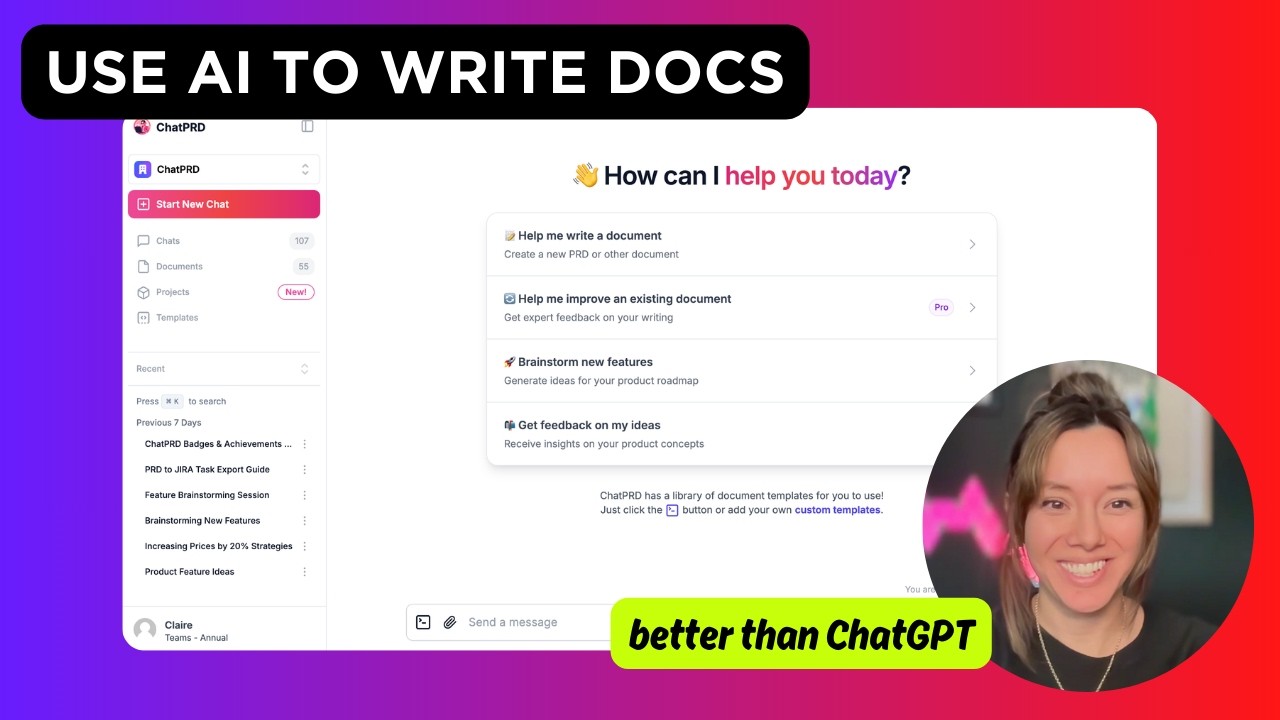
Video Overview 🎬

ChatPRD - Video Overview

What are the key features? ✨

  • Document Mode: Generates structured PRDs from brief inputs, including objectives and user stories.
  • Templates Library: Offers pre-built and community-sourced PRD templates for consistency.
  • Coaching Mode: Provides real-time feedback to improve PRDs and PM skills.
  • Collaboration Tools: Supports team editing and version control on paid plans.
  • Integrations: Connects with Notion, Google Drive, and Slack for seamless workflows.

Who is it for? 🤔

ChatPRD is ideal for product managers, startup founders, VPs, and teams without dedicated PMs, particularly those in fast-paced environments needing quick, high-quality PRDs. It benefits solo PMs seeking to streamline documentation, teams requiring standardized templates, and new PMs looking for coaching to refine their skills. Engineers and cross-functional teams also find its clear, diagram-supported PRDs useful for aligning on requirements.

Examples of what you can use it for 💡

  • Solo Product Manager: Drafts a PRD for a new feature in 30 minutes using a template.
  • Startup Founder: Refines a pitch deckโ€™s product section with AI feedback.
  • Engineering Team: Uses diagrams to clarify user journey flows in a PRD.
  • New PM: Gets coaching to improve user story clarity in a draft PRD.
  • Team Lead: Shares custom templates across a team for consistent documentation.

Pros & Cons ⚖️

  • Fast PRD drafting in under 30 minutes.
  • Tailored PM coaching improves skills.
  • Integrates with Notion and Google Drive.
  • Free plan limits to three documents.
  • Occasional jargon in AI outputs.

FAQs 💬

What is ChatPRD?
ChatPRD is an AI tool that drafts PRDs and coaches PMs to improve skills.
Is there a free version of ChatPRD?
Yes, it offers a free plan with up to three document creations.
Can ChatPRD integrate with other tools?
It integrates with Notion, Google Drive, and Slack (beta).
Who created ChatPRD?
Claire Vo, a three-time CPO, built ChatPRD for PMs.
Does ChatPRD support team collaboration?
Yes, Team and Enterprise plans offer collaborative editing and version control.
Can I customize PRD templates?
Paid plans allow custom templates tailored to your workflow.
Is ChatPRD secure for sensitive data?
It uses OpenAI APIs that donโ€™t train on user data, ensuring privacy.
How does ChatPRD compare to ChatGPT?
ChatPRD is PM-specific, with tailored templates and coaching, unlike general-purpose ChatGPT.
Can beginners use ChatPRD?
Yes, itโ€™s user-friendly and offers coaching for new PMs.
Does ChatPRD generate diagrams?
Yes, it creates visual diagrams to clarify PRDs on some plans.

Ready to try ChatPRD?

Streamlines product requirements drafting and coaches product managers to excel

Visit ChatPRD ↗

ChatPRD alternatives 🔗

  1. UserTesting AI UserTesting AI An online platform that leverages AI to streamline user experience research
  2. Amplitude AI Amplitude AI A suite of AI-powered features that help users navigate every aspect of building digital products
  3. Canny Canny Centralizes customer feedback to prioritize product features
  4. Blueprint Blueprint A smart tool that handles therapy notes for mental health professionals
  5. Sprig Sprig An AI-powered product experience platform to optimize user engagement, retention, and satisfaction
  6. Fibery Fibery An online tool to brainstorm ideas, improve writing, automate tasks, and experiment
Share
ChatPRD screenshot enlarged
Promote ChatPRD
light badge
Copy Embed Code
dark badge
Copy Embed Code
neutral badge
Copy Embed Code
Best AI Tools

Discover the best AI tools for any use case

Explore
  • Tool Categories
  • AI Use Cases
  • AI Events
  • AI News
  • Saved Tools
Company
  • About Us
  • Contact Us
  • Media & Partnerships
  • Suggest a Tool
Legal
  • Privacy Policy
  • Terms of Service
Copyright © 2026 Best AI Tools 415 Mission Street, 37th Floor, San Francisco, CA 94105