logo-darklogo-darklogo-darklogo-dark
  • Tool Categories
    • ๐ŸŽจArt & Creative Design505
    • ๐ŸขBusiness Management644
    • ๐Ÿ’ปCoding & Development515
    • ๐Ÿ‘ฎDetection83
    • ๐Ÿง General Use727
    • ๐ŸฅHealth & Wellness55
    • ๐Ÿ“ทImage & Photo Analysis100
    • ๐Ÿ–ผ๏ธImage Generation & Editing618
    • ๐Ÿ“Interior & Architectural Design37
    • ๐ŸŽ“Learning & Education483
    • โš–๏ธLegal & Finance90
    • ๐ŸŽญLifestyle & Entertainment236
    • ๐Ÿ“ขMarketing & Advertising627
    • ๐ŸŽงMusic & Audio138
    • ๐Ÿ‘”Office & Workplace1,014
    • ๐Ÿ”ฌResearch & Data Analysis372
    • ๐Ÿ‘ฅSocial Media245
    • ๐ŸŽฅVideo Generation & Editing426
    • ๐Ÿ‘ง๐ŸปVirtual Companion135
    • ๐ŸŽคVoice Generation & Editing381
    • โœ๏ธWriting & Editing808
    • All Categories
    • AI Use Cases
  • News
  • Events
    • Academic Conferences
    • Developer Conferences
    • Expos / Trade Shows
    • Industry Summits
    • Workshops / Training
    • All Events
    • Past Events
  • Saved Tools
  • Suggest a Tool
โœ•
Home › Writing & Editing › Prompt Generation› PromptEngine
PromptEngine

PromptEngine

Generates high-quality AI prompts to optimize interactions with language models

I had a chance to try out PromptEngine, and my first impression is that it’s like finding a shortcut through the maze of AI prompting. This tool promises to turn your half-baked ideas into prompts that make AI models sing, and after a few hours of poking around, I think it delivers — mostly. Picture a clean, no-nonsense website that feels like it was built for people who want results, not headaches. I tried it out to generate prompts for a blog post and a coding task, and the experience was smooth, with a few surprises that made me grin.

The Prompt Generator is the heart of PromptEngine. I typed in a vague idea for a marketing email, and within seconds, it churned out a prompt that got ChatGPT to spit out a punchy, professional draft. The same went for a coding prompt I tested with the Cursor Prompt Generator — my request for a Python script came back clean and usable. The Google sign-in was a breeze, and I loved that it’s free, unlike Rytr or Writesonic, which push premium plans hard. But I noticed a slight lag when generating multiple prompts back-to-back, which could annoy anyone on a tight deadline.

What I liked most was the prompt history feature. It’s like a little notebook that remembers your past prompts, saving you from starting from scratch. I didn’t expect to care about this, but it’s a game-changer for tweaking prompts on the fly. On the flip side, the tool feels a bit basic for advanced users. I tried crafting a highly specific prompt for a data analysis task, and it needed some manual tweaking to hit the mark. Compared to Jasper, which offers more templates, or Copy.ai, with its slicker interface, PromptEngine is less flashy but more focused.

Across platforms like X, users rave about its simplicity and model compatibility — ChatGPT, Claude, even Mistral. But some mentioned occasional hiccups, like prompts that don’t quite nail niche technical requests. Still, for a free tool, it punches above its weight. My surprise? The v0 Prompt Generator for full-stack app ideas. I tossed in a concept for a simple app, and the prompt it generated was specific enough to feel like I’d hired a consultant. If you’re curious, start with its ChatGPT generator for quick wins, and don’t overcomplicate your inputs — simple descriptions yield the best results.

Visit PromptEngine ↗
Categories
โœ๏ธ Writing
๐Ÿ’ก Prompt Generation ๐Ÿ› ๏ธ Prompt Engineering ๐Ÿค– Writing Assistant
๐Ÿง  General
โœ… Productivity

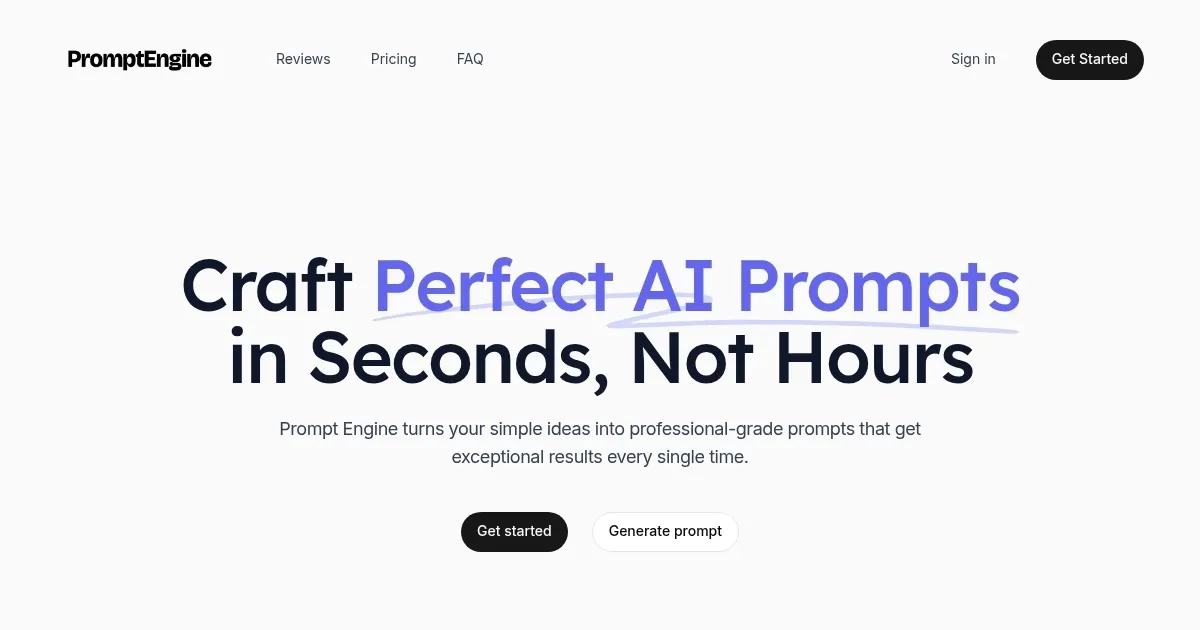
Homepage Screenshot 📸

PromptEngine screenshot

What are the key features? ✨

  • Prompt Generator: Crafts optimized prompts for various AI models based on user input
  • Cursor Prompt Generator: Creates precise prompts for coding tasks, ensuring bug-free code
  • v0 Prompt Generator: Generates prompts for deployment-ready full-stack app development
  • Prompt History: Saves past prompts for easy access and refinement
  • Google Sign-In: Enables quick and secure account creation using Google credentials

Who is it for? 🤔

PromptEngine is designed for students, educators, marketers, developers, and researchers who interact with AI models like ChatGPT or Claude and want to streamline their prompt creation process. Its intuitive design suits beginners with limited technical skills, while its support for multiple models appeals to professionals seeking efficient, versatile tools. The free access makes it particularly attractive for budget-conscious users, such as students or small business owners, looking to enhance AI-driven tasks without investing in pricier alternatives.

Examples of what you can use it for 💡

  • Student: Uses PromptEngine.cc to generate prompts that simplify complex academic topics for study
  • Marketer: Crafts prompts to create compelling ad copy or social media content quickly
  • Developer: Leverages the Cursor Prompt Generator to produce accurate coding prompts for projects
  • Researcher: Generates prompts to analyze large datasets or summarize research findings
  • Educator: Creates prompts to develop engaging lesson plans or quiz questions efficiently

Pros & Cons ⚖️

  • Free to use, no hidden costs
  • Supports multiple AI models
  • Saves prompt history for reuse
  • Lacks advanced customization options
  • Limited for niche technical tasks

FAQs 💬

What is PromptEngine.cc?
A free tool to generate optimized prompts for AI models like ChatGPT and Claude
Do I need to pay to use PromptEngine.cc?
No, itโ€™s currently free with no subscription required
Which AI models does it support?
It supports ChatGPT, Claude, Gemini, LLama, and Mistral
How do I sign up for PromptEngine.cc?
Use your Google account for quick and secure registration
Can I save my prompts?
Yes, the Prompt History feature stores past prompts for reuse
Is it suitable for coding tasks?
Yes, the Cursor Prompt Generator creates prompts for coding projects
Does it work for app development?
The v0 Prompt Generator crafts prompts for full-stack app ideas
Is the interface easy to use?
The intuitive design is beginner-friendly and requires minimal setup
Are there any performance issues?
Some users report slight lags during high-traffic periods

Ready to try PromptEngine?

Generates high-quality AI prompts to optimize interactions with language models

Visit PromptEngine ↗

PromptEngine alternatives 🔗

  1. Google AI Studio Google AI Studio Prototypes AI solutions using Gemini models in a browser-based IDE
  2. OpenArt OpenArt A versatile AI-powered platform for generating and enhancing images and art.
  3. FlowGPT FlowGPT Discovers and shares AI prompts for enhanced ChatGPT interactions
  4. Image-to-Prompt Image-to-Prompt Generate captions from images instantly with one click.
  5. ImagePrompt.org ImagePrompt.org Helping users create detailed prompts for AI art generation
  6. AIPRM AIPRM Browser extension that helps with curated ChatGPT prompts
Share
PromptEngine screenshot enlarged
Promote PromptEngine
light badge
Copy Embed Code
dark badge
Copy Embed Code
neutral badge
Copy Embed Code
Best AI Tools

Discover the best AI tools for any use case

Explore
  • Tool Categories
  • AI Use Cases
  • AI Events
  • AI News
  • Saved Tools
Company
  • About Us
  • Contact Us
  • Media & Partnerships
  • Suggest a Tool
Legal
  • Privacy Policy
  • Terms of Service
Copyright © 2026 Best AI Tools 415 Mission Street, 37th Floor, San Francisco, CA 94105