logo-darklogo-darklogo-darklogo-dark
  • Tool Categories
    • 🎨Art & Creative Design505
    • 🏢Business Management644
    • 💻Coding & Development515
    • 👮Detection83
    • 🧠General Use727
    • 🏥Health & Wellness55
    • 📷Image & Photo Analysis100
    • 🖼️Image Generation & Editing618
    • 📐Interior & Architectural Design37
    • 🎓Learning & Education483
    • ⚖️Legal & Finance90
    • 🎭Lifestyle & Entertainment236
    • 📢Marketing & Advertising627
    • 🎧Music & Audio138
    • 👔Office & Workplace1,014
    • 🔬Research & Data Analysis372
    • 👥Social Media245
    • 🎥Video Generation & Editing426
    • 👧🏻Virtual Companion135
    • 🎤Voice Generation & Editing381
    • ✍️Writing & Editing808
    • All Categories
    • AI Use Cases
  • News
  • Events
    • Academic Conferences
    • Developer Conferences
    • Expos / Trade Shows
    • Industry Summits
    • Workshops / Training
    • All Events
    • Past Events
  • Saved Tools
  • Suggest a Tool
✕
Home › Art & Creative Design › Design Assistant› Design Sense
Design Sense

Design Sense

Transforms room photos into styled interior designs instantly

Design Sense is a mobile app that uses AI to generate interior and exterior design renders from user-uploaded photos. It processes images to apply over 32 predefined styles, including modern, minimalist, and Zen, across 34 room categories like kitchens, offices, and gardens. The core functionality involves uploading a photo, selecting a style and optional color palette, and receiving multiple rendered outputs in seconds via generative AI models optimized for spatial consistency. Recent updates include an Inpaint function for targeted edits and bug fixes for smoother performance.

The tool supports both iOS and Android platforms, with a free version offering limited renders and a premium tier for unlimited access and watermark-free exports. Compared to competitors, it provides broader exterior design options than RoomGPT, which prioritizes indoor color experiments, and faster generation times than Interior AI, focused on real estate staging. Pricing follows a freemium model, generally lower entry cost than specialized tools like REImagine Home, which emphasize virtual reality previews.

Key features include style application that maintains room proportions, prompt-based customizations for elements like furniture, and export options for sharing designs. Users report high satisfaction with visualization speed for DIY projects, though some note occasional inaccuracies in object scaling on complex photos. A surprise capability is rendering from sketches, extending use beyond photos to conceptual ideas.

The AI employs computer vision to detect room elements and diffusion models to blend styles, ensuring outputs align with real-world feasibility. It integrates no external software but allows direct app downloads from stores. Positive aspects include accessibility for non-professionals and quick iterations; drawbacks encompass limited manual adjustments and dependency on photo quality.

Test the app with high-resolution images in good lighting, iterate on styles for best results, and combine outputs with physical measurements for accurate implementations.

Visit Design Sense ↗
Categories
🎨 Art
🧑‍🎨 Design Assistant 📱 UX Design 🖼️ Design Generation 🖌️ Graphic Design

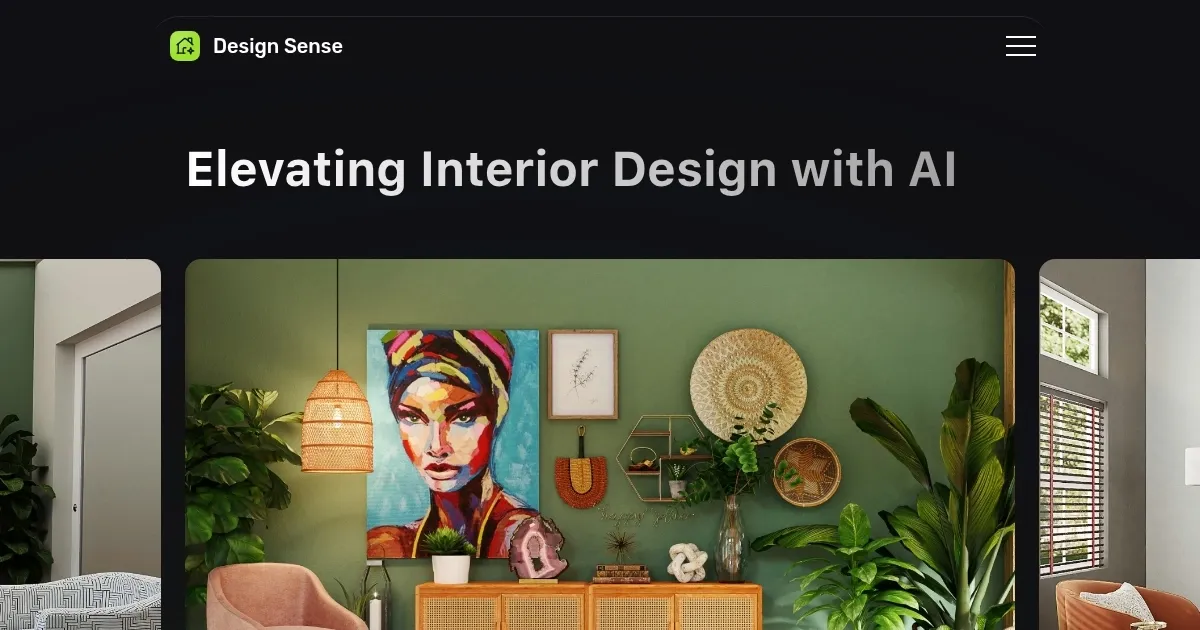
Homepage Screenshot 📸

Design Sense screenshot

Video Overview 🎬

Design Sense - Video Overview

What are the key features? ✨

  • AI Rendering: Generates instant design visualizations from uploaded room photos in various styles.
  • Style Library: Offers over 32 predefined aesthetics like modern, tropical, and vintage for diverse explorations.
  • Room Categories: Supports 34+ interior and exterior types, from bedrooms to outdoor patios.
  • Inpaint Function: Allows targeted edits to specific areas of the rendered design for customization.
  • Prompt Customization: Enables text-based additions like furniture or colors to refine outputs.

Who is it for? 🤔

Design Sense suits homeowners dreaming of quick space refreshes, DIY enthusiasts experimenting with styles on a budget, interior designers needing fast client mockups, real estate agents staging properties virtually, and office managers planning functional layouts, all benefiting from its simple photo-based AI renders that democratize professional-level visualizations without requiring design expertise or expensive hires.

Examples of what you can use it for 💡

  • Homeowner: Uploads a living room photo to test boho versus minimalist styles before buying new decor.
  • Interior Designer: Generates multiple bedroom concepts in seconds to present options during client meetings.
  • Real Estate Agent: Renders empty property exteriors in modern styles to attract buyers with virtual tours.
  • DIY Enthusiast: Transforms a sketch of a patio into tropical designs for weekend project inspiration.
  • Office Manager: Redesigns workspace images in Zen aesthetics to improve employee comfort and productivity.

Pros & Cons ⚖️

  • Easy to use
  • Many styles
  • Free tier available
  • Scaling issues
  • Watermarks on free

FAQs 💬

What platforms does Design Sense support?
It works on iOS and Android devices via app downloads from the App Store and Google Play.
How many styles can I choose from?
Users access over 32 styles, including traditional, modern, and Zen, with options to explore more through prompts.
Does it handle exterior designs?
Yes, it supports exterior renders for spaces like patios and buildings alongside interiors.
Is there a free version?
The free tier allows basic renders with watermarks, while premium removes limits and adds features like Inpaint.
Can I edit the generated designs?
Basic tweaks via prompts and the Inpaint function are available, but advanced manual editing is limited.
What file types work for uploads?
It accepts standard photo formats from your device's camera or gallery, best in high resolution.
How accurate are the room proportions?
The AI preserves original layouts but may have minor scaling variances, improved with clear photos.
Is it suitable for professionals?
Interior designers and agents use it for quick mockups, though it pairs well with pro software for finals.
Does it integrate with other tools?
Outputs export as images for use in apps like Canva, but no direct CAD integration exists.
What's the processing time?
Renders generate in seconds, depending on device speed and image complexity.

Ready to try Design Sense?

Transforms room photos into styled interior designs instantly

Visit Design Sense ↗

Design Sense alternatives 🔗

  1. Canva Magic Design Canva Magic Design Generates custom, on-brand designs from text prompts or uploaded media in seconds.
  2. Adobe Express Adobe Express Creates on-brand content with AI-driven design and video tools
  3. FigJam AI FigJam AI Instantly visualize ideas, suggest best practices, and automate tedious tasks
  4. Miro AI Miro AI Visual collaboration platform that lets you build the next big thing with a prompt and a chat
  5. Vecteezy AI Vecteezy AI A reverse image search engine that generates related and fully licensable similar images
  6. Pixlr Pixlr An AI-powered online photo editing and design platform, enabling everyone to create stunning designs
Share
Design Sense screenshot enlarged
Promote Design Sense
light badge
Copy Embed Code
dark badge
Copy Embed Code
neutral badge
Copy Embed Code
Best AI Tools

Discover the best AI tools for any use case

Explore
  • Tool Categories
  • AI Use Cases
  • AI Events
  • AI News
  • Saved Tools
Company
  • About Us
  • Contact Us
  • Media & Partnerships
  • Suggest a Tool
Legal
  • Privacy Policy
  • Terms of Service
Copyright © 2026 Best AI Tools 415 Mission Street, 37th Floor, San Francisco, CA 94105