logo-darklogo-darklogo-darklogo-dark
  • Tool Categories
    • 🎨Art & Creative Design505
    • 🏢Business Management644
    • 💻Coding & Development515
    • 👮Detection83
    • 🧠General Use727
    • 🏥Health & Wellness55
    • 📷Image & Photo Analysis100
    • 🖼️Image Generation & Editing618
    • 📐Interior & Architectural Design37
    • 🎓Learning & Education483
    • ⚖️Legal & Finance90
    • 🎭Lifestyle & Entertainment236
    • 📢Marketing & Advertising627
    • 🎧Music & Audio138
    • 👔Office & Workplace1,014
    • 🔬Research & Data Analysis372
    • 👥Social Media245
    • 🎥Video Generation & Editing426
    • 👧🏻Virtual Companion135
    • 🎤Voice Generation & Editing381
    • ✍️Writing & Editing808
    • All Categories
    • AI Use Cases
  • News
  • Events
    • Academic Conferences
    • Developer Conferences
    • Expos / Trade Shows
    • Industry Summits
    • Workshops / Training
    • All Events
    • Past Events
  • Saved Tools
  • Suggest a Tool
✕
Home › Voice Generation & Editing › Voice Generation› FineVoice
FineVoice

FineVoice by Fineshare

Generates realistic AI voices from text for videos and podcasts

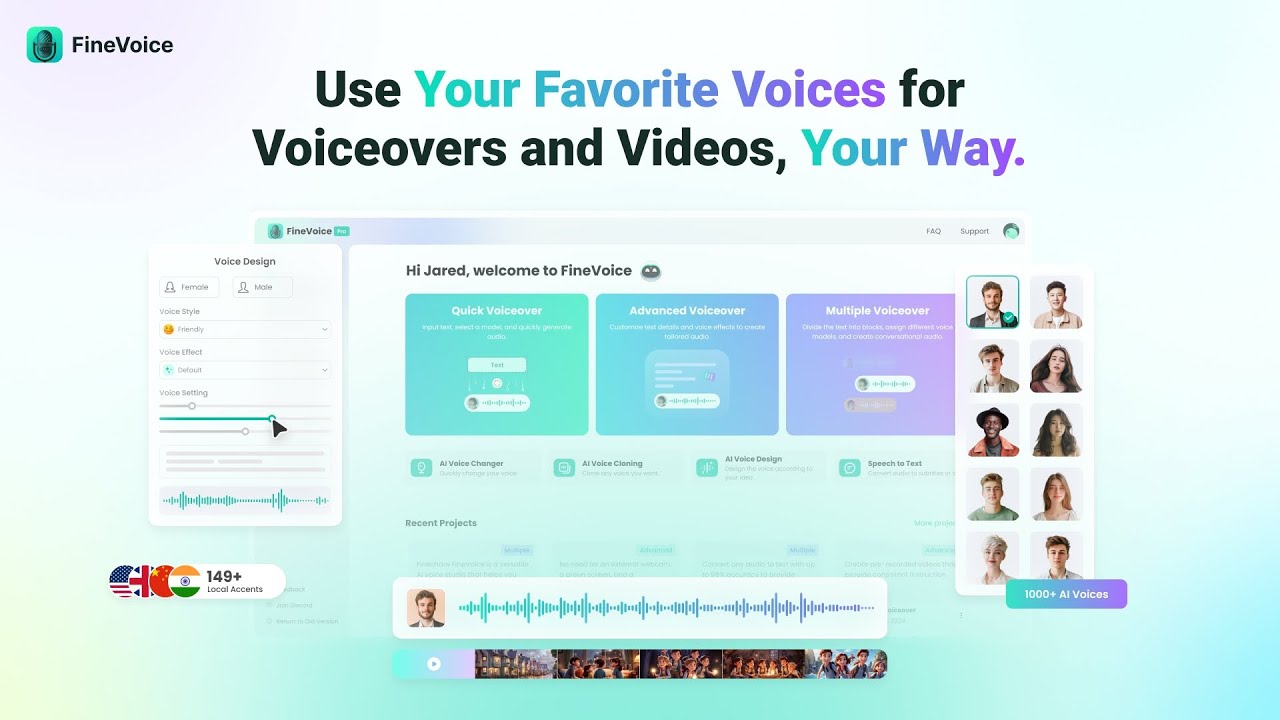
FineVoice is an AI voice generator that converts text to speech using over 2000 voices across 149 languages and accents. It supports commercial models like Brian for documentaries and community clones such as David Attenborough. The tool includes Professional Cloning for detailed voice replication from extended samples and Instant Cloning from 30-second clips. Advanced AI Voiceover allows adjustments to speed, pitch, and effects for professional outputs. Multiple AI Voiceover automatically assigns voices to dialogue segments in scripts.

Key functionalities cover text-to-speech generation, voice design for custom personas, and Video to SFX for synchronized audio effects from video inputs. It processes inputs in steps: enter text, select voice, adjust parameters, generate, and export. Supported formats include MP3 and WAV at up to 48kHz quality. Integration works with platforms like OBS, Discord, and Zoom for real-time use.

Competitors include ElevenLabs, which provides similar cloning but emphasizes 32 languages with stronger emotional controls. Murf AI offers 120 voices in 20 languages focused on API streaming. Voicemod specializes in real-time changing for gaming, lacking FineVoice’s text-to-speech depth. FineVoice’s free tier limits exports and voices, while paid plans unlock full access at lower entry costs than ElevenLabs.

Users report natural-sounding outputs suitable for videos, podcasts, and eLearning. Limitations include occasional processing delays for complex clones and platform-specific compatibility issues on non-Windows systems. The interface supports browser-based access for basic tasks.

For implementation, test with short texts in the free mode to verify voice fit, then scale to paid for production use.

Visit FineVoice ↗
Categories
🎤 Voice
🗨️ Voice Generation 📢 Text-to-Speech 🔊 Speech Synthesis 👯 Voice Cloning 📣 Voice Over 🌟 Celebrity Voice Generation

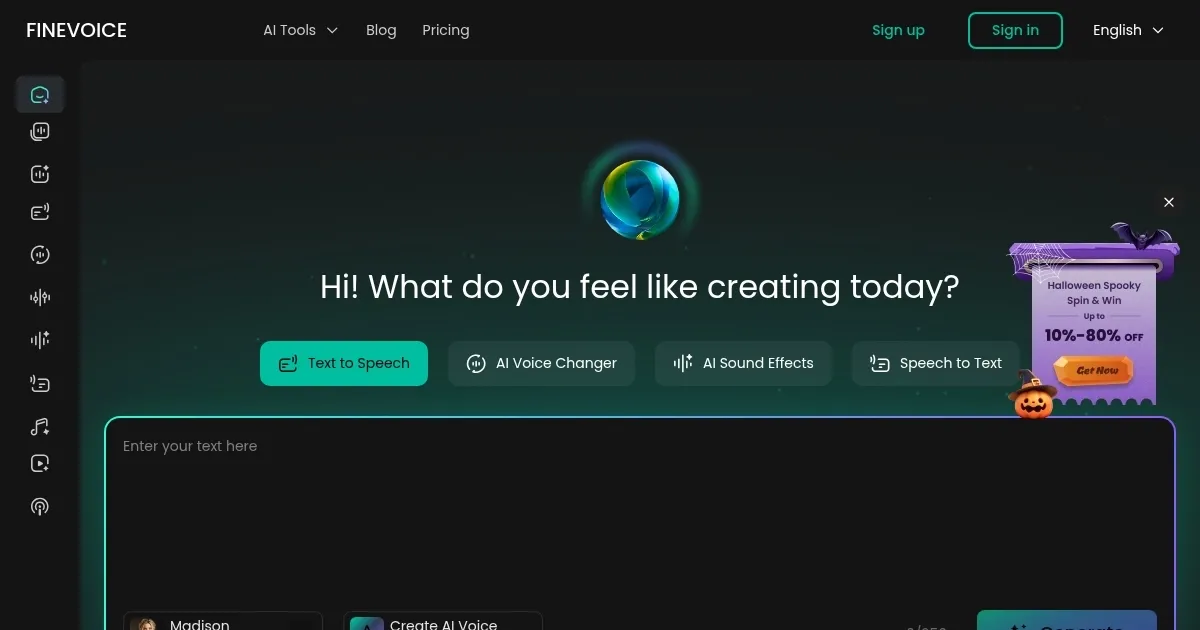
Homepage Screenshot 📸

FineVoice screenshot

Video Overview 🎬

FineVoice - Video Overview

What are the key features? ✨

  • Text-to-Speech: Converts written text into natural-sounding audio using over 2000 AI voices in 149 languages.
  • Voice Cloning: Creates realistic clones from audio samples, with Professional and Instant options for quick or detailed replication.
  • AI Voiceover: Generates customized voiceovers with adjustments to speed, pitch, and effects for professional content.
  • Multiple Voiceover: Automatically assigns different voices to dialogue segments in scripts for multi-character scenes.
  • Video to SFX: Produces synchronized sound effects and music from uploaded videos to enhance audio depth.

Who is it for? 🤔

Content creators, podcasters, educators, and marketers find Fineshare FineVoice helpful because it streamlines audio production without needing voice actors or complex software. Beginners appreciate the simple steps for generating voices, while professionals value the cloning and customization for consistent branding across videos and global audiences. It empowers small teams or individuals to produce high-quality, multilingual content efficiently, saving time on editing and enhancing engagement in eLearning or ads.

Examples of what you can use it for 💡

  • YouTuber: Uses text-to-speech to narrate tutorials with natural voices, adding accents for international viewers.
  • Podcaster: Clones a host's voice for consistent episodes and applies multiple voices for guest dialogues.
  • Educator: Generates eLearning voiceovers in multiple languages to make lessons accessible worldwide.
  • Marketer: Creates ad voiceovers with emotional tones and SFX to boost video campaigns on social media.
  • Animator: Assigns character voices automatically to scripts for lively dialogue in short videos.

Pros & Cons ⚖️

  • Vast voice library
  • Easy cloning tools
  • Multilingual support
  • Free limits exports

FAQs 💬

What is Fineshare FineVoice?
An AI tool that generates realistic voices from text and clones audio for voiceovers.
How does voice cloning work in FineVoice?
Upload a sample; Instant uses 30 seconds for quick clones, Professional captures emotions from longer inputs.
What languages does FineVoice support?
Over 149 languages and accents, including English, Spanish, French, and Chinese.
Is the free version sufficient for beginners?
Yes, it allows basic text-to-speech and limited cloning to test features.
Can I use FineVoice for commercial projects?
Yes, commercial voices ensure safe monetization for ads and videos.
How accurate are the generated voices?
They mimic human intonation using machine learning, often indistinguishable from real speech.
Does FineVoice integrate with other software?
It works with OBS, Discord, and Zoom for real-time and recording use.
What if I need custom voice designs?
The AI Voice Design feature creates unique personas with clicks, adjusting accents and styles.
Are there limits on voice library access?
Free users get basic voices; paid unlocks 2000+ including community clones.
How do I export audio files?
Generate the voiceover and download in MP3 or WAV formats directly from the tool.

Ready to try FineVoice?

Generates realistic AI voices from text for videos and podcasts

Visit FineVoice ↗

FineVoice alternatives 🔗

  1. ElevenLabs ElevenLabs Generates lifelike, expressive AI voices for diverse applications
  2. Speechify Speechify Transforms text into natural-sounding speech for effortless listening
  3. NaturalReader NaturalReader Transforms text into natural AI voices for accessibility and content creation
  4. Voicemod Voicemod Transforms your voice in real time with AI effects for gaming and streaming.
  5. TTSMaker TTSMaker Transforms text into natural-sounding audio in multiple languages
  6. Vozard Vozard Transforms voices in real time for gaming and streaming
Share
FineVoice screenshot enlarged
Promote FineVoice
light badge
Copy Embed Code
dark badge
Copy Embed Code
neutral badge
Copy Embed Code
Best AI Tools

Discover the best AI tools for any use case

Explore
  • Tool Categories
  • AI Use Cases
  • AI Events
  • AI News
  • Saved Tools
Company
  • About Us
  • Contact Us
  • Media & Partnerships
  • Suggest a Tool
Legal
  • Privacy Policy
  • Terms of Service
Copyright © 2026 Best AI Tools 415 Mission Street, 37th Floor, San Francisco, CA 94105