logo-darklogo-darklogo-darklogo-dark
  • Tool Categories
    • ๐ŸŽจArt & Creative Design505
    • ๐ŸขBusiness Management644
    • ๐Ÿ’ปCoding & Development515
    • ๐Ÿ‘ฎDetection83
    • ๐Ÿง General Use727
    • ๐ŸฅHealth & Wellness55
    • ๐Ÿ“ทImage & Photo Analysis100
    • ๐Ÿ–ผ๏ธImage Generation & Editing618
    • ๐Ÿ“Interior & Architectural Design37
    • ๐ŸŽ“Learning & Education483
    • โš–๏ธLegal & Finance90
    • ๐ŸŽญLifestyle & Entertainment236
    • ๐Ÿ“ขMarketing & Advertising627
    • ๐ŸŽงMusic & Audio138
    • ๐Ÿ‘”Office & Workplace1,014
    • ๐Ÿ”ฌResearch & Data Analysis372
    • ๐Ÿ‘ฅSocial Media245
    • ๐ŸŽฅVideo Generation & Editing426
    • ๐Ÿ‘ง๐ŸปVirtual Companion135
    • ๐ŸŽคVoice Generation & Editing381
    • โœ๏ธWriting & Editing808
    • All Categories
    • AI Use Cases
  • News
  • Events
    • Academic Conferences
    • Developer Conferences
    • Expos / Trade Shows
    • Industry Summits
    • Workshops / Training
    • All Events
    • Past Events
  • Saved Tools
  • Suggest a Tool
โœ•
Home › Office & Workplace › PPT Generation› GenPPT
GenPPT

GenPPT

Creates professional PowerPoint slides from simple topic prompts in minutes

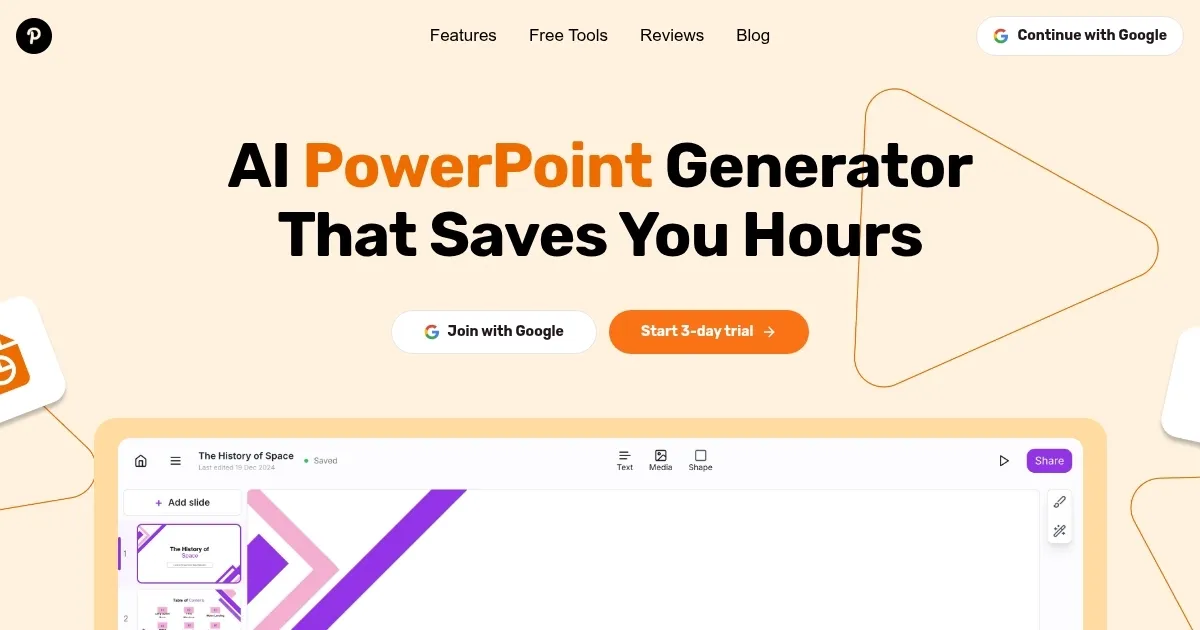
GenPPT is an AI-powered tool that generates professional PowerPoint presentations from user-provided topics in minutes. It streamlines slide creation with features like the AI Editor, which allows customization through text prompts, and the Text to PPT feature, which converts notes into structured slides. The platform supports PowerPoint and Google Slides exports, making it versatile for various users. It also includes data visualization tools, such as the AI Chart Maker, for creating charts and graphs, and auto-generated speaker notes to aid presentation delivery. GenPPT offers a freemium model with a free trial and paid plans.

The tool excels in speed, producing complete decks from minimal input. Users input a topic, and the AI generates slides with relevant content, titles, and visuals. The AI Editor lets users modify slides by requesting changes like color adjustments or layout shifts. The platform’s content generation stands out, often including unique insights, such as historical context for niche topics. It supports multiple use cases, including business pitches, academic presentations, and marketing campaigns. Over 40,000 users, including professionals and students, rely on GenPPT for its efficiency.

However, the free trial requires credit card details, and cancellation isn’t always straightforward. Generated slides may need manual tweaks for highly specific designs, and the stock photo library is limited. Compared to Pitch, which offers more collaborative features, or Visme, with its robust design templates, GenPPT prioritizes content over advanced design. Its pricing aligns with competitors, but some, like Visme, provide more visual customization for similar costs.

GenPPT’s data visualization tools include options for bar graphs, pie charts, and line graphs, though customization is basic. The platform’s intuitive interface ensures accessibility, even for users without design skills. Recent updates have improved content depth, but the tool may not satisfy users needing extensive creative control. It integrates well with major presentation software, ensuring compatibility.

To maximize GenPPT, input clear, specific topics for best results. Use the AI Editor for quick customizations, and export to your preferred format early to test compatibility. If you’re testing the free trial, note the cancellation process to avoid charges. For data-heavy presentations, pair GenPPT with external charting tools for more flexibility.

Visit GenPPT ↗
Categories
๐Ÿ‘” Work
๐Ÿ“ฝ๏ธ PPT Generation ๐Ÿ’ฌ Presentation Generation ๐Ÿ“„ Document Generation โšก Work Productivity
๐Ÿข Business
๐Ÿ“Š Pitch Deck Generation

Homepage Screenshot 📸

GenPPT screenshot

Video Overview 🎬

GenPPT - Video Overview

What are the key features? ✨

  • AI Editor: Customizes slides using natural language prompts for quick edits.
  • Text to PPT: Converts raw notes or topics into structured presentation slides.
  • AI Chart Maker: Generates charts like bar graphs and pie charts for data visualization.
  • Auto-Generated Speaker Notes: Provides cues to enhance presentation delivery.
  • Export Flexibility: Supports exports to PowerPoint, Google Slides, and PDF formats.

Who is it for? 🤔

GenPPT is designed for busy professionals, students, educators, and marketers who need to create polished presentations quickly without design expertise. It suits those preparing for business meetings, academic lectures, or marketing pitches, offering a fast, content-focused solution for users prioritizing efficiency over intricate design customization.

Examples of what you can use it for 💡

  • Entrepreneur: Crafts a pitch deck to present a startup idea to investors.
  • Student: Creates an academic presentation for a class project on history.
  • Marketer: Designs a campaign slide deck to outline strategies for clients.
  • Educator: Builds seminar slides to teach complex topics clearly.
  • Manager: Generates a weekly report presentation for team updates.

Pros & Cons ⚖️

  • Unique AI content
  • Easy customization
  • Multi-format export
  • Limited photo library
  • Basic chart options

FAQs 💬

Is GenPPT free to use?
GenPPT offers a free trial, but premium features require a paid plan.
Does GenPPT work with Google Slides?
Yes, it exports to Google Slides, PowerPoint, and PDF.
Do I need design skills to use GenPPT?
No, the AI handles design, making it accessible for beginners.
Can I customize slides after generation?
Yes, the AI Editor allows tweaks via text prompts.
What types of presentations can GenPPT create?
It supports academic, business, marketing, and pitch presentations.
Is a credit card required for the free trial?
Yes, a card is needed, and cancellation must be active.
Can GenPPT handle data visualizations?
Yes, it includes tools for charts and graphs, though options are basic.
Is GenPPT suitable for professional use?
Yes, itโ€™s used by professionals for pitches and reports.
How fast does GenPPT create slides?
It generates complete decks in minutes from a topic.
Can I use GenPPT for niche topics?
Yes, it provides unique content for specialized subjects.

Ready to try GenPPT?

Creates professional PowerPoint slides from simple topic prompts in minutes

Visit GenPPT ↗

GenPPT alternatives 🔗

  1. Canva Magic Design Canva Magic Design Generates custom, on-brand designs from text prompts or uploaded media in seconds.
  2. Gamma Gamma An AI tool for creating presentations, documents, or webpages.
  3. Prezi Prezi Creates engaging AI-powered presentations in seconds
  4. Slidesgo AI Presentation Maker Slidesgo AI Presentation Maker An AI-powered presentation maker that simplifies the creation of presentations for all kinds of use cases
  5. Beautiful.AI Beautiful.AI An AI tool that helps create presentations
  6. Skywork Skywork Transforms simple prompts into research-backed docs, slides, and podcasts
Share
GenPPT screenshot enlarged
Promote GenPPT
light badge
Copy Embed Code
dark badge
Copy Embed Code
neutral badge
Copy Embed Code
Best AI Tools

Discover the best AI tools for any use case

Explore
  • Tool Categories
  • AI Use Cases
  • AI Events
  • AI News
  • Saved Tools
Company
  • About Us
  • Contact Us
  • Media & Partnerships
  • Suggest a Tool
Legal
  • Privacy Policy
  • Terms of Service
Copyright © 2026 Best AI Tools 415 Mission Street, 37th Floor, San Francisco, CA 94105