logo-darklogo-darklogo-darklogo-dark
  • Tool Categories
    • 🎨Art & Creative Design505
    • 🏢Business Management644
    • 💻Coding & Development515
    • 👮Detection83
    • 🧠General Use727
    • 🏥Health & Wellness55
    • 📷Image & Photo Analysis100
    • 🖼️Image Generation & Editing618
    • 📐Interior & Architectural Design37
    • 🎓Learning & Education483
    • ⚖️Legal & Finance90
    • 🎭Lifestyle & Entertainment236
    • 📢Marketing & Advertising627
    • 🎧Music & Audio138
    • 👔Office & Workplace1,014
    • 🔬Research & Data Analysis372
    • 👥Social Media245
    • 🎥Video Generation & Editing426
    • 👧🏻Virtual Companion135
    • 🎤Voice Generation & Editing381
    • ✍️Writing & Editing808
    • All Categories
    • AI Use Cases
  • News
  • Events
    • Academic Conferences
    • Developer Conferences
    • Expos / Trade Shows
    • Industry Summits
    • Workshops / Training
    • All Events
    • Past Events
  • Saved Tools
  • Suggest a Tool
✕
Home › Business Management › Workflow› Gumloop
Gumloop

Gumloop

A no-code platform that empowers users to automate workflows using AI

Gumloop is a no-code platform that empowers users to automate workflows using artificial intelligence. By providing a drag-and-drop interface, it enables individuals and businesses to streamline complex processes without writing a single line of code. This approach is meant to democratize automation, making it accessible to users with varying technical backgrounds.

Gumloop integrates with different services — including Slack, Salesforce, Google applications, and more — enabling seamless data transfer and process automation across platforms. This flexibility is meant to ensure that businesses can tailor the platform to their specific needs, enhancing operational efficiency.

Gumloop also offers many pre-built workflows, known as “flows,” which users can customize to suit their requirements. These flows cover different tasks, from web scraping to document processing, providing a solid foundation for users to build upon. The platform’s modular design, utilizing components called “nodes,” allows for easy customization and scalability of these workflows.

Speaking of scalability, Gumloop is designed to handle large-scale automation tasks — with features like parallel flow execution and auto-scaling compute resources. This ensures that as a business grows, its automation processes can scale accordingly without compromising performance.

Gumloop is also serious about security — it is SOC 2 Type 2 and GDPR compliant, implementing state-of-the-art encryption to protect user data. In addition, it offers precise access controls, allowing organizations to manage permissions effectively and ensure that only authorized personnel can access sensitive information.

The bottom line is – Gumloop is a great solution for businesses seeking to automate workflows through an AI-driven, no-code platform. Its extensive integration options, scalability, and focus on security make it a compelling choice for organizations aiming to enhance efficiency and productivity.

Visit Gumloop ↗
Categories
🏢 Business
🔄 Workflow
👔 Work
🔗 Agent ⚡ Work Productivity ✅ Task Management
🧠 General
✅ Productivity
💻 Coding
👨‍💻 Development 📱 App Building 🕷️ Web Scraping
📢 Advertising
🎯 Lead Generation

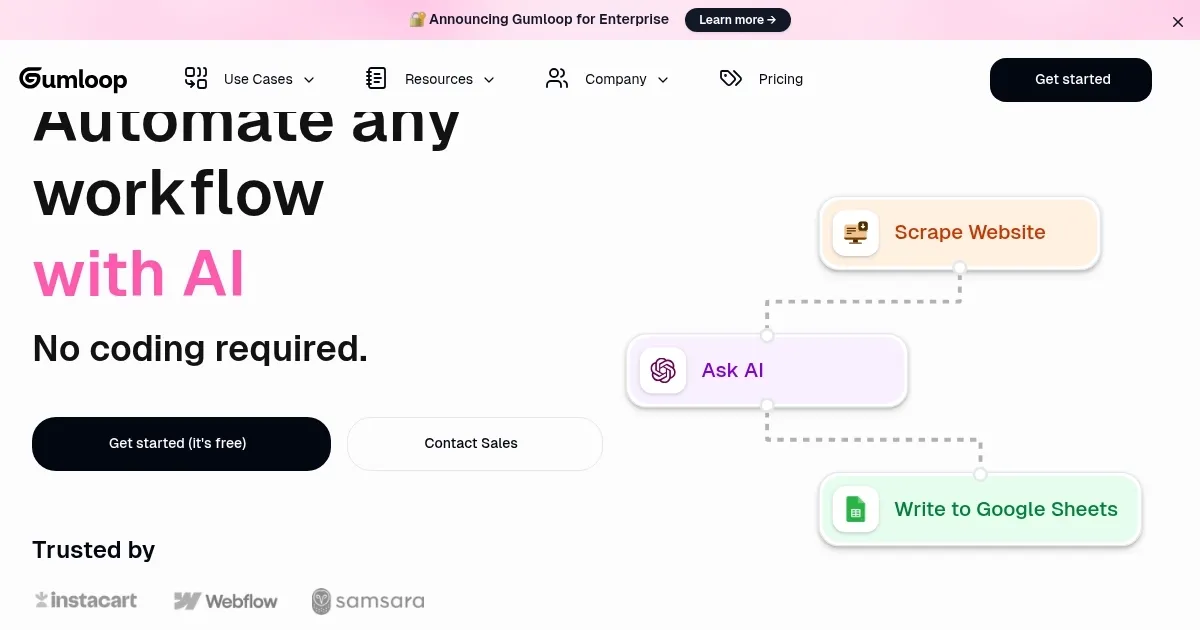
Homepage Screenshot 📸

Gumloop screenshot

Video Overview 🎬

What are the key features? ✨

  • No-code automation: Gumloop's intuitive drag-and-drop interface enables users to create complex workflows without coding knowledge.
  • Extensive integrations: The platform supports connections with numerous third-party applications, facilitating data flow between services.
  • Pre-built workflows: Users can access a library of customizable workflows, allowing for quick deployment of automation processes.
  • Scalability: Designed to handle large-scale operations, Gumloop ensures efficient performance even as automation demands increase.
  • Robust security: With compliance to industry standards and advanced encryption, user data is protected against unauthorized access.

Who is it for? 🤔

Gumloop targets diverse user groups, including small to medium-sized businesses, marketing agencies, sales teams, data analysts, and customer support departments. Its no-code approach makes it accessible to users without technical expertise, while its scalability and integration capabilities cater to the needs of larger enterprises. By offering a versatile platform, Gumloop appeals to any organization seeking to enhance efficiency through automation.

Examples of what you can use it for 💡

  • Marketers can automate tasks such as data extraction, scoring, and more
  • Sales teams can streamline lead management and follow-ups
  • Businesses can automate data extraction from various sources
  • Support teams can automate responses to common inquiries
  • HR departments can automate onboarding processes

Pros & Cons ⚖️

  • Create and manage workflows easily
  • Support for numerous applications for seamless automation across platforms
  • The platform can handle increasing automation demands
  • While designed for ease of use, some users may require time to fully grasp the platform's capabilities

FAQs 💬

What exactly is Gumloop?
Gumloop is a no-code platform that lets you build AI-powered workflows and agents using a visual drag-and-drop canvas. It connects apps, runs AI tasks, and automates processes across teams without requiring programming skills.
Who is Gumloop best suited for?
It's ideal for non-technical users in marketing, sales, operations, support, or engineering who want to automate repetitive or complex tasks. Teams at companies like Instacart use it to let everyone build automations quickly.
How does the visual builder work?
You drag nodes (pre-built actions or AI tools) onto a canvas, connect them to pass data, and configure each one. Workflows can include triggers, AI decisions, data processing, and outputs to apps or reports.
What kinds of AI features does it include?
Gumloop offers built-in AI nodes for web research, text/image generation, data extraction, categorization, summarization, and an AI Router that intelligently chooses the next workflow step based on conditions.
Does it support integrations with popular tools?
Yes, it has over 125 native integrations including Salesforce, Apollo, Zendesk, Slack, Stripe, Google Docs, LinkedIn, and major AI models like OpenAI, Claude, Gemini, and Perplexity.
Can beginners start using Gumloop easily?
Absolutely. The interface is clean and intuitive, plus features like Prompt-to-Create and the Gummie AI assistant help you build flows even if you're new to automation tools.
What types of workflows can you create?
Common examples include lead scoring, social media sentiment analysis, ticket categorization and summaries, data parsing from webhooks, email drafting, and report generation from multiple sources.
Is Gumloop secure for business use?
It offers enterprise-grade security with SOC2 and GDPR compliance, audit logging, role-based access controls, AI model restrictions, and options for private cloud deployments.
How do workflows get triggered?
You can run them manually, on a schedule, or automatically through events like incoming emails, webhooks, calendar updates, or app triggers.
Can you build full AI agents with Gumloop?
Yes, you can create intelligent agents that orchestrate multiple tools, make decisions, and handle complex multi-step tasks beyond basic linear automations.

Ready to try Gumloop?

A no-code platform that empowers users to automate workflows using AI

Visit Gumloop ↗

Gumloop alternatives 🔗

  1. Salesforce Einstein Salesforce Einstein Generative AI for CRM, designed to supercharge your productivity
  2. Zendesk AI Zendesk AI An AI tool built on billions of real customer service interactions that understands customer experience
  3. Zia Zia AI-powered business assistant from Zoho
  4. Asana AI Asana AI An AI helper built into the Asana platform to make managing projects and tasks easier
  5. ClickUp Brain ClickUp Brain Automates workflows with contextual AI for tasks, meetings, and content creation
  6. Manus Manus An AI agent designed to handle complex tasks all by itself
Share
Gumloop screenshot enlarged
Promote Gumloop
light badge
Copy Embed Code
dark badge
Copy Embed Code
neutral badge
Copy Embed Code
Best AI Tools

Discover the best AI tools for any use case

Explore
  • Tool Categories
  • AI Use Cases
  • AI Events
  • AI News
  • Saved Tools
Company
  • About Us
  • Contact Us
  • Media & Partnerships
  • Suggest a Tool
Legal
  • Privacy Policy
  • Terms of Service
Copyright © 2026 Best AI Tools 415 Mission Street, 37th Floor, San Francisco, CA 94105