logo-darklogo-darklogo-darklogo-dark
  • Tool Categories
    • 🎨 Art
    • 🏢 Business
    • 💻 Coding
    • 👮 Detection
    • 🧠 General
    • 🏥 Health
    • 📷 Image Analysis
    • 🖼️ Image
    • 📐 Architecture
    • 🎓 Education
    • ⚖️ Legal/Finance
    • 🎭 Lifestyle
    • 📢 Advertising
    • 🎧 Music
    • 👔 Work
    • 🔬 Research
    • 👥 Social
    • 🎥 Video
    • 👧🏻 Companion
    • 🎤 Voice
    • ✍️ Writing
    • All Categories
    • AI Use Cases
  • News
  • Events
    • Academic Conferences
    • Developer Conferences
    • Expos / Trade Shows
    • Industry Summits
    • Online Events
    • Workshops / Training
    • All Events
    • Past Events
  • Saved Tools
  • Suggest a Tool
✕
Home › Coding & Development › Browser› HARPA AI
HARPA AI

HARPA AI

A Chrome extension that acts as a personal assistant for many tasks

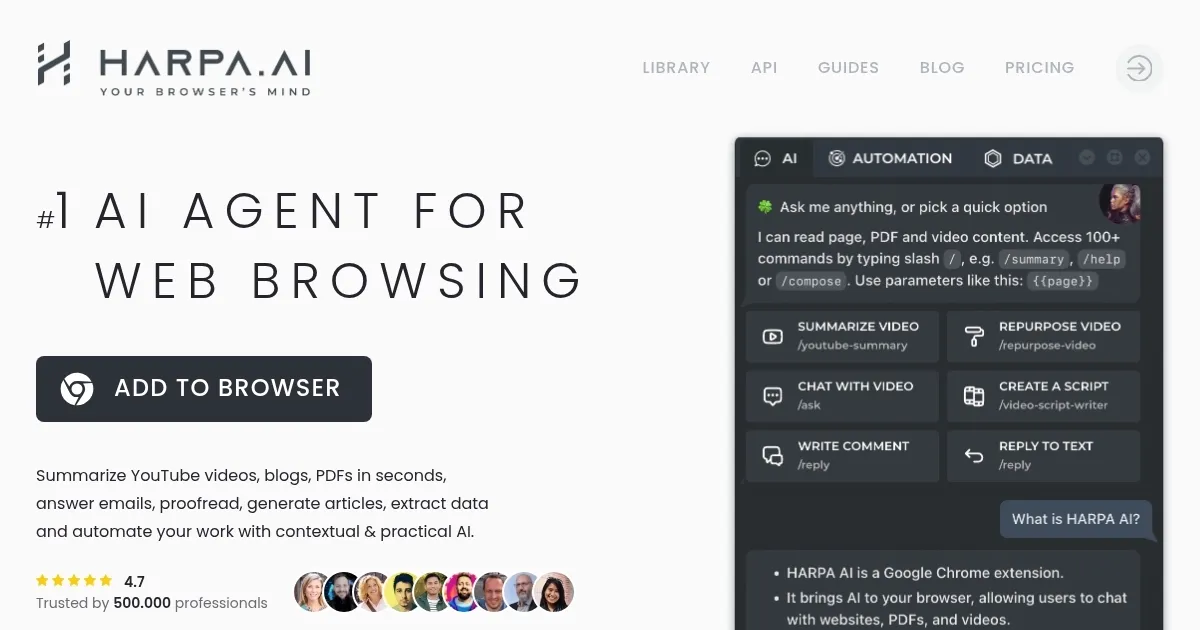
HARPA AI is a Chrome extension designed to streamline various online tasks by integrating advanced AI directly into the web browsing experience. With a hybrid AI engine that utilizes OpenAI’s GPT-3 & GPT-4, ChatGPT, Claude2, and Google Gemini – HARPA offers a wide range of functionalities, including summarizing and responding to emails, rewriting and expanding text, translating, scanning web pages for data, and generating content for social media, SEO articles, and more.

Moreover, it provides unique features such as summarizing YouTube videos, monitoring competitor websites for changes, tracking price drops on e-commerce sites, and turning websites into APIs to automate workflows and data extraction. HARPA stands out by being able to understand and interact with web page content, offering over 100 web-aware commands to enhance productivity and automate repetitive tasks.

Emphasizing user convenience and productivity, HARPA AI supports a variety of uses across different domains, such as marketing, SEO, copywriting, human resources, recruiting, and product development. It allows users to generate long articles, engage in web-based research with AI-generated responses, and interact with PDFs and websites for quicker information retrieval. HARPA also includes a competitive spying feature and SEO optimization tools to aid in content creation and digital marketing strategies.

Finally, we should mention that it incorporates privacy by design, running locally without sending user data externally — making it a trustworthy tool for over 200,000 professionals.

Visit HARPA AI ↗

Categories

💻 Coding

🌐 Browser 🕷️ Web Scraping

🧠 General

🤖 Assistant 💬 Chatbot

👔 Work

🔗 Agent 📡 Monitoring ⚡ Work Productivity

✍️ Writing

📝 Summarizer

👥 Social

📺 YouTube Summary

🏢 Business

🔄 Workflow

Screenshot 📸

HARPA AI screenshot

Video Overview 🎬

What are the key features? ✨

  • Automated tasks: Execute web automation tasks such as navigating, clicking, and extracting data from web pages.
  • GPT integration: Integrates with multiple AI models like GPT, Claude, and Google Gemini for advanced AI capabilities.
  • Email & text automation: Automate email responses, text generation, and other writing tasks.
  • Web monitoring: Monitor websites for updates, track price drops, and receive notifications for changes.
  • SEO & marketing: Enhance SEO efforts with tools for keyword extraction, content planning, and competitor analysis tools.

Who is it for? 🤔

Harpa AI is made for professionals and businesses seeking to automate web-based tasks and enhance productivity with the help of AI technology. It is ideal for content creators, marketers, SEO specialists, and other folks looking to streamline their workflow. Its integration with different AI models makes it suitable for a broad range of applications, from writing and research to data monitoring and automation.

Examples of what you can use it for 💡

  • Automate repetitive tasks such as form filling, data extraction, and web navigation
  • Generate blog posts, articles, social media content, and more
  • Perform SEO audits, extract keywords, and create content plans to boost online visibility
  • Automatically reply to emails, summarize threads, and manage communication efficiently
  • Track competitor websites for updates and monitor price changes on e-commerce platforms

Pros & Cons ⚖️

  • One service with multiple tools
  • Great for streamlining your SEO efforts
  • Also helps with competition analysis
  • There are better AI tools for writing

FAQs 💬

What is HARPA AI exactly?
HARPA AI is a Chrome browser extension that integrates multiple AI models like ChatGPT, Claude, Gemini, and Perplexity with web automation to help summarize content, write text, extract data, and automate tasks directly on any webpage.
Which browsers does HARPA AI support?
It primarily works on Chrome, Brave, Edge, and other Chromium-based browsers. A Firefox version is planned but not available yet.
How do I access HARPA AI while browsing?
After installation, press Alt + A (or Cmd + A on Mac) to open the sidebar on any page, or click its toolbar icon.
Can HARPA AI summarize YouTube videos or long articles?
Yes, it quickly summarizes YouTube videos (including timestamps), blogs, PDFs, and web pages, pulling out key points without you leaving the tab.
Does HARPA AI help with writing emails or social media posts?
It drafts replies, generates posts, or refines text in your personal style, using prompts tailored for Gmail, LinkedIn, Twitter/X, and more.
Is HARPA AI able to automate repetitive web tasks?
It supports automation like monitoring price drops, tracking page changes for alerts, extracting data from sites, and integrating with tools like Zapier or Make.com.
How private is my data with HARPA AI?
It runs locally in many cases, does not log conversations or actions, follows GDPR, and avoids storing your data on servers.
What AI models can I use with HARPA AI?
You connect to OpenAI GPT, Anthropic Claude, Google Gemini, Perplexity, DeepSeek, Meta Llama, and others, often via your own API keys for full access.
Does HARPA AI work for SEO or content creation?
Yes, it performs keyword research, SEO audits, generates outlines or full articles, and helps with marketing tasks like content calendars.
Is there a free version of HARPA AI?
A basic free tier exists with limits, while premium features unlock more advanced models, higher usage, and full automation capabilities.

Ready to try HARPA AI?

A Chrome extension that acts as a personal assistant for many tasks

Visit HARPA AI ↗

HARPA AI alternatives 🔗

  1. Brave Leo Brave Leo Assists with web queries, content creation, and document analysis in-browser
  2. Opera AI Opera AI Integrates AI chat and image generation into a browser
  3. Manus Manus An AI agent designed to handle complex tasks all by itself
  4. Monica Monica A browser extension powered by ChatGPT that acts as a chatbot assistant
  5. Bolt Bolt Transforms natural language prompts into full-stack web apps instantly
  6. Sider Sider Quick access to ChatGPT from a sidebar of your web browser
Share
HARPA AI screenshot enlarged
Promote HARPA AI
light badge
Copy Embed Code
dark badge
Copy Embed Code
neutral badge
Copy Embed Code
Best AI Tools

Discover the best AI tools for any use case

About Us | Contact Us | Suggest an AI Tool
Privacy Policy | Terms of Service
Copyright © 2026 Best AI Tools 415 Mission Street, 37th Floor, San Francisco, CA 94105