Hatch by Playful Software
Collaborate with AI on an infinite canvas to create websites, apps, and content
Picture me last week, staring at a blank screen, trying to mock up a quick app prototype for a side hustle. I’d sketched it on paper, but translating that to digital? A nightmare of tabs and forgotten prompts. Then I stumbled on Hatch during a late-night scroll through X, where creators were buzzing about its beta. With just a day or so of tinkering, less than two full sessions really, I went from doodle to deployable web page, and it felt like magic mixed with a bit of mischief.
You kick off in the chat pane, type something like “build a travel planner app with interactive maps,” and Hatch pulls it onto the infinite canvas, laying out elements visually. I loved the Hatch Draw tool; I scribbled a basic layout, added a prompt for functionality, and boom, it generated clickable buttons and even sample code behind the scenes. No coding needed, which was a relief since I’m no developer. The AI weaves in models like Claude for text or Flux for images seamlessly, so when I asked for destination visuals, multiple variants popped up side by side, easy to drag and tweak. It’s like having a witty assistant who anticipates your next move, riffing on your changes to suggest colors or layouts.
The real joy came in organizing chaos. I dumped in some notes from a voice memo, and Hatch spatially grouped them into sections, adjusting as I moved things around. Collaboration surprised me too; I shared a link with a friend, and we edited live, the AI updating suggestions based on our combined inputs. Users on forums like Reddit echo this, calling it a game-changer for teams, though one thread mentioned initial UI quirks, like tabs not closing intuitively. I hit that once, fumbling to zoom out on a crowded canvas, but a quick refresh fixed it. Compared to Excalidraw, which is great for simple sketches but lacks AI depth, Hatch feels alive, generating full prototypes. Or against Whimsical, it’s more dynamic for interactive builds, with publishing that’s one-click to the web, no exports hassles.
What I didn’t expect was the custom AIs, like the Marketing Ad Creator. I prompted it for promo graphics, and it churned out polished ads with palettes that matched my brand vibe, all editable on the canvas. Free tier lets you play plenty, pro unlocks unlimited generations, which seems fairer than Whimsical’s per-user fees. Downsides? The learning curve for spatial navigation might trip up linear thinkers, and image gens occasionally needed re-prompts for precision. But the thrill of seeing my rough idea turn into something shareable? Pure adrenaline. If you’re prototyping or brainstorming, dive in with a simple prompt, invite a buddy, and watch ideas spark, it might just hook you like it did me.
Homepage Screenshot 📸
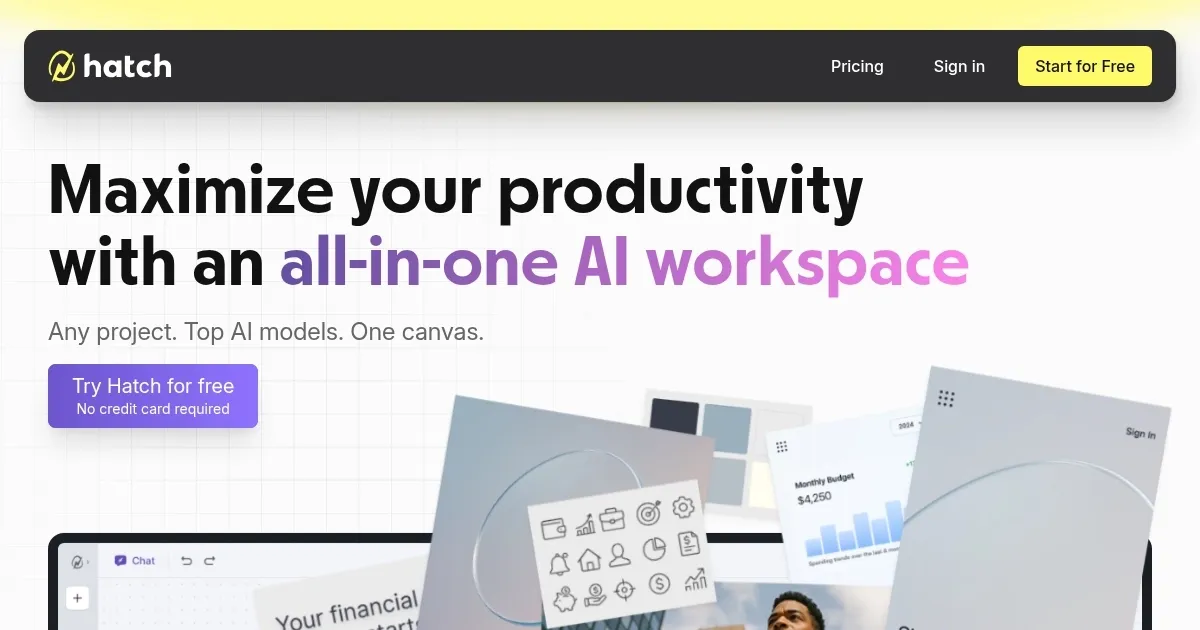
What are the key features? ✨
- Infinite Canvas: Provides a boundless visual workspace where users organize ideas spatially, with AI adapting to layout changes for contextual suggestions.
- AI Model Integration: Supports multiple models like ChatGPT, Claude, Flux, and DALL-E for generating text, images, code, and interactive elements in one environment.
- Hatch Draw: Allows users to sketch ideas on the canvas, which the AI converts into functional prototypes, websites, or apps without requiring coding skills.
- Real-Time Collaboration: Enables team members to join via shared links for simultaneous editing, with AI updating based on collective inputs.
- One-Click Publishing: Facilitates instant deployment of projects as live web pages, apps, or stories directly from the canvas.
Who is it for? 🤔
Examples of what you can use it for 💡
- Entrepreneur: Uses Hatch Canvas to generate a full brand kit, including logos and website mockups, from a simple business prompt on the shared canvas.
- Designer: Sketches app interfaces with Hatch Draw, then refines them collaboratively with clients in real time using AI-generated variants.
- Educator: Builds interactive lesson plans by organizing notes and images on the canvas, with AI suggesting visuals and exporting for classroom sharing.
- Marketer: Creates ad campaigns by prompting custom AIs for graphics and copy, arranging elements spatially before one-click publishing.
- Developer: Prototypes simple web tools without code, integrating AI-generated scripts and testing interactions directly on the infinite canvas.
Pros & Cons ⚖️
- Seamless AI integration
- Infinite canvas freedom
- Real-time collaboration
- UI learning curve
- Occasional glitches
FAQs 💬
Ready to try Hatch?
Collaborate with AI on an infinite canvas to create websites, apps, and content
Visit Hatch