Skip to content
logo-darklogo-darklogo-darklogo-dark
  • Tool Categories
    • 🎨Art & Creative Design505
    • 🏢Business Management644
    • 💻Coding & Development514
    • 👮Detection83
    • 🧠General Use728
    • 🏥Health & Wellness55
    • 📷Image & Photo Analysis100
    • 🖼️Image Generation & Editing618
    • 📐Interior & Architectural Design37
    • 🎓Learning & Education483
    • ⚖️Legal & Finance90
    • 🎭Lifestyle & Entertainment236
    • 📢Marketing & Advertising627
    • 🎧Music & Audio138
    • 👔Office & Workplace1,014
    • 🔬Research & Data Analysis373
    • 👥Social Media245
    • 🎥Video Generation & Editing426
    • 👧🏻Virtual Companion135
    • 🎤Voice Generation & Editing381
    • ✍️Writing & Editing808
    • All Categories
    • AI Use Cases
  • News
  • Events
    • Academic Conferences
    • Developer Conferences
    • Expos / Trade Shows
    • Industry Summits
    • Workshops / Training
    • All Events
    • Past Events
  • Saved Tools
  • Suggest a Tool
    ✕
    Home › Art & Creative Design › UX Design› Visily
    Visily

    Visily

    Create software wireframes from sketches, screenshots, templates, and more

    Visily is an AI-powered UI design software tailored to simplify the design process, making it accessible for not only professional designers but anyone involved in product development. Key functionalities include transforming text descriptions into diagrams, converting sketches or screenshots into editable designs, and offering a library of over 1,500 prebuilt design templates for quick prototyping.

    Visily’s AI capabilities alleviate the common challenges of starting from a blank canvas by providing users with instant design drafts based on simple inputs such as text prompts or rough sketches. Thus, the brainstorming, wireframing, and prototyping stages of product design are easier and, as they say, streamlined.

    Visily’s collaborative environment enhances teamwork by allowing members to easily share and work on designs together, irrespective of their design expertise. The tool eliminates the steep learning curve associated with traditional design tools through its intuitive interface and use of AI to automate and suggest design elements.

    In summary — by incorporating features for ideation, wireframing, and high-fidelity prototyping within a single platform — Visily aims to reduce the time and resources typically required to bring a digital product idea to life.

    Visit Visily ↗
    Categories
    🎨 Art
    📱 UX Design 🖼️ Design Generation 📐 Mockup Generation ✏️ Sketch Generation 🖌️ Graphic Design
    💻 Coding
    📱 App Building 🏗️ Website Building
    👔 Work
    🖍️ Whiteboard

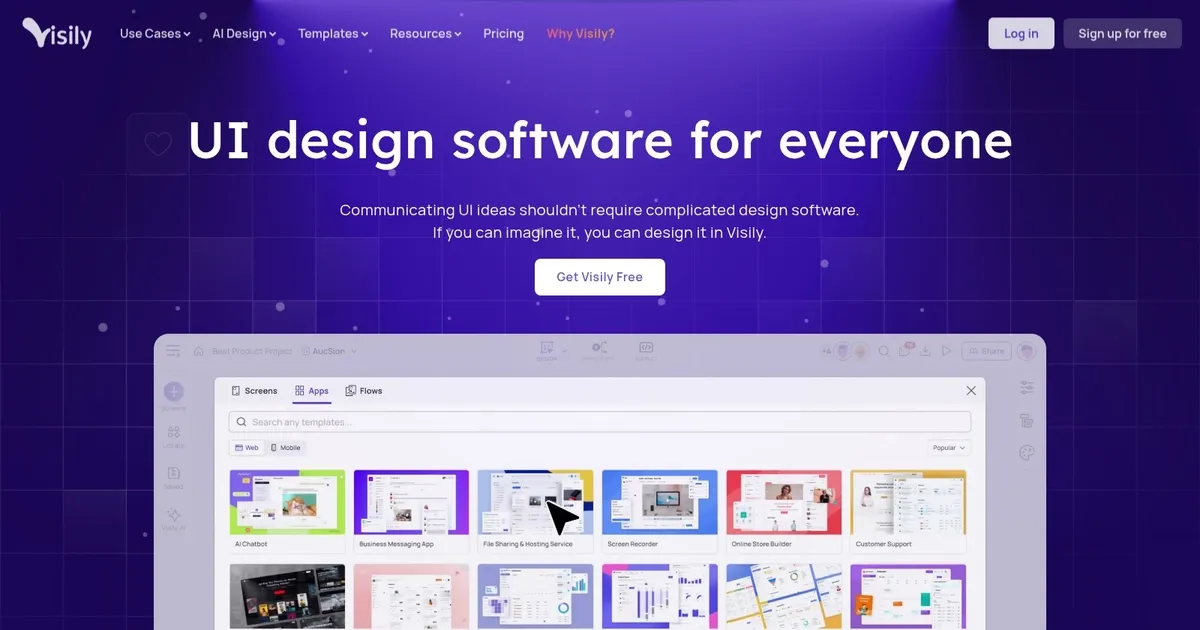
    Homepage Screenshot 📸

    Visily screenshot

    Video Overview 🎬

    Visily - Video Overview

    What are the key features? ✨

    • AI-Powered Generation: Creates editable wireframes and designs from text prompts, screenshots, or sketches in minutes.
    • Smart Components: Automatically adapts and maintains consistent layouts across screens for faster editing.
    • Real-Time Collaboration: Enables commenting, cursor chat, follower mode, and shared libraries for team alignment.
    • Auto-Prototyping: Links screens and builds clickable prototypes quickly without complex setup.
    • Extensive Template Library: Offers thousands of pre-built templates to jumpstart projects and avoid starting from scratch.

    Who is it for? 🤔

    Visily proves especially helpful for product managers, startup founders, business analysts, software developers, and cross-functional teams who need to visualize and communicate product ideas rapidly without deep design expertise. Non-designers create professional-looking wireframes and prototypes to validate concepts, gather feedback, and align stakeholders early, while small teams benefit from built-in collaboration that keeps everyone on the same page during ideation and iteration.

    Examples of what you can use it for 💡

    • Product Manager: Generates quick wireframes from text requirements to share with designers and developers for faster alignment on features.
    • Startup Founder: Turns rough sketches or app ideas into high-fidelity mockups to pitch investors and demonstrate vision clearly.
    • Business Analyst: Converts screenshots of existing tools into editable designs to propose improvements or new flows during requirements gathering.
    • Software Developer: Builds clickable prototypes independently to clarify UI expectations before handing off to design teams.
    • Cross-Functional Team: Collaborates in real time on shared canvases to brainstorm, refine, and present concepts without design bottlenecks.

    Pros & Cons ⚖️

    • Fast AI generation
    • Intuitive for beginners
    • Strong collaboration
    • Generous free tier
    • AI needs tweaks
    • Basic interactions

    FAQs 💬

    What is Visily mainly used for?
    Visily helps create wireframes, mockups, and prototypes for apps and websites using AI, especially for non-designers who want quick, professional results.
    Do I need design experience to use Visily?
    No, Visily is built specifically for non-designers with an intuitive interface, AI assistance, and templates that make it accessible to anyone.
    How does Visily handle AI generation?
    It generates editable designs from text prompts, screenshots, or sketches, often producing usable starting points that you can refine easily.
    Is Visily free to use?
    Yes, it offers a generous free tier for core features, with paid plans adding more AI credits, templates, and team options.
    Can teams collaborate in Visily?
    Yes, real-time commenting, cursor chat, follower mode, and shared libraries support seamless team work.
    How does Visily compare to Figma?
    Visily focuses on speed and accessibility for non-designers with strong AI, while Figma offers deeper customization for experienced designers.
    What file types can I import?
    Visily supports JPG, PNG, and PDF for screenshot or sketch imports to convert into designs.
    Does Visily support prototyping?
    Yes, auto-prototyping links screens and creates clickable flows for presentations or testing.
    Can I export designs from Visily?
    Yes, exports include images and CSS properties, with options for higher quality in paid plans.
    Is Visily suitable for mobile apps?
    Yes, it includes mobile-specific templates and responsive features for app wireframing and design.

    Ready to try Visily?

    Create software wireframes from sketches, screenshots, templates, and more

    Visit Visily ↗

    Visily alternatives 🔗

    1. Uizard Uizard Generates editable UI prototypes from text prompts and sketches in minutes.
    2. FigJam AI FigJam AI Instantly visualize ideas, suggest best practices, and automate tedious tasks
    3. UX Pilot UX Pilot Creates wireframes and UI designs from text prompts in seconds
    4. Motiff Motiff An AI-powered design tool that helps create user interfaces (UI) more efficiently
    5. Flowstep Flowstep Generates user flows, wireframes, and UI designs from simple text prompts
    6. Creately AI Creately AI An AI-powered tool that aims to revolutionize how users create and manage visual content
    Share
    Visily screenshot enlarged
    Best AI Tools

    Discover the best AI tools for any use case

    Explore
    • Tool Categories
    • AI Use Cases
    • AI Events
    • AI News
    • Saved Tools
    Company
    • About Us
    • Contact Us
    • Media & Partnerships
    • Suggest a Tool
    Legal
    • Privacy Policy
    • Terms of Service
    Copyright © 2026 Best AI Tools 415 Mission Street, 37th Floor, San Francisco, CA 94105