logo-darklogo-darklogo-darklogo-dark
  • Tool Categories
    • ๐ŸŽจArt & Creative Design505
    • ๐ŸขBusiness Management644
    • ๐Ÿ’ปCoding & Development514
    • ๐Ÿ‘ฎDetection83
    • ๐Ÿง General Use728
    • ๐ŸฅHealth & Wellness55
    • ๐Ÿ“ทImage & Photo Analysis100
    • ๐Ÿ–ผ๏ธImage Generation & Editing618
    • ๐Ÿ“Interior & Architectural Design37
    • ๐ŸŽ“Learning & Education483
    • โš–๏ธLegal & Finance90
    • ๐ŸŽญLifestyle & Entertainment236
    • ๐Ÿ“ขMarketing & Advertising627
    • ๐ŸŽงMusic & Audio138
    • ๐Ÿ‘”Office & Workplace1,014
    • ๐Ÿ”ฌResearch & Data Analysis373
    • ๐Ÿ‘ฅSocial Media245
    • ๐ŸŽฅVideo Generation & Editing426
    • ๐Ÿ‘ง๐ŸปVirtual Companion135
    • ๐ŸŽคVoice Generation & Editing381
    • โœ๏ธWriting & Editing808
    • All Categories
    • AI Use Cases
  • News
  • Events
    • Academic Conferences
    • Developer Conferences
    • Expos / Trade Shows
    • Industry Summits
    • Workshops / Training
    • All Events
    • Past Events
  • Saved Tools
  • Suggest a Tool
โœ•
Home › Music & Audio › Audio Editing› Hit’n’Mix
Hit’n’Mix

Hit’n’Mix

Separates mixed audio into editable stems and notes, enables deep remixing and manipulation

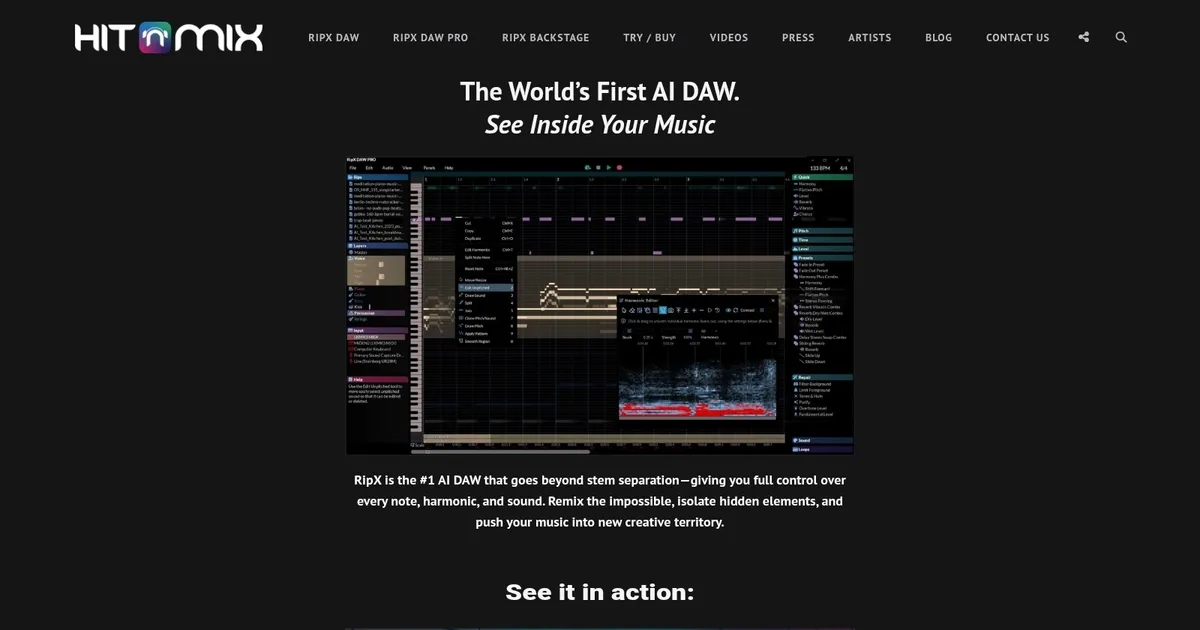
Hit’n’Mix’s RipX DAW is an AI-powered Digital Audio Workstation (DAW) that positions itself at the forefront of music production. In that sense, it offers many features, such as the ability to separate audio into 6+ stems, edit notes directly within a mixed track, and perform sound replacement with ease.

The technology is especially tailored for those working with samples produced by AI music generators, like Stable Audio and MusicLM, indicating how RipX DAW is specifically designed to complement and enhance the workflows of modern music producers who are integrating AI-generated content into their creations.

Music circles and professionals have praised Hit’n’Mix’s RipX DAW for its excellent ability to extract individual sounds from a mixed recording, making it an invaluable tool for inspiration and remixing. Also, publications such as Magnetic and musicradar have highlighted how RipX DAW ushers the music industry into a new era with its AI-centric features — preparing producers and artists for the evolving landscape of music creation that AI tools and generators are rapidly shaping.

So, do you want to try it out?

Visit Hit’n’Mix ↗
Categories
๐ŸŽง Music
๐ŸŽš๏ธ Audio Editing ๐Ÿ”ˆ Vocal Removal ๐ŸŽธ Instrumental Generation ๐ŸŽ›๏ธ Audio Enhancing ๐Ÿ”‡ Noise Cancellation
๐ŸŽค Voice
โœจ Voice Enhancing

Homepage Screenshot 📸

Hit’n’Mix screenshot

What are the key features? ✨

  • AI Stem Separation: Breaks down mixed audio into high-quality, editable stems like vocals, drums, bass, and other instruments with minimal bleed.
  • Note & Harmonic Editing: Displays and lets users manipulate individual notes, pitches, timings, and harmonics visually for precise remixing and sound design.
  • Unified Audio/MIDI Workflow: Treats audio and MIDI as one, enabling recording new parts directly into ripped tracks and seamless editing.
  • Chord Progression Tools: Analyzes and suggests chords, aids in building progressions from separated elements or new ideas.
  • Dynamic Track Starters: Generates auto-fitting loops and starters based on scale, chords, or ripped audio to inspire creativity.

Who is it for? 🤔

RipX DAW helps music producers, remix artists, sound designers, sampling enthusiasts, educators, and anyone working with archival or mixed audio who needs more than basic stem splitting. Its especially useful for those who want deep control over every element in a track, whether rebuilding old sessions, creating mashups, extracting samples, or experimenting with note-level changes in a creative workflow.

Examples of what you can use it for 💡

  • Remix Producer: Separates a full mix into stems, tweaks individual notes or harmonics, then rebuilds with new effects for fresh versions.
  • Sample-Based Beatmaker: Rips rare vinyl or old tracks, isolates specific sounds or phrases, cleans them up, and layers into new productions.
  • Music Educator: Analyzes commercial songs note-by-note to demonstrate arrangement, harmony, or instrumentation to students.
  • Archival Restorer: Extracts lost or damaged elements from bounced mixes or old recordings to reconstruct sessions or create instrumentals.
  • Sound Designer: Manipulates separated harmonics and timbres to create unique textures or hybrid instruments for film, games, or electronic music.

Pros & Cons ⚖️

  • Top-tier stem separation
  • Note-level editing power
  • Creative inspiration tools
  • One-time purchase option
  • Unique interface curve
  • Occasional separation artifacts

FAQs 💬

What does RipX DAW actually do?
It uses AI to separate mixed audio into editable stems and individual notes so you can remix, isolate, or manipulate sounds precisely.
How accurate is the stem separation in RipX?
It ranks among the best available, often delivering cleaner results than many competitors on complex tracks, though artifacts can appear in very dense mixes.
Is RipX a full replacement for my main DAW?
Not quite. It excels at separation and editing but works best alongside tools like Ableton or Logic for final mixing and arrangement.
Can I try RipX before buying?
Yes, a free trial is available directly from the site, usually 21 days for the PRO version.
Does RipX work offline?
Yes, after installation it runs fully offline with no internet required for core functions.
What file formats does RipX support for import?
It handles common formats like MP3, WAV, and most mainstream audio files.
How does RipX compare to Lalal.ai or Moises?
RipX offers deeper note-level editing and creative tools beyond basic stems, while Lalal.ai and Moises focus more on quick, cloud-based splitting.
Is there a mobile version?
No, RipX DAW is desktop software for Windows and macOS.

Ready to try Hit’n’Mix?

Separates mixed audio into editable stems and notes, enables deep remixing and manipulation

Visit Hit’n’Mix ↗

Hit’n’Mix alternatives 🔗

  1. CapCut Creative Suite CapCut Creative Suite Online creative suite for everyone to create stunning images and videos
  2. VEED VEED Creates pro-level videos with AI-powered editing and collaboration tools
  3. Clipchamp Clipchamp Edit videos effortlessly with AI-powered tools and templates
  4. Vocal Remover Vocal Remover Separates vocals from instrumentals in songs using AI
  5. Streamlabs Podcast Editor Streamlabs Podcast Editor A podcast editing solution that transcribes audio and video to text for easy edits and repurposing content
  6. Media.io Media.io An online platform offering AI-powered video, audio, and image editing tools
Share
Hit’n’Mix screenshot enlarged
Best AI Tools

Discover the best AI tools for any use case

Explore
  • Tool Categories
  • AI Use Cases
  • AI Events
  • AI News
  • Saved Tools
Company
  • About Us
  • Contact Us
  • Media & Partnerships
  • Suggest a Tool
Legal
  • Privacy Policy
  • Terms of Service
Copyright © 2026 Best AI Tools 415 Mission Street, 37th Floor, San Francisco, CA 94105