logo-darklogo-darklogo-darklogo-dark
  • Tool Categories
    • ๐ŸŽจArt & Creative Design505
    • ๐ŸขBusiness Management644
    • ๐Ÿ’ปCoding & Development515
    • ๐Ÿ‘ฎDetection83
    • ๐Ÿง General Use727
    • ๐ŸฅHealth & Wellness55
    • ๐Ÿ“ทImage & Photo Analysis100
    • ๐Ÿ–ผ๏ธImage Generation & Editing618
    • ๐Ÿ“Interior & Architectural Design37
    • ๐ŸŽ“Learning & Education483
    • โš–๏ธLegal & Finance90
    • ๐ŸŽญLifestyle & Entertainment236
    • ๐Ÿ“ขMarketing & Advertising627
    • ๐ŸŽงMusic & Audio138
    • ๐Ÿ‘”Office & Workplace1,014
    • ๐Ÿ”ฌResearch & Data Analysis372
    • ๐Ÿ‘ฅSocial Media245
    • ๐ŸŽฅVideo Generation & Editing426
    • ๐Ÿ‘ง๐ŸปVirtual Companion135
    • ๐ŸŽคVoice Generation & Editing381
    • โœ๏ธWriting & Editing808
    • All Categories
    • AI Use Cases
  • News
  • Events
    • Academic Conferences
    • Developer Conferences
    • Expos / Trade Shows
    • Industry Summits
    • Workshops / Training
    • All Events
    • Past Events
  • Saved Tools
  • Suggest a Tool
โœ•
Home › Image Generation & Editing › Photo Editing› iFoto
iFoto

iFoto

An AI-powered photo editing tool specifically designed for e-commerce businesses

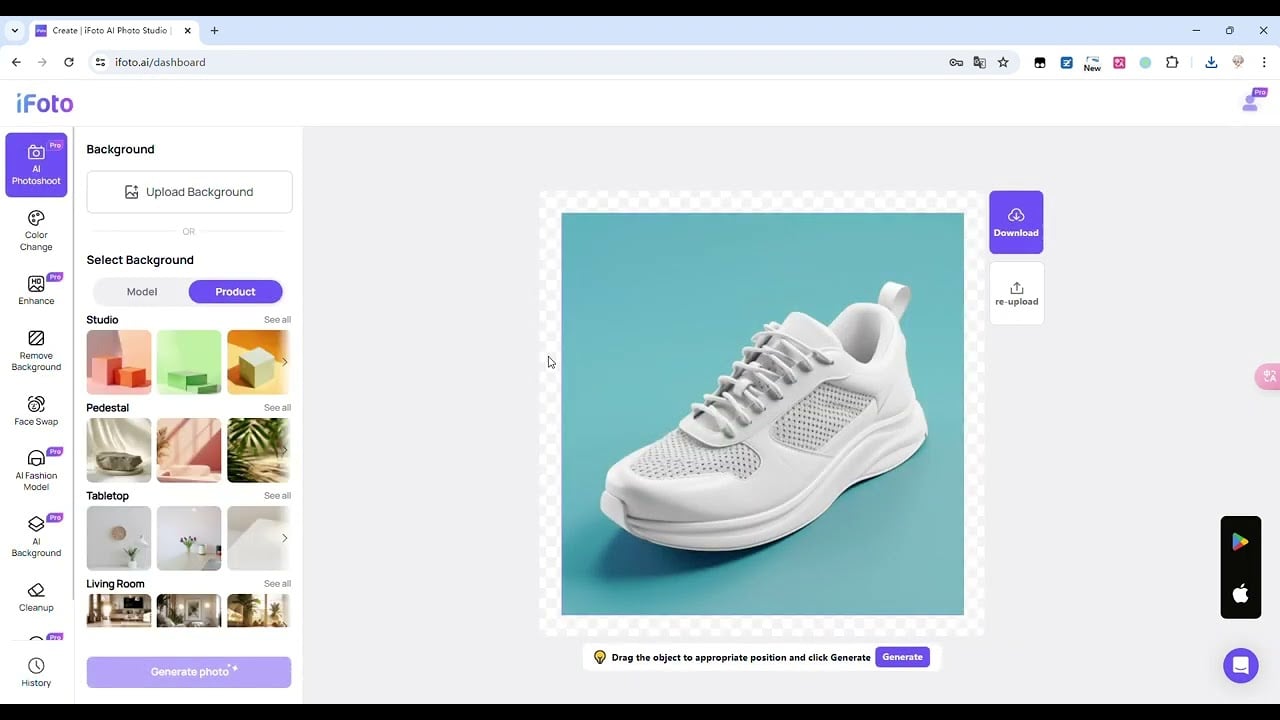
iFoto is an AI-powered photo editing tool specifically designed for e-commerce businesses, offering a range of features to enhance product images. One of these features is AI-driven background removal, which allows users to easily create clean, professional images with white or customized backdrops.

Another feature, called iFoto’s AI Fashion Models, enables users to replace traditional mannequins with realistic, lifelike AI models.

Also, there is the clothing recoloring tool, which (as you can imagine) lets you change the color of apparel and other products within seconds. This can be particularly useful for businesses selling products in multiple colors but may need more resources to photograph each variant.

Further, iFoto excels in image enhancements, enabling users to upscale, sharpen, and restore images to higher quality. This can be beneficial for improving lower-resolution photos or correcting issues such as brightness and contrast.

So, instead of hiring models or renting studio space, e-commerce businesses can use iFoto to quickly produce professional-quality images.

The tool is available in both free and paid plans, with the free version allowing users to test out features with limited credits. The paid plan unlocks advanced tools like high-resolution exports, watermark-free images, and additional AI models. Check it out.

Visit iFoto ↗
Categories
๐Ÿ–ผ๏ธ Image
โœ๏ธ Photo Editing ๐Ÿ›๏ธ Product Photography ๐Ÿž๏ธ Background Generation โœ‚๏ธ Background Removal ๐Ÿ“ธ Headshot Generation ๐ŸŒŸ Photo Enhancing ๐Ÿ’Ž Image Enhancing ๐Ÿ–ผ๏ธ Image Generation ๐Ÿงน Object Removal
๐ŸŽจ Art
๐Ÿ“ท Photography

Homepage Screenshot 📸

iFoto screenshot

Video Overview 🎬

iFoto - Video Overview

What are the key features? ✨

  • Background removal: iFoto allows users to remove backgrounds from product images with a single click, which is perfect for creating clean, professional-looking photos for e-commerce listings.
  • Fashion models: Users can generate realistic models to showcase clothing without the need for a physical photo shoot.
  • Recolor & image enhancements: Easily change the colors of products and enhance image quality to create more visually appealing photos.
  • Face swap & recopyright: This feature lets users replace a model's facial features or modify certain elements to avoid copyright issues.
  • Photo enhancements: iFoto offers tools to improve image resolution and quality.

Who is it for? 🤔

iFoto is primarily made for e-commerce businesses, digital marketers, and social media influencers looking for quick, efficient ways to create high-quality product images. Its easy-to-use interface and automation make it accessible for both professionals and beginners, helping users save time and money on photo editing and improve their online presence. The tool is especially useful for small- to medium-sized enterprises in the fashion, retail, and real estate sectors.

Examples of what you can use it for 💡

  • Online sellers can use it to create professional, high-quality product images
  • Fashion brands can use AI models to simulate product try-ons
  • Real estate professionals can use iFoto's background removal and enhancement tools to present properties in a more attractive way
  • Social media influencers and marketers can use iFoto's AI tools to create polished, eye-catching visuals for posts and ads
  • Designers can use iFoto to quickly edit and enhance images for campaigns or mockups

Pros & Cons ⚖️

  • Quick background changes, face swaps, clothing recoloring
  • Simple drag-and-drop interface
  • A free version is available
  • You may still need Photoshop for fine-tuning

FAQs 💬

What is iFoto?
iFoto is an AI-powered photo editing platform focused on e-commerce and personal use, offering tools to enhance images, remove backgrounds, and generate product visuals quickly.
Who is iFoto best suited for?
It's ideal for online sellers, e-commerce businesses, fashion brands, and content creators who need professional product photos without expensive shoots.
Does iFoto work well for background removal?
Yes, its background remover is fully automatic and free, producing clean, transparent results in seconds for product images or portraits.
Can I use iFoto to create virtual fashion models?
Absolutely, the AI Fashion Models feature turns mannequin photos into lifelike models with customizable looks, including diverse ages and ethnicities.
Is iFoto useful for changing clothes in photos?
It includes an AI Clothes Changer that lets you visualize different outfits realistically, acting like a virtual try-on tool.
Does iFoto support photo enhancement?
The photo enhancer improves quality, sharpens details, and fixes issues like lighting automatically for better-looking images.
Can I remove unwanted objects from images with iFoto?
Yes, the cleanup tool brushes away people, text, or objects easily, restoring the background naturally.
Is there a way to recolor clothing or products?
The clothing recolor feature creates multiple color variants from one photo, saving time for e-commerce listings.
Does iFoto integrate with Shopify?
It has an Image Optimizer app for Shopify that helps optimize and enhance product images directly in your store.
Are the AI-generated images realistic?
Many users find the results professional and lifelike, especially for fashion models and product shots, though quality can vary by input photo.

Ready to try iFoto?

An AI-powered photo editing tool specifically designed for e-commerce businesses

Visit iFoto ↗


iFoto alternatives 🔗

  1. Imagen Imagen Generates photorealistic images from detailed text prompts
  2. Black Forest Labs Black Forest Labs Generates high-quality images from text prompts with precision and speed
  3. Stable Diffusion Stable Diffusion Generates high-quality images from text prompts with versatile styles
  4. Adobe Express Adobe Express Creates on-brand content with AI-driven design and video tools
  5. Adobe Firefly Adobe Firefly Generates images, videos, audio, and vectors using AI.
  6. Freepik AI Freepik AI Creates AI images and videos with fluid motion, detailed textures, and synced audio up to 1080p
Share
iFoto screenshot enlarged
Promote iFoto
light badge
Copy Embed Code
dark badge
Copy Embed Code
neutral badge
Copy Embed Code
Best AI Tools

Discover the best AI tools for any use case

Explore
  • Tool Categories
  • AI Use Cases
  • AI Events
  • AI News
  • Saved Tools
Company
  • About Us
  • Contact Us
  • Media & Partnerships
  • Suggest a Tool
Legal
  • Privacy Policy
  • Terms of Service
Copyright © 2026 Best AI Tools 415 Mission Street, 37th Floor, San Francisco, CA 94105