logo-darklogo-darklogo-darklogo-dark
  • Tool Categories
    • ๐ŸŽจArt & Creative Design505
    • ๐ŸขBusiness Management644
    • ๐Ÿ’ปCoding & Development514
    • ๐Ÿ‘ฎDetection83
    • ๐Ÿง General Use728
    • ๐ŸฅHealth & Wellness55
    • ๐Ÿ“ทImage & Photo Analysis100
    • ๐Ÿ–ผ๏ธImage Generation & Editing618
    • ๐Ÿ“Interior & Architectural Design37
    • ๐ŸŽ“Learning & Education483
    • โš–๏ธLegal & Finance90
    • ๐ŸŽญLifestyle & Entertainment236
    • ๐Ÿ“ขMarketing & Advertising627
    • ๐ŸŽงMusic & Audio138
    • ๐Ÿ‘”Office & Workplace1,014
    • ๐Ÿ”ฌResearch & Data Analysis373
    • ๐Ÿ‘ฅSocial Media245
    • ๐ŸŽฅVideo Generation & Editing426
    • ๐Ÿ‘ง๐ŸปVirtual Companion135
    • ๐ŸŽคVoice Generation & Editing381
    • โœ๏ธWriting & Editing808
    • All Categories
    • AI Use Cases
  • News
  • Events
    • Academic Conferences
    • Developer Conferences
    • Expos / Trade Shows
    • Industry Summits
    • Workshops / Training
    • All Events
    • Past Events
  • Saved Tools
  • Suggest a Tool
โœ•
Home › Image Generation & Editing › Background Removal› jpgRM
jpgRM

jpgRM

Removes unwanted objects and backgrounds from images then fills gaps intelligently with AI

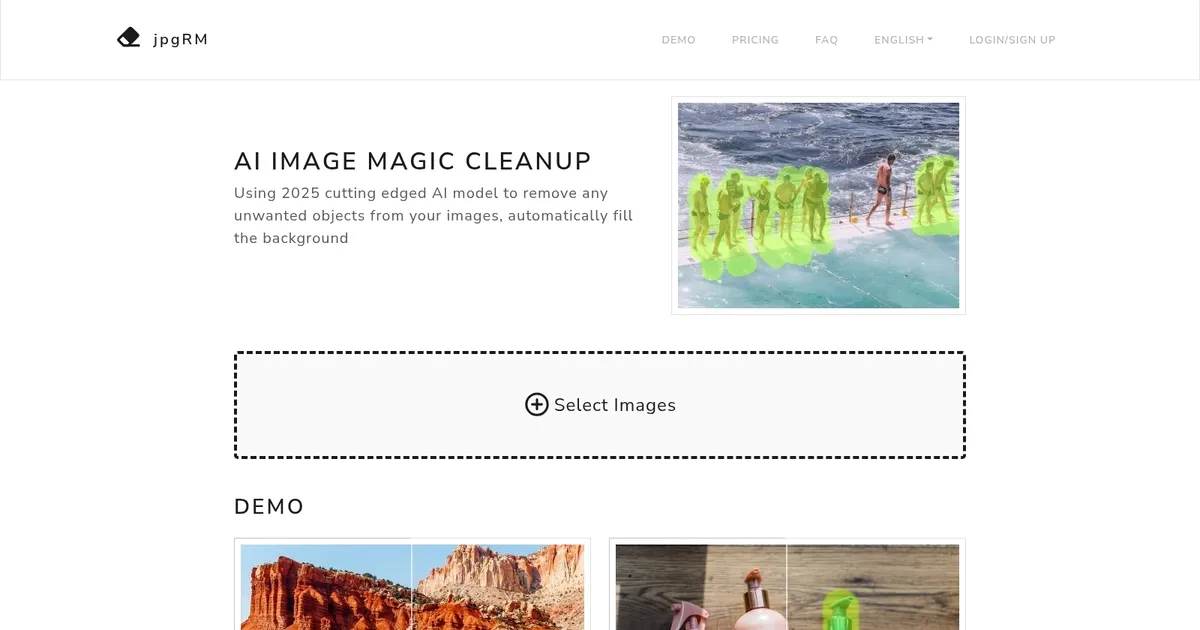
jpgRM, or AI Image Magic Cleanup, leverages a cutting-edge AI model to intelligently erase unwanted objects from images and seamlessly fill in the background. It can distinguish between the content and background of an image, allowing users to effortlessly remove objects, product logos, dense crowds, and watermarks — thereby enhancing the visual appeal of their photos.

jpgRM is designed to work efficiently with varying image resolutions, with processing times ranging from a couple of seconds for images under 1000 pixels to longer for higher-resolution images. It supports both desktop and mobile devices, ensuring accessibility and convenience for users.

Both free and VIP services are available with free users being able to download processed images at a maximum resolution of 720 pixels, while VIP members have the privilege of downloading images in 4K resolution and benefit from unlimited image processing.

Finally, we should add that jpgRM ensures the privacy of users by deleting images immediately after processing and addresses potential issues such as server errors or network issues.

Visit jpgRM ↗
Categories
๐Ÿ–ผ๏ธ Image
โœ‚๏ธ Background Removal โœ๏ธ Photo Editing ๐Ÿงน Object Removal ๐Ÿ’ง Watermark Removal

Homepage Screenshot 📸

jpgRM screenshot

What are the key features? ✨

  • Object Removal: Brush over any unwanted item like people, logos, watermarks, or objects and the AI erases it while filling the space realistically.
  • Background Removal: Automatically detect and remove the entire background, leaving the main subject isolated with clean edges.
  • Smart Inpainting: Uses advanced GAN technology to generate seamless, context-aware background content in removed areas.
  • Mobile-Friendly Editing: Full brush-based interface works smoothly on phones and tablets for on-the-go touch-ups.
  • Quick Processing & Compare View: Edits complete in seconds for standard sizes, with instant before-and-after comparison to check quality.

Who is it for? 🤔

jpgRM helps casual photographers, social media creators, e-commerce sellers, content marketers, and anyone who occasionally needs to tidy up photos without learning complex software. Its especially useful for people who shoot travel pictures, product shots, or group photos and want fast removal of distractions like photobombers, logos, watermarks, or busy backgrounds, all while keeping edits simple and mobile-accessible.

Examples of what you can use it for 💡

  • Travel photographer: Removes photobombers or crowds from scenic shots and fills the background naturally so the landscape looks untouched.
  • E-commerce seller: Erases logos, watermarks, or unwanted props from product photos to create clean, professional images ready for listings.
  • Social media creator: Quickly cleans up selfies or group pictures by brushing away strangers or distractions before posting online.
  • Content marketer: Strips unwanted text or branding from stock-style images to repurpose them for blogs or ads without visible edits.
  • Everyday user: Fixes vacation photos on a phone by removing random objects or people in the frame with a few brush strokes.

Pros & Cons ⚖️

  • Fast processing speed
  • Realistic inpainting results
  • Mobile support works well
  • Simple intuitive brush
  • Free resolution limited
  • Complex scenes need multiple passes

FAQs 💬

What does jpgRM actually do to my images?
It lets you brush over unwanted objects, backgrounds, logos, watermarks or crowds, then uses AI to erase them and fill the empty space with matching generated content.
Is jpgRM free to use?
Yes for basic editing and 720px downloads; higher resolution like 4K requires a paid VIP upgrade to support server costs.
Does it work on my phone?
Yes, the full brush interface and editing tools function on mobile browsers without needing an app.
How private is my uploaded photo?
Images are deleted from the server immediately after processing to protect your privacy.
What kind of results can I expect on tricky areas like hair or fur?
Background removal usually handles fine edges well, though very intricate details sometimes benefit from careful brushing and a second pass.
How does jpgRM compare to Photoshop's AI tools?
Its much simpler and web-based with no install needed, though Photoshop gives more manual control for professional work.
Can I remove multiple objects in one image?
Yes, just paint over each one separately and process again until everything looks right.
Is there a limit on image size or number of edits?
Free tier handles typical uploads but speed and resolution are capped; VIP removes those restrictions.

Ready to try jpgRM?

Removes unwanted objects and backgrounds from images then fills gaps intelligently with AI

Visit jpgRM ↗

jpgRM alternatives 🔗

  1. Runway Runway Generates and edits AI-powered videos from text prompts
  2. Adobe Express Adobe Express Creates on-brand content with AI-driven design and video tools
  3. Freepik AI Freepik AI Creates AI images and videos with fluid motion, detailed textures, and synced audio up to 1080p
  4. Remove.bg Remove.bg A free online tool that automatically removes backgrounds from images
  5. Pixelcut Pixelcut A suite of AI-powered image editing and upscaling tools
  6. PhotoRoom PhotoRoom An AI-powered photo editing tool that removes backgrounds and enhances photos with user-friendly features.
Share
jpgRM screenshot enlarged
Promote jpgRM
light badge
Copy Embed Code
dark badge
Copy Embed Code
neutral badge
Copy Embed Code
Best AI Tools

Discover the best AI tools for any use case

Explore
  • Tool Categories
  • AI Use Cases
  • AI Events
  • AI News
  • Saved Tools
Company
  • About Us
  • Contact Us
  • Media & Partnerships
  • Suggest a Tool
Legal
  • Privacy Policy
  • Terms of Service
Copyright © 2026 Best AI Tools 415 Mission Street, 37th Floor, San Francisco, CA 94105