logo-darklogo-darklogo-darklogo-dark
  • Home
  • Browse
    • Assistant
    • Coding
    • Image
    • Productivity
    • Video
    • Voice
    • Writing
    • All Categories
    • AI Use Cases
  • Events
  • My Favorites
  • Suggest a Tool
✕
Home › Productivity›
Published by Dusan Belic on August 30, 2023

June AI

June AI
June AI Homepage
Categories Productivity

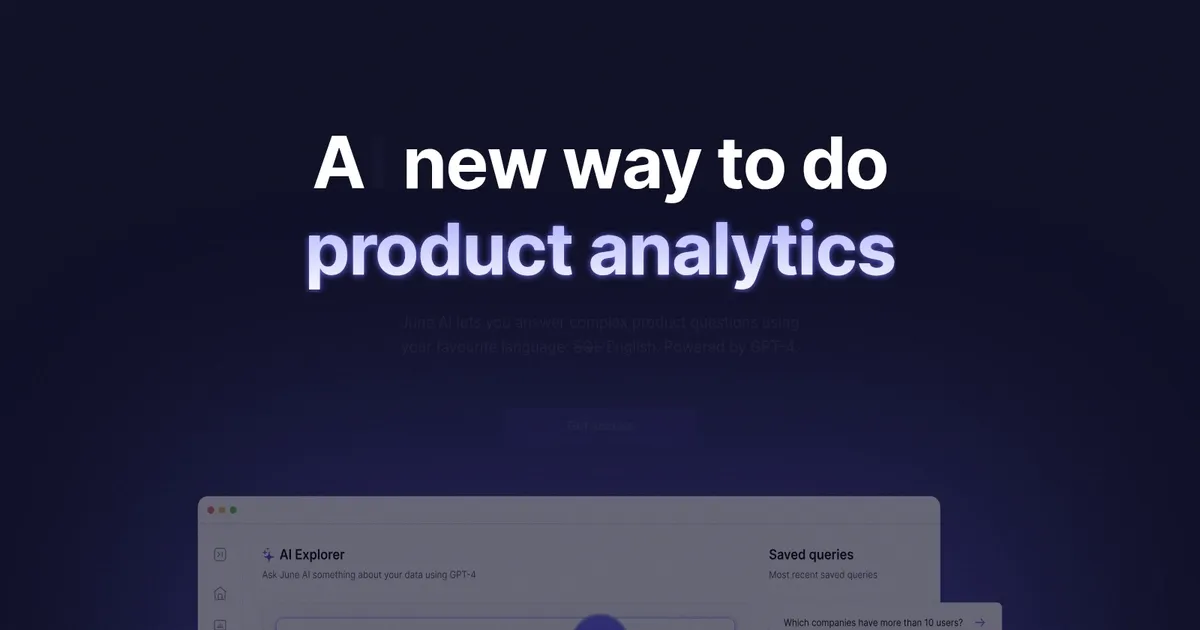
June AI - screenshot

Answer complex product questions using your favorite language - English, powered by GPT

June AI

June AI is a product analytics AI platform designed specifically for B2B SaaS applications that allows users to ask complex product questions using either SQL or plain English. This cutting-edge tool, powered by OpenAI’s GPT tech, simplifies the analytics process — enabling users to gain insights quickly without needing in-depth technical expertise.

By connecting June AI to a data source, teams can effortlessly monitor their metrics, analyze feature usage, and optimize their products. June AI boasts several integrations with popular platforms such as HubSpot and Attio, while also offering a widget for iOS.

With capabilities ranging from deep analysis of ad-hoc questions to sharing insights across teams via saved queries, June AI empowers startups and established companies to refine their products based on actionable data.

Unsurprisingly, the tool has been recognized for its excellence in the field of Data & Analytics, and has quickly become the fastest growing app on Twilio Segment in 2022.

June AI Homepage
Categories Productivity

What are the key features? ⭐

  • Natural Language Querying: Ask complex product questions in plain English and get instant answers with charts and explanations.
  • Company-Level Analytics: Focuses on account-based metrics like activation, retention, power users, and churn across organizations instead of individual users.
  • Saved & Shared Queries: Save favorite questions and share them team-wide for reusable insights and collaboration.
  • Quick Setup & Integrations: Connect via Segment, SDK, HubSpot, Attio or similar sources in minutes to start analyzing data.
  • Visualization & SQL Transparency: Automatically generates appropriate charts while allowing users to view and edit the generated SQL queries.

Who is it for? 🤔

June AI helps product managers, founders, customer success teams, and growth leads at B2B SaaS companies who want fast, reliable answers about how organizations use their product without depending on analysts or wrestling with complex tools. Its especially valuable for mid-market teams that think in terms of accounts and company health rather than thousands of anonymous users, and for anyone frustrated by slow data requests when decisions need to happen now.

Examples of what you can use it for 💭

  • Product Manager: Asks 'which features show highest adoption in companies over 200 employees' to prioritize roadmap decisions.
  • Customer Success Lead: Queries 'which accounts dropped below 40 percent activity this month' to proactively reach out before churn.
  • Founder: Checks 'how has retention changed since the pricing update across company sizes' to measure impact quickly.
  • Growth Marketer: Explores 'top activation paths by industry vertical' to refine onboarding experiments.
  • Sales Engineer: Pulls 'power user behaviors in trial accounts' to build better demos and handoff notes.

Pros & Cons ⚖️

  • Extremely fast setup
  • Plain English questions
  • B2B account focus
  • Team-shared insights
  • Limited for non-SaaS data
  • Occasional prompt refinement needed

FAQs 💬

What kind of data does June AI need to work?
It connects to event data from Segment, the native SDK, HubSpot, Attio, or similar sources that track product usage at the user and company level.
Do I need to know SQL to use June AI?
No, the core experience uses natural language questions, though you can optionally view or edit the generated SQL if you want more control.
Is June AI built only for B2B SaaS?
Yes, its designed specifically around account-based analytics for B2B SaaS, with metrics rolled up to the company level rather than individual users.
How quick is the setup process?
Most users get meaningful insights within minutes after connecting an existing data pipeline like Segment.
Can teams collaborate on insights?
Yes, you save queries and share them so anyone on the team can reuse or build on analyses.
What happens if my question is too vague?
The AI may return a broad result, but rephrasing with more detail or context usually produces a more precise chart and summary.
Does June AI replace tools like Amplitude or Mixpanel?
It serves a lighter, faster, more conversational role focused on B2B, so many teams use it alongside or instead of heavier platforms depending on needs.
Is there a free way to try it?
Check the pricing page for trial or starter options, as the tool emphasizes quick onboarding for growing SaaS teams.
Visit June AI

Related tools ↙️

  1. Pineify Pineify Generates error-free Pine Script indicators and strategies without coding
  2. ResuFit ResuFit Generates AI-tailored resumes, cover letters, and interview prep for job applications
  3. Fina Money Fina Money Builds customizable AI-driven systems to track and optimize personal finances effortlessly
  4. Upwork Uma Upwork Uma Streamlines freelance hiring with AI-powered skill assessments and job creation
  5. Oliv Oliv Automates sales workflows with AI agents for deal tracking and coaching
  6. Justt Justt Automates chargeback disputes using AI to customize evidence and boost recovery rates.
Last update: March 1, 2026
Share
Promote June AI
light badge
Copy Embed Code
dark badge
Copy Embed Code
neutral badge
Copy Embed Code
About Us | Contact Us | Suggest an AI Tool | Privacy Policy | Terms of Service

Copyright © 2026 Best AI Tools
415 Mission Street, 37th Floor, San Francisco, CA 94105