logo-darklogo-darklogo-darklogo-dark
  • Tool Categories
    • 🎨Art & Creative Design505
    • 🏢Business Management644
    • 💻Coding & Development515
    • 👮Detection83
    • 🧠General Use727
    • 🏥Health & Wellness55
    • 📷Image & Photo Analysis100
    • 🖼️Image Generation & Editing618
    • 📐Interior & Architectural Design37
    • 🎓Learning & Education483
    • ⚖️Legal & Finance90
    • 🎭Lifestyle & Entertainment236
    • 📢Marketing & Advertising627
    • 🎧Music & Audio138
    • 👔Office & Workplace1,014
    • 🔬Research & Data Analysis372
    • 👥Social Media245
    • 🎥Video Generation & Editing426
    • 👧🏻Virtual Companion135
    • 🎤Voice Generation & Editing381
    • ✍️Writing & Editing808
    • All Categories
    • AI Use Cases
  • News
  • Events
    • Academic Conferences
    • Developer Conferences
    • Expos / Trade Shows
    • Industry Summits
    • Workshops / Training
    • All Events
    • Past Events
  • Saved Tools
  • Suggest a Tool
✕
Home › Coding & Development › Code Assistant› Kilo Code
Kilo Code

Kilo Code

Generates code, automates tasks, and offers smart coding suggestions in VS Code

Kilo Code is an open-source AI agent extension for Visual Studio Code that enhances coding efficiency through code generation, task automation, and intelligent suggestions. It integrates with VS Code’s interface, offering a chat-based system powered by models like Claude 3.7 Sonnet and Gemini 2.5 Pro. It builds on features from Roo and Cline, adding unique tools like the MCP Server Marketplace. The extension is free with a $20 credit for AI model usage, with additional tokens available at Anthropic’s API rates.

Key features include Code Generation, which creates code from natural language prompts, and Task Automation, which handles repetitive tasks like dependency updates. The Orchestrator mode divides complex projects into subtasks, using specialized modes like Architect, Coder, and Debugger. The MCP Server Marketplace allows integration with external APIs and custom tools, while Custom Modes let users create task-specific personas. It supports over 15,000 libraries for precise suggestions.

Compared to Cursor and Windsurf, Kilo Code’s open-source model and free tier stand out, but it lacks the full-IDE polish of Cursor. Setup is simple via the VS Code Marketplace, though web-based IDEs may require manual API key configuration. Some users report latency issues with large projects, and the learning curve for advanced features can be steep.

The extension excels for developers seeking flexibility and community-driven updates. Its ability to read non-code files like PDFs is a unique advantage. Active GitHub and Discord communities provide support and feedback opportunities.

To get started, install the extension, sign in with Google for free credits, and use the chat interface for simple tasks. Experiment with Orchestrator mode for larger projects, and join the Discord for community insights.

Visit Kilo Code ↗
Categories
💻 Coding
🤖 Code Assistant ⌨️ Code Generation 👨‍💻 Development ✨ Vibe Coding
👔 Work
🔗 Agent
🧠 General
🦙 Open Source Model

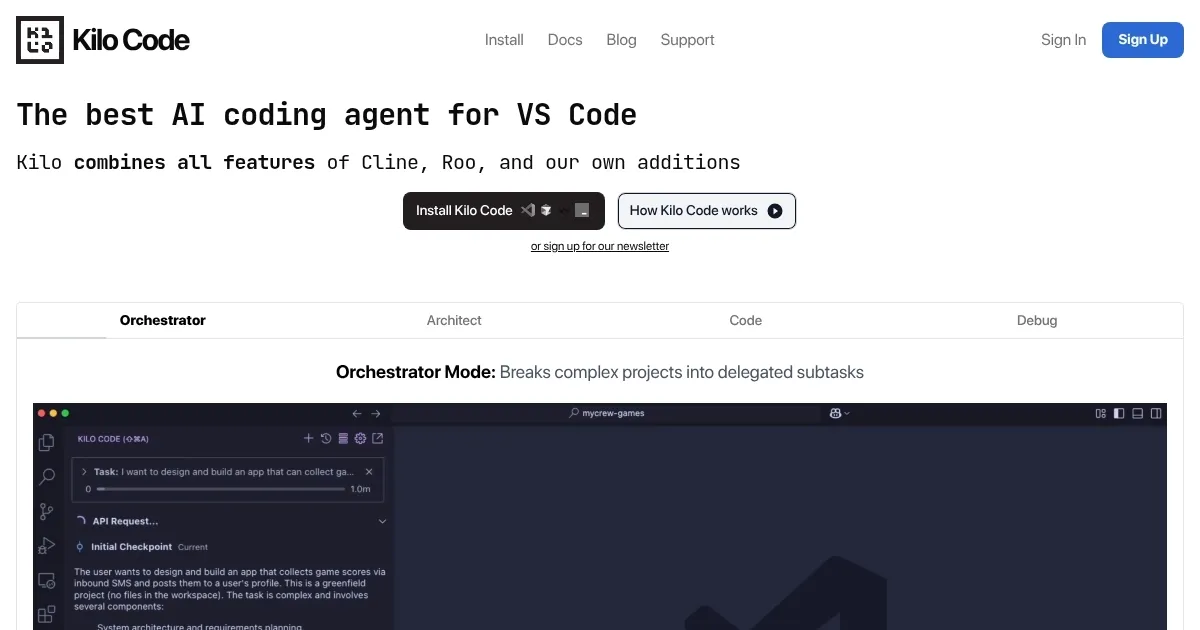
Homepage Screenshot 📸

Kilo Code screenshot

Video Overview 🎬

Kilo Code - Video Overview

What are the key features? ✨

  • Code Generation: Creates code snippets from natural language prompts.
  • Task Automation: Automates repetitive coding tasks like dependency management.
  • Orchestrator Mode: Breaks complex projects into subtasks with specialized modes.
  • MCP Server Marketplace: Extends functionality with custom tools and API integrations.
  • Custom Modes: Allows creation of task-specific personas for tailored workflows.

Who is it for? 🤔

Kilo Code is ideal for developers using Visual Studio Code, from beginners learning coding patterns to seasoned pros tackling complex projects. Its open-source nature and active community make it a great fit for those who value customization and collaboration, while its free tier appeals to budget-conscious users exploring AI-assisted coding.

Examples of what you can use it for 💡

  • Junior Developer: Generates code snippets to learn best practices.
  • Freelancer: Automates repetitive tasks to meet tight deadlines.
  • Team Lead: Uses Orchestrator mode to plan and delegate project tasks.
  • Data Scientist: Reads Jupyter notebooks for quick analysis scripts.
  • API Developer: Integrates external APIs via MCP Server Marketplace.

Pros & Cons ⚖️

  • Free tier with $20 credits.
  • Open-source with community support.
  • Supports 15,000+ libraries.
  • Setup complex for web IDEs.

FAQs 💬

What is Kilo Code?
Kilo Code is an open-source AI extension for VS Code that generates code, automates tasks, and offers suggestions.
Is Kilo Code free to use?
Yes, it’s free with $20 in Claude 3.7 Sonnet tokens; additional tokens match Anthropic’s API rates.
How do I install Kilo Code?
Search “Kilo Code” in the VS Code Marketplace, install, and sign in with Google for free credits.
What AI models does Kilo Code support?
It supports Claude 3.7 Sonnet, Gemini 2.5 Pro, GPT-4.1, and local models for offline use.
Can Kilo Code work offline?
Yes, with local AI models for enhanced privacy and offline functionality.
What is the Orchestrator mode?
It breaks projects into subtasks, delegating to modes like Architect, Coder, and Debugger.
How does Kilo Code compare to Cursor?
Kilo Code is free and open-source but lacks Cursor’s full-IDE polish.
Can I customize Kilo Code?
Yes, Custom Modes let you create personas for tasks like security auditing.
Does it support non-code files?
Yes, it can read PDFs, DOCX, and Jupyter notebooks for versatile workflows.
Where can I get support?
Join the Kilo Code Discord or GitHub community for help and updates.

Ready to try Kilo Code?

Generates code, automates tasks, and offers smart coding suggestions in VS Code

Visit Kilo Code ↗

Kilo Code alternatives 🔗

  1. ChatGPT ChatGPT All-round AI assistant generating human-like responses to user queries and tasks
  2. Claude Claude Assists users in reasoning, coding, writing, and analyzing data with advanced AI models
  3. DeepSeek DeepSeek Delivers advanced AI models for coding and reasoning at low costs
  4. Cursor Cursor Supercharges coding with AI agents that build, edit, and review code autonomously.
  5. Windsurf Windsurf Empowers developers with AI-driven code generation and real-time collaboration.
  6. Lovable Lovable Builds apps and websites via AI chat prompts.
Share
Kilo Code screenshot enlarged
Promote Kilo Code
light badge
Copy Embed Code
dark badge
Copy Embed Code
neutral badge
Copy Embed Code
Best AI Tools

Discover the best AI tools for any use case

Explore
  • Tool Categories
  • AI Use Cases
  • AI Events
  • AI News
  • Saved Tools
Company
  • About Us
  • Contact Us
  • Media & Partnerships
  • Suggest a Tool
Legal
  • Privacy Policy
  • Terms of Service
Copyright © 2026 Best AI Tools 415 Mission Street, 37th Floor, San Francisco, CA 94105