logo-darklogo-darklogo-darklogo-dark
  • Tool Categories
    • 🎨Art & Creative Design505
    • 🏢Business Management644
    • 💻Coding & Development515
    • 👮Detection83
    • 🧠General Use727
    • 🏥Health & Wellness55
    • 📷Image & Photo Analysis100
    • 🖼️Image Generation & Editing618
    • 📐Interior & Architectural Design37
    • 🎓Learning & Education483
    • ⚖️Legal & Finance90
    • 🎭Lifestyle & Entertainment236
    • 📢Marketing & Advertising627
    • 🎧Music & Audio138
    • 👔Office & Workplace1,014
    • 🔬Research & Data Analysis372
    • 👥Social Media245
    • 🎥Video Generation & Editing426
    • 👧🏻Virtual Companion135
    • 🎤Voice Generation & Editing381
    • ✍️Writing & Editing808
    • All Categories
    • AI Use Cases
  • News
  • Events
    • Academic Conferences
    • Developer Conferences
    • Expos / Trade Shows
    • Industry Summits
    • Workshops / Training
    • All Events
    • Past Events
  • Saved Tools
  • Suggest a Tool
✕
Home › Image Generation & Editing › Image Generation› Lummi
Lummi

Lummi

Offering a treasure trove of AI-generated visuals that cater to different creative needs

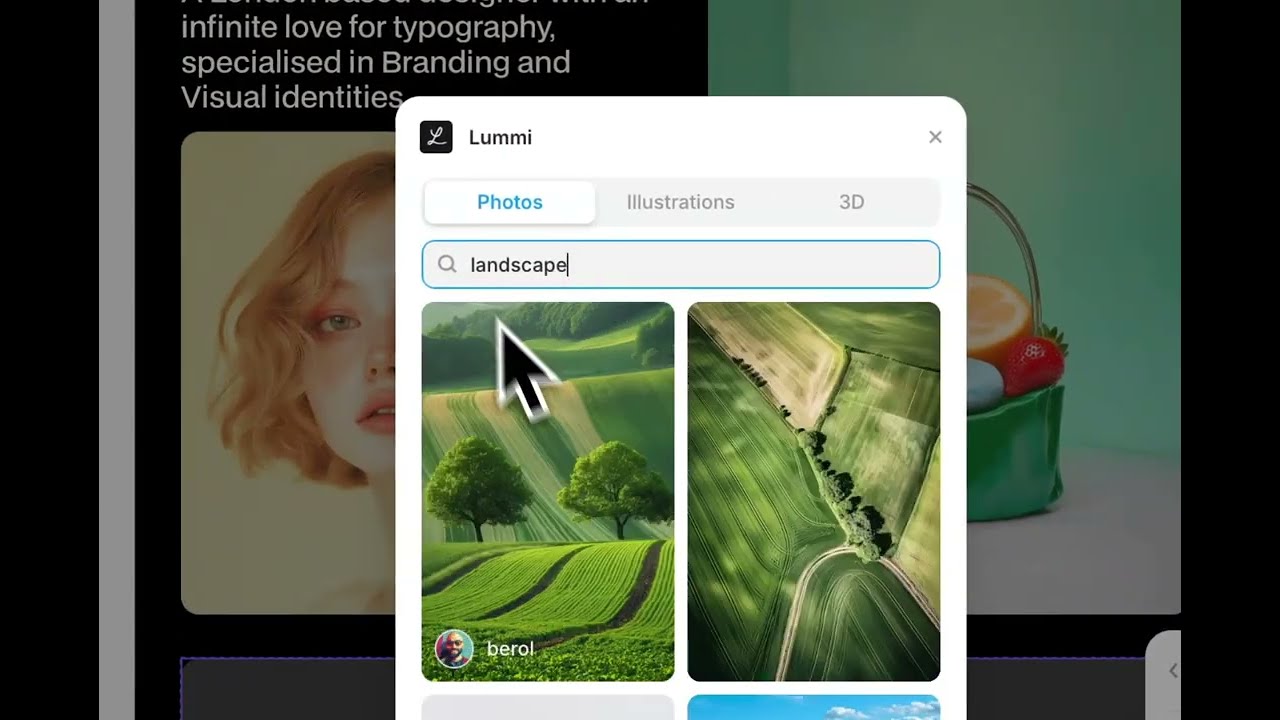
Lummi is a fancy service offering a treasure trove of AI-generated visuals that cater to different creative needs. In a way, it’s like having a library where every image is crafted by AI, yet resonates with authenticity and “artistic flair.”

Whereas traditional stock photos often lack the spark needed to make designs stand out, images generated by Lummi have a unique blend of AI artistry and human creativity. This, in turn, is meant to make the process of finding a perfect image both efficient and inspiring.

Lummi features an advanced filtering system, so you can — for instance — define a specific color palette or orientation. This is something you can’t do with regular stock image services.

The best part is that Lummi can seamlessly integrate with popular tools like Figma, Canva, Framer, Webflow, and Adobe Express — allowing designers to drag and drop visuals directly into their projects. This can be super-beneficial for designers all across the world, saving them a lot of time along the way.

Also, we should mention that Lummi caters to a broad array of themes and styles, from abstract 3D designs to realistic illustrations, to ensure that creatives from various industries can find visuals that resonate with their brand’s voice and message.

To sum it up, Lummi aims to revolutionize the way creatives access and utilize stock images. Its blend of AI innovation and user-centric features makes it a valuable asset for anyone looking to enhance their visual content. If you’re in that resonates with you – well, you may want to give it a try.

Visit Lummi ↗
Categories
🖼️ Image
🖼️ Image Generation 🪄 Text to Image
🎨 Art
🖌️ Graphic Design 🧑‍🎨 Design Assistant 🌅 Illustration Generation
📢 Advertising
🚀 Marketing

Homepage Screenshot 📸

Lummi screenshot

Video Overview 🎬

Lummi - Video Overview

What are the key features? ✨

  • AI-crafted visuals: Each image is generated by AI, offering unique and fresh visuals that stand out from traditional stock photos.
  • Advanced filtering: Users can search for images based on color, orientation, luminance, and the number of people.
  • Seamless integration: Lummi integrates effortlessly with popular design tools like Figma, Canva, Framer, Webflow, and Adobe Express.
  • In-browser editing: Before downloading, users can adjust brightness, saturation, contrast, and apply duotone effects.
  • Diverse collections: With over 20,000 images spanning various themes, Lummi provides visuals for all kinds of creative projects.

Who is it for? 🤔

Lummi primarily targets designers, marketers, content creators, educators, and small business owners seeking unique, high-quality visuals. By leveraging AI tech, it offers a cost-effective and efficient alternative to traditional stock photo libraries. The platform is particularly beneficial for those aiming to enhance their creative projects without compromising on quality or originality.

Examples of what you can use it for 💡

  • Web designers can quickly source unique images that align with their site's aesthetics
  • Marketers can find compelling visuals for campaigns
  • Content creators can enrich blogs and social media posts with relevant images
  • Educators can incorporate diverse visuals into presentations to make learning materials more engaging
  • Small business owners can access high-quality images without breaking the bank

Pros & Cons ⚖️

  • Easy-to-grasp user interface
  • The AI-generated images maintain a professional standard
  • Integration with existing (popular) tools
  • AI-generated images may occasionally lack the nuanced touch of human photography

FAQs 💬

What exactly does Lummi provide?
Lummi offers a large curated collection of royalty-free AI-generated stock images, illustrations, and 3D models, plus editing tools like Reframe, Retouch, and background removal.
Who is Lummi best suited for?
It works great for graphic designers, web developers, marketers, content creators, and small businesses looking for fresh, professional visuals without traditional stock photo limitations.
Can I use the images commercially?
Yes, most images are royalty-free and safe for commercial projects like websites, ads, social media, and presentations.
Does Lummi let me generate my own images?
Yes, it includes a create feature where you can generate custom AI images directly on the platform, in addition to browsing the library.
What editing tools are available?
Key tools include Reframe for resizing or expanding images, Retouch for detail changes, background removal, and basic adjustments like contrast or duotone effects.
Are there integrations with design software?
Lummi integrates smoothly with Figma, Canva, Webflow, and Adobe Express, so you can pull visuals right into your workflow.
How fresh is the content on Lummi?
The library gets daily updates with new AI-crafted images and models from global creators, keeping options current and diverse.
Is Lummi different from Midjourney or similar generators?
Unlike pure generators like Midjourney, Lummi emphasizes a curated stock library with editing tools and integrations, though it now offers on-platform generation too.
Can I contribute my own AI creations to Lummi?
Yes, AI artists can join as contributors by following the guidelines, then share and showcase their work in the library.
Does Lummi support video features?
It includes image-to-video animation capabilities, sometimes with audio, letting you turn static visuals into short clips quickly.

Ready to try Lummi?

Offering a treasure trove of AI-generated visuals that cater to different creative needs

Visit Lummi ↗

Lummi alternatives 🔗

  1. ChatGPT ChatGPT All-round AI assistant generating human-like responses to user queries and tasks
  2. Grok Grok Delivers witty, real-time AI responses with advanced reasoning and image generation
  3. Imagen Imagen Generates photorealistic images from detailed text prompts
  4. Black Forest Labs Black Forest Labs Generates high-quality images from text prompts with precision and speed
  5. Kling AI Kling AI Generates cinematic videos from text or images with realistic motion
  6. Runway Runway Generates and edits AI-powered videos from text prompts
Share
Lummi screenshot enlarged
Promote Lummi
light badge
Copy Embed Code
dark badge
Copy Embed Code
neutral badge
Copy Embed Code
Best AI Tools

Discover the best AI tools for any use case

Explore
  • Tool Categories
  • AI Use Cases
  • AI Events
  • AI News
  • Saved Tools
Company
  • About Us
  • Contact Us
  • Media & Partnerships
  • Suggest a Tool
Legal
  • Privacy Policy
  • Terms of Service
Copyright © 2026 Best AI Tools 415 Mission Street, 37th Floor, San Francisco, CA 94105