logo-darklogo-darklogo-darklogo-dark
  • Tool Categories
    • 🎨Art & Creative Design505
    • 🏢Business Management644
    • 💻Coding & Development515
    • 👮Detection83
    • 🧠General Use727
    • 🏥Health & Wellness55
    • 📷Image & Photo Analysis100
    • 🖼️Image Generation & Editing618
    • 📐Interior & Architectural Design37
    • 🎓Learning & Education483
    • ⚖️Legal & Finance90
    • 🎭Lifestyle & Entertainment236
    • 📢Marketing & Advertising627
    • 🎧Music & Audio138
    • 👔Office & Workplace1,014
    • 🔬Research & Data Analysis372
    • 👥Social Media245
    • 🎥Video Generation & Editing426
    • 👧🏻Virtual Companion135
    • 🎤Voice Generation & Editing381
    • ✍️Writing & Editing808
    • All Categories
    • AI Use Cases
  • News
  • Events
    • Academic Conferences
    • Developer Conferences
    • Expos / Trade Shows
    • Industry Summits
    • Workshops / Training
    • All Events
    • Past Events
  • Saved Tools
  • Suggest a Tool
✕
Home › Research & Data Analysis › Research› Odin
Odin

Odin

Builds no-code AI agents to automate business tasks and boost efficiency

Odin is a no-code platform that allows users to build and deploy AI agents for business automation across functions like customer support sales HR and finance. It includes tools such as Automator for workflow sequences Chatbot Builder for conversational interfaces and Notetaker for meeting transcription and analysis. The platform supports over 200 integrations including Zapier Gmail Zoom and Quickbooks enabling seamless connections to existing systems.

Key functionalities involve creating agents that perform automated actions based on user defined rules and data inputs. For example the knowledge base feature stores documents and links which agents query to generate responses or summaries. Notetaker identifies speakers extracts action items and provides searchable transcripts integrating with calendars for context. Chatbot Builder offers design test and deploy steps where users customize appearances and flows without coding.

In comparison competitors like Zapier focus on broad automation but lack Odin’s AI driven adaptability while Otter.ai specializes in transcription yet misses the agent building aspect. Odin provides API access for extensions and uses vector search for accurate retrieval in its database. Pricing begins at about seventeen dollars per seat monthly including 2000 message credits and five AI actions which is competitive against Make.com that charges more for similar scale.

Users value the ease of setup and versatility but some report limits in handling complex queries or needing more customization options. Technical elements include compliance with standards like GDPR and support for advanced models ensuring secure operations. The platform replaces multiple tools reducing costs for teams.

To get started select one business function like support map your needs to an agent and monitor performance over a week adjusting as required.

Visit Odin ↗
Categories
🔬 Research
🔬 Research
🧠 General
🤖 Assistant 💬 Chatbot
🎓 Education
🗂️ Knowledge Management
👔 Work
📄 Document Generation 📊 Report Generation

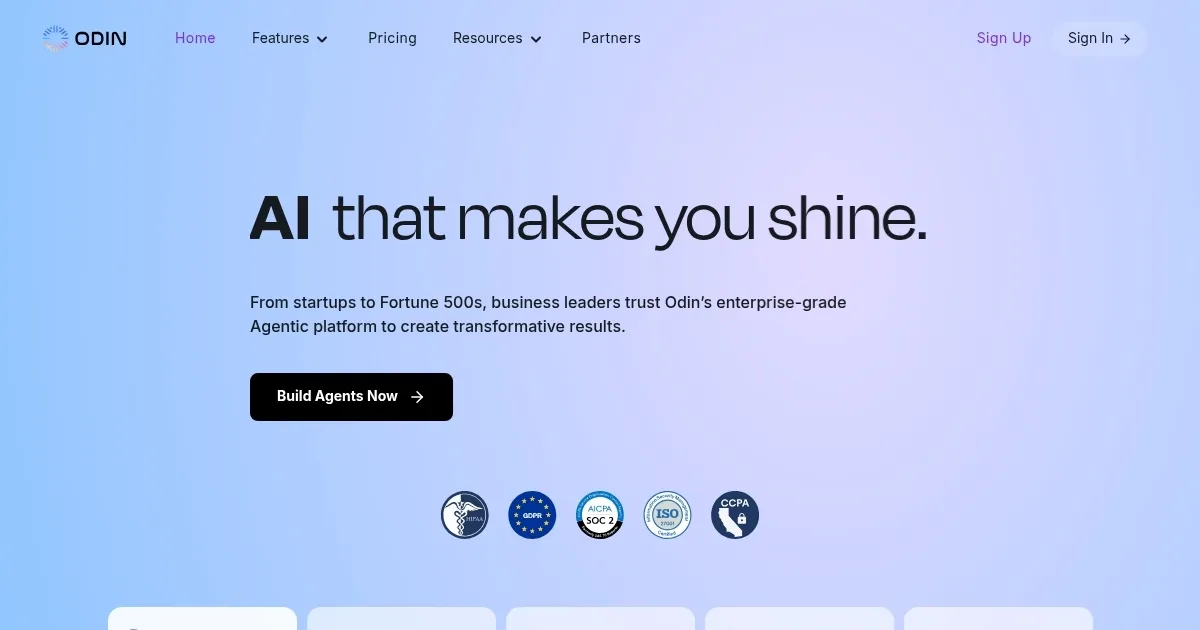
Homepage Screenshot 📸

Odin screenshot

Video Overview 🎬

What are the key features? ✨

  • AI Agents: Enables creation of custom agents that automate tasks across business functions like sales and HR.
  • Odin Automator: Provides no-code automation with over 200 integrations for handling workflows such as invoice processing.
  • Chatbot Builder: Allows designing testing and deploying personalized chatbots for customer interactions.
  • AI Notetaker: Captures transcribes and analyzes meetings highlighting action items and syncing with apps like Zoom.
  • Knowledge Base: Stores and indexes data for agents to query ensuring accurate and contextual responses.

Who is it for? 🤔

Odin proves useful for small to medium business owners managers and teams who need to automate routine tasks without coding skills, such as entrepreneurs handling customer support solo marketers streamlining lead generation or HR professionals managing onboarding, as it simplifies workflows boosts efficiency and integrates with common tools to fit diverse sectors like finance healthcare and sales.

Examples of what you can use it for 💡

  • Business Owner: Automates invoice processing by connecting Quickbooks and email to extract and log data.
  • Sales Manager: Builds chatbots that handle lead qualification and schedule meetings via Calendly integration.
  • HR Specialist: Deploys agents for employee onboarding pulling info from knowledge bases to answer queries.
  • Team Lead: Uses Notetaker to transcribe Zoom calls and highlight action items for follow up.
  • Marketer: Creates automators that sync Meta Leads with Google Contacts for campaign tracking.

Pros & Cons ⚖️

  • Easy no-code interface
  • Strong integrations
  • Versatile agents
  • Limited credits
  • Basic customization

FAQs 💬

What is Odin?
Odin is a no-code platform for building AI agents and automators.
How does pricing work?
It offers monthly per seat plans starting around $17 with credits and actions included.
Does it integrate with email?
Yes it connects to Gmail and Microsoft Outlook for automation.
Is there a free trial?
Odin provides a trial period to test features before subscribing.
What models does it use?
It leverages advanced AI models like GPT for generation and responses.
Can it handle meetings?
Yes the Notetaker transcribes and analyzes calls on Zoom or Teams.
Is data secure?
Odin complies with GDPR HIPAA and other standards for protection.
How many integrations?
Over 200 including Zapier Calendly and Quickbooks.
Suitable for beginners?
Yes its no-code design makes it accessible without technical skills.
What are main competitors?
Tools like Zapier Otter.ai and Make.com offer similar functions.

Ready to try Odin?

Builds no-code AI agents to automate business tasks and boost efficiency

Visit Odin ↗

Odin alternatives 🔗

  1. Claude Claude Assists users in reasoning, coding, writing, and analyzing data with advanced AI models
  2. DeepSeek DeepSeek Delivers advanced AI models for coding and reasoning at low costs
  3. Perplexity Perplexity Delivers cited AI answers from web searches instantly
  4. WarrenAI WarrenAI An AI tool for people who want to understand the stock market better
  5. Britannica Chatbot Britannica Chatbot A digital librarian drawing from over 130,000 meticulously fact-checked articles
  6. Kimi Kimi An AI assistant that can interpret images, analyze code, and provide real-time information
Share
Odin screenshot enlarged
Promote Odin
light badge
Copy Embed Code
dark badge
Copy Embed Code
neutral badge
Copy Embed Code
Best AI Tools

Discover the best AI tools for any use case

Explore
  • Tool Categories
  • AI Use Cases
  • AI Events
  • AI News
  • Saved Tools
Company
  • About Us
  • Contact Us
  • Media & Partnerships
  • Suggest a Tool
Legal
  • Privacy Policy
  • Terms of Service
Copyright © 2026 Best AI Tools 415 Mission Street, 37th Floor, San Francisco, CA 94105