logo-darklogo-darklogo-darklogo-dark
  • Home
  • Browse
    • Assistant
    • Coding
    • Image
    • Productivity
    • Video
    • Voice
    • Writing
    • All Categories
    • AI Use Cases
  • My Favorites
  • Suggest a Tool
✕
Home › Image Generation & Editing / Video Generation & Editing›
Published by Dusan Belic on August 30, 2023

Prequel

Prequel
Prequel Homepage
Categories Image Generation & EditingVideo Generation & Editing

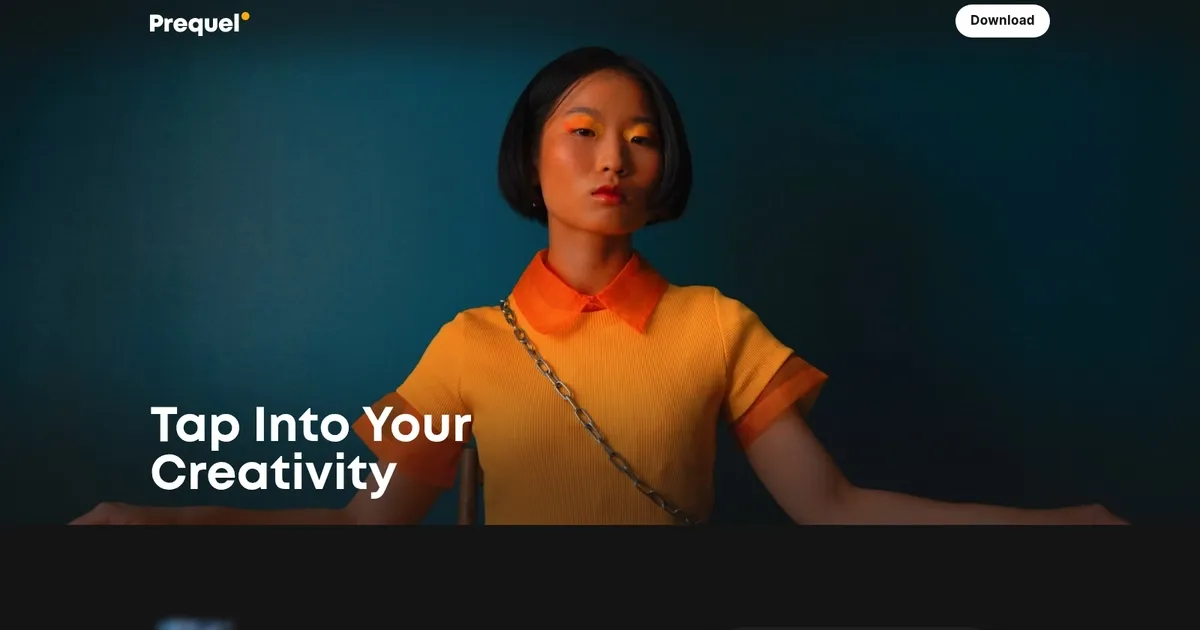
Prequel - screenshot

Photo and video editing app with an easy-to-use creative toolkit, aesthetic effects and filters

Prequel

Prequel is a photo and video editing venture studio application designed to unlock creative potential and provide users with advanced editing capabilities. It caters to various aesthetic preferences, offering a vast library of inspiring edits, presets, and templates.

Users can transform their photos and videos beyond the ordinary with over 800 top-notch effects, including D3D, AR objects, and custom captions. The application lets users create eye-catching profile pictures, turn selfies and portraits into comic book characters or artsy masterpieces, and more. For those seeking to fine-tune their visual content, Prequel offers tools for retouching — including skin smoothing, teeth whitening, and face reshaping.

Beyond these adjustments, Prequel equips users with advanced editing capabilities — allowing for color correction, mood enhancement through various filters like vintage, retro, Y2K, Indie Kid style, and the fine-tuning of image attributes like contrast, brightness, saturation, warmth, and sharpness.

The application also simplifies video editing with ready-to-use templates featuring intros, outros, and background music.

Prequel Homepage
Categories Image Generation & EditingVideo Generation & Editing

What are the key features? ⭐

  • Real-time Search: Pulls current information from the web and X for timely, relevant answers.
  • Imagine Generation: Creates and edits images plus videos from text prompts with high detail and remix options.
  • Grok Voice: Enables natural, fluid voice conversations on mobile apps.
  • Coding Assistance: Generates, explains, and debugs code with practical guidance.
  • Document Analysis: Summarizes lengthy files and highlights key trends and insights.

Who is it for? 🤔

Grok helps people who crave quick, unfiltered insights mixed with personality, especially those active on X or needing fresh data fast. Coders appreciate solid programming support, creators enjoy Imagine for visuals, and casual users like the witty chats and voice mode. Professionals handling research or brainstorming find value in real-time pulls and document breakdowns, while anyone tired of overly cautious AIs might prefer its direct style. Its a fit for folks wanting an assistant that feels lively and current without heavy setup.

Examples of what you can use it for 💭

  • Researcher: Queries breaking news or trends and gets instant summaries with X sentiment and web sources.
  • Developer: Asks for code solutions, optimizations, or bug fixes with clear explanations.
  • Content Creator: Generates custom images or short videos for posts, ads, or concepts via Imagine.
  • Daily User: Chats casually via text or voice for fun, advice, or quick facts with humorous twists.
  • Analyst: Uploads reports and receives concise breakdowns of key data points and trends.

Pros & Cons ⚖️

  • Real-time X/web data
  • Witty, engaging personality
  • Strong image/video gen
  • Solid coding help
  • Free tier limits
  • Occasional snark excess

FAQs 💬

What is the main homepage for Grok?
The primary access point is https://grok.com, where you chat, generate images, and use features directly.
Is there a free version of Grok?
Yes, a free tier exists with message limits, roughly ten every two hours, and restricted features.
How does Grok access real-time information?
It pulls fresh data from the web and especially X posts for current events and trends.
Can Grok generate images and videos?
Yes, through the Imagine feature, it creates and edits images plus short videos from text prompts.
Does Grok have voice capabilities?
Voice mode supports natural conversations on the iOS and Android apps.
How does Grok compare to ChatGPT?
Grok emphasizes real-time data, humor, and fewer restrictions, while ChatGPT offers broader integrations and polish.
What subscription unlocks full features?
SuperGrok provides longer chats, better generations, priority access, and early features for a monthly fee.
Is Grok good for coding?
It excels at generating, explaining, and debugging code with practical, logical responses.
Can I use Grok on mobile?
Yes, dedicated iOS and Android apps support chat, voice, and other features.
What makes Grok different from other AIs?
Its truth-seeking approach, sarcastic wit, and tight X integration set it apart for timely, lively interactions.
Visit Prequel

Related tools ↙️

  1. Tango Tango Creates interactive how-to guides from screen captures in minutes.
  2. Dawn AI Dawn AI Generates personalized avatars and images from selfies using advanced AI technology
  3. Nullface Nullface Generates AI-powered faceless videos for TikTok and YouTube effortlessly
  4. Cloudinary Cloudinary Manages, transforms, optimizes, and delivers images and videos with AI-powered features
  5. Imgix Imgix Optimizes images in real-time using AI for faster web delivery
  6. Imajinn Imajinn Transforms user photos into artistic images and custom visuals using AI
Last update: March 4, 2026
Share
Promote Prequel
light badge
Copy Embed Code
dark badge
Copy Embed Code
neutral badge
Copy Embed Code
About Us | Contact Us | Suggest an AI Tool | Privacy Policy | Terms of Service

Copyright © 2026 Best AI Tools
415 Mission Street, 37th Floor, San Francisco, CA 94105