Skip to content
logo-darklogo-darklogo-darklogo-dark
  • Tool Categories
    • 🎨Art & Creative Design505
    • 🏢Business Management644
    • 💻Coding & Development514
    • 👮Detection83
    • 🧠General Use728
    • 🏥Health & Wellness55
    • 📷Image & Photo Analysis100
    • 🖼️Image Generation & Editing618
    • 📐Interior & Architectural Design37
    • 🎓Learning & Education483
    • ⚖️Legal & Finance90
    • 🎭Lifestyle & Entertainment236
    • 📢Marketing & Advertising627
    • 🎧Music & Audio138
    • 👔Office & Workplace1,014
    • 🔬Research & Data Analysis373
    • 👥Social Media245
    • 🎥Video Generation & Editing426
    • 👧🏻Virtual Companion135
    • 🎤Voice Generation & Editing381
    • ✍️Writing & Editing808
    • All Categories
    • AI Use Cases
  • News
  • Events
    • Academic Conferences
    • Developer Conferences
    • Expos / Trade Shows
    • Industry Summits
    • Workshops / Training
    • All Events
    • Past Events
  • Saved Tools
  • Suggest a Tool
    ✕
    Home › Coding & Development › Code Assistant› Refact.ai
    Refact.ai

    Refact.ai

    Automates coding tasks with context-aware AI assistance

    Refact.ai is an open-source AI coding assistant that automates coding, debugging, and testing, integrating with IDEs like VS Code and JetBrains while supporting over 25 programming languages. It uses advanced models like Qwen2.5-Coder and Retrieval-Augmented Generation (RAG) to provide context-aware code suggestions, in-IDE chat, and task automation. Its top ranking on SWE-bench highlights its ability to handle real-world coding challenges. The tool offers on-premise deployment for data security and supports integrations with GitHub, PostgreSQL, and Docker.

    The Autonomous AI Agent is a core feature, capable of planning and executing multi-step tasks, such as debugging or generating code from natural language prompts. The in-IDE chat answers coding questions with project-specific context, while autocomplete predicts lines, functions, or classes with high accuracy. Refact.ai supports languages like Python, JavaScript, Java, and Rust, making it versatile for diverse projects. It also allows users to bring their own API keys for models like GPT-4o or Claude 4.

    Compared to GitHub Copilot, Refact.ai offers more control through its open-source nature and self-hosted option, though Copilot’s GitHub integration is more seamless. Tabnine provides similar autocomplete features but lacks Refact.ai’s autonomous task handling. The free tier includes daily usage limits, which may restrict heavy users. Fine-tuning the AI requires technical setup, and support for less common languages may be less robust.

    User feedback from platforms like Discord highlights Refact.ai’s ability to save time, with examples like building an IoT app in days or fixing a plugin in 30 minutes. The tool’s documentation is comprehensive, aiding setup and usage. Its open-source model encourages community contributions, enhancing its adaptability.

    For best results, install the plugin for your preferred IDE and start with small tasks to test autocomplete and chat features. Review the documentation for setup guidance, especially for on-premise deployment. Monitor usage limits on the free plan, and consider enterprise options for larger teams. Refact.ai suits developers seeking a customizable, secure coding assistant.

    Visit Refact.ai ↗
    Categories
    💻 Coding
    🤖 Code Assistant ⌨️ Code Generation 👨‍💻 Development 🔍 Code Review
    👔 Work
    🤖 Copilot 🔗 Agent
    🧠 General
    🦙 Open Source Model

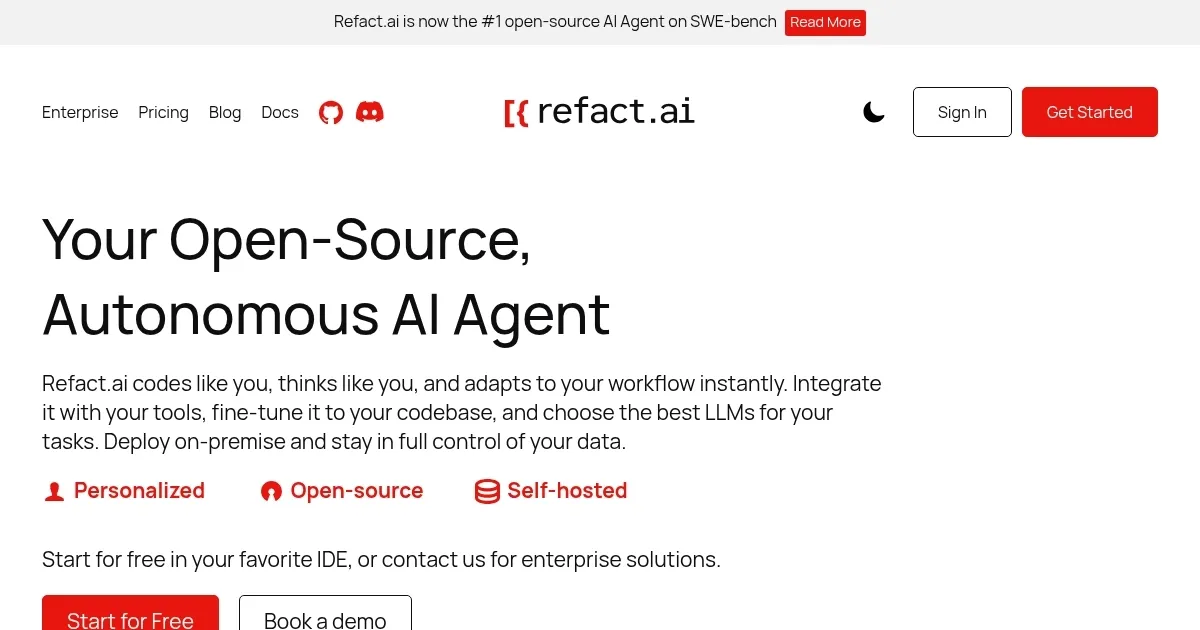
    Homepage Screenshot 📸

    Refact.ai screenshot

    Video Overview 🎬

    Refact.ai - Video Overview

    What are the key features? ✨

    • Autonomous AI Agent: Plans and executes coding tasks end-to-end with context awareness.
    • In-IDE Chat: Provides real-time, project-specific answers within VS Code or JetBrains.
    • Context-Aware Autocomplete: Predicts code using Qwen2.5-Coder and RAG for accuracy.
    • On-Premise Deployment: Ensures data security with self-hosted installation.
    • Multi-Language Support: Supports over 25 languages, including Python and JavaScript.

    Who is it for? 🤔

    Refact.ai is designed for software developers, DevOps engineers, and enterprise teams who need a customizable AI coding assistant that integrates with their existing tools and prioritizes data security. It suits those working on diverse projects across multiple programming languages, particularly in environments where privacy is critical, thanks to its on-premise deployment option.

    Examples of what you can use it for 💡

    • Solo Developer: Uses Refact.ai to automate debugging and generate code for a Python project.
    • Enterprise Team: Deploys Refact.ai on-premise to securely enhance team productivity.
    • Freelancer: Leverages in-IDE chat to quickly resolve coding queries for clients.
    • Open-Source Contributor: Customizes Refact.ai to improve code quality in community projects.
    • DevOps Engineer: Integrates Refact.ai with Docker to streamline CI/CD workflows.

    Pros & Cons ⚖️

    • Supports 25+ languages
    • Context-aware suggestions
    • Seamless IDE integration
    • Less polished than Copilot

    FAQs 💬

    What is Refact.ai?
    Refact.ai is an open-source AI coding assistant for IDEs like VS Code and JetBrains.
    Which IDEs does Refact.ai support?
    It integrates with VS Code, JetBrains, Visual Studio, and Neovim.
    Does Refact.ai offer a free version?
    Yes, it has a free tier with daily usage limits.
    Can Refact.ai be used on-premise?
    Yes, it supports self-hosted deployment for data security.
    What languages does Refact.ai support?
    It supports over 25 languages, including Python and JavaScript.
    How does Refact.ai compare to GitHub Copilot?
    Refact.ai offers open-source flexibility and on-premise options, unlike Copilot’s cloud focus.
    Can I use my own LLM with Refact.ai?
    Yes, you can bring your own API key for models like GPT-4o.
    Is Refact.ai suitable for enterprise teams?
    Yes, its on-premise deployment and integrations suit enterprise needs.
    Does Refact.ai require internet access?
    The self-hosted version does not; the cloud version does.
    How do I start using Refact.ai?
    Install the plugin for your IDE and follow the setup guide on their site.

    Ready to try Refact.ai?

    Automates coding tasks with context-aware AI assistance

    Visit Refact.ai ↗

    Refact.ai alternatives 🔗

    1. GitHub Copilot GitHub Copilot Enhances coding with AI-driven completions and chat assistance
    2. Cursor Cursor Supercharges coding with AI agents that build, edit, and review code autonomously.
    3. Replit AI Replit AI Transforms natural language prompts into fully deployable apps using AI agents
    4. Windsurf Windsurf Empowers developers with AI-driven code generation and real-time collaboration.
    5. BlackBox AI BlackBox AI Generates code snippets and assists developers with AI-powered tools
    6. JetBrains AI JetBrains AI Deeply integrated, context aware AI assistant for coding, right in your IDE
    Share
    Refact.ai screenshot enlarged
    Best AI Tools

    Discover the best AI tools for any use case

    Explore
    • Tool Categories
    • AI Use Cases
    • AI Events
    • AI News
    • Saved Tools
    Company
    • About Us
    • Contact Us
    • Media & Partnerships
    • Suggest a Tool
    Legal
    • Privacy Policy
    • Terms of Service
    Copyright © 2026 Best AI Tools 415 Mission Street, 37th Floor, San Francisco, CA 94105