logo-darklogo-darklogo-darklogo-dark
  • Tool Categories
    • ๐ŸŽจArt & Creative Design505
    • ๐ŸขBusiness Management644
    • ๐Ÿ’ปCoding & Development515
    • ๐Ÿ‘ฎDetection83
    • ๐Ÿง General Use727
    • ๐ŸฅHealth & Wellness55
    • ๐Ÿ“ทImage & Photo Analysis100
    • ๐Ÿ–ผ๏ธImage Generation & Editing618
    • ๐Ÿ“Interior & Architectural Design37
    • ๐ŸŽ“Learning & Education483
    • โš–๏ธLegal & Finance90
    • ๐ŸŽญLifestyle & Entertainment236
    • ๐Ÿ“ขMarketing & Advertising627
    • ๐ŸŽงMusic & Audio138
    • ๐Ÿ‘”Office & Workplace1,014
    • ๐Ÿ”ฌResearch & Data Analysis372
    • ๐Ÿ‘ฅSocial Media245
    • ๐ŸŽฅVideo Generation & Editing426
    • ๐Ÿ‘ง๐ŸปVirtual Companion135
    • ๐ŸŽคVoice Generation & Editing381
    • โœ๏ธWriting & Editing808
    • All Categories
    • AI Use Cases
  • News
  • Events
    • Academic Conferences
    • Developer Conferences
    • Expos / Trade Shows
    • Industry Summits
    • Workshops / Training
    • All Events
    • Past Events
  • Saved Tools
  • Suggest a Tool
โœ•
Home › Coding & Development › Code Assistant› Repo Prompt
Repo Prompt

Repo Prompt

Streamlines code iteration using AI for macOS developers

Repo Prompt is a macOS-native application that integrates AI models to streamline code iteration, optimization, and review for developers. It focuses on structuring prompts, managing repositories, and providing interactive tools to enhance coding workflows. Built specifically for macOS, it offers a clean interface and seamless integration with Apple’s ecosystem, making it a strong choice for developers who prefer working on this platform.

The Compose feature allows users to select specific files or folders, creating structured prompts for AI models like Grok 4 Heavy or Claude Opus. It respects .gitignore patterns and filters out binary files, ensuring clean inputs. The Repository Map provides a reusable overview of a project’s structure, saving time for recurring tasks. Interactive File Chat enables real-time queries about code, such as explaining functions or suggesting improvements. The Review tool lets users approve or undo AI-suggested changes, mimicking Git-like functionality with added explanations.

Compared to GitHub Copilot and Cursor, Repo Prompt is more limited in scope due to its macOS exclusivity. Copilot offers broader IDE support, while Cursor provides similar AI-driven coding but across platforms. Repo Prompt’s free tier is accessible, with a paid plan for heavier users, aligning with competitors’ pricing models. User feedback on platforms like X highlights its intuitive design but notes occasional bugs, such as issues with local LLM connections or file merging errors.

The tool’s strength lies in its simplicity and macOS optimization. Developers can quickly set up prompts and manage projects without wading through complex menus. However, the platform restriction may deter those needing cross-platform support. Early-stage bugs, like Ollama integration issues, have been reported but are being addressed, according to developer updates on Discord.

For best results, start with the free tier to test compatibility with your workflow. Focus on small projects to explore features like Interactive File Chat and Repository Map before committing to a paid plan.

Visit Repo Prompt ↗
Categories
๐Ÿ’ป Coding
๐Ÿค– Code Assistant ๐Ÿ‘จโ€๐Ÿ’ป Development โŒจ๏ธ Code Generation ๐Ÿ” Code Review
โœ๏ธ Writing
๐Ÿ’ก Prompt Generation ๐Ÿ› ๏ธ Prompt Engineering
๐Ÿ‘” Work
โšก Work Productivity

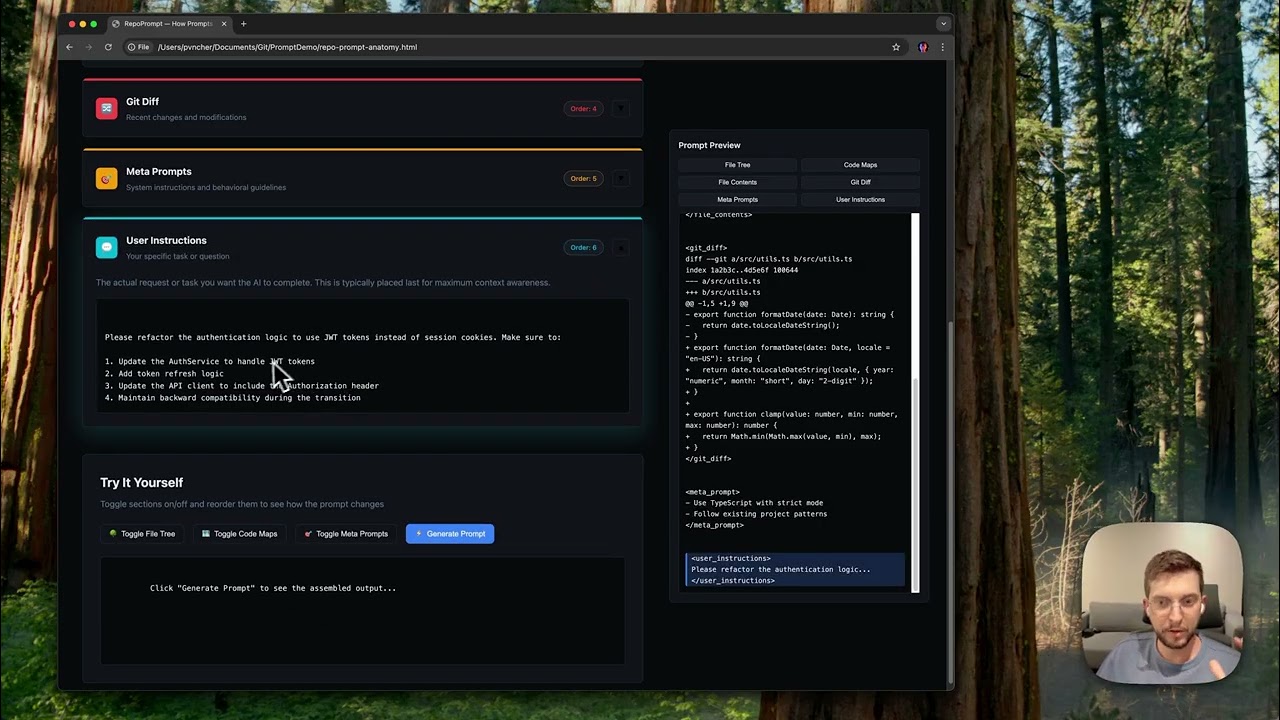
Homepage Screenshot 📸

Repo Prompt screenshot

Video Overview 🎬

Repo Prompt - Video Overview

What are the key features? ✨

  • Compose: Selects files/folders for structured AI prompts.
  • Repository Map: Saves project structure for reuse.
  • Interactive File Chat: Enables real-time code queries.
  • Review: Approves or undoes AI changes with explanations.
  • Gitignore Support: Filters out ignored or binary files.

Who is it for? 🤔

Repo Prompt is ideal for macOS-based software developers, particularly those working on small to medium-sized projects who want to integrate AI into their coding workflow. It suits solo coders, small tech teams, or hobbyists who value a clean, Apple-optimized interface and need tools to streamline code reviews, optimizations, or AI-driven suggestions.

Examples of what you can use it for 💡

  • Solo Developer: Uses Compose to optimize Python scripts with AI.
  • Small Team Lead: Maps repositories for consistent AI prompts.
  • Code Reviewer: Employs Review to approve AI-suggested changes.
  • Hobbyist Coder: Chats with files to understand complex code.
  • Freelancer: Filters files with Gitignore for clean AI inputs.

Pros & Cons ⚖️

  • Clean, macOS-native interface.
  • Intuitive Compose feature.
  • Interactive File Chat shines.
  • macOS-only, limits access.
  • Occasional bugs reported.

FAQs 💬

What is Repo Prompt?
A macOS app for AI-driven code iteration.
Is it available on Windows?
No, itโ€™s exclusive to macOS.
Does it support multiple AI models?
Yes, including Grok 4 Heavy, Claude Opus.
Is there a free version?
Yes, with a paid plan for more features.
Can it handle large repositories?
Yes, but performance varies by size.
Does it integrate with Git?
It mimics Git-like merging for AI edits.
Whatโ€™s Interactive File Chat?
A tool to query code in real time.
Does it respect .gitignore files?
Yes, it filters ignored files automatically.
Are there known bugs?
Some, like Ollama errors, are being fixed.
How does it compare to Copilot?
More macOS-focused, less cross-platform.

Ready to try Repo Prompt?

Streamlines code iteration using AI for macOS developers

Visit Repo Prompt ↗


Repo Prompt alternatives 🔗

  1. ChatGPT ChatGPT All-round AI assistant generating human-like responses to user queries and tasks
  2. Claude Claude Assists users in reasoning, coding, writing, and analyzing data with advanced AI models
  3. DeepSeek DeepSeek Delivers advanced AI models for coding and reasoning at low costs
  4. Cursor Cursor Supercharges coding with AI agents that build, edit, and review code autonomously.
  5. Windsurf Windsurf Empowers developers with AI-driven code generation and real-time collaboration.
  6. Lovable Lovable Builds apps and websites via AI chat prompts.
Share
Repo Prompt screenshot enlarged
Promote Repo Prompt
light badge
Copy Embed Code
dark badge
Copy Embed Code
neutral badge
Copy Embed Code
Best AI Tools

Discover the best AI tools for any use case

Explore
  • Tool Categories
  • AI Use Cases
  • AI Events
  • AI News
  • Saved Tools
Company
  • About Us
  • Contact Us
  • Media & Partnerships
  • Suggest a Tool
Legal
  • Privacy Policy
  • Terms of Service
Copyright © 2026 Best AI Tools 415 Mission Street, 37th Floor, San Francisco, CA 94105