logo-darklogo-darklogo-darklogo-dark
  • Tool Categories
    • 🎨Art & Creative Design505
    • 🏢Business Management644
    • 💻Coding & Development514
    • 👮Detection83
    • 🧠General Use728
    • 🏥Health & Wellness55
    • 📷Image & Photo Analysis100
    • 🖼️Image Generation & Editing618
    • 📐Interior & Architectural Design37
    • 🎓Learning & Education483
    • ⚖️Legal & Finance90
    • 🎭Lifestyle & Entertainment236
    • 📢Marketing & Advertising627
    • 🎧Music & Audio138
    • 👔Office & Workplace1,014
    • 🔬Research & Data Analysis373
    • 👥Social Media245
    • 🎥Video Generation & Editing426
    • 👧🏻Virtual Companion135
    • 🎤Voice Generation & Editing381
    • ✍️Writing & Editing808
    • All Categories
    • AI Use Cases
  • News
  • Events
    • Academic Conferences
    • Developer Conferences
    • Expos / Trade Shows
    • Industry Summits
    • Workshops / Training
    • All Events
    • Past Events
  • Saved Tools
  • Suggest a Tool
✕
Home › Writing & Editing › Summarizer› SummyMonkey
SummyMonkey

SummyMonkey

Converts audio recordings and emails into summaries, transcripts, and chat-ready insights

SummyMonkey is an AI-powered productivity tool designed to help users manage information overload by transforming complex tasks into efficient workflows. To that end, it offers services like NoteTaker, which transcribes and summarizes meetings, lectures, and podcasts within minutes; and Summarizer, which compresses information from emails, YouTube videos, and websites into concise summaries and newsletters. In addition, there’s SummyMonkey’s Compiler, which aggregates information automatically — allowing users to chat with compiled emails for deeper insights.

The platform supports multiple languages, making it accessible to a global audience. SummyMonkey’s flexible pricing structure allows users to utilize interchangeable units for different purposes, such as email summarization or minutes of voice recording. Additional units can be purchased as needed, providing scalability for varying workloads.

SummyMonkey emphasizes user privacy and data security, ensuring that all processed information remains confidential. The platform’s user-friendly interface and commitment to simplifying information management make it a valuable tool for professionals, students, and anyone else seeking to enhance productivity in handling large volumes of information.

By integrating multiple advanced AI capabilities into a single tool, SummyMonkey can transform hours of work into minutes — thus reinventing traditional workflows. Talk about the great use of AI…

Visit SummyMonkey ↗
Categories
✍️ Writing
📝 Summarizer
🎓 Education
📰 Article Summarization 📔 Book Summarization
👔 Work
📑 PDF Summarizer 📕 PDF
👥 Social
📺 YouTube Summary
🎥 Video
📋 Video Summarizer

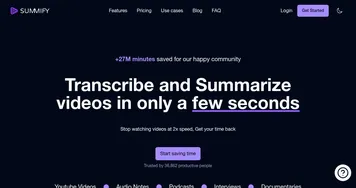
Homepage Screenshot 📸

SummyMonkey screenshot

What are the key features? ✨

  • NoteTaker: transcribes and summarizes audio recordings from meetings or conversations into text and key insights
  • Summariser: condenses multiple emails into a single, concise daily digest for quick review
  • Compiler: aggregates email threads into a unified view and allows chat-based questions for tailored clarity
  • Insight Extraction: pulls actionable points and summaries from both audio and email inputs
  • Credit-Based Processing: starts with free credits on sign-up for testing core services

Who is it for? 🤔

Summy Monkey helps busy professionals who face constant meetings and heavy email loads, students converting recorded lectures into notes, and anyone needing to process spoken or written information quickly without losing important details. It suits people who value time savings and clear insights over manual review.

Examples of what you can use it for 💡

  • busy executive: summarizes daily email flood into one actionable overview and chats with thread compilations for fast decisions
  • student: transcribes and summarizes lecture recordings to create study notes without rewatching
  • freelancer: turns client call audio into key points and follow-ups in minutes
  • team lead: compiles project-related email chains and queries for status updates or missed items
  • remote worker: digests long meeting recordings into concise insights for async sharing

Pros & Cons ⚖️

  • saves significant time on emails and audio
  • chat with compiled insights is handy
  • easy to start with free credits
  • clean and straightforward interface
  • audio accuracy varies with quality
  • limited public integrations

FAQs 💬

What does Summy Monkey actually do?
It summarizes audio recordings and emails, transcribes speech, and lets you chat with compiled email insights to save time.
How do I get started with Summy Monkey?
Sign up on the homepage to receive free credits and begin using NoteTaker, Summariser, or Compiler right away.
Can Summy Monkey handle live meetings?
It focuses on uploaded or recorded audio rather than real-time transcription, though you can process recordings shortly after.
How does the email Summariser work?
Forward multiple emails to a provided address, and it sends back a condensed summary of the key content.
Is there a chat feature in Summy Monkey?
Yes, Compiler lets you ask questions directly about aggregated email data for specific answers.
Does Summy Monkey work for students?
Yes, it transcribes and summarizes lecture audio to help create notes and study materials quickly.
What kind of pricing does Summy Monkey use?
It operates on credits, starting with free ones on sign-up, with more available through paid plans.
How accurate is the transcription?
It performs well on clear audio, though heavy accents, noise, or overlapping speech can reduce accuracy slightly.

Ready to try SummyMonkey?

Converts audio recordings and emails into summaries, transcripts, and chat-ready insights

Visit SummyMonkey ↗

SummyMonkey alternatives 🔗

  1. Gemini Gemini Generates responses from text, images, audio, and video inputs using advanced multimodal AI
  2. Claude Claude Assists users in reasoning, coding, writing, and analyzing data with advanced AI models
  3. Brave Leo Brave Leo Assists with web queries, content creation, and document analysis in-browser
  4. Slack AI Slack AI Search smarter, summarize conversations instantly, and be at your most productive
  5. FigJam AI FigJam AI Instantly visualize ideas, suggest best practices, and automate tedious tasks
  6. Box AI Box AI An assistant that taps into your enterprise content and documents
Share
SummyMonkey screenshot enlarged
Promote SummyMonkey
light badge
Copy Embed Code
dark badge
Copy Embed Code
neutral badge
Copy Embed Code
Best AI Tools

Discover the best AI tools for any use case

Explore
  • Tool Categories
  • AI Use Cases
  • AI Events
  • AI News
  • Saved Tools
Company
  • About Us
  • Contact Us
  • Media & Partnerships
  • Suggest a Tool
Legal
  • Privacy Policy
  • Terms of Service
Copyright © 2026 Best AI Tools 415 Mission Street, 37th Floor, San Francisco, CA 94105