logo-darklogo-darklogo-darklogo-dark
  • Tool Categories
    • 🎨Art & Creative Design505
    • 🏢Business Management644
    • 💻Coding & Development515
    • 👮Detection83
    • 🧠General Use727
    • 🏥Health & Wellness55
    • 📷Image & Photo Analysis100
    • 🖼️Image Generation & Editing618
    • 📐Interior & Architectural Design37
    • 🎓Learning & Education483
    • ⚖️Legal & Finance90
    • 🎭Lifestyle & Entertainment236
    • 📢Marketing & Advertising627
    • 🎧Music & Audio138
    • 👔Office & Workplace1,014
    • 🔬Research & Data Analysis372
    • 👥Social Media245
    • 🎥Video Generation & Editing426
    • 👧🏻Virtual Companion135
    • 🎤Voice Generation & Editing381
    • ✍️Writing & Editing808
    • All Categories
    • AI Use Cases
  • News
  • Events
    • Academic Conferences
    • Developer Conferences
    • Expos / Trade Shows
    • Industry Summits
    • Workshops / Training
    • All Events
    • Past Events
  • Saved Tools
  • Suggest a Tool
✕
Home › Image Generation & Editing › Image Generation› TensorPix AI Image Generator
TensorPix AI Image Generator

TensorPix AI Image Generator

Generates stunning 4K images from text prompts, edits photos with AI, and more

TensorPix is an advanced online AI tool designed to improve the visual quality of videos and images. Through the use of artificial intelligence, the platform enables users to enhance their media content — making it clearer, higher in resolution, and more appealing.

TensorPix is easy to use, making it easy to address common issues related to digital content — such as blurriness, low resolution, and imperfections. The service is particularly beneficial for content creators, marketers, and anyone looking to elevate the visual quality of their digital assets without requiring extensive technical skills in video or image editing.

In addition, TensorPix offers a variety of resources and supports to assist users in making the most out of their enhanced media. Through its website, users can access a blog with informative articles, a help center for technical support, and various other useful tools tailored for novice and advanced users. Moreover, TensorPix emphasizes its commitment to accessibility and user satisfaction by presenting clear pricing models, a comprehensive FAQ section, and direct customer support options.

Overall, TensorPix wants to be a leader in the AI-driven media enhancement sector, promising high-quality results with a simple and efficient online platform.

Visit TensorPix AI Image Generator ↗
Categories
🖼️ Image
🖼️ Image Generation 🪄 Text to Image 💎 Image Enhancing ⬆️ Image Upscaling
🎨 Art
🎨 Art Generation

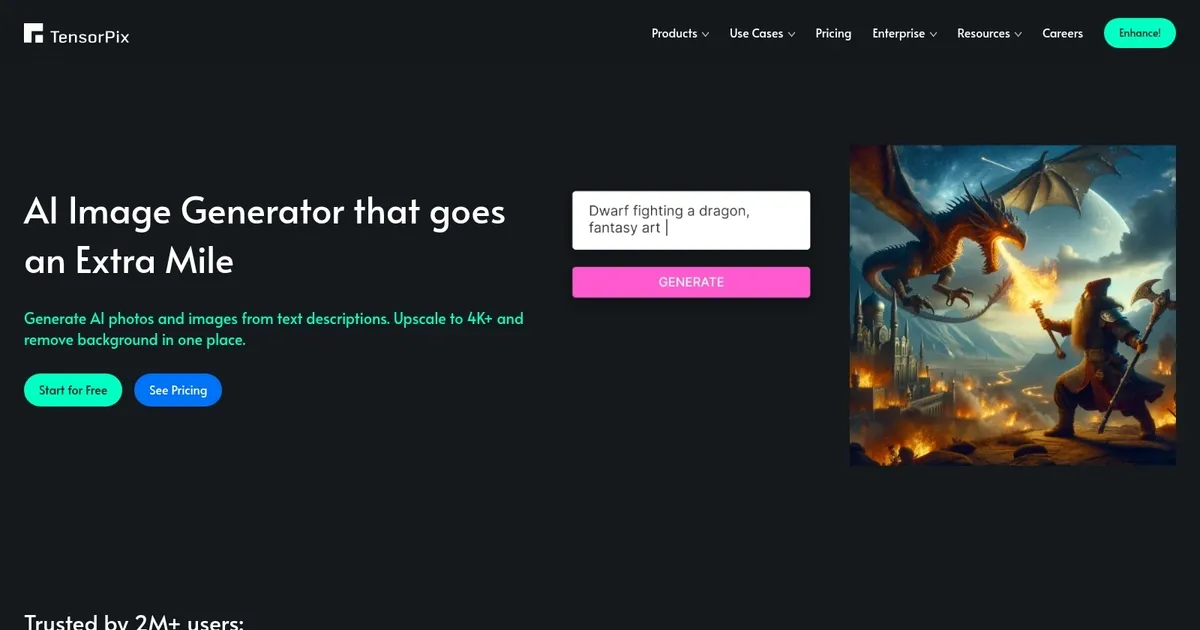
Homepage Screenshot 📸

TensorPix AI Image Generator screenshot

What are the key features? ✨

  • Text-to-Image Generation: Creates 4K images from detailed text descriptions, producing artwork, photos, or designs.
  • AI Image Editing: Modifies uploaded photos using simple text prompts to change backgrounds, lighting, or elements.
  • Image Merging: Combines up to 10 images into one cohesive composition while preserving key details.
  • Style Transfer: Applies the artistic style from a reference image to new creations or photos.
  • High-Resolution Output: Generates and processes images up to 4K or higher with sharp details.

Who is it for? 🤔

TensorPix AI Image Generator helps content creators, marketers, graphic designers, and hobbyists who need quick, high-quality visuals without complex software. It's ideal for anyone wanting to generate custom images, edit photos easily, or remix existing ones for social media, presentations, websites, or personal projects. Beginners appreciate the simple interface, while professionals value the speed and browser-based convenience for fast iterations.

Examples of what you can use it for 💡

  • Content Creator: Generates custom visuals for blog posts, YouTube thumbnails, or social media graphics from text ideas.
  • Marketer: Creates branded images, product mockups, or promotional banners by editing and merging photos.
  • Graphic Designer: Produces concept art, logos, or illustrations quickly, then refines them with style transfers.
  • Hobbyist Artist: Experiments with AI to turn ideas into 4K artwork or remix personal photos into surreal scenes.
  • Educator: Develops visual aids, diagrams, or illustrative examples for lessons and presentations.

Pros & Cons ⚖️

  • Easy browser access
  • Fast 4K generation
  • Powerful merging feature
  • Intuitive editing
  • Queue times vary
  • Limited free credits

FAQs 💬

What is TensorPix AI Image Generator?
TensorPix AI Image Generator is an online AI tool that generates 4K images from text prompts, edits photos with descriptions, merges multiple images, and transfers styles between them.
Do I need to install anything to use TensorPix AI Image Generator?
No, it works entirely in your web browser without any downloads or installations.
Can I generate images for free?
Yes, you get limited free credits upon signing up, with more available through subscriptions or pay-as-you-go.
What resolutions does it support?
It generates images up to 4K and higher, depending on your plan and settings.
How does the image merging feature work?
Upload up to 10 images, provide a prompt, and the AI blends them into one new composition.
Is style transfer available?
Yes, you can upload a reference image and apply its style to your generated or edited content.
How does it compare to Midjourney?
TensorPix AI Image Generator focuses on ease and speed in the browser, while Midjourney offers more artistic depth but requires Discord.
Can I edit my own photos?
Yes, upload images and use text prompts to modify backgrounds, lighting, or other elements.
What kind of content can I create?
You can make realistic photos, artwork, logos, backgrounds, marketing visuals, and more.
Is there an API for developers?
Yes, TensorPix offers API access for integrating image generation and editing into apps.

Ready to try TensorPix AI Image Generator?

Generates stunning 4K images from text prompts, edits photos with AI, and more

Visit TensorPix AI Image Generator ↗

TensorPix AI Image Generator alternatives 🔗
  1. ChatGPT ChatGPT All-round AI assistant generating human-like responses to user queries and tasks
  2. Grok Grok Delivers witty, real-time AI responses with advanced reasoning and image generation
  3. Imagen Imagen Generates photorealistic images from detailed text prompts
  4. Black Forest Labs Black Forest Labs Generates high-quality images from text prompts with precision and speed
  5. Kling AI Kling AI Generates cinematic videos from text or images with realistic motion
  6. Runway Runway Generates and edits AI-powered videos from text prompts
Share
TensorPix AI Image Generator screenshot enlarged
Promote TensorPix AI Image Generator
light badge
Copy Embed Code
dark badge
Copy Embed Code
neutral badge
Copy Embed Code
Best AI Tools

Discover the best AI tools for any use case

Explore
  • Tool Categories
  • AI Use Cases
  • AI Events
  • AI News
  • Saved Tools
Company
  • About Us
  • Contact Us
  • Media & Partnerships
  • Suggest a Tool
Legal
  • Privacy Policy
  • Terms of Service
Copyright © 2026 Best AI Tools 415 Mission Street, 37th Floor, San Francisco, CA 94105