Zed by Zed Industries
Accelerates coding with fast, collaborative editing and AI integration
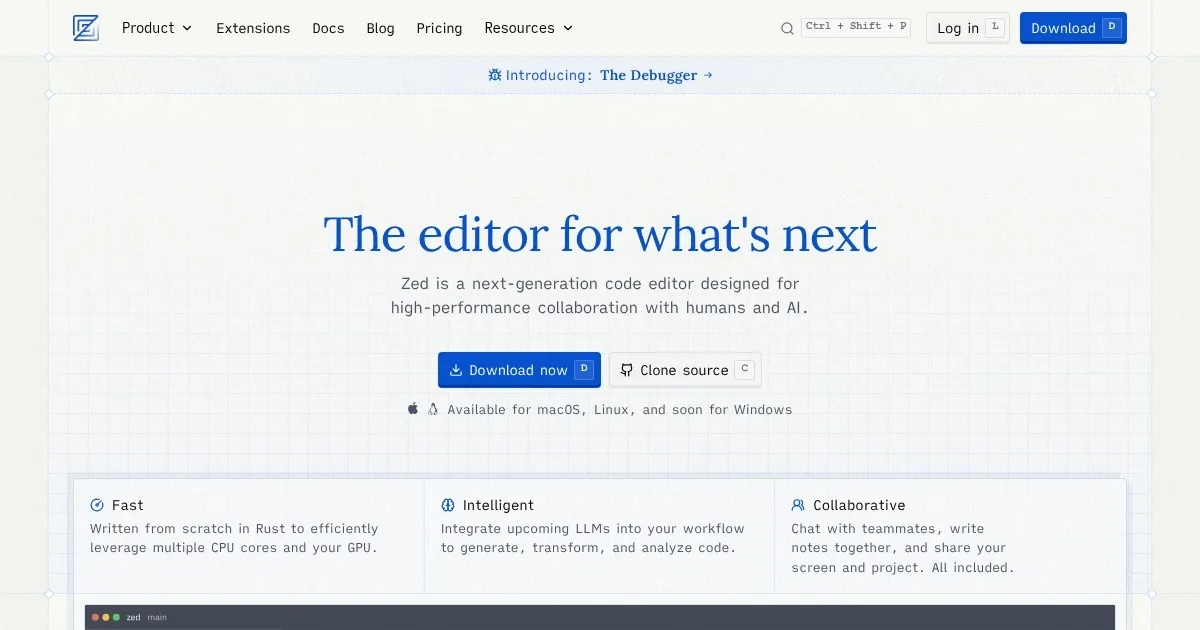
Zed is a high-performance, open-source code editor built in Rust for macOS and Linux, focusing on speed, collaboration, and AI integration. Developed by Zed Industries, creators of Atom and Tree-sitter, it supports real-time multiplayer editing, extensive customization, and language support via Tree-sitter and LSP. It’s free, with debugging recently added via DAP.
Key features include the Command Palette (cmd-shift-p) for accessing all functions, Multibuffers for editing multiple file excerpts in one view, and an Inline Assistant for AI-driven code generation using models like Claude or GPT. Remote development runs heavy tasks on a server via SSH, keeping the local UI responsive. Debugging supports Rust, Python, C/C++, and more, with keyboard-driven controls. Extensions, available via the Zed repository, enhance themes and language support.
Zed’s performance leverages Rust’s multi-core efficiency and GPU acceleration, achieving near-instant file opening and low-latency typing. Collaboration allows sharing projects via links, with built-in chat and screen-sharing. The settings.json file enables customization of fonts, keybindings, and AI models.
Drawbacks include limited Windows support (early access only), an immature Vim mode, and a less robust extension ecosystem compared to Visual Studio Code or JetBrains’ IntelliJ IDEA. Some users report issues with AI configuration complexity and occasional instability in beta features.
Zed is ideal for developers prioritizing speed and collaboration. Install it via the official script, configure “settings.json” for your workflow, and explore extensions to enhance functionality. Regularly check for updates, as the team releases frequent patches.
Homepage Screenshot 📸
Video Overview 🎬

What are the key features? ✨
- Command Palette: Access all editor functions via cmd-shift-p for quick navigation.
- Multibuffers: Edit excerpts from multiple files in a single, unified view.
- Inline Assistant: Generate or transform code using AI models like Claude or GPT-4o.
- Remote Development: Run heavy tasks on a server via SSH, keeping the local UI responsive.
- Debugging: Step through code in Rust, Python, and more using DAP-based debugging.
Who is it for? 🤔
Examples of what you can use it for 💡
- Web Developer: Uses Multibuffers to edit HTML, CSS, and JavaScript snippets in one view for faster front-end development.
- Data Scientist: Leverages Inline Assistant to generate Python code for data analysis directly in the editor.
- Remote Team Lead: Shares a project link for real-time pair programming and debugging with team members.
- Rust Developer: Debugs Rust code with DAP support, stepping through breakpoints efficiently.
- Open-Source Contributor: Customizes settings.json to tailor Zed’s UI and keybindings for open-source projects.
Pros & Cons ⚖️
- Lightning-fast performance with Rust.
- Real-time collaboration with teammates.
- AI-driven code generation and analysis.
- Free and open-source!
- Smaller extension ecosystem than competitors.
- AI setup can be complex to configure.
FAQs 💬