Skip to content
logo-darklogo-darklogo-darklogo-dark
  • Tool Categories
    • 🎨Art & Creative Design505
    • 🏢Business Management644
    • 💻Coding & Development514
    • 👮Detection83
    • 🧠General Use728
    • 🏥Health & Wellness55
    • 📷Image & Photo Analysis100
    • 🖼️Image Generation & Editing618
    • 📐Interior & Architectural Design37
    • 🎓Learning & Education483
    • ⚖️Legal & Finance90
    • 🎭Lifestyle & Entertainment236
    • 📢Marketing & Advertising627
    • 🎧Music & Audio138
    • 👔Office & Workplace1,014
    • 🔬Research & Data Analysis373
    • 👥Social Media245
    • 🎥Video Generation & Editing426
    • 👧🏻Virtual Companion135
    • 🎤Voice Generation & Editing381
    • ✍️Writing & Editing808
    • All Categories
    • AI Use Cases
  • News
  • Events
    • Academic Conferences
    • Developer Conferences
    • Expos / Trade Shows
    • Industry Summits
    • Workshops / Training
    • All Events
    • Past Events
  • Saved Tools
  • Suggest a Tool
    ✕
    Home › Image Generation & Editing › Image Generation› AliveAI
    AliveAI

    AliveAI

    Generates realistic AI images and videos, from lifelike to anime styles

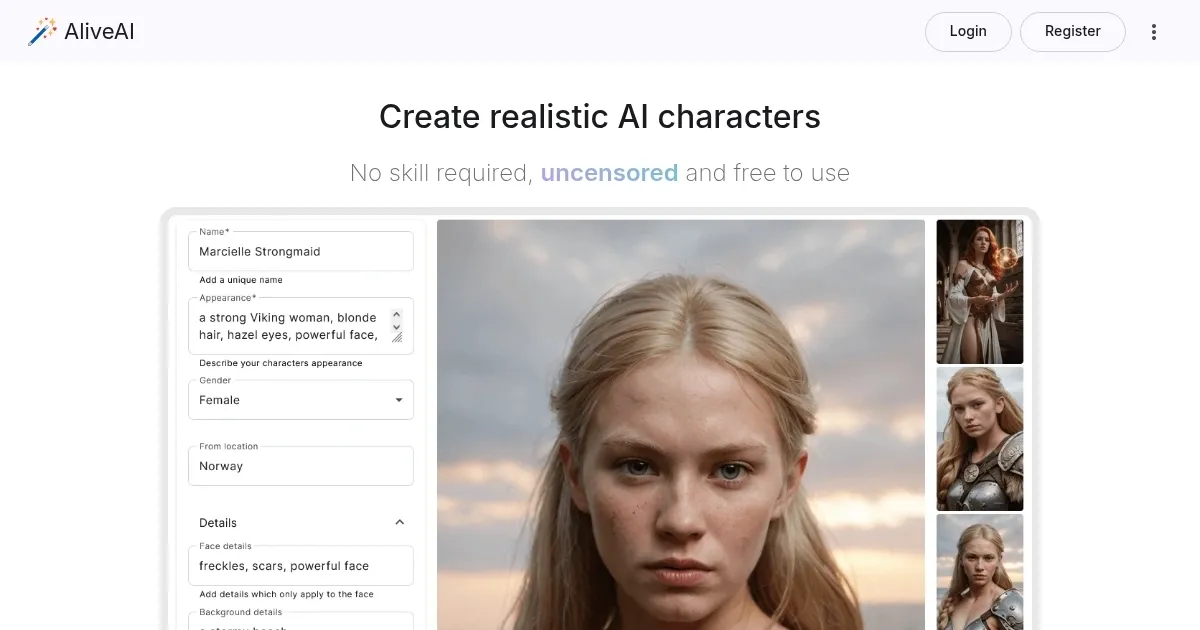
    AliveAI is an AI-powered platform that generates photorealistic images and videos, offering uncensored creative freedom for artists and storytellers. It uses advanced models like Stable Diffusion with custom LORAs to produce visuals in styles like realism, anime, or cartoon. The platform’s Angular-based interface, paired with Google’s Material Design, is intuitive and accessible. Users can customize body poses, outfits, lighting, and moods, creating detailed characters or short video clips. A private mode ensures secure, confidential creations, especially for sensitive content.

    The platform offers three core models: Creative, Realism, and Cartoon. Each allows precise tweaks to generate lifelike or stylized visuals. Image generation is fast, typically taking minutes, and video tools animate static images into smooth clips up to 10 seconds. Unlike Midjourney or DALL·E, which enforce strict content filters, AliveAI prioritizes creative control, making it ideal for bold or NSFW projects within legal bounds. A community feature lets users share prompts and ideas, though engagement is limited compared to competitors.

    Pricing includes free credits for new users, with subscription plans for heavier use. This aligns with Runway ML‘s model but feels less generous than DALL·E’s free tier. The platform’s speed and quality are strong, producing crisp images with detailed textures. Video outputs, while impressive, may have minor background inconsistencies. Some users report occasional bugs or slow load times, which can disrupt workflows.

    AliveAI’s low trust score on sites like Scam Detector raises concerns due to its newness and uncensored focus. It lacks the robust community of Midjourney or the advanced video editing of Runway ML. Still, its ease of use and flexibility make it a solid choice for creators seeking unfiltered expression.

    For best results, use clear, specific prompts in Basic mode to start. Experiment with Realism for lifelike characters or Cartoon for stylized art. Leverage free credits to test features, and use private mode for sensitive projects. Check community prompts for inspiration, and expect occasional glitches.

    Visit AliveAI ↗
    Categories
    🖼️ Image
    🖼️ Image Generation 🧑‍🎤 Avatar Generation ✏️ Photo Editing 🪄 Text to Image
    🎥 Video
    🖼️ Image to Video 🎞️ Animation Generation
    🎨 Art
    🎨 Art Generation

    Homepage Screenshot 📸

    AliveAI screenshot

    Video Overview 🎬

    What are the key features? ✨

    • Realism Model: Generates photorealistic characters with detailed textures and customizable features.
    • Cartoon Model: Creates vibrant, anime-style visuals ideal for graphic novels or social media.
    • Video Generation: Animates static images into smooth, lifelike video clips up to 10 seconds.
    • Private Mode: Secures sensitive creations, ensuring user privacy for bold or NSFW content.
    • Community Hub: Allows users to share and explore prompts for creative inspiration.

    Who is it for? 🤔

    AliveAI is made for digital artists, graphic designers, storytellers, and content creators who want to produce high-quality, uncensored visuals without complex software. It suits those crafting photorealistic or anime-style characters for art, social media, or storytelling, as well as role-players and indie developers needing quick, customizable assets. Its user-friendly interface appeals to beginners, while its flexibility attracts experienced creators seeking creative freedom.

    Examples of what you can use it for 💡

    • Digital Artist: Uses AliveAI.app to create photorealistic character portraits for concept art.
    • Social Media Influencer: Generates anime-style avatars for engaging posts or stories.
    • Storyteller: Produces lifelike video clips from static images for narrative projects.
    • Game Developer: Crafts custom character designs for indie games or prototypes.
    • Content Creator: Builds unique AI influencers for YouTube or TikTok content.

    Pros & Cons ⚖️

    • Uncensored creative freedom
    • Intuitive, clean interface
    • Various style options
    • Occasional bugs reported
    • Basic video editing tools

    FAQs 💬

    What is AliveAI used for?
    Generates realistic or anime-style images and videos for creative projects.
    Is AliveAI safe to use?
    Features a private mode to secure creations, but check local laws for NSFW content.
    Do I need technical skills to use it?
    No, its intuitive interface suits beginners and pros alike.
    Can I try AliveAI for free?
    Yes, new users get free credits to test the platform.
    What styles does AliveAI offer?
    Includes Realism, Cartoon, and Creative models for varied visuals.
    How long does image generation take?
    Typically a few minutes, depending on complexity.
    Can I create videos with AliveAI?
    Yes, it animates static images into short, lifelike clips.
    Is AliveAI censored?
    No, it offers uncensored creative freedom within legal limits.
    How does it compare to Midjourney?
    More flexible with fewer content restrictions but less community support.
    Where can I find inspiration for prompts?
    The community hub offers shared prompts to spark ideas.

    Ready to try AliveAI?

    Generates realistic AI images and videos, from lifelike to anime styles

    Visit AliveAI ↗

    AliveAI alternatives 🔗

    1. Runway Runway Generates and edits AI-powered videos from text prompts
    2. Stable Diffusion Stable Diffusion Generates high-quality images from text prompts with versatile styles
    3. Freepik AI Freepik AI Creates AI images and videos with fluid motion, detailed textures, and synced audio up to 1080p
    4. OpenArt OpenArt A versatile AI-powered platform for generating and enhancing images and art.
    5. ArtAny ArtAny Transforms text and images into stunning videos and visuals with AI
    6. Kling AI Kling AI Generates cinematic videos from text or images with realistic motion
    Share
    AliveAI screenshot enlarged
    Best AI Tools

    Discover the best AI tools for any use case

    Explore
    • Tool Categories
    • AI Use Cases
    • AI Events
    • AI News
    • Saved Tools
    Company
    • About Us
    • Contact Us
    • Media & Partnerships
    • Suggest a Tool
    Legal
    • Privacy Policy
    • Terms of Service
    Copyright © 2026 Best AI Tools 415 Mission Street, 37th Floor, San Francisco, CA 94105