logo-darklogo-darklogo-darklogo-dark
  • Tool Categories
    • 🎨Art & Creative Design505
    • 🏢Business Management644
    • 💻Coding & Development515
    • 👮Detection83
    • 🧠General Use727
    • 🏥Health & Wellness55
    • 📷Image & Photo Analysis100
    • 🖼️Image Generation & Editing618
    • 📐Interior & Architectural Design37
    • 🎓Learning & Education483
    • ⚖️Legal & Finance90
    • 🎭Lifestyle & Entertainment236
    • 📢Marketing & Advertising627
    • 🎧Music & Audio138
    • 👔Office & Workplace1,014
    • 🔬Research & Data Analysis372
    • 👥Social Media245
    • 🎥Video Generation & Editing426
    • 👧🏻Virtual Companion135
    • 🎤Voice Generation & Editing381
    • ✍️Writing & Editing808
    • All Categories
    • AI Use Cases
  • News
  • Events
    • Academic Conferences
    • Developer Conferences
    • Expos / Trade Shows
    • Industry Summits
    • Workshops / Training
    • All Events
    • Past Events
  • Saved Tools
  • Suggest a Tool
✕
Home › Coding & Development › Code Assistant› Augment Code
Augment Code

Augment Code

Smart AI tool created to help software teams write code faster and better

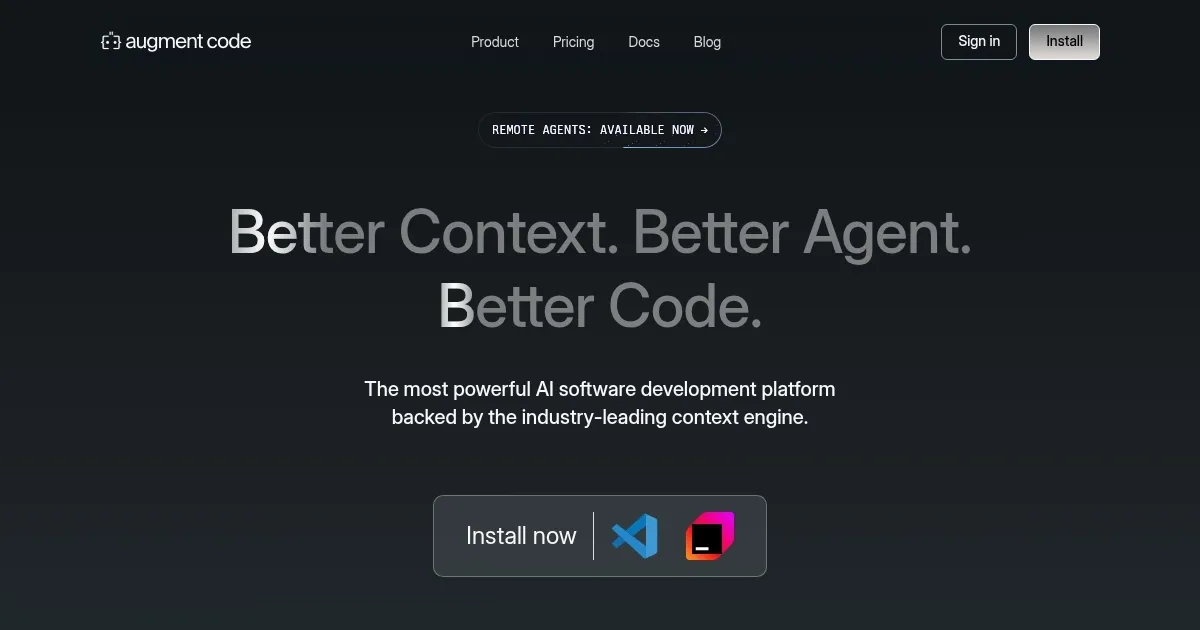
Augment Code is a smart AI tool created to help software teams write code faster and better. In that sense, it can understand your code and assists you in building software.

Keeping track of all the code can be challenging and the situation only gets worse with big projects. That’s where Augment Code helps by understanding your entire codebase and giving suggestions that fit right in. It’s like having a teammate who knows all the details and can guide you through different tasks.

The tool can work with popular tools like VS Code, JetBrains, and Slack — so you don’t have to switch between different programs. You can ask questions, get code suggestions, and even “have conversations” about your code all in one place.

Augment Code also helps teams work together better by keeping everyone on the same page and by understanding changes in the code. This is meant to make collaboration smoother and help avoid confusion.

Companies like Webflow and Kong have used Augment Code to improve their development processes. They have seen faster onboarding for new developers and better productivity overall. However, it is important to add that it is not just big companies that can benefit — even smaller teams can use Augment Code to make coding easier and more efficient.

When compared to GitHub Copilot and Cursor, Augment Code promises deep(r) integration with your codebase and real-time collaboration features. Its focus on context-aware suggestions and seamless tool integration makes it a useful asset for any development team looking to improve efficiency and code quality. Love it!

Visit Augment Code ↗
Categories
💻 Coding
🤖 Code Assistant ⌨️ Code Generation 👨‍💻 Development 🔍 Code Review ✨ Vibe Coding 🐙 Github
👔 Work
🤖 Copilot 🔗 Agent

Homepage Screenshot 📸

Augment Code screenshot

Video Overview 🎬

Augment Code - Video Overview

What are the key features? ✨

  • Context-aware suggestions: Augment Code understands your entire codebase and provides suggestions that fit seamlessly into your project.
  • Tool integration: It works with popular tools like VS Code, JetBrains, and Slack, so you can use it without changing your workflow.
  • Real-time collaboration: The platform keeps your team updated with real-time changes, making collaboration more efficient.
  • Slackbot assistance: You can interact with Augment Code through Slack, asking questions and getting help directly in your chat.
  • Fast code completions: Augment Code provides quick code suggestions, helping you write code faster and with fewer errors.

Who is it for? 🤔

Augment Code is designed for software development teams looking to enhance their coding efficiency. So, whether you're part of a large organization or a small startup - it offers tools that can help streamline your development process. Augment Code is especially useful for teams dealing with complex codebases and looking to improve collaboration and productivity.

Examples of what you can use it for 💡

  • Teams working on big projects can use Augment Code to navigate and manage complex code structures
  • New team members can get up to speed quickly by using Augment Code to understand the codebase
  • Developers can identify and fix bugs more efficiently with Augment Code's context-aware suggestions
  • Get help in reorganizing and improving existing code without changing its functionality
  • Get assistance in integrating third-party APIs with relevant code snippets and guidance

Pros & Cons ⚖️

  • Speeds up coding tasks with intelligent suggestions
  • Works with existing tools
  • Better teamwork through real-time updates and shared understanding
  • New users might some need time to get familiar with all the features

FAQs 💬

What is Augment Code?
Augment Code is an AI coding platform that helps developers understand codebases, debug issues, and ship features faster through deep context awareness. It integrates as an extension in popular IDEs and provides completions, chat, and agent capabilities tailored for real-world software engineering.
Which IDEs does Augment Code support?
It works seamlessly with Visual Studio Code, all JetBrains IDEs like IntelliJ, PyCharm, and WebStorm, as well as Vim and Neovim. You can also use its CLI for terminal-based workflows.
How does Augment Code handle large codebases?
Its industry-leading context engine indexes your entire codebase in real-time, allowing it to reason across hundreds of thousands of files and understand dependencies, patterns, and architecture. This makes it particularly effective for monorepos or legacy projects where context is key.
Does Augment Code support autonomous agents?
Yes, its agents can plan tasks, write code, run commands, and even open pull requests. They operate with user approval for safety and leverage the full codebase context for high-quality, production-ready outputs.
Can I add images or screenshots for context?
Augment Code supports multimodal inputs, so you can include screenshots, wireframes, or diagrams to provide extra context for tasks like implementing UI changes.
Is my code private and secure with Augment Code?
Code remains private by default, and paid plans ensure no training on your data. It respects .gitignore files, offers SOC 2 compliance, and includes enterprise features like customer-managed keys for sensitive environments.
What makes Augment Code different from tools like GitHub Copilot or Cursor?
It prioritizes deep, persistent codebase understanding over simple autocomplete, excelling in complex refactors, cross-file changes, and architectural reasoning where competitors often need manual context additions.
Does Augment Code work with multiple repositories?
Yes, it can index and reason across multiple repos simultaneously, making it suitable for microservices or distributed systems.
Can Augment Code help with code reviews?
It includes an AI code review feature that analyzes pull requests for correctness, architectural issues, and bugs, often catching problems human reviewers might miss in large codebases.
Is there a terminal or CLI version?
Augment offers a powerful CLI with agents, task management, and full access to its context engine, perfect for automation in scripts or remote workflows.

Ready to try Augment Code?

Smart AI tool created to help software teams write code faster and better

Visit Augment Code ↗

Augment Code alternatives 🔗

  1. ChatGPT ChatGPT All-round AI assistant generating human-like responses to user queries and tasks
  2. Claude Claude Assists users in reasoning, coding, writing, and analyzing data with advanced AI models
  3. DeepSeek DeepSeek Delivers advanced AI models for coding and reasoning at low costs
  4. Cursor Cursor Supercharges coding with AI agents that build, edit, and review code autonomously.
  5. Windsurf Windsurf Empowers developers with AI-driven code generation and real-time collaboration.
  6. Lovable Lovable Builds apps and websites via AI chat prompts.
Share
Augment Code screenshot enlarged
Promote Augment Code
light badge
Copy Embed Code
dark badge
Copy Embed Code
neutral badge
Copy Embed Code
Best AI Tools

Discover the best AI tools for any use case

Explore
  • Tool Categories
  • AI Use Cases
  • AI Events
  • AI News
  • Saved Tools
Company
  • About Us
  • Contact Us
  • Media & Partnerships
  • Suggest a Tool
Legal
  • Privacy Policy
  • Terms of Service
Copyright © 2026 Best AI Tools 415 Mission Street, 37th Floor, San Francisco, CA 94105