logo-darklogo-darklogo-darklogo-dark
  • Tool Categories
    • ๐ŸŽจArt & Creative Design505
    • ๐ŸขBusiness Management644
    • ๐Ÿ’ปCoding & Development515
    • ๐Ÿ‘ฎDetection83
    • ๐Ÿง General Use727
    • ๐ŸฅHealth & Wellness55
    • ๐Ÿ“ทImage & Photo Analysis100
    • ๐Ÿ–ผ๏ธImage Generation & Editing618
    • ๐Ÿ“Interior & Architectural Design37
    • ๐ŸŽ“Learning & Education483
    • โš–๏ธLegal & Finance90
    • ๐ŸŽญLifestyle & Entertainment236
    • ๐Ÿ“ขMarketing & Advertising627
    • ๐ŸŽงMusic & Audio138
    • ๐Ÿ‘”Office & Workplace1,014
    • ๐Ÿ”ฌResearch & Data Analysis372
    • ๐Ÿ‘ฅSocial Media245
    • ๐ŸŽฅVideo Generation & Editing426
    • ๐Ÿ‘ง๐ŸปVirtual Companion135
    • ๐ŸŽคVoice Generation & Editing381
    • โœ๏ธWriting & Editing808
    • All Categories
    • AI Use Cases
  • News
  • Events
    • Academic Conferences
    • Developer Conferences
    • Expos / Trade Shows
    • Industry Summits
    • Workshops / Training
    • All Events
    • Past Events
  • Saved Tools
  • Suggest a Tool
โœ•
Home › Image Generation & Editing › Photo Editing› B612 AI Photo&Video Editor
B612 AI Photo&Video Editor

B612 AI Photo&Video Editor

Capture and edit photos/videos with trendy filters and AI effects

B612 AI Photo & Video Editor is a mobile app by SNOW Corporation that combines real-time camera filters, AI-driven beauty enhancements, and video editing tools for creating social media-ready content. It offers a robust set of features for casual users, with a focus on selfies and short videos. The app’s Smart Beauty feature uses AI to analyze facial features and apply tailored enhancements, while AR filters add playful or dramatic effects in real time. Users can create custom filters, access over 500 music tracks for videos, and use tools like Video Mosaic for background blurring. The app supports high-resolution and night modes for better image quality.

Key features include the ability to shoot 3- or 6-second video clips with sound, ideal for social media stories, and a GIF Bounce feature for creating shareable loops. The app’s editing suite offers precise color adjustments, like HSL and split tone, alongside basic cropping and sticker tools. Compared to Canva and Adobe Express, B612 prioritizes real-time effects over graphic design, making it less suited for professional projects but ideal for quick, fun edits. Canva excels in templates, while Adobe Express offers broader editing capabilities.

The app is free with optional B612 VIP subscriptions for premium filters and tools, which is competitive with similar apps. However, it lacks integration with device camera rolls, limiting editing to in-app captures. Some users report occasional glitches, like filter lag or crashes, which can disrupt workflows. The interface, while intuitive, may overwhelm beginners due to its extensive options.

B612’s strength lies in its accessibility and creative freedom. The custom filter creator is straightforward, requiring just a few taps to design and share. Video editing tools, including music integration, make it easy to craft engaging clips. The app’s focus on AR and beauty effects sets it apart for selfie enthusiasts, though it may not appeal to users seeking advanced editing.

For best results, experiment with the Smart Beauty settings to personalize your look, and use the music library to enhance videos. If you need to edit existing media, consider pairing B612 with a secondary app like Adobe Express for flexibility.

Visit B612 AI Photo&Video Editor ↗
Categories
๐Ÿ–ผ๏ธ Image
โœ๏ธ Photo Editing ๐ŸŽž๏ธ Photo Filtering ๐ŸŒŸ Photo Enhancing ๐Ÿง‘โ€๐ŸŽค Avatar Generation
๐ŸŽจ Art
๐Ÿ’„ Beauty
๐ŸŽฅ Video
โœ๏ธ Video Editing

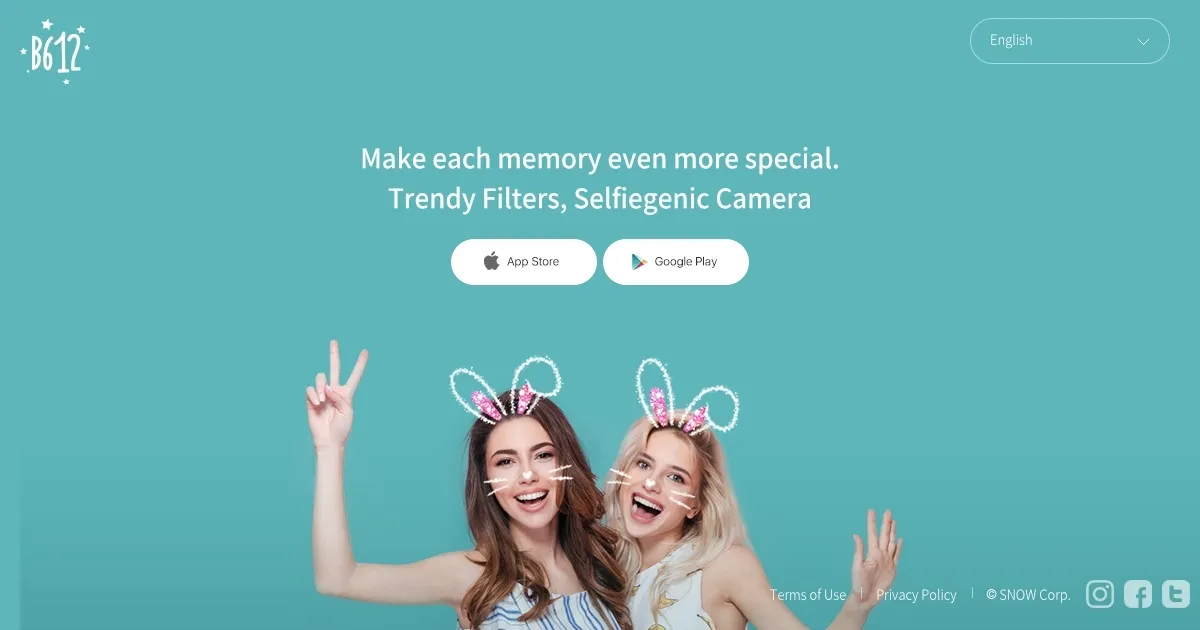
Homepage Screenshot 📸

B612 AI Photo&Video Editor screenshot

What are the key features? ✨

  • Smart Beauty: AI analyzes face shape for custom beauty enhancements.
  • AR Filters: Real-time augmented reality effects for photos and videos.
  • Custom Filter Creator: Design and share unique filters with friends.
  • Video Mosaic: Blurs backgrounds in videos for a polished look.
  • GIF Bounce: Creates short, looping GIFs from video clips.

Who is it for? 🤔

B612 is best for social media enthusiasts, casual photographers, and content creators who want to produce eye-catching selfies and short videos without complex editing skills. Itโ€™s perfect for younger users or those active on platforms like TikTok and Instagram, where quick, visually striking content thrives.

Examples of what you can use it for 💡

  • Social Media Influencer: Applies AR filters to create engaging Instagram stories.
  • Teen Photographer: Uses Smart Beauty to enhance selfies for TikTok posts.
  • Casual User: Records a 6-second video with music for a fun Snapchat share.
  • Content Creator: Designs custom filters to brand their social media content.
  • Event Planner: Captures vibrant event photos with night mode for posting.

Pros & Cons ⚖️

  • Broad range of AR filters
  • Free with robust features
  • High-resolution mode
  • Occasional app glitches
  • Overwhelming interface

FAQs 💬

What is B612 used for?
B612 is a camera and editing app for creating photos and videos with AR filters and beauty effects.
Is B612 free to use?
Yes, B612 is free with optional VIP subscriptions for premium features.
Can I edit existing photos in B612?
No, B612 only edits photos and videos captured within the app.
Does B612 support video editing?
Yes, it offers video editing with filters, music, and effects like Video Mosaic.
What platforms is B612 available on?
B612 is available on iOS and Android devices.
Can I create my own filters in B612?
Yes, the Custom Filter Creator lets you design and share unique filters.
Does B612 work in low light?
Yes, the night mode ensures clear photos in low-light conditions.
How does B612 compare to Snapchat?
B612 focuses on editing over messaging, unlike Snapchatโ€™s social features.
Is B612 safe for privacy?
B612 uses facial recognition, but you can review its privacy policy for details.
Can I share B612 content to social media?
Yes, edited photos and videos can be easily shared to platforms like Instagram.

Ready to try B612 AI Photo&Video Editor?

Capture and edit photos/videos with trendy filters and AI effects

Visit B612 AI Photo&Video Editor ↗
B612 AI Photo&Video Editor alternatives 🔗

  1. Imagen Imagen Generates photorealistic images from detailed text prompts
  2. Black Forest Labs Black Forest Labs Generates high-quality images from text prompts with precision and speed
  3. Stable Diffusion Stable Diffusion Generates high-quality images from text prompts with versatile styles
  4. Adobe Express Adobe Express Creates on-brand content with AI-driven design and video tools
  5. Adobe Firefly Adobe Firefly Generates images, videos, audio, and vectors using AI.
  6. Freepik AI Freepik AI Creates AI images and videos with fluid motion, detailed textures, and synced audio up to 1080p
Share
B612 AI Photo&Video Editor screenshot enlarged
Promote B612 AI Photo&Video Editor
light badge
Copy Embed Code
dark badge
Copy Embed Code
neutral badge
Copy Embed Code
Best AI Tools

Discover the best AI tools for any use case

Explore
  • Tool Categories
  • AI Use Cases
  • AI Events
  • AI News
  • Saved Tools
Company
  • About Us
  • Contact Us
  • Media & Partnerships
  • Suggest a Tool
Legal
  • Privacy Policy
  • Terms of Service
Copyright © 2026 Best AI Tools 415 Mission Street, 37th Floor, San Francisco, CA 94105