logo-darklogo-darklogo-darklogo-dark
  • Tool Categories
    • ๐ŸŽจArt & Creative Design505
    • ๐ŸขBusiness Management644
    • ๐Ÿ’ปCoding & Development515
    • ๐Ÿ‘ฎDetection83
    • ๐Ÿง General Use727
    • ๐ŸฅHealth & Wellness55
    • ๐Ÿ“ทImage & Photo Analysis100
    • ๐Ÿ–ผ๏ธImage Generation & Editing618
    • ๐Ÿ“Interior & Architectural Design37
    • ๐ŸŽ“Learning & Education483
    • โš–๏ธLegal & Finance90
    • ๐ŸŽญLifestyle & Entertainment236
    • ๐Ÿ“ขMarketing & Advertising627
    • ๐ŸŽงMusic & Audio138
    • ๐Ÿ‘”Office & Workplace1,014
    • ๐Ÿ”ฌResearch & Data Analysis372
    • ๐Ÿ‘ฅSocial Media245
    • ๐ŸŽฅVideo Generation & Editing426
    • ๐Ÿ‘ง๐ŸปVirtual Companion135
    • ๐ŸŽคVoice Generation & Editing381
    • โœ๏ธWriting & Editing808
    • All Categories
    • AI Use Cases
  • News
  • Events
    • Academic Conferences
    • Developer Conferences
    • Expos / Trade Shows
    • Industry Summits
    • Workshops / Training
    • All Events
    • Past Events
  • Saved Tools
  • Suggest a Tool
โœ•
Home › Image Generation & Editing › Image Generation› Bulk Image Generation
Bulk Image Generation

Bulk Image Generation

Creates 100+ high-quality AI images in seconds for professional use

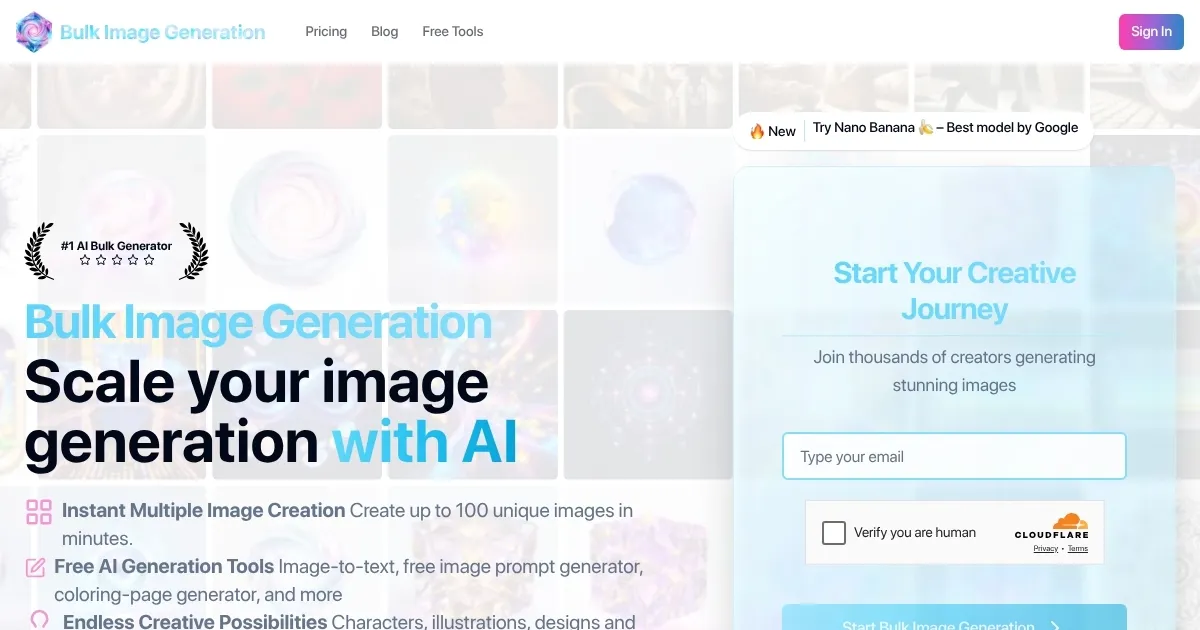
Bulk Image Generation is an AI-powered platform that creates up to 100 high-quality images in seconds using the Flux 1.1 model. It targets professionals needing visuals for product photography, social media, or game design. The tool automates prompt engineering, allowing users to describe goals simply, like “app icons for a tech startup,” and generates consistent images fast. Batch editing features, including face swap and background removal, streamline post-production without external software.

Key features include the ability to generate 100 images in 15 seconds, automated prompt creation, and bulk editing tools. The platform offers free tools like an AI Prompt Generator and aspect ratio calculator, enhancing usability. It supports diverse use cases, such as creating 34 game design images or 8 social media ads. The Flux 1.1 model ensures high-resolution outputs, and the interface is user-friendly, requiring minimal technical knowledge.

Compared to competitors like MidJourney and DALLยทE, Bulk Image Generation prioritizes speed and volume over artistic depth. Canva offers broader design tools but lacks the same batch generation scale. Pricing includes a free tier and paid plans, aligning with industry standards but potentially limiting for heavy users compared to Stable Diffusion’s open-source model.

Users appreciate the speed and ease but note occasional inconsistencies in style across batches, as seen in X feedback. The platform’s focus on bulk output can lead to less variety in niche artistic styles, requiring prompt adjustments. The free tools, like the image-to-prompt converter, add value for beginners.

To use Bulk Image Generation effectively, start with the free tier to test outputs. Use specific prompts for better results and leverage the aspect ratio calculator for platform compatibility. Businesses needing rapid, high-volume visuals will find it most useful.

Visit Bulk Image Generation ↗
Categories
๐Ÿ–ผ๏ธ Image
๐Ÿ–ผ๏ธ Image Generation ๐Ÿช„ Text to Image
๐ŸŽจ Art
๐ŸŽจ Art Generation ๐Ÿ–ผ๏ธ Design Generation
๐Ÿ“ข Advertising
๐ŸŽจ Ad Creative

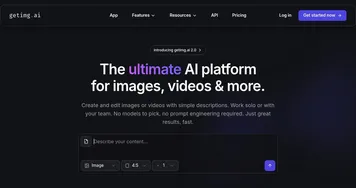
Homepage Screenshot 📸

Bulk Image Generation screenshot

What are the key features? ✨

  • Batch Generation: Creates up to 100 images in 15 seconds using Flux 1.1
  • Automated Prompt Engineering: Simplifies input by generating AI prompts from basic descriptions
  • Bulk Editing: Enables face swaps and background removal across multiple images
  • AI Prompt Generator: Suggests optimized prompts for better image results
  • Aspect Ratio Calculator: Optimizes image dimensions for various platforms

Who is it for? 🤔

Bulk Image Generation is designed for small business owners, social media managers, and game designers who need high-quality visuals quickly. It suits e-commerce sellers creating product photos, marketers crafting social media ads, or educators producing visual content like coloring pages. Its speed and batch editing make it perfect for professionals with high-volume image needs but limited design skills.

Examples of what you can use it for 💡

  • E-commerce Seller: Generates product photos for online stores in various styles
  • Social Media Manager: Creates consistent ad visuals for campaigns in minutes
  • Game Designer: Produces character or environment art for game prototypes
  • Educator: Develops coloring pages for classroom or online learning materials
  • Marketing Agency: Crafts branded visuals for client campaigns efficiently

Pros & Cons ⚖️

  • Generates 100 images in 15 seconds
  • No prompt engineering needed
  • Free tools included like prompt generator and resizer
  • Limited style variety and outputs can feel similar

FAQs 💬

What is Bulk Image Generation?
An AI tool that creates up to 100 images in seconds for professional use
How does it handle prompts?
It automates prompt engineering based on simple user descriptions
What model powers the tool?
It uses Flux 1.1 for high-quality, fast image generation
Is there a free version?
Yes, a free tier includes limited features and tools
What are the main use cases?
Product photos, social media ads, game art, and more
Can I edit images in bulk?
Yes, features include face swaps and background removal
How does it compare to MidJourney?
It prioritizes speed and volume over artistic depth
Do I need design skills?
No, the interface is beginner-friendly
What free tools are included?
AI Prompt Generator, aspect ratio calculator, and more
Is it suitable for small businesses?
Yes, itโ€™s ideal for quick, high-volume visual needs

Ready to try Bulk Image Generation?

Creates 100+ high-quality AI images in seconds for professional use

Visit Bulk Image Generation ↗

Bulk Image Generation alternatives 🔗
  1. ChatGPT ChatGPT All-round AI assistant generating human-like responses to user queries and tasks
  2. Grok Grok Delivers witty, real-time AI responses with advanced reasoning and image generation
  3. Imagen Imagen Generates photorealistic images from detailed text prompts
  4. Black Forest Labs Black Forest Labs Generates high-quality images from text prompts with precision and speed
  5. Kling AI Kling AI Generates cinematic videos from text or images with realistic motion
  6. Runway Runway Generates and edits AI-powered videos from text prompts
Share
Bulk Image Generation screenshot enlarged
Promote Bulk Image Generation
light badge
Copy Embed Code
dark badge
Copy Embed Code
neutral badge
Copy Embed Code
Best AI Tools

Discover the best AI tools for any use case

Explore
  • Tool Categories
  • AI Use Cases
  • AI Events
  • AI News
  • Saved Tools
Company
  • About Us
  • Contact Us
  • Media & Partnerships
  • Suggest a Tool
Legal
  • Privacy Policy
  • Terms of Service
Copyright © 2026 Best AI Tools 415 Mission Street, 37th Floor, San Francisco, CA 94105