logo-darklogo-darklogo-darklogo-dark
  • Tool Categories
    • 🎨Art & Creative Design505
    • 🏢Business Management644
    • 💻Coding & Development515
    • 👮Detection83
    • 🧠General Use727
    • 🏥Health & Wellness55
    • 📷Image & Photo Analysis100
    • 🖼️Image Generation & Editing618
    • 📐Interior & Architectural Design37
    • 🎓Learning & Education483
    • ⚖️Legal & Finance90
    • 🎭Lifestyle & Entertainment236
    • 📢Marketing & Advertising627
    • 🎧Music & Audio138
    • 👔Office & Workplace1,014
    • 🔬Research & Data Analysis372
    • 👥Social Media245
    • 🎥Video Generation & Editing426
    • 👧🏻Virtual Companion135
    • 🎤Voice Generation & Editing381
    • ✍️Writing & Editing808
    • All Categories
    • AI Use Cases
  • News
  • Events
    • Academic Conferences
    • Developer Conferences
    • Expos / Trade Shows
    • Industry Summits
    • Workshops / Training
    • All Events
    • Past Events
  • Saved Tools
  • Suggest a Tool
✕
Home › Office & Workplace › Diagram Generation› Edraw.AI
Edraw.AI

Edraw.AI

An innovative platform that combines AI with diagram creation

Edraw.AI is an innovative platform that combines AI with diagram creation. Whether you’re mapping out ideas, designing workflows, or planning projects – this tool can simplify the process, making it accessible to everyone.

Beyond drawing diagrams, Edraw.AI assists in generating content, analyzing data, and even brainstorming ideas. This means you can focus more on developing concepts rather than getting bogged down by technical details.

The platform boasts an extensive library of templates and symbols, providing users with access to over 26,000 symbols and 700 built-in templates that cover a broad range of diagram types and industries. This vast resource is meant to ensure that you can find the right tools to bring your ideas to life, no matter the complexity or field.

Edraw.AI supports real-time teamwork, allowing multiple users to work on the same project simultaneously. This feature is invaluable for teams spread across different locations, ensuring seamless communication and unified project development.

In conclusion, Edraw.AI is an intelligent diagramming tool (and more) that caters to a wide array of users. Its blend of AI, extensive resources, and collaborative features make it a valuable asset for anyone looking to visualize ideas effectively.

Visit Edraw.AI ↗
Categories
👔 Work
📐 Diagram Generation 🖍️ Whiteboard 📈 Charting 💬 Presentation Generation 📽️ PPT Generation 📄 Document Generation ⚡ Work Productivity
🎓 Education
🗺️ Mind Mapping
🎨 Art
📊 Infographic Generation
🏢 Business
🔄 Workflow

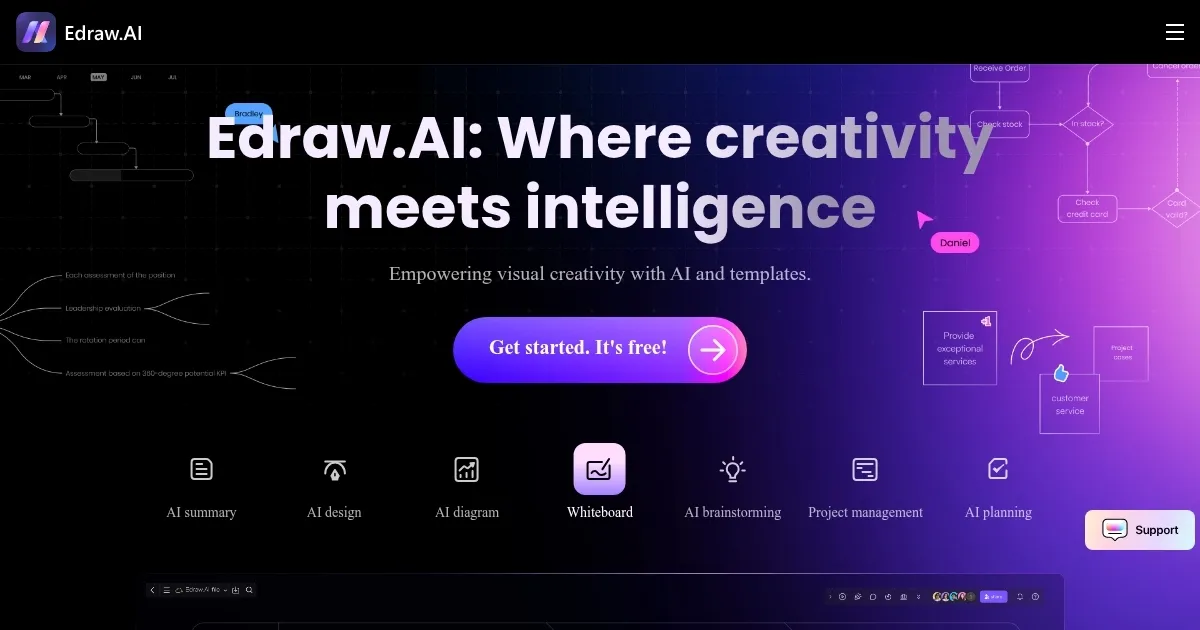
Homepage Screenshot 📸

Edraw.AI screenshot

Video Overview 🎬

Edraw.AI - Video Overview

What are the key features? ✨

  • AI-powered diagram creation: Generate flowcharts, mind maps, and other diagrams automatically using AI.
  • Extensive template library: Access over 700 professionally designed templates and 26,000 symbols to kickstart your projects.
  • Real-time collaboration: Work simultaneously with team members on the same project, enhancing productivity and communication.
  • AI chat assistance: Utilize the AI chat feature to brainstorm ideas, get answers to questions, and receive guidance during the diagram creation process.
  • AI drawing generation: Describe the drawing you want using natural language, and the AI will generate a visual representation based on your description.

Who is it for? 🤔

Edraw.AI is designed for a diverse audience, including professionals, educators, designers, and students. Its intuitive interface and AI capabilities suit anyone looking to transform ideas into visual representations. Whether you're managing a project, teaching a class, analyzing business processes, or studying for exams, Edraw.AI provides the tools to visualize and communicate effectively.

Examples of what you can use it for 💡

  • Plan and visualize project timelines, workflows, and resource allocations efficiently
  • Create engaging mind maps and educational materials to enhance teaching methods
  • Develop SWOT analysis, organizational charts, and process diagrams for strategic planning
  • Draft layouts, wireframes, and design concepts with ease using AI-generated visuals
  • Organize study materials, brainstorm ideas, and create presentations for academic projects

Pros & Cons ⚖️

  • Makes it (really) easy to create diagrams
  • A vast library of templates and symbols
  • Supports teamwork with real-time collaboration
  • You may need some time to master it

FAQs 💬

What is Edraw.AI mainly used for?
Edraw.AI helps create professional diagrams, mind maps, flowcharts, and other visuals quickly using AI, making it ideal for teams in project management, education, engineering, marketing, and IT.
Does Edraw.AI require design experience to use effectively?
No, its intuitive interface and AI features let beginners generate high-quality diagrams from text prompts or templates, while advanced users can customize extensively.
What types of diagrams can I create with Edraw.AI?
You can create over 210 types, including flowcharts, mind maps, org charts, UML diagrams, timelines, blueprints, Gantt charts, and more specialized visuals like PEST analysis or SWOT diagrams.
How does the AI diagram generation work?
Simply input a text description or prompt, and the AI automatically builds the diagram, suggests layouts, or refines it based on your feedback in real time.
Can multiple people collaborate on the same diagram?
Yes, Edraw.AI supports real-time teamwork, so team members can edit, comment, and brainstorm together seamlessly.
Is Edraw.AI suitable for educational purposes?
Absolutely, teachers and students use it to create engaging mind maps, presentations, timelines, and study aids with AI assistance for faster results.
Does Edraw.AI support importing from other tools?
It allows imports from related Edraw products and handles common formats, making it easy to bring existing work into the platform.
What file formats can I export diagrams in?
Diagrams export to popular formats like PDF, PNG, SVG, and others for easy sharing or embedding in documents and presentations.
How does Edraw.AI handle data visualization?
It converts complex data or text into clear charts, graphs, and diagrams, with AI helping summarize and organize information visually.
Is there mobile support for Edraw.AI?
The web version works on mobile browsers, though some reviews note it's optimized more for desktop; companion apps from the Edraw family offer additional mobile access.

Ready to try Edraw.AI?

An innovative platform that combines AI with diagram creation

Visit Edraw.AI ↗

Edraw.AI alternatives 🔗

  1. FigJam AI FigJam AI Instantly visualize ideas, suggest best practices, and automate tedious tasks
  2. Miro AI Miro AI Visual collaboration platform that lets you build the next big thing with a prompt and a chat
  3. Napkin AI Napkin AI Turn text into visually engaging content like infographics, flowcharts, and diagrams
  4. Mermaid Chart Mermaid Chart A diagramming tool that allows users to create a range of diagrams using text
  5. Whimsical AI: Text-to-Flowchart Whimsical AI: Text-to-Flowchart Transforms text prompts into editable flowcharts instantly
  6. Whimsical Mind Maps Whimsical Mind Maps An AI-powered tool for the quick and collaborative creation of mind maps
Share
Edraw.AI screenshot enlarged
Promote Edraw.AI
light badge
Copy Embed Code
dark badge
Copy Embed Code
neutral badge
Copy Embed Code
Best AI Tools

Discover the best AI tools for any use case

Explore
  • Tool Categories
  • AI Use Cases
  • AI Events
  • AI News
  • Saved Tools
Company
  • About Us
  • Contact Us
  • Media & Partnerships
  • Suggest a Tool
Legal
  • Privacy Policy
  • Terms of Service
Copyright © 2026 Best AI Tools 415 Mission Street, 37th Floor, San Francisco, CA 94105