Skip to content
logo-darklogo-darklogo-darklogo-dark
  • Tool Categories
    • 🎨Art & Creative Design505
    • 🏢Business Management644
    • 💻Coding & Development514
    • 👮Detection83
    • 🧠General Use728
    • 🏥Health & Wellness55
    • 📷Image & Photo Analysis100
    • 🖼️Image Generation & Editing618
    • 📐Interior & Architectural Design37
    • 🎓Learning & Education483
    • ⚖️Legal & Finance90
    • 🎭Lifestyle & Entertainment236
    • 📢Marketing & Advertising627
    • 🎧Music & Audio138
    • 👔Office & Workplace1,014
    • 🔬Research & Data Analysis373
    • 👥Social Media245
    • 🎥Video Generation & Editing426
    • 👧🏻Virtual Companion135
    • 🎤Voice Generation & Editing381
    • ✍️Writing & Editing808
    • All Categories
    • AI Use Cases
  • News
  • Events
    • Academic Conferences
    • Developer Conferences
    • Expos / Trade Shows
    • Industry Summits
    • Workshops / Training
    • All Events
    • Past Events
  • Saved Tools
  • Suggest a Tool
    ✕
    Home › Video Generation & Editing › Image to Video› Image-to-Video Maker
    Image-to-Video Maker

    Image-to-Video Maker

    Transform images, text, or clips into high-quality AI-generated videos

    Image-to-Video Maker is an AI-powered platform that converts images, text, or video clips into high-quality videos, supporting 4K resolution and multiple AI models like Kling 2.1, Veo3, and Hailuo 02. It offers a user-friendly interface with drag-and-drop functionality, making it accessible for users without video editing experience. The tool includes features like text-to-video generation, image-to-video animation, and video upscaling, with a library of templates and effects for various use cases. It supports JPG and PNG uploads with a 10MB size limit and offers watermark-free HD exports on the free plan.

    The platform’s key strength is its speed, generating 5- to 10-second videos in minutes. The “Text-to-Video Generator” allows users to input prompts for 4K videos with dialogue and ambient sound, while the “Image-to-Video Generator” animates static images with smooth transitions. The AI Avatar feature creates talking heads from a single photo, supporting over 15 voices. Compared to VideoMaker.me, which offers more customization, or AnyVideo.ai, which requires no registration, Image-to-Video Maker balances ease of use with professional output.

    Limitations include a restrictive credit system on the free plan, which caps usage for frequent users. Some templates, like “Bigfoot Vlog Maker,” are niche and may not suit all audiences. Processing times, while fast, can vary based on complexity, and customization options are less robust than competitors like Google’s Veo. The pricing structure is competitive, with a free tier and paid plans that unlock unlimited features, aligning with industry standards.

    The tool’s upscaling feature enhances blurry videos to 2K or 4K, ideal for restoring old footage. Its template library includes viral effects like “AI Twerk Video Maker” and “AI Logo Reveal,” catering to social media creators. Users may find the AI’s semantic understanding impressive, though complex prompts can occasionally yield inconsistent results.

    To maximize value, start with simple prompts and test the free plan. Explore templates that match your goals, like promotional or social media content. Monitor credit usage to avoid hitting limits, and consider paid plans for regular video production.

    Visit Image-to-Video Maker ↗
    Categories
    🎥 Video
    🖼️ Image to Video 📹 Video Generation 🎞️ Animation Generation 📲 Short Video Generation

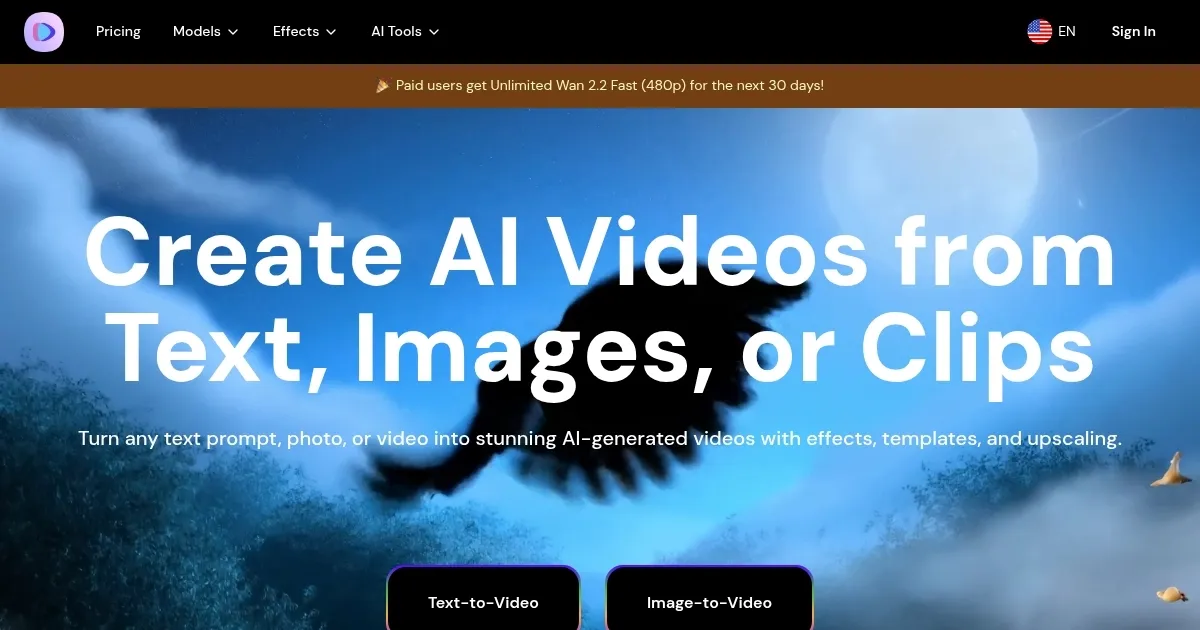
    Homepage Screenshot 📸

    Image-to-Video Maker screenshot

    What are the key features? ✨

    • Text-to-Video Generator: Creates 4K videos from text prompts with dialogue and effects.
    • Image-to-Video Generator: Animates static images into dynamic videos with smooth transitions.
    • AI Avatar Creation: Turns a single photo into a talking avatar with realistic lip-sync.
    • Video Upscaling: Enhances blurry videos to 2K or 4K resolution with sharp details.
    • Template Library: Offers hundreds of AI-powered effects and templates for quick video creation.

    Who is it for? 🤔

    Image-to-Video Maker is great for content creators, small business owners, marketers, and educators who need quick, high-quality video content without advanced editing skills. Its intuitive interface and AI-driven features suit social media influencers crafting viral clips, businesses producing promotional videos, and educators animating static images for engaging lessons.

    Examples of what you can use it for 💡

    • Content Creator: Uses templates like “AI Street Interview” to create engaging social media videos.
    • Small Business Owner: Animates product images into promotional videos for online marketing.
    • Educator: Converts static educational images into dynamic videos for classroom presentations.
    • Event Planner: Compiles event photos into highlight reels to share with clients or promote future events.
    • Digital Artist: Transforms artwork into animated videos to showcase creative portfolios.

    Pros & Cons ⚖️

    • Fast video generation
    • Watermark-free HD exports
    • Diverse template library
    • Limited free plan credits
    • Less customization than competitors

    FAQs 💬

    Is Image-to-Video Maker free to use?
    Yes, it offers a free plan with watermark-free HD exports, though credits are limited.
    What image formats does the tool support?
    It supports JPG and PNG formats with a 10MB size limit.
    How long does video generation take?
    Most videos generate in minutes, depending on complexity and settings.
    Can I create videos without editing skills?
    Yes, the drag-and-drop interface requires no technical expertise.
    Does it offer watermark-free exports on the free plan?
    Yes, all videos exported on the free plan are watermark-free.
    What AI models are supported?
    It supports Kling 2.1, Veo3, Hailuo 02, and others for varied video styles.
    Can I upscale old videos?
    Yes, the upscaling feature enhances blurry videos to 2K or 4K.
    Are there templates for social media?
    Yes, templates like “AI Twerk Video Maker” cater to viral social media content.
    How does it compare to VideoMaker.me?
    It’s simpler but offers less customization than VideoMaker.me.
    Can I create talking avatars?
    Yes, the AI Avatar feature creates realistic talking heads from a single photo.

    Ready to try Image-to-Video Maker?

    Transform images, text, or clips into high-quality AI-generated videos

    Visit Image-to-Video Maker ↗

    Image-to-Video Maker alternatives 🔗
    1. Kling AI Kling AI Generates cinematic videos from text or images with realistic motion
    2. Runway Runway Generates and edits AI-powered videos from text prompts
    3. Veo Veo Generates high-quality videos with audio from text or image prompts
    4. Freepik AI Freepik AI Creates AI images and videos with fluid motion, detailed textures, and synced audio up to 1080p
    5. Vidu AI Video Generator Vidu AI Video Generator Transforms text and images into high-quality AI-generated videos in seconds
    6. VideoPlus.ai VideoPlus.ai Transforms images and text into professional videos with AI-driven effects
    Share
    Image-to-Video Maker screenshot enlarged
    Best AI Tools

    Discover the best AI tools for any use case

    Explore
    • Tool Categories
    • AI Use Cases
    • AI Events
    • AI News
    • Saved Tools
    Company
    • About Us
    • Contact Us
    • Media & Partnerships
    • Suggest a Tool
    Legal
    • Privacy Policy
    • Terms of Service
    Copyright © 2026 Best AI Tools 415 Mission Street, 37th Floor, San Francisco, CA 94105