logo-darklogo-darklogo-darklogo-dark
  • Tool Categories
    • 🎨Art & Creative Design505
    • 🏢Business Management644
    • 💻Coding & Development515
    • 👮Detection83
    • 🧠General Use727
    • 🏥Health & Wellness55
    • 📷Image & Photo Analysis100
    • 🖼️Image Generation & Editing618
    • 📐Interior & Architectural Design37
    • 🎓Learning & Education483
    • ⚖️Legal & Finance90
    • 🎭Lifestyle & Entertainment236
    • 📢Marketing & Advertising627
    • 🎧Music & Audio138
    • 👔Office & Workplace1,014
    • 🔬Research & Data Analysis372
    • 👥Social Media245
    • 🎥Video Generation & Editing426
    • 👧🏻Virtual Companion135
    • 🎤Voice Generation & Editing381
    • ✍️Writing & Editing808
    • All Categories
    • AI Use Cases
  • News
  • Events
    • Academic Conferences
    • Developer Conferences
    • Expos / Trade Shows
    • Industry Summits
    • Workshops / Training
    • All Events
    • Past Events
  • Saved Tools
  • Suggest a Tool
✕
Home › Image Generation & Editing › Photo Editing› PhotoEditor.ai
PhotoEditor.ai

PhotoEditor.ai

Remove objects, people, blemishes or text from your images in seconds

PhotoEditor.ai is a sophisticated visual AI platform designed to transform the way we edit photos. Leveraging so-called advanced “inpainting technology,” it enables users to effortlessly remove unwanted objects, text, or people from images — providing exceptional results that surpass traditional editing methods.

In other words, PhotoEditor.ai can significantly streamline the editing process, making it accessible to users who may not have extensive design skills​​.

The service enables tasks such as object removal, blemish correction, and text deletion from images. All this can be accomplished with minimal effort​​, with AI doing the “heavy lifting” on the user’s behalf.

Lastly, we’ll add that if you start using PhotoEditor.ai and see room for its improvement, make sure to send them your two cents. The company encourages feedback and communication with its users, so that in the end – we all get a better product.

Visit PhotoEditor.ai ↗
Categories
🖼️ Image
✏️ Photo Editing 🧹 Object Removal ✂️ Background Removal 🌟 Photo Enhancing 💎 Image Enhancing 🎞️ Photo Filtering ⬆️ Image Upscaling

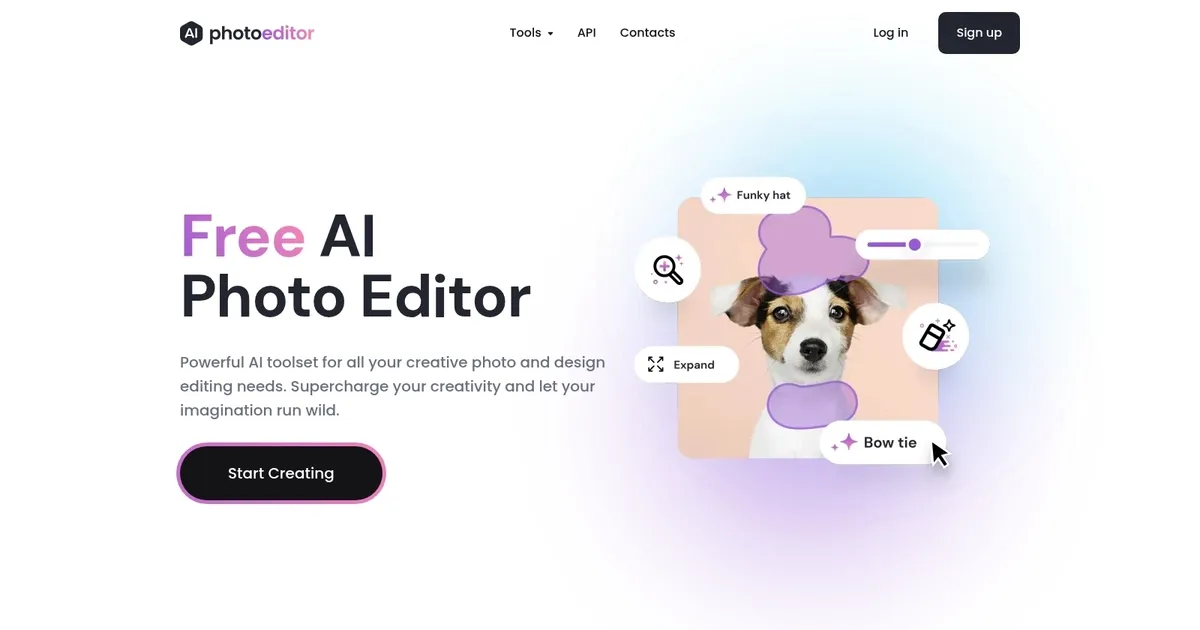
Homepage Screenshot 📸

PhotoEditor.ai screenshot

What are the key features? ✨

  • Enhance: Instantly fixes blurred or old photos to make them crisp and vivid using AI restoration.
  • Cleanup: Removes unwanted objects, text, people, or watermarks from images with intelligent inpainting.
  • Remove BG: Automatically extracts subjects by removing backgrounds from portraits or product photos in seconds.
  • Inpaint: Enables generative fill to edit or add elements anywhere in a photo via brush or text prompts.
  • Image Generator: Creates entirely new images from text descriptions using advanced AI models.

Who is it for? 🤔

PhotoEditor.ai suits casual users seeking quick photo improvements without software installs, social media creators who need fast polished posts, small business owners managing product or real-estate images, e-commerce sellers requiring clean backgrounds and distraction-free shots, and hobbyists experimenting with enhancements, object removal, or creative generative edits like expanding frames and text-to-image ideas.

Examples of what you can use it for 💡

  • social media creator: Quickly removes distractions or enhances selfies and posts to look professional without advanced editing skills.
  • e-commerce seller: Instantly cleans up product photos by removing backgrounds or unwanted objects for consistent online listings.
  • real-estate agent: Enhances property images, removes blemishes, or expands shots to show more of a room attractively.
  • content marketer: Generates custom visuals from text prompts or refines existing graphics for campaigns and ads.
  • hobby photographer: Revives blurry family photos with enhancement or experiments with creative inpainting and outpainting.

Pros & Cons ⚖️

  • Easy browser access
  • Free solid tools
  • Fast processing
  • No watermarks
  • Free resolution limit
  • Occasional wait times

FAQs 💬

Is PhotoEditor.ai completely free to use?
A free plan exists forever with three tools (Enhance, Cleanup, Remove BG) and 720px exports, no watermarks, and commercial use allowed. Pro unlocks the remaining five tools and higher resolutions.
Do I need to download anything to use PhotoEditor.ai?
No, everything runs directly in your web browser or on mobile—no software installation required.
What file formats does PhotoEditor.ai support?
It accepts JPG, PNG, HEIC, and WEBP files up to 15MB.
Can I use the generated or edited images commercially?
Yes, even on the free plan, commercial use is permitted with no watermarks added.
How does the privacy work with uploaded photos?
Images process on the server and automatically delete within one hour; they arent stored, reused, or resold.
What makes the Pro plan worth it?
Pro provides access to all eight tools, HD and 4K/8K outputs, generative features like Inpaint, Expand, and Image Generator, plus higher quality results.
Is PhotoEditor.ai good for beginners?
Yes, the interface stays simple with no design skills needed—just upload and select a tool.
How fast are the edits?
Most edits complete in seconds, though busier times or complex generative tasks might take a bit longer.
Does it work on mobile devices?
Yes, the web-based tool functions smoothly on smartphones and tablets without an app.
Can I upscale images to 8K?
Pro supports upscaling to 4K and 8K depending on the original and settings chosen.

Ready to try PhotoEditor.ai?

Remove objects, people, blemishes or text from your images in seconds

Visit PhotoEditor.ai ↗

PhotoEditor.ai alternatives 🔗

  1. Imagen Imagen Generates photorealistic images from detailed text prompts
  2. Black Forest Labs Black Forest Labs Generates high-quality images from text prompts with precision and speed
  3. Stable Diffusion Stable Diffusion Generates high-quality images from text prompts with versatile styles
  4. Adobe Express Adobe Express Creates on-brand content with AI-driven design and video tools
  5. Adobe Firefly Adobe Firefly Generates images, videos, audio, and vectors using AI.
  6. Freepik AI Freepik AI Creates AI images and videos with fluid motion, detailed textures, and synced audio up to 1080p
Share
PhotoEditor.ai screenshot enlarged
Promote PhotoEditor.ai
light badge
Copy Embed Code
dark badge
Copy Embed Code
neutral badge
Copy Embed Code
Best AI Tools

Discover the best AI tools for any use case

Explore
  • Tool Categories
  • AI Use Cases
  • AI Events
  • AI News
  • Saved Tools
Company
  • About Us
  • Contact Us
  • Media & Partnerships
  • Suggest a Tool
Legal
  • Privacy Policy
  • Terms of Service
Copyright © 2026 Best AI Tools 415 Mission Street, 37th Floor, San Francisco, CA 94105