logo-darklogo-darklogo-darklogo-dark
  • Tool Categories
    • ๐ŸŽจArt & Creative Design505
    • ๐ŸขBusiness Management644
    • ๐Ÿ’ปCoding & Development515
    • ๐Ÿ‘ฎDetection83
    • ๐Ÿง General Use727
    • ๐ŸฅHealth & Wellness55
    • ๐Ÿ“ทImage & Photo Analysis100
    • ๐Ÿ–ผ๏ธImage Generation & Editing618
    • ๐Ÿ“Interior & Architectural Design37
    • ๐ŸŽ“Learning & Education483
    • โš–๏ธLegal & Finance90
    • ๐ŸŽญLifestyle & Entertainment236
    • ๐Ÿ“ขMarketing & Advertising627
    • ๐ŸŽงMusic & Audio138
    • ๐Ÿ‘”Office & Workplace1,014
    • ๐Ÿ”ฌResearch & Data Analysis372
    • ๐Ÿ‘ฅSocial Media245
    • ๐ŸŽฅVideo Generation & Editing426
    • ๐Ÿ‘ง๐ŸปVirtual Companion135
    • ๐ŸŽคVoice Generation & Editing381
    • โœ๏ธWriting & Editing808
    • All Categories
    • AI Use Cases
  • News
  • Events
    • Academic Conferences
    • Developer Conferences
    • Expos / Trade Shows
    • Industry Summits
    • Workshops / Training
    • All Events
    • Past Events
  • Saved Tools
  • Suggest a Tool
โœ•
Home › Office & Workplace › Email Assistant› PolitePost
PolitePost

PolitePost

Rewrites rough email drafts into professional, courteous versions using AI

PolitePost is a neat AI-powered tool made to assist users in refining their email communication to be more professional and suitable for the workplace. Users can input a rough draft of their email, and the platform utilizes AI technology to analyze and restructure the text, ensuring that the email’s language, tone, and structure meet professional standards. This, in turn, enhances the effectiveness of workplace communication by providing a convenient and user-friendly way to polish emails before they are sent.

PolitePost operates under a model where each email processed incurs a nominal fee of approximately $0.001. This fee supports the maintenance and continuous improvement of the site, ensuring users have access to a high-quality service for their email refinement needs.

In addition, the service encourages users to support the site through donations, though that’s entirely optional. But we guess it’s fair to put in some money if you determine PolitePost actually helps you out. In the end, it’s your call.

Visit PolitePost ↗
Categories
๐Ÿ‘” Work
โœ‰๏ธ Email Assistant ๐Ÿ“จ Email Response
โœ๏ธ Writing
โœ‰๏ธ Email Writing ๐Ÿ” Rewriting ๐Ÿค– Writing Assistant ๐Ÿ”„ Paraphraser

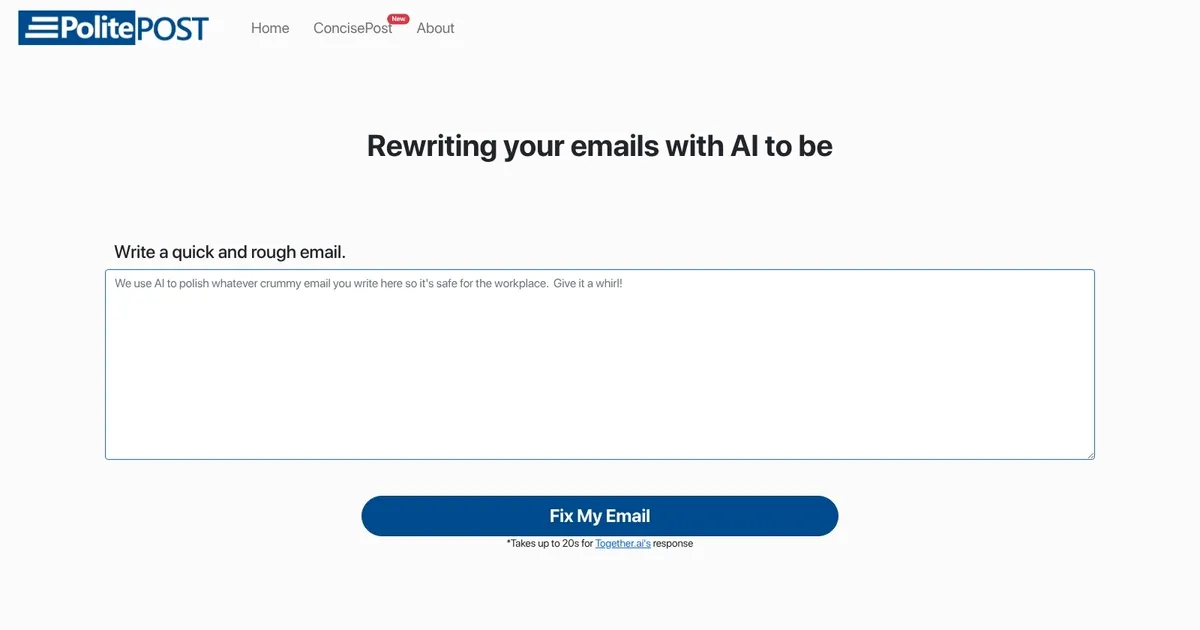
Homepage Screenshot 📸

PolitePost screenshot

What are the key features? ✨

  • AI Email Rewrite: Takes rough or informal email drafts and transforms them into polished, professional messages while preserving original intent.
  • No Account Required: Users can use the tool instantly without signing up or logging in for immediate access.
  • Fast Processing: Generates rewritten emails in approximately 20 seconds using Together.ai inference.
  • Copy Options: Provides easy copy text and copy as image buttons for quick use in emails or elsewhere.
  • Workplace Tone Focus: Specializes in removing slang, expletives, or harsh phrasing to ensure suitability for colleagues and clients.

Who is it for? 🤔

PolitePost is helpful for professionals who write a lot of emails under time pressure or emotional strainโ€”accountants explaining figures, customer support reps handling complaints, managers giving feedback, freelancers dealing with clients, or anyone who occasionally drafts something too direct and needs a quick politeness filter before sending.

Examples of what you can use it for 💡

  • Client communication: Paste a frustrated draft about delayed payment and get a diplomatic version that keeps the relationship intact.
  • Internal feedback: Turn blunt notes to colleagues about missed deadlines into constructive requests that encourage cooperation.
  • Customer support replies: Rewrite irritated responses to upset users into calm, solution-focused messages that de-escalate issues.
  • Job application follow-ups: Soften overly casual thank-you emails or handle rejection replies with professional grace.
  • Personal work venting: Clean up emotional drafts meant for a spouse or friend about work stress so they read as reasonable.

Pros & Cons ⚖️

  • Completely free to use
  • No signup needed
  • Handles harsh drafts well
  • Very simple interface
  • 20-second wait sometimes
  • No tone or length options

FAQs 💬

Is PolitePost really free?
Yes, the tool is free with no hidden fees or required account. The site mentions running costs and sometimes asks for optional support via Buy Me a Coffee.
Do I need to create an account to use it?
No, there is no signup or login required. You can paste your draft and get a rewrite immediately.
How long does it take to rewrite an email?
It usually takes up to 20 seconds, depending on the Together.ai inference response time.
What happens to my email drafts after I use the tool?
Drafts are sent directly to the API for processing with a backend to prevent abuse, but the site does not store them long-term.
Can it change the tone to something other than professional?
No, it focuses on making emails courteous and workplace-appropriate; there are no other tone options.
Is it good for very angry or ranting emails?
Yes, many users report it effectively softens strong language while keeping the main points.
Does it work on mobile devices?
Yes, it's a simple web tool that works in any modern browser, including on phones.
How does it compare to Grammarly for emails?
Grammarly corrects grammar and style, but PolitePost specializes in full rewrites to make tone polite and professional, especially for rough drafts.
Can I use it for non-work emails?
Yes, you can paste any text, though it's tuned for workplace communication.
What if the rewrite isn't perfect?
Review the output and edit it manually, or try rephrasing your original draft and running it again.

Ready to try PolitePost?

Rewrites rough email drafts into professional, courteous versions using AI

Visit PolitePost ↗

PolitePost alternatives 🔗

  1. Zia Zia AI-powered business assistant from Zoho
  2. HubSpot Breeze HubSpot Breeze Streamlines business growth with AI tools for marketing, sales, and service
  3. Zoom AI Companion Zoom AI Companion Get high-quality results when drafting emails and chat messages, summarizing meetings and chat threads
  4. Notion Mail Notion Mail Organizes emails automatically with AI while drafting replies and scheduling meetings
  5. Superhuman Mail Superhuman Mail AI-powered, premium email client designed to make email management easier and improve productivity
  6. Gorgias Gorgias Streamlines customer support with AI-powered automation for ecommerce brands
Share
PolitePost screenshot enlarged
Promote PolitePost
light badge
Copy Embed Code
dark badge
Copy Embed Code
neutral badge
Copy Embed Code
Best AI Tools

Discover the best AI tools for any use case

Explore
  • Tool Categories
  • AI Use Cases
  • AI Events
  • AI News
  • Saved Tools
Company
  • About Us
  • Contact Us
  • Media & Partnerships
  • Suggest a Tool
Legal
  • Privacy Policy
  • Terms of Service
Copyright © 2026 Best AI Tools 415 Mission Street, 37th Floor, San Francisco, CA 94105