logo-darklogo-darklogo-darklogo-dark
  • Tool Categories
    • 🎨Art & Creative Design505
    • 🏢Business Management644
    • 💻Coding & Development515
    • 👮Detection83
    • 🧠General Use727
    • 🏥Health & Wellness55
    • 📷Image & Photo Analysis100
    • 🖼️Image Generation & Editing618
    • 📐Interior & Architectural Design37
    • 🎓Learning & Education483
    • ⚖️Legal & Finance90
    • 🎭Lifestyle & Entertainment236
    • 📢Marketing & Advertising627
    • 🎧Music & Audio138
    • 👔Office & Workplace1,014
    • 🔬Research & Data Analysis372
    • 👥Social Media245
    • 🎥Video Generation & Editing426
    • 👧🏻Virtual Companion135
    • 🎤Voice Generation & Editing381
    • ✍️Writing & Editing808
    • All Categories
    • AI Use Cases
  • News
  • Events
    • Academic Conferences
    • Developer Conferences
    • Expos / Trade Shows
    • Industry Summits
    • Workshops / Training
    • All Events
    • Past Events
  • Saved Tools
  • Suggest a Tool
✕
Home › Image Generation & Editing › Image Generation› Real Fake
Real Fake

Real Fake

Transforms selfies into realistic professional headshots for LinkedIn and profiles in hours

Real Fake uses AI to generate fake headshots of its users and that’s not necessarily a bad thing.

Instead of doing it manually, this tool will do it all for you — generating photos that are “indistinguishable from reality.”

In order to get started, you should upload 10-20 selfies to Real Fake, press the button, and let AI do its magic. Within a few hours, you’ll get fancy, brand-new headshots, which you can then use on LinkedIn, your CV, your business cards, and wherever else you want.

What’s really cool is the fact that Real Fake offers a 100% user satisfaction guarantee. This means that if for any reason you are not satisfied with the quality of the photos, they will generate new photos for you at no extra cost.

As of November 2023, Real Fake generated more than 3.5 million professional headshots.

Visit Real Fake ↗
Categories
🖼️ Image
🖼️ Image Generation 🪄 Text to Image 🧍 Person Generation 🌟 Photo Enhancing 🧑‍🎤 Avatar Generation
🎨 Art
📷 Photography

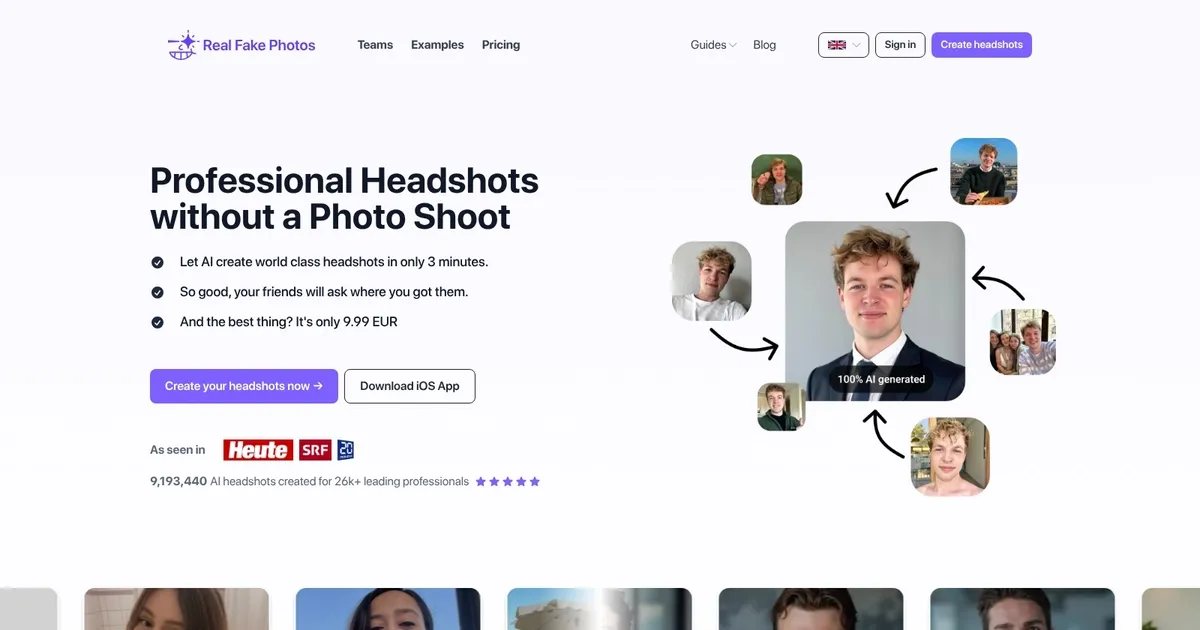
Homepage Screenshot 📸

Real Fake screenshot

What are the key features? ✨

  • Selfie-to-Headshot Training: Upload 10-20 casual photos to train AI specifically on your appearance for personalized realistic portraits.
  • Multiple Style Options: Choose 1 to 4 styles including Professional, Casual, Classy, Highperformer, and Everyday for varied professional and social looks.
  • Fast Batch Generation: Receive 40 to 160 high-resolution AI headshots in 2.5 to 4 hours depending on the selected plan.
  • Privacy-Focused Processing: Uploaded selfies are automatically deleted after 3 hours to protect user data.
  • Money-Back Guarantee: Offers a 100% refund if the results do not meet expectations.

Who is it for? 🤔

RealFakePhotos helps professionals who need polished LinkedIn, CV, or corporate profile photos but want to skip expensive and time-consuming photoshoots. It's especially useful for software engineers, consultants, founders, remote workers, job seekers, and small teams updating branding quickly and affordably. Anyone camera-shy or short on good recent headshots benefits from its low-effort, selfie-based approach that delivers realistic results without leaving home.

Examples of what you can use it for 💡

  • Job seeker: Uploads recent selfies to generate professional headshots that strengthen LinkedIn and resume profiles for better first impressions.
  • Freelance consultant: Creates polished portraits in multiple styles to match different client-facing platforms and proposals.
  • Startup founder: Produces executive-looking headshots quickly for pitch decks, websites, and investor outreach without scheduling a photographer.
  • Remote employee: Updates corporate directory or Slack avatar with consistent, high-quality images that look studio-taken from home.
  • Content creator: Generates versatile profile pictures for social media bios and personal branding across platforms like Instagram or X.

Pros & Cons ⚖️

  • Professional results with little effort
  • It's more affordable than similar services
  • Mobile app is available
  • But only for iPhone

FAQs 💬

How many photos do I need to upload?
You should upload 10 to 20 clear facial selfies for the best training results. The tool accepts group shots if your face is clearly visible.
How long does it take to get the headshots?
Generation takes 2.5 to 4 hours depending on the plan: 4 hours for 1 style, 3 hours for 2 styles, and 2.5 hours for 4 styles.
What styles can I choose?
Available styles include Professional, Casual, Classy, Highperformer, and Everyday to suit different professional or social needs.
Are the images realistic?
Yes, the AI focuses on realistic skin textures, lighting, and facial features trained directly on your selfies for a natural look.
What happens to my uploaded photos?
All selfies are automatically deleted from the servers after 3 hours for privacy protection.
Is there a refund policy?
A 100% money-back guarantee applies if you're not satisfied with the generated headshots.
Can I use these for LinkedIn?
Absolutely, many users choose them specifically for LinkedIn, corporate bios, and other professional profiles.
Do I need an account?
Yes, you register to upload photos, select styles, and access the image portal for downloads.

Ready to try Real Fake?

Transforms selfies into realistic professional headshots for LinkedIn and profiles in hours

Visit Real Fake ↗

Real Fake alternatives 🔗

  1. ChatGPT ChatGPT All-round AI assistant generating human-like responses to user queries and tasks
  2. Grok Grok Delivers witty, real-time AI responses with advanced reasoning and image generation
  3. Imagen Imagen Generates photorealistic images from detailed text prompts
  4. Black Forest Labs Black Forest Labs Generates high-quality images from text prompts with precision and speed
  5. Kling AI Kling AI Generates cinematic videos from text or images with realistic motion
  6. Runway Runway Generates and edits AI-powered videos from text prompts
Share
Real Fake screenshot enlarged
Promote Real Fake
light badge
Copy Embed Code
dark badge
Copy Embed Code
neutral badge
Copy Embed Code
Best AI Tools

Discover the best AI tools for any use case

Explore
  • Tool Categories
  • AI Use Cases
  • AI Events
  • AI News
  • Saved Tools
Company
  • About Us
  • Contact Us
  • Media & Partnerships
  • Suggest a Tool
Legal
  • Privacy Policy
  • Terms of Service
Copyright © 2026 Best AI Tools 415 Mission Street, 37th Floor, San Francisco, CA 94105