logo-darklogo-darklogo-darklogo-dark
  • Tool Categories
    • 🎨Art & Creative Design505
    • 🏢Business Management644
    • 💻Coding & Development515
    • 👮Detection83
    • 🧠General Use727
    • 🏥Health & Wellness55
    • 📷Image & Photo Analysis100
    • 🖼️Image Generation & Editing618
    • 📐Interior & Architectural Design37
    • 🎓Learning & Education483
    • ⚖️Legal & Finance90
    • 🎭Lifestyle & Entertainment236
    • 📢Marketing & Advertising627
    • 🎧Music & Audio138
    • 👔Office & Workplace1,014
    • 🔬Research & Data Analysis372
    • 👥Social Media245
    • 🎥Video Generation & Editing426
    • 👧🏻Virtual Companion135
    • 🎤Voice Generation & Editing381
    • ✍️Writing & Editing808
    • All Categories
    • AI Use Cases
  • News
  • Events
    • Academic Conferences
    • Developer Conferences
    • Expos / Trade Shows
    • Industry Summits
    • Workshops / Training
    • All Events
    • Past Events
  • Saved Tools
  • Suggest a Tool
✕
Home › Image Generation & Editing › Headshot Generation› Reshot AI
Reshot AI

Reshot AI

Helping you edit photos using artificial intelligence

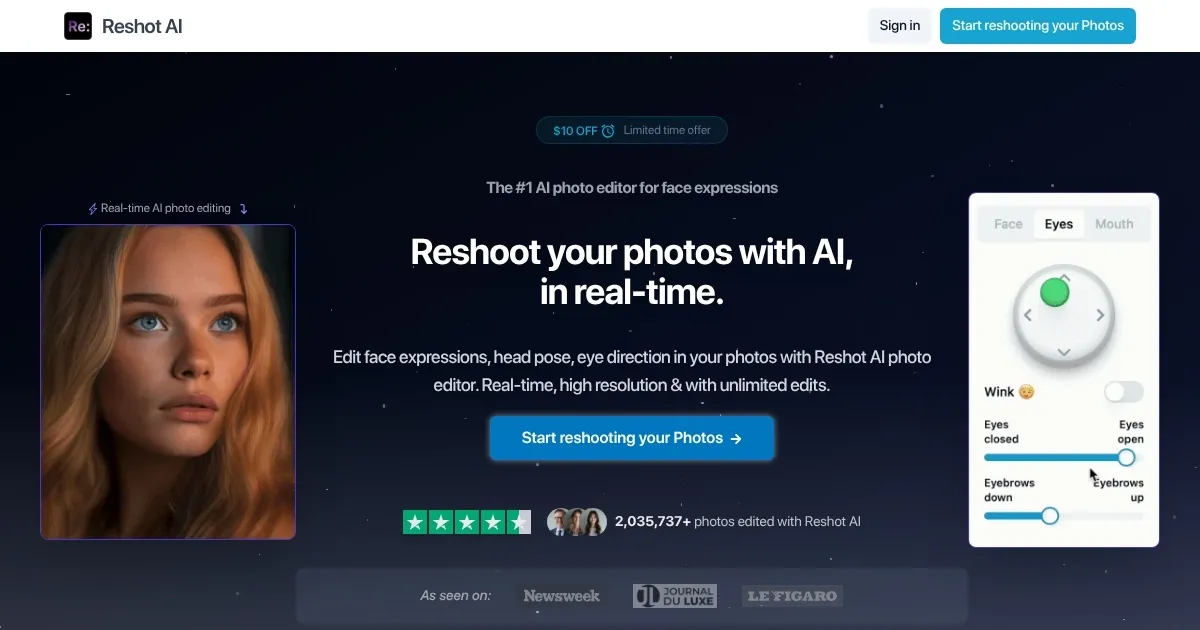
Reshot AI is a fancy tool that helps you edit photos using artificial intelligence. You can use it to change facial expressions, head positions, and eye directions in your pictures. Also, you can adjust lighting and backgrounds to make your photos look professional.

The main idea behind the tool is pretty cool – turn a simple selfie into a polished headshot in seconds. Reshot AI makes this possible by analyzing your photo and offering multiple edited versions for you to choose from. You can then tweak smiles, adjust eye contact, and even change the tilt of your head.

Alas, Reshot AI is not the only tool available for photo editing. Other options include Luminar Neo, Photoleap, and PhotoRoom — all offering AI-powered editing features. Still, we would argue that Reshot AI stands out for its focus on facial expressions and real-time editing. Also included is support for high-resolution images up to 4K and unlimited edits.

Another thing worth mentioning is the ability to simulate natural lighting and adjust shadows and highlights. This helps create more realistic and appealing photos.

Reshot AI is not free, but it offers the Free AI Eyes Editor, which you can try to get an idea of what it’s all about. Check it out and see whether it can fit your needs. It’s your money, after all.

Visit Reshot AI ↗
Categories
🖼️ Image
📸 Headshot Generation 👤 Profile Picture Generation 🌟 Photo Enhancing ✏️ Photo Editing 🧑‍🎤 Avatar Generation
👥 Social
💼 Linkedin Headshot

Homepage Screenshot 📸

Reshot AI screenshot

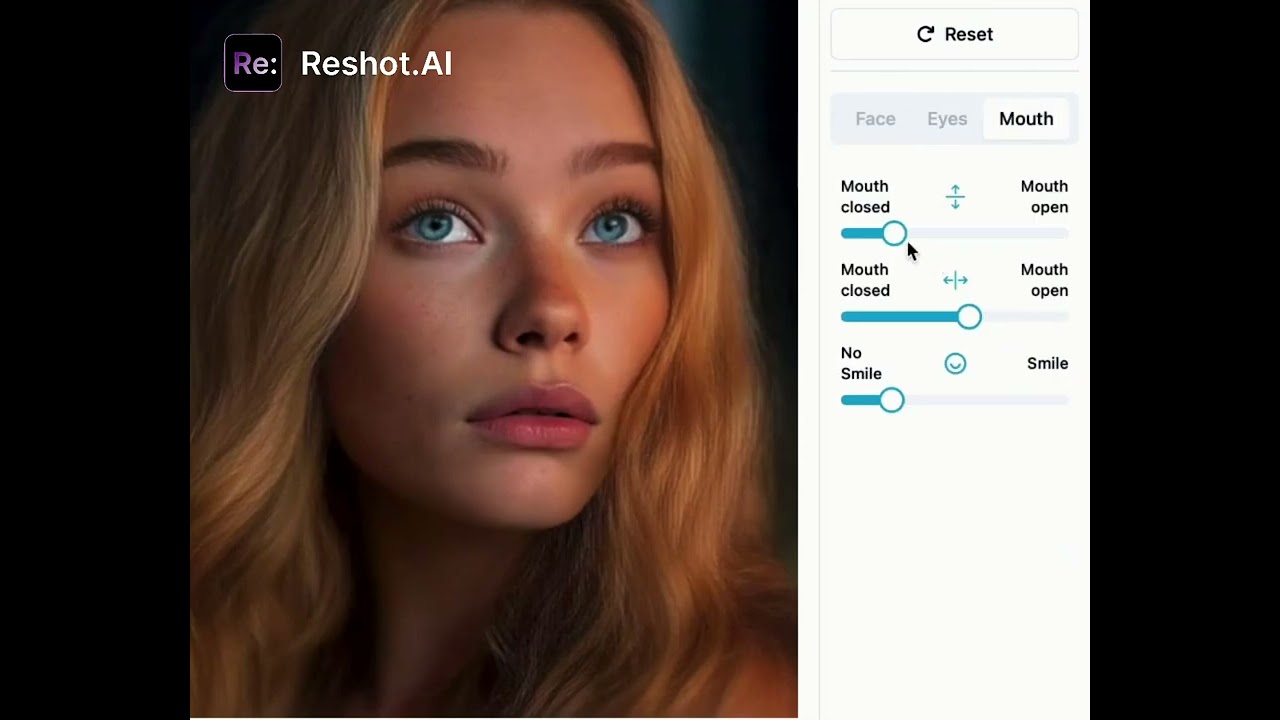
Video Overview 🎬

Reshot AI - Video Overview

What are the key features? ✨

  • Professional headshots: Allows easy creation of polished headshots for resumes, LinkedIn profiles, company websites, and more.
  • Precision Eye Editor: Fine-tune eyebrow expressions, control eye movement, adjust eyelid openings, and even add a subtle wink to your photos.
  • Advanced Expression Sculptor: Craft the perfect smile and precisely control mouth animations for lifelike results.
  • 3D Pose Manipulator: Achieve perfect composition by adjusting head rotation and tilt with easy-to-grasp intuitive 3D controls.
  • High-resolution support: Reshot AI supports high-resolution images up to 4K, ensuring that edits maintain quality and clarity for professional use.

Who is it for? 🤔

Reshot AI is primarily designed for professionals and creatives who require high-quality, customizable photo headshots. This includes photographers seeking efficient editing tools, marketers aiming for consistent branding visuals, and content creators desiring standout images for various platforms. Moreover, anyone looking to enhance their personal photos with professional-grade edits will find Reshot AI useful.

Examples of what you can use it for 💡

  • Individuals can create polished headshots for resumes, LinkedIn profiles, or company websites
  • Influencers and content creators can produce eye-catching profile pictures and posts that stand out in crowded feeds
  • Businesses can generate compelling images for advertising campaigns, brochures, and online promotions
  • Creators can design expressive thumbnails that attract viewers and increase click-through rates
  • Users can enhance personal photos for events, gifts, or creative endeavors

Pros & Cons ⚖️

  • Makes advanced editing accessible to all users
  • Quick processing with 30-second rendering
  • Full ownership rights of edited photos
  • Limited free trial (that tech comes with a price tag)

Ready to try Reshot AI?

Helping you edit photos using artificial intelligence

Visit Reshot AI ↗

Reshot AI alternatives 🔗

  1. Fotor Fotor Enhances and edits photos with AI-powered tools and creative features
  2. LiveMemory LiveMemory A tool from MyHeritage that creates AI-generated avatars of people in historical attire and settings
  3. Remaker AI Remaker AI Online platform offering media manipulation, such as face swapping, AI portraits, and video enhancements
  4. Artguru Avatar Generator Artguru Avatar Generator Create highly realistic and expressive avatars with Artguru's advanced AI model
  5. Artguru Artguru Transforms text or photos into unique AI-generated artwork in seconds
  6. Supawork Supawork Streamlines the job application process by leveraging AI to enhance professional presentation
Share
Reshot AI screenshot enlarged
Promote Reshot AI
light badge
Copy Embed Code
dark badge
Copy Embed Code
neutral badge
Copy Embed Code
Best AI Tools

Discover the best AI tools for any use case

Explore
  • Tool Categories
  • AI Use Cases
  • AI Events
  • AI News
  • Saved Tools
Company
  • About Us
  • Contact Us
  • Media & Partnerships
  • Suggest a Tool
Legal
  • Privacy Policy
  • Terms of Service
Copyright © 2026 Best AI Tools 415 Mission Street, 37th Floor, San Francisco, CA 94105