logo-darklogo-darklogo-darklogo-dark
  • Tool Categories
    • 🎨Art & Creative Design505
    • 🏢Business Management644
    • 💻Coding & Development515
    • 👮Detection83
    • 🧠General Use727
    • 🏥Health & Wellness55
    • 📷Image & Photo Analysis100
    • 🖼️Image Generation & Editing618
    • 📐Interior & Architectural Design37
    • 🎓Learning & Education483
    • ⚖️Legal & Finance90
    • 🎭Lifestyle & Entertainment236
    • 📢Marketing & Advertising627
    • 🎧Music & Audio138
    • 👔Office & Workplace1,014
    • 🔬Research & Data Analysis372
    • 👥Social Media245
    • 🎥Video Generation & Editing426
    • 👧🏻Virtual Companion135
    • 🎤Voice Generation & Editing381
    • ✍️Writing & Editing808
    • All Categories
    • AI Use Cases
  • News
  • Events
    • Academic Conferences
    • Developer Conferences
    • Expos / Trade Shows
    • Industry Summits
    • Workshops / Training
    • All Events
    • Past Events
  • Saved Tools
  • Suggest a Tool
✕
Home › Office & Workplace › Agent› String
String

String

Builds AI agents from natural language prompts

String is an AI platform that builds, runs, edits, and deploys agents from natural language prompts. It connects to over 2,500 apps and APIs, including GitHub, Slack, Gmail, and Google Sheets. The tool generates code automatically, tests it, and handles deployment without user-managed infrastructure.

Key features include prompt-based creation, where users describe tasks in English. The system parses intent, writes code, and integrates services. It supports editing generated code and real-time testing with logs. Deployment occurs in one click after authentication. Integrations cover messaging, data processing, and AI services. No API keys or setup required from users.

Users appreciate the speed for simple automations, such as email alerts or data syncing. It reduces development time compared to manual coding. The free tier allows basic testing, with pro plans starting at $20 monthly for unlimited agents. This pricing undercuts competitors like Make.com, which charges per operation and lacks native AI code generation. Make excels in visual flows but requires more configuration. String handles conditional logic better through prompts.

Limitations include occasional inaccuracies in complex prompts, needing manual code tweaks. It depends on external API stability, which can cause failures. Advanced users may find the generated code basic, requiring custom additions. No offline mode exists, as it runs cloud-based.

Surprise elements involve its error explanations, which detail issues clearly. It also suggests prompt refinements for better results.

Practical advice: Use specific prompts with action verbs. Test agents thoroughly before production use. Monitor logs for integrations.

Visit String ↗
Categories
👔 Work
🔗 Agent ⚡ Work Productivity
🏢 Business
🔄 Workflow
💻 Coding
📱 App Building
🧠 General
🤖 Assistant

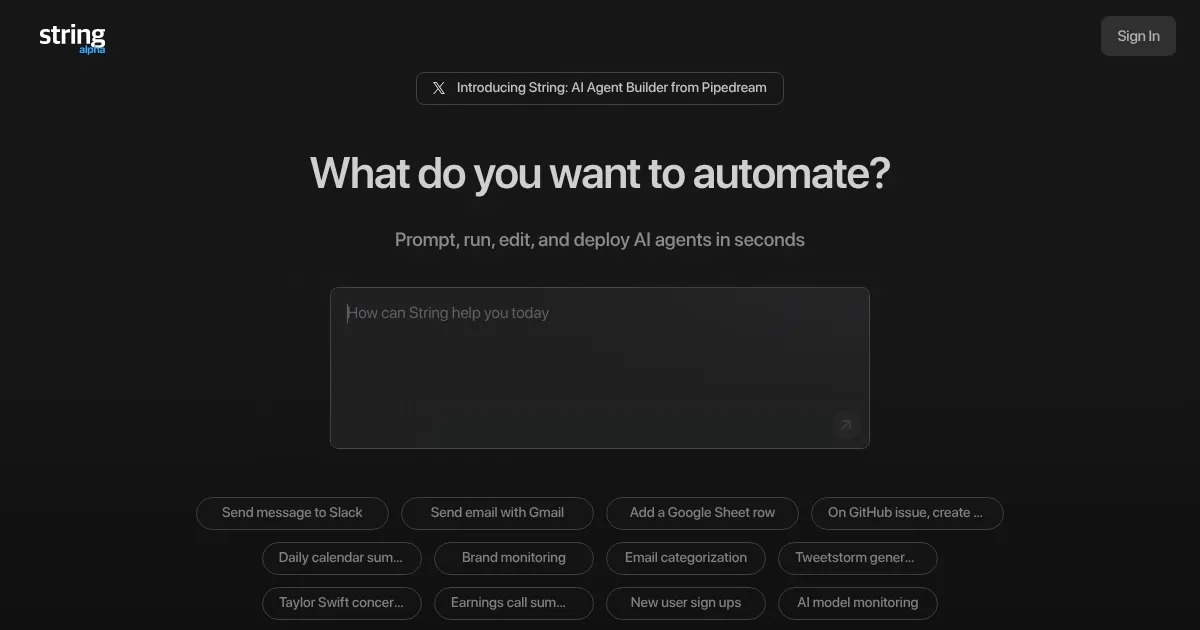
Homepage Screenshot 📸

String screenshot

Video Overview 🎬

What are the key features? ✨

  • Prompt-based agent creation: Users describe tasks in natural language, and the tool generates, tests, and deploys functional code automatically.
  • Seamless integrations: Connects to over 2,500 apps and APIs like Slack, GitHub, Gmail, and Google Sheets without manual setup or API keys.
  • Code editing and testing: Allows viewing and modifying generated code, with built-in real-time testing and error logs for reliability.
  • One-click deployment: Authenticates services and deploys agents instantly, supporting workflows like alerts, data processing, and automation.
  • Multi-agent workflows: Manages chains of agents for complex tasks, including conditional logic and webhooks for custom extensions.

Who is it for? 🤔

String works best for developers, marketers, and small teams who need quick automations without deep coding. It helps non-technical users build agents for tasks like monitoring emails or syncing data, while pros appreciate the code access for tweaks. Businesses in sales or ops find it useful for scaling workflows, as it cuts setup time and integrates widely. If you handle repetitive app interactions, this tool empowers faster productivity, though it suits lighter use over enterprise-scale needs.

Examples of what you can use it for 💡

  • Developer: Builds a GitHub repo watcher that posts changes to Slack, automating notifications without manual scripting.
  • Marketer: Creates a lead scraper from LinkedIn profiles and logs them to Google Sheets for follow-up campaigns.
  • Sales rep: Sets up an email monitor that flags keywords and schedules calendar invites for qualified prospects.
  • Ops manager: Deploys an agent to sync data between Stripe payments and Snowflake for real-time reporting.
  • Content creator: Automates web scraping of API docs into Markdown files stored in Airtable for easy reference.

Pros & Cons ⚖️

  • Fast agent building
  • No code needed
  • Free tier available
  • Complex prompts can fail
  • Basic code output

FAQs 💬

What is String?
String is an AI platform that creates and deploys agents from natural language prompts, integrating with apps like Slack and GitHub.
How do I get started with String?
Sign up on the website, enter a prompt describing your task, review the generated code, and deploy with one click.
Does String require coding knowledge?
No, it uses plain English prompts, but you can edit code if needed for advanced tweaks.
What integrations does String support?
It connects to over 2,500 services, including Gmail, Google Sheets, Stripe, and Snowflake, without manual API setup.
Is there a free version of String?
Yes, a free tier allows basic agent creation and testing, with pro plans for unlimited use starting at $20 monthly.
How does String handle errors?
It provides real-time logs and explanations during testing, suggesting prompt fixes for issues.
Can String build complex workflows?
Yes, it supports multi-agent chains with conditions, though very intricate ones may need code adjustments.
Is my data secure on String?
Yes, it uses encryption and does not train on user data; integrations follow service policies.
How does String compare to Zapier?
String focuses on AI-driven code generation for smarter logic, while Zapier uses visual builders; String is faster for prototypes.
What if an integration fails in String?
The tool retries automatically and notifies via logs; check API status or refine the prompt.

Ready to try String?

Builds AI agents from natural language prompts

Visit String ↗

String alternatives 🔗

  1. Gemini Gemini Generates responses from text, images, audio, and video inputs using advanced multimodal AI
  2. Claude Claude Assists users in reasoning, coding, writing, and analyzing data with advanced AI models
  3. Windsurf Windsurf Empowers developers with AI-driven code generation and real-time collaboration.
  4. Poe Poe Aggregates top AI models for seamless chatting and bot creation
  5. Replit AI Replit AI Transforms natural language prompts into fully deployable apps using AI agents
  6. Google AI Studio Google AI Studio Prototypes AI solutions using Gemini models in a browser-based IDE
Share
String screenshot enlarged
Promote String
light badge
Copy Embed Code
dark badge
Copy Embed Code
neutral badge
Copy Embed Code
Best AI Tools

Discover the best AI tools for any use case

Explore
  • Tool Categories
  • AI Use Cases
  • AI Events
  • AI News
  • Saved Tools
Company
  • About Us
  • Contact Us
  • Media & Partnerships
  • Suggest a Tool
Legal
  • Privacy Policy
  • Terms of Service
Copyright © 2026 Best AI Tools 415 Mission Street, 37th Floor, San Francisco, CA 94105