Summarizer.org
Condenses text into concise summaries using AI
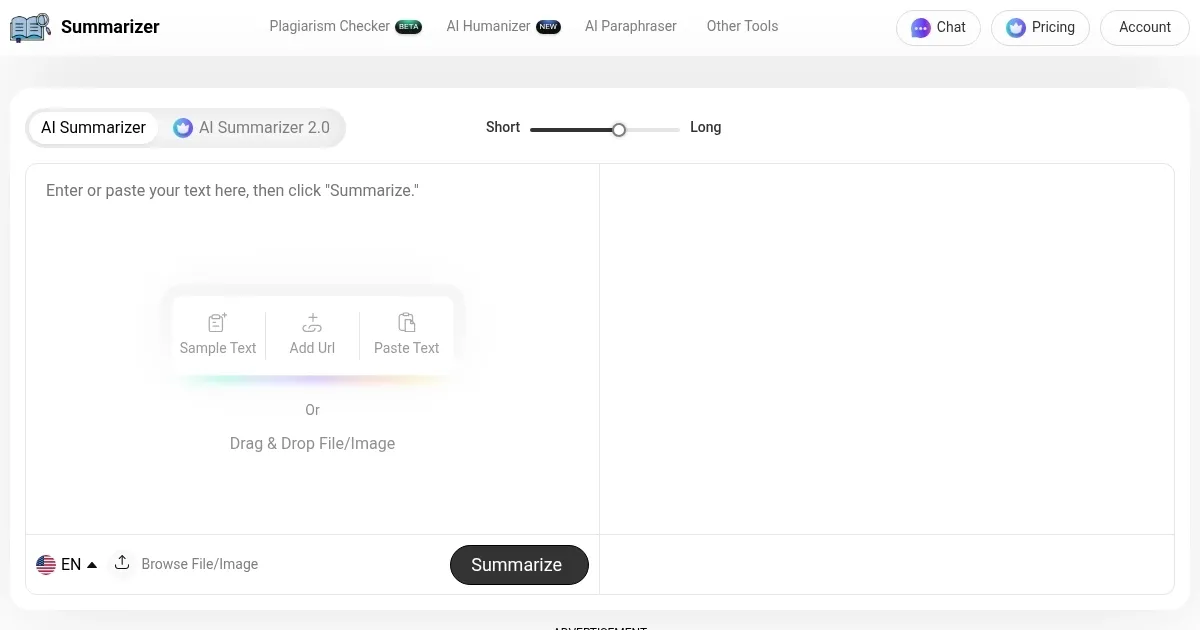
Summarizer.org greets you with a clean interface, a text box begging for your long-winded article, and a promise: it’ll boil down your content to its essence in seconds. This isn’t just another AI tool trying to muscle into the crowded text-summarization space; it’s a focused utility that knows its job and does it well. I think it’s like a digital librarian who reads your stack of books and hands you a crisp notecard with the highlights. You paste in text or a URL, tweak a slider for summary length, and boom — key points appear, ready to copy or download. It’s fast, it’s free, and it supports multiple languages, which is a nice touch for global users.
What stands out is the flexibility. Want a bullet-point breakdown? Click “Show bullets.” Need just the best sentence? Hit “Best line.” You can even download your summary as a .docx file, which is handy for students or researchers compiling notes. The tool’s AI, built on natural language processing (NLP), scans your input and picks out the critical bits without mangling the context. It’s not perfect — sometimes it misses subtle nuances in complex texts, like a philosophical essay or a dense legal document — but it’s reliable for most articles or blog posts. Compared to competitors like QuillBot or Scribbr, Summarizer.org feels leaner, with no sign-up nonsense or paywalls, though it lacks some of their advanced editing features.
Users love the simplicity. No accounts, no fees, just paste and summarize. That’s a big win for anyone drowning in reading material — think students cramming for exams or professionals skimming reports. But here’s the rub: it’s not great for super technical content. Scientific papers with jargon-heavy prose can trip it up, leaving you with a summary that feels a bit shallow. Also, while it handles up to 600 words well, longer texts might need multiple runs, which can be a hassle. A surprise perk? The multilingual support. You can summarize in Spanish, French, or even Arabic, which is great for non-English sources.
The tool’s interface is intuitive, almost to a fault. It’s so straightforward you might wish for more bells and whistles, like tone adjustments or integration with note-taking apps. TLDR This offers similar simplicity but throws in browser extensions for web summarization, something Summarizer.org lacks. Still, the speed is impressive — summaries pop up in seconds, and the word count tracker is a nice touch for gauging how much you’ve trimmed.
If you’re looking to try it, start with a blog post or news article. Paste the text, play with the length slider, and see how it captures the gist. If you need more polish, you might pair it with a tool like Grammarly for refining the output. Keep your expectations realistic for niche or highly technical texts, and you’ll find this tool a solid time-saver.
Homepage Screenshot 📸
What are the key features? ✨
- Text Summarization: Condenses articles or essays into key points using AI.
- Bullet-Point Option: Generates summaries as concise bullet lists.
- Best Line Feature: Extracts the most critical sentence from the text.
- URL Summarization: Summarizes online articles directly via URL input.
- Multilingual Support: Produces summaries in languages like Spanish and Arabic.
Who is it for? 🤔
Examples of what you can use it for 💡
- Student: Summarizes textbook chapters for quick exam prep.
- Researcher: Condenses journal articles for literature reviews.
- Professional: Skims industry reports for key insights.
- Blogger: Summarizes web articles for content curation.
- Language Learner: Translates and summarizes foreign-language texts.
Pros & Cons ⚖️
- Free with unlimited use.
- Multilingual output support.
- URL summarization feature.
- Downloadable .docx summaries.
- Weak on technical texts.
- No mobile app.
FAQs 💬
Summarizer.org alternatives 🔗