Skip to content
logo-darklogo-darklogo-darklogo-dark
  • Tool Categories
    • 🎨Art & Creative Design505
    • 🏢Business Management644
    • 💻Coding & Development514
    • 👮Detection83
    • 🧠General Use728
    • 🏥Health & Wellness55
    • 📷Image & Photo Analysis100
    • 🖼️Image Generation & Editing618
    • 📐Interior & Architectural Design37
    • 🎓Learning & Education483
    • ⚖️Legal & Finance90
    • 🎭Lifestyle & Entertainment236
    • 📢Marketing & Advertising627
    • 🎧Music & Audio138
    • 👔Office & Workplace1,014
    • 🔬Research & Data Analysis373
    • 👥Social Media245
    • 🎥Video Generation & Editing426
    • 👧🏻Virtual Companion135
    • 🎤Voice Generation & Editing381
    • ✍️Writing & Editing808
    • All Categories
    • AI Use Cases
  • News
  • Events
    • Academic Conferences
    • Developer Conferences
    • Expos / Trade Shows
    • Industry Summits
    • Workshops / Training
    • All Events
    • Past Events
  • Saved Tools
  • Suggest a Tool
    ✕
    Home › General Use › Chatbot› AnythingLLM
    AnythingLLM

    AnythingLLM

    An open-source AI application that lets you interact with your documents using LLMs

    AnythingLLM is an open-source AI application that lets you interact with your documents using large language models (LLMs). It supports various LLMs, including GPT-4 and open-source models like Llama and Mistral. This flexibility allows you to choose the model that best fits your needs.

    Setting up AnythingLLM is easy — you can install it on your desktop, whether you use Windows, macOS, or Linux. Once installed, it runs locally on your machine, ensuring that your data remains private and secure. This local operation means you don’t need an internet connection to use its features.

    AnythingLLM can “handle” various document types beyond just PDFs, including Word documents and more. This makes it suitable for business use cases where different document formats are common.

    In my experience, AnythingLLM has been invaluable for managing and interacting with diverse documents. Its user-friendly interface and solid support have made document analysis more efficient and less stressful.

    So, whether you’re dealing with complex reports or simple text files, AnythingLLM can adapt to your needs — making it super-handy for effective document management.

    Visit AnythingLLM ↗
    Categories
    🧠 General
    💬 Chatbot 🦙 Open Source Model 🧠 Large Language Model 🤖 Assistant
    🎓 Education
    📖 Knowledge Base 🗂️ Knowledge Management
    👔 Work
    📤 Document Extraction 🔗 Agent
    💻 Coding
    👨‍💻 Development

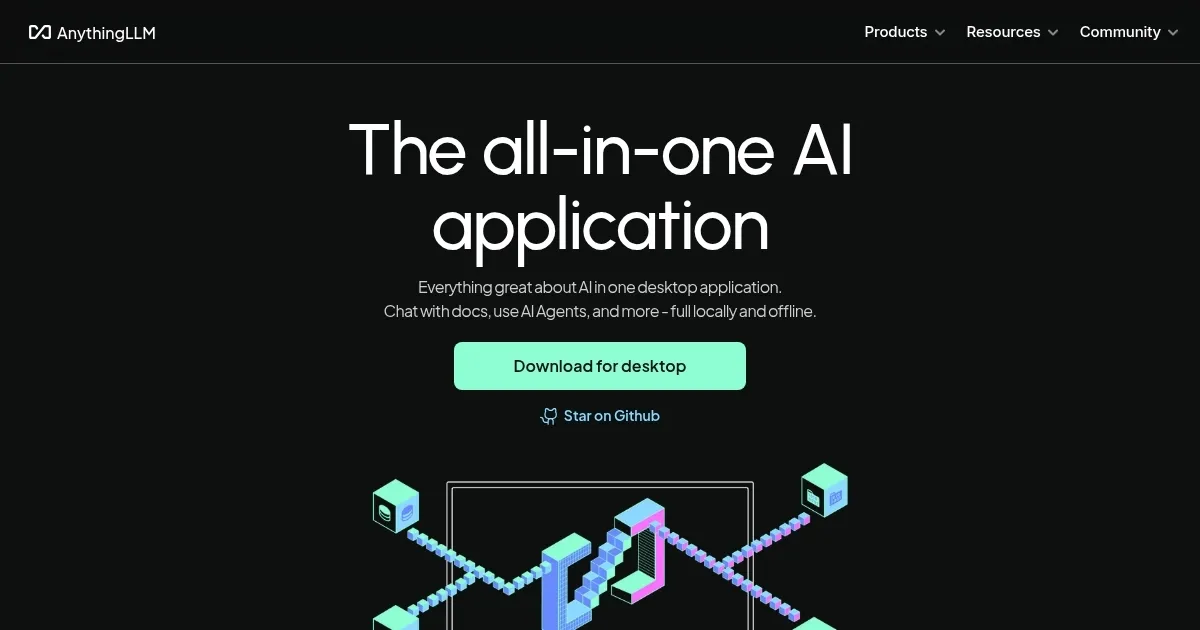
    Homepage Screenshot 📸

    AnythingLLM screenshot

    Video Overview 🎬

    AnythingLLM - Video Overview

    What are the key features? ✨

    • Custom model support: AnythingLLM allows you to run your preferred LLM locally with just a click, or connect to your local or cloud LLM engine.
    • Document handling: The application supports various document types, including PDFs, Word documents, CSVs, and codebases.
    • Full privacy: Designed with privacy in mind, AnythingLLM operates entirely on your local machine, ensuring that your data remains secure and under your control.
    • User-friendly interface: AnythingLLM makes it easy for users to leverage AI capabilities without requiring technical expertise.
    • Open-source & customizable: As an open-source project, AnythingLLM is free to use and MIT-licensed, allowing users to extend its functionality with custom agents, data connectors, and more.

    Who is it for? 🤔

    AnythingLLM targets individuals and organizations seeking a comprehensive AI solution that prioritizes privacy and ease of use. Its versatility makes it suitable for professionals across various fields, including researchers, content creators, developers, and business analysts, as well as individuals looking to enhance personal productivity. By providing robust AI capabilities in a user-friendly, locally run application - AnythingLLM empowers users to harness the benefits of AI without compromising on data security.

    Examples of what you can use it for 💡

    • Researchers can utilize AnythingLLM to analyze large volumes of text, generate summaries, and interact with complex data sets
    • Writers and content creators can leverage AI assistance for drafting articles, generating ideas, and editing text
    • Developers can integrate AnythingLLM into their workflow to assist with code generation, debugging, and documentation
    • Analysts can process and interpret business documents, financial reports, and market data more effectively
    • Individuals can use AnythingLLM for tasks such as drafting emails, organizing information, and automating routine tasks

    Pros & Cons ⚖️

    • Run LLMs locally on your machine
    • Multi-LLM support
    • Good for different use cases
    • Initial setup could take some time

    FAQs 💬

    What is AnythingLLM mainly used for?
    AnythingLLM lets you chat with your own documents using AI, run AI agents, and work with any LLM while keeping everything private and often local.
    Does AnythingLLM require an internet connection?
    No, the desktop version works fully offline once models and components are downloaded, although connecting to cloud LLMs needs internet.
    What kinds of documents can I use with AnythingLLM?
    It supports PDFs, Word documents, CSVs, codebases, and more, plus you can import from online locations.
    Can I use my own local LLM with AnythingLLM?
    Yes, it includes a built-in provider for running any local model, and it also connects easily to tools like Ollama.
    Is AnythingLLM suitable for beginners?
    It is quite beginner-friendly with a simple interface and one-click desktop install, though some advanced features might take a little learning.
    Does AnythingLLM support multi-user setups?
    Yes, the self-hosted and cloud versions offer multi-user access with isolation and admin controls for teams.
    Can AnythingLLM handle images or multi-modal inputs?
    Yes, it works with multi-modal LLMs that process images, audio, and other formats beyond plain text.
    Is AnythingLLM open source?
    Yes, it is fully open source under the MIT license, so you can customize or extend it freely.
    What makes AnythingLLM different from similar tools like LM Studio?
    It focuses more on document chatting, RAG, and agents with a polished UI, while many alternatives emphasize raw model management.
    Can I extend AnythingLLM with custom features?
    Yes, it includes a Community Hub for plugins, custom agents, system prompts, and an API for building your own integrations.

    Ready to try AnythingLLM?

    An open-source AI application that lets you interact with your documents using LLMs

    Visit AnythingLLM ↗
    AnythingLLM alternatives 🔗

    1. LM Studio LM Studio An AI platform that helps users discover, download, and run local large language models
    2. ChatRTX ChatRTX Allows users to create a personalized LLM chatbot by using their own data on their own computer
    3. Open WebUI Open WebUI Enables offline AI interactions with LLMs, integrating document and web content
    4. Ollama Ollama Run large language models locally for private, customizable AI interactions
    5. Brave Leo Brave Leo Assists with web queries, content creation, and document analysis in-browser
    6. Msty Msty Simplifies AI model usage with a unified interface for local and online LLMs
    Share
    AnythingLLM screenshot enlarged
    Best AI Tools

    Discover the best AI tools for any use case

    Explore
    • Tool Categories
    • AI Use Cases
    • AI Events
    • AI News
    • Saved Tools
    Company
    • About Us
    • Contact Us
    • Media & Partnerships
    • Suggest a Tool
    Legal
    • Privacy Policy
    • Terms of Service
    Copyright © 2026 Best AI Tools 415 Mission Street, 37th Floor, San Francisco, CA 94105