logo-darklogo-darklogo-darklogo-dark
  • Tool Categories
    • ๐ŸŽจArt & Creative Design505
    • ๐ŸขBusiness Management644
    • ๐Ÿ’ปCoding & Development515
    • ๐Ÿ‘ฎDetection83
    • ๐Ÿง General Use727
    • ๐ŸฅHealth & Wellness55
    • ๐Ÿ“ทImage & Photo Analysis100
    • ๐Ÿ–ผ๏ธImage Generation & Editing618
    • ๐Ÿ“Interior & Architectural Design37
    • ๐ŸŽ“Learning & Education483
    • โš–๏ธLegal & Finance90
    • ๐ŸŽญLifestyle & Entertainment236
    • ๐Ÿ“ขMarketing & Advertising627
    • ๐ŸŽงMusic & Audio138
    • ๐Ÿ‘”Office & Workplace1,014
    • ๐Ÿ”ฌResearch & Data Analysis372
    • ๐Ÿ‘ฅSocial Media245
    • ๐ŸŽฅVideo Generation & Editing426
    • ๐Ÿ‘ง๐ŸปVirtual Companion135
    • ๐ŸŽคVoice Generation & Editing381
    • โœ๏ธWriting & Editing808
    • All Categories
    • AI Use Cases
  • News
  • Events
    • Academic Conferences
    • Developer Conferences
    • Expos / Trade Shows
    • Industry Summits
    • Workshops / Training
    • All Events
    • Past Events
  • Saved Tools
  • Suggest a Tool
โœ•
Home › Office & Workplace › PDF› docAnalyzer.ai
docAnalyzer.ai

docAnalyzer.ai

Analyze documents conversationally, extracting insights from PDFs and other formats

docAnalyzer.ai is an AI-powered platform that enables users to upload documents in various formats, ask questions, and receive context-aware answers for efficient analysis. It supports PDFs, Word, PowerPoint, Markdown, and more, using advanced models like Claude 3.5, GPT-4o, and Gemini. The tool is designed for professionals handling large document volumes, offering features like OCR for scanned files and multi-document querying.

Key features include Interactive Learning Chat, which adapts to user queries for tailored responses, and Sophisticated Embeddings for deep content analysis. Multi-Document Conversations allow simultaneous querying across files, ideal for cross-referencing. Workflow Automation enables AI agents to handle tasks like data extraction, while Enhanced Data Privacy ensures compliance with ISO/IEC 27001 and 27701 standards.

The platform’s interface is user-friendly, though some report a learning curve with document tagging. Users praise its speed and accuracy but note occasional bugs, like image rendering issues or cut-off responses. The free Community plan limits users to three PDFs daily, while paid Basic and Pro plans offer higher page limits and advanced features. Compared to Adobe Acrobat AI, it offers more conversational depth but less collaborative polish. Microsoft Syntex integrates better with Microsoft 365 but lacks docAnalyzer.ai’s chat-based flexibility.

Privacy is a strength, with no data sharing. Mobile compatibility supports on-the-go use. Some users want more customizable reporting. The tool’s API allows workflow integration, and recent updates include Zotero integration and chatbot spawning.

To get started, sign up on the website, upload a document, and experiment with simple queries. Use labels to organize files for better results. For complex tasks, explore AI agent automation to save time.

Visit docAnalyzer.ai ↗
Categories
๐Ÿ‘” Work
๐Ÿ“• PDF ๐Ÿ“ค Document Extraction ๐Ÿ“‘ PDF Summarizer ๐Ÿ“ File
โœ๏ธ Writing
๐Ÿ“ Summarizer
๐ŸŽ“ Education
๐Ÿ“ฐ Article Summarization โ“ Answer
๐Ÿ”ฌ Research
๐Ÿ“„ Research Paper
๐Ÿง  General
๐Ÿ’ฌ Chatbot

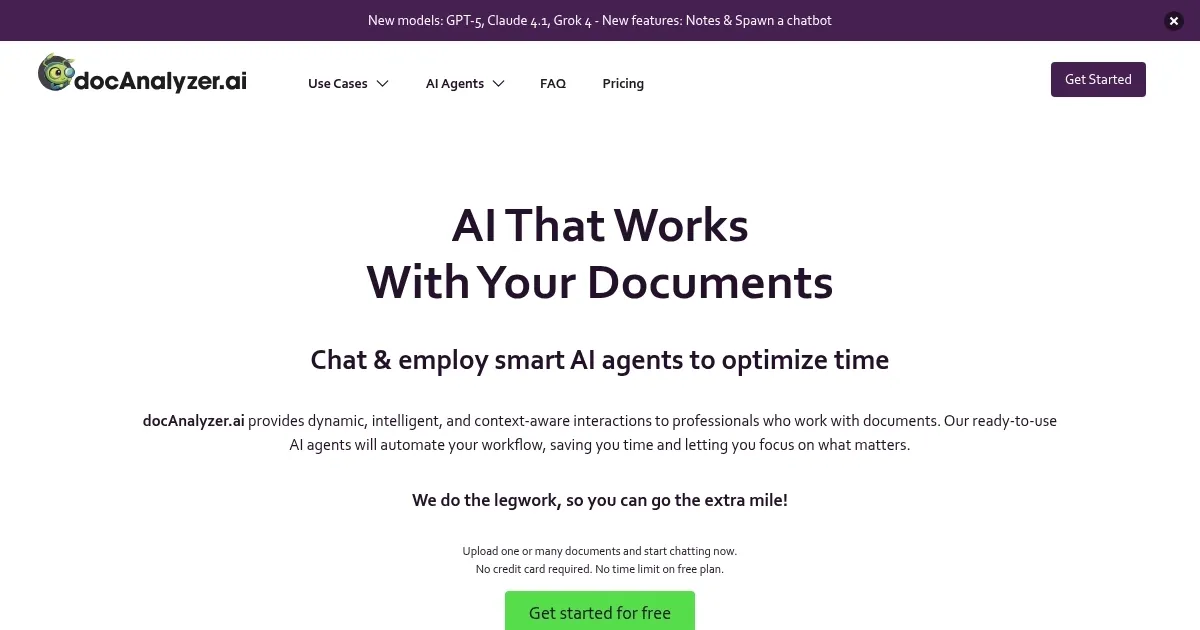
Homepage Screenshot 📸

docAnalyzer.ai screenshot

Video Overview 🎬

docAnalyzer.ai - Video Overview

What are the key features? ✨

  • Interactive Learning Chat: Adapts to user style for tailored document responses.
  • Sophisticated Embeddings: Enables deep, context-aware document analysis.
  • Multi-Document Conversations: Queries multiple files simultaneously for efficiency.
  • Workflow Automation: AI agents streamline data extraction and organization.
  • Enhanced Data Privacy: Ensures compliance with ISO/IEC 27001 and 27701 standards.

Who is it for? 🤔

docAnalyzer.ai is a boon for professionals juggling hefty document loads, think researchers poring over academic papers, lawyers dissecting contracts, or administrators sorting reports. Its conversational AI and automation shine for those needing quick, accurate insights without wading through pages manually. If youโ€™re in a field like education, finance, or healthcare, where precision and time matter, this toolโ€™s ability to handle multiple file types and ensure privacy makes it a solid fit.

Examples of what you can use it for 💡

  • Researcher: Summarizes key findings from multiple academic papers for faster analysis.
  • Lawyer: Extracts specific clauses from contracts for quick compliance checks.
  • Administrator: Automates data extraction from reports to streamline workflows.
  • Student: Organizes and queries study materials for efficient thesis preparation.
  • Business Analyst: Compares financial documents to identify trends across reports.

Pros & Cons ⚖️

  • Supports multiple file formats.
  • Mobile-friendly for on-the-go use.
  • Free plan for easy testing.
  • Learning curve for tagging.
  • Limited free plan features.

FAQs 💬

What file formats does docAnalyzer.ai support?
docAnalyzer.ai supports PDF, DOCX, PPTX, Markdown, ODT, HTML, EPUB, RTF, and TXT files.
Is there a free version of docAnalyzer.ai?
Yes, the Community plan allows up to three PDF uploads daily with no cost.
Can I use docAnalyzer.ai on my phone?
The platform is compatible with mobile devices for uploading and querying documents.
How secure are my documents on docAnalyzer.ai?
It complies with ISO/IEC 27001 and 27701, ensuring your data isnโ€™t shared or used.
Can I query multiple documents at once?
Yes, Multi-Document Conversations lets you analyze multiple files simultaneously.
Does it support scanned or handwritten documents?
OCR capabilities allow analysis of scanned files and handwritten notes.
How does it compare to Adobe Acrobat AI?
docAnalyzer.ai offers deeper conversational analysis but less collaborative editing.
Can I integrate it into my workflow?
API keys enable integration with existing systems for seamless use.
Are there limits on the free plan?
The free plan limits users to three PDFs daily and 20 pages per chat.
Does it support non-English documents?
Yes, it can parse and analyze content in multiple languages.

Ready to try docAnalyzer.ai?

Analyze documents conversationally, extracting insights from PDFs and other formats

Visit docAnalyzer.ai ↗
docAnalyzer.ai alternatives 🔗

  1. Box AI Box AI An assistant that taps into your enterprise content and documents
  2. Kimi Kimi An AI assistant that can interpret images, analyze code, and provide real-time information
  3. CoCounsel CoCounsel Tool for legal document review, research memos, deposition preparation, and contract analysis
  4. Monica Monica A browser extension powered by ChatGPT that acts as a chatbot assistant
  5. LINER LINER A web-based tool that combines searching and collecting information in a user-friendly interface
  6. SciSpace SciSpace Your AI assistant to discover and understand research papers
Share
docAnalyzer.ai screenshot enlarged
Promote docAnalyzer.ai
light badge
Copy Embed Code
dark badge
Copy Embed Code
neutral badge
Copy Embed Code
Best AI Tools

Discover the best AI tools for any use case

Explore
  • Tool Categories
  • AI Use Cases
  • AI Events
  • AI News
  • Saved Tools
Company
  • About Us
  • Contact Us
  • Media & Partnerships
  • Suggest a Tool
Legal
  • Privacy Policy
  • Terms of Service
Copyright © 2026 Best AI Tools 415 Mission Street, 37th Floor, San Francisco, CA 94105