logo-darklogo-darklogo-darklogo-dark
  • Tool Categories
    • ๐ŸŽจArt & Creative Design505
    • ๐ŸขBusiness Management644
    • ๐Ÿ’ปCoding & Development515
    • ๐Ÿ‘ฎDetection83
    • ๐Ÿง General Use727
    • ๐ŸฅHealth & Wellness55
    • ๐Ÿ“ทImage & Photo Analysis100
    • ๐Ÿ–ผ๏ธImage Generation & Editing618
    • ๐Ÿ“Interior & Architectural Design37
    • ๐ŸŽ“Learning & Education483
    • โš–๏ธLegal & Finance90
    • ๐ŸŽญLifestyle & Entertainment236
    • ๐Ÿ“ขMarketing & Advertising627
    • ๐ŸŽงMusic & Audio138
    • ๐Ÿ‘”Office & Workplace1,014
    • ๐Ÿ”ฌResearch & Data Analysis372
    • ๐Ÿ‘ฅSocial Media245
    • ๐ŸŽฅVideo Generation & Editing426
    • ๐Ÿ‘ง๐ŸปVirtual Companion135
    • ๐ŸŽคVoice Generation & Editing381
    • โœ๏ธWriting & Editing808
    • All Categories
    • AI Use Cases
  • News
  • Events
    • Academic Conferences
    • Developer Conferences
    • Expos / Trade Shows
    • Industry Summits
    • Workshops / Training
    • All Events
    • Past Events
  • Saved Tools
  • Suggest a Tool
โœ•
Home › Video Generation & Editing › Video Enhancing› EaseUS Fixo
EaseUS Fixo

EaseUS Fixo

Repairs corrupted video, photo, and document files with AI-driven precision

EaseUS Online Repair, or EaseUS Fixo, is a web-based tool that restores corrupted video, photo, and document files using AI algorithms. Accessible at repair.easeus.com, it supports formats like MP4, MOV, JPEG, PNG, PDF, and ZIP, handling issues like playback errors, blurry images, or unreadable documents. The free version processes files up to 100 MB with a limit of three repairs per day, while the Pro version offers unlimited repairs and batch processing. The tool operates via a three-step process: upload, repair, and save, with a preview option for videos and photos.

Key features include AI-driven repair for videos, photos, and documents, supporting devices like cameras (Canon, Nikon, GoPro), phones, and storage media. It addresses common issues like pixelation, audio sync problems, and unopenable files. The platform ensures file privacy by deleting uploads after repair. Performance is reliable for standard formats but less consistent for niche ones like MXF or heavily damaged files.

Compared to competitors, Stellar Repair excels in advanced video repair, while Wondershare Repairit offers a polished interface and broader format support. EaseUS stands out for its free tier and ease of use, though its daily repair limit and file size cap may restrict heavy users. The Pro version’s pricing aligns with industry standards, offering more flexibility than the free tier.

User feedback highlights successful repairs for MP4s and JPEGs but mixed results for complex corruptions. The preview feature is widely praised, allowing users to verify repairs before downloading. Security measures and a simple interface make it accessible for beginners.

For best results, confirm your file format is supported, start with the free version, and consider the Pro version for frequent or large-scale repairs. Compare with Stellar or Wondershare if you need specialized features.

Visit EaseUS Fixo ↗
Categories
๐ŸŽฅ Video
โœจ Video Enhancing โœ๏ธ Video Editing โฌ†๏ธ Video Upscaling
๐Ÿ–ผ๏ธ Image
๐Ÿ› ๏ธ Photo Restoration

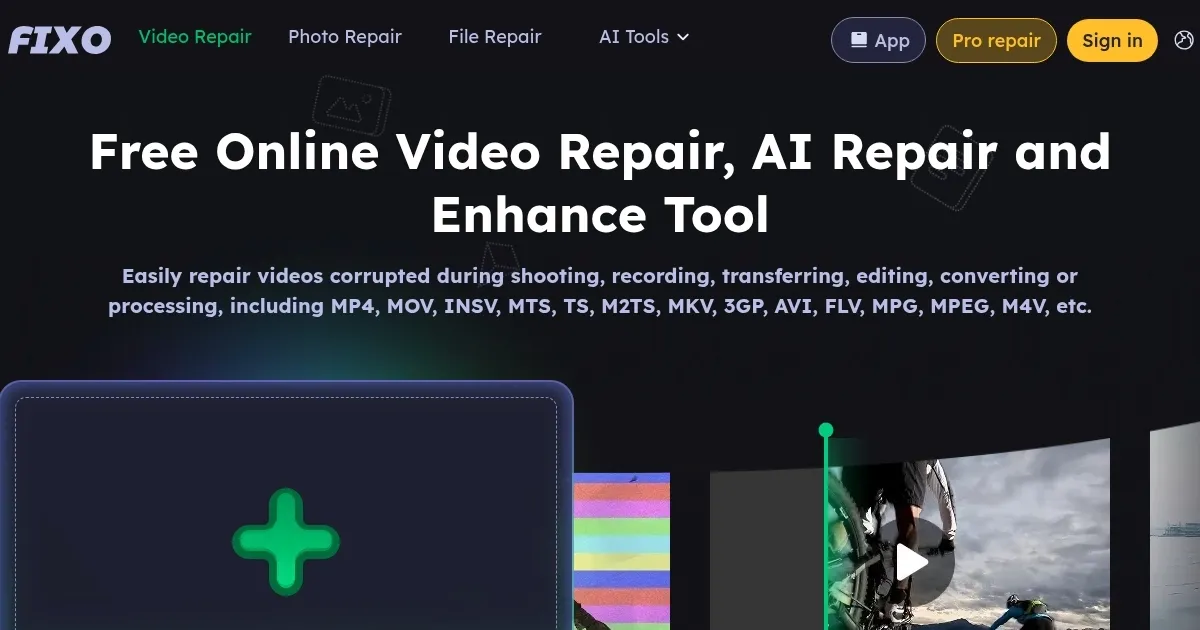
Homepage Screenshot 📸

EaseUS Fixo screenshot

Video Overview 🎬

EaseUS Fixo - Video Overview

What are the key features? ✨

  • AI Repair: Automatically fixes corrupted video, photo, and document files with minimal user input.
  • Wide Format Support: Handles MP4, MOV, JPEG, PNG, PDF, ZIP, and more across various devices.
  • Preview Option: Allows users to view repaired videos or photos before downloading.
  • Secure Processing: Deletes uploaded files from servers post-repair to ensure privacy.
  • Free Tier: Repairs files up to 100 MB with a daily limit of three repairs at no cost.

Who is it for? 🤔

EaseUS Fixo is designed for casual users, small business owners, and content creators needing quick fixes for corrupted videos, photos, or documents. It suits those with minimal technical skills, offering a simple interface to restore files from cameras, phones, or storage devices without software installation. Professionals handling large or frequent repairs may prefer the Pro version for its unlimited capabilities.

Examples of what you can use it for 💡

  • Videographer: Restores corrupted MP4 footage from a GoPro for a client project.
  • Photographer: Fixes blurry JPEGs from a Nikon camera for a photo exhibition.
  • Student: Recovers a corrupted PDF assignment damaged during transfer.
  • Small Business Owner: Repairs an unreadable Excel spreadsheet with financial data.
  • Hobbyist: Restores a family video in MOV format from a phone for personal archives.

Pros & Cons ⚖️

  • Free tier repairs up to 100 MB files.
  • Supports many video and photo formats.
  • Files deleted post-repair for privacy.
  • Limited to three repairs daily.
  • Inconsistent with niche formats.

FAQs 💬

Can I repair MP4 files for free?
Yes, EaseUS Online Repair fixes MP4 files up to 100 MB for free, with a three-repair daily limit.
Is my data safe during repair?
EaseUS deletes uploaded files after repair, ensuring privacy and security.
What file formats are supported?
It supports MP4, MOV, JPEG, PNG, PDF, ZIP, and more, covering many devices.
How long does a repair take?
Most repairs complete in minutes, depending on file size and damage.
Can I repair files from my phone?
Yes, the tool works with files from iOS and Android devices via web upload.
What if my file is over 100 MB?
Youโ€™ll need the Pro version for unlimited file sizes and repairs.
Does it fix blurry photos?
Yes, it restores clarity to blurry JPEGs and PNGs using AI algorithms.
Can I preview repaired files?
Yes, you can preview videos and photos before downloading.
Is it better than competitors?
Itโ€™s great for free, simple repairs, but Stellar or Wondershare may suit advanced needs.
What if the repair doesnโ€™t work?
Try the Pro version or contact EaseUS support for advanced repair options.

Ready to try EaseUS Fixo?

Repairs corrupted video, photo, and document files with AI-driven precision

Visit EaseUS Fixo ↗

EaseUS Fixo alternatives 🔗

  1. Runway Runway Generates and edits AI-powered videos from text prompts
  2. Cutout.Pro Cutout.Pro An AI-powered automatic visual design platform that saves time & money
  3. Media.io Media.io An online platform offering AI-powered video, audio, and image editing tools
  4. Topaz Labs Topaz Labs An AI-powered photo and video enhancement software designed for professionals
  5. Vmake AI Vmake AI An AI-powered platform designed to enhance the online retail experience
  6. VideoProc VideoProc Enhances, converts, compresses, and edits videos with AI and GPU acceleration
Share
EaseUS Fixo screenshot enlarged
Promote EaseUS Fixo
light badge
Copy Embed Code
dark badge
Copy Embed Code
neutral badge
Copy Embed Code
Best AI Tools

Discover the best AI tools for any use case

Explore
  • Tool Categories
  • AI Use Cases
  • AI Events
  • AI News
  • Saved Tools
Company
  • About Us
  • Contact Us
  • Media & Partnerships
  • Suggest a Tool
Legal
  • Privacy Policy
  • Terms of Service
Copyright © 2026 Best AI Tools 415 Mission Street, 37th Floor, San Francisco, CA 94105