logo-darklogo-darklogo-darklogo-dark
  • Tool Categories
    • ๐ŸŽจArt & Creative Design505
    • ๐ŸขBusiness Management644
    • ๐Ÿ’ปCoding & Development515
    • ๐Ÿ‘ฎDetection83
    • ๐Ÿง General Use727
    • ๐ŸฅHealth & Wellness55
    • ๐Ÿ“ทImage & Photo Analysis100
    • ๐Ÿ–ผ๏ธImage Generation & Editing618
    • ๐Ÿ“Interior & Architectural Design37
    • ๐ŸŽ“Learning & Education483
    • โš–๏ธLegal & Finance90
    • ๐ŸŽญLifestyle & Entertainment236
    • ๐Ÿ“ขMarketing & Advertising627
    • ๐ŸŽงMusic & Audio138
    • ๐Ÿ‘”Office & Workplace1,014
    • ๐Ÿ”ฌResearch & Data Analysis372
    • ๐Ÿ‘ฅSocial Media245
    • ๐ŸŽฅVideo Generation & Editing426
    • ๐Ÿ‘ง๐ŸปVirtual Companion135
    • ๐ŸŽคVoice Generation & Editing381
    • โœ๏ธWriting & Editing808
    • All Categories
    • AI Use Cases
  • News
  • Events
    • Academic Conferences
    • Developer Conferences
    • Expos / Trade Shows
    • Industry Summits
    • Workshops / Training
    • All Events
    • Past Events
  • Saved Tools
  • Suggest a Tool
โœ•
Home › Image Generation & Editing › Photo Editing› Evoto
Evoto

Evoto

An AI photo editing platform that simplifies the editing process for everyone

Evoto is a fancy AI photo editing platform designed to simplify and enhance the editing process for photographers of all levels. It offers a variety of powerful tools for retouching portraits, adjusting colors, and changing backgrounds — all while maintaining an easy-to-use interface.

Evoto supports batch processing, meaning it allows users to apply edits to multiple photos simultaneously.

The platform uses AI to perform tasks like wrinkle removal, blemish correction, and even smile enhancement. In addition, it supports tethered shooting, enabling real-time editing as photos are taken. This, they say, is particularly useful for professional photographers looking to streamline their studio operations.

Evoto caters to various photography needs, from weddings and family portraits to commercial shoots. Its AI-powered features ensure that every photo receives precise and consistent enhancements without extensive manual adjustments.

To sum it up, Evoto is a comprehensive solution for photographers seeking to improve their editing efficiency and output quality. Its combination of advanced AI features, ease of use, and robust features makes it useful for both amateur and professional photographers.

Visit Evoto ↗
Categories
๐Ÿ–ผ๏ธ Image
โœ๏ธ Photo Editing ๐ŸŒŸ Photo Enhancing ๐Ÿ’Ž Image Enhancing โœ‚๏ธ Background Removal ๐ŸŽž๏ธ Photo Filtering ๐Ÿงน Object Removal
๐ŸŽจ Art
๐Ÿ“ท Photography ๐Ÿ’„ Beauty

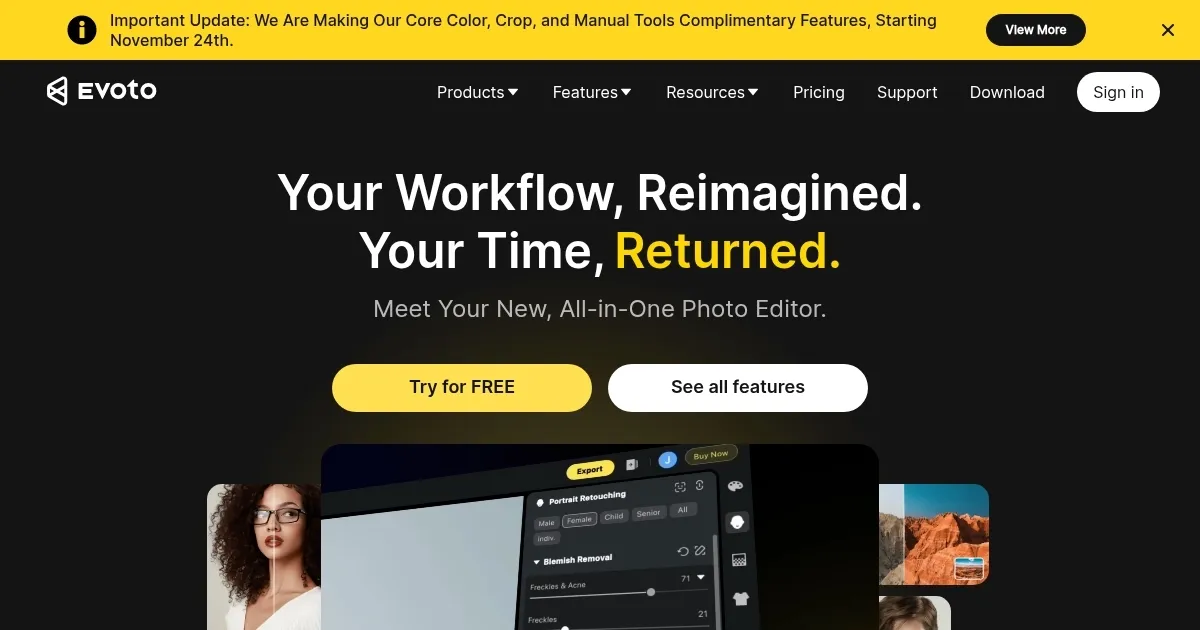
Homepage Screenshot 📸

Evoto screenshot

Video Overview 🎬

Evoto - Video Overview

What are the key features? ✨

  • AI-powered editing: Cockatoo automates complex photo edits with AI, allowing users to easily perform advanced retouching.
  • Batch processing: It lets users edit multiple photos simultaneously, saving time and ensuring consistency across projects.
  • Customizable presets: Cockatoo lets you create and apply custom presets for consistent edits tailored to individual styles and preferences.
  • Advanced retouching tools: It supports features like blemish removal, sky replacement, and background changes to enhance photos.
  • Tethered shooting: Users can connect their camera for real-time editing, thus streamlining the workflow and speeding up the editing process.

Who is it for? 🤔

Evoto targets professional photographers, content creators, and photo enthusiasts looking to enhance their photo editing workflow with AI-powered tools. It is ideal for those in the portrait, wedding, e-commerce, and real estate photography industries, as it provides efficient and high-quality editing solutions. The platform is designed for users who need advanced yet easy-to-use editing capabilities to improve their productivity and output quality.

Examples of what you can use it for 💡

  • Quickly retouch portraits by smoothing skin tones, removing blemishes, and enhancing details
  • Enhance wedding photos with advanced retouching and background adjustments to create perfect memories.
  • Improve product images by removing backgrounds, adjusting colors, and refining details for better online presentation
  • Create eye-catching photos for social media with easy-to-use filters and editing tools
  • Enhance property photos by changing skies, adjusting lighting, and removing unwanted elements

Pros & Cons ⚖️

  • It does wonders for retouching portraits
  • Also great for e-commerce websites
  • Batch processing makes you way more productive
  • You will still need Photoshop for fine-tuning

FAQs 💬

What is Evoto mainly used for?
Evoto serves as a specialized photo editor focused on portrait retouching and batch processing for photographers. It combines AI automation with manual controls to handle tasks like skin smoothing, background adjustments, and color grading, making it ideal for professional workflows in events, headshots, and fashion shoots.
Who benefits most from using Evoto?
Professional photographers, wedding specialists, and studio retouchers gain the most, as it speeds up editing large batches while preserving natural details. Hobbyists might find it useful too, though its advanced AI shines in high-volume scenarios.
How does Evoto handle portrait retouching?
The tool uses AI to detect faces, gender, and age for precise edits like blemish removal and wrinkle reduction without losing skin texture. You adjust sliders for fine control, and it applies changes across batches seamlessly.
Can Evoto work with other editing software like Lightroom or Photoshop?
Yes, it integrates well by exporting TIFF files back to Lightroom for further tweaks, though it's a standalone app rather than a plugin. Many users round-trip images for combined workflows, saving time on AI-heavy tasks.
What platforms does Evoto support?
It runs on Windows, macOS desktops, iPad, and via web-based Evoto Instant for quick mobile edits. Tethered shooting connects directly to cameras for real-time processing on supported devices.
Does Evoto offer batch editing capabilities?
Absolutely, you edit one image and sync adjustments like retouching or color matches to hundreds at once, which cuts down processing time dramatically for events or client galleries.
How accurate is the AI in Evoto for background removal?
The AI Background Remover detects edges sharply, even with complex hair or clothing, and allows replacements or cleanups with minimal manual fixes. It performs reliably on portraits but might need tweaks for busy scenes.
Is there a learning curve for new users of Evoto?
The intuitive interface and preset templates make it approachable, with most features accessible via simple sliders. Tutorials and community forums help, though mastering custom presets takes a bit of practice.
What makes Evoto stand out from tools like Luminar Neo?
Evoto excels in portrait-specific AI like natural skin enhancements and individual subject adjustments, while Luminar focuses more on creative filters. Evoto's batch syncing feels more tailored for pros handling client volumes.
How does Evoto ensure natural-looking results?
AI analyzes lighting and tones to maintain consistency, avoiding over-smoothed effects common in basic tools. Users report it preserves facial expressions and textures better than manual Photoshop work in many cases.

Ready to try Evoto?

An AI photo editing platform that simplifies the editing process for everyone

Visit Evoto ↗

Evoto alternatives 🔗

  1. Imagen Imagen Generates photorealistic images from detailed text prompts
  2. Black Forest Labs Black Forest Labs Generates high-quality images from text prompts with precision and speed
  3. Stable Diffusion Stable Diffusion Generates high-quality images from text prompts with versatile styles
  4. Adobe Express Adobe Express Creates on-brand content with AI-driven design and video tools
  5. Adobe Firefly Adobe Firefly Generates images, videos, audio, and vectors using AI.
  6. Freepik AI Freepik AI Creates AI images and videos with fluid motion, detailed textures, and synced audio up to 1080p
Share
Evoto screenshot enlarged
Promote Evoto
light badge
Copy Embed Code
dark badge
Copy Embed Code
neutral badge
Copy Embed Code
Best AI Tools

Discover the best AI tools for any use case

Explore
  • Tool Categories
  • AI Use Cases
  • AI Events
  • AI News
  • Saved Tools
Company
  • About Us
  • Contact Us
  • Media & Partnerships
  • Suggest a Tool
Legal
  • Privacy Policy
  • Terms of Service
Copyright © 2026 Best AI Tools 415 Mission Street, 37th Floor, San Francisco, CA 94105