logo-darklogo-darklogo-darklogo-dark
  • Tool Categories
    • 🎨Art & Creative Design505
    • 🏢Business Management644
    • 💻Coding & Development515
    • 👮Detection83
    • 🧠General Use727
    • 🏥Health & Wellness55
    • 📷Image & Photo Analysis100
    • 🖼️Image Generation & Editing618
    • 📐Interior & Architectural Design37
    • 🎓Learning & Education483
    • ⚖️Legal & Finance90
    • 🎭Lifestyle & Entertainment236
    • 📢Marketing & Advertising627
    • 🎧Music & Audio138
    • 👔Office & Workplace1,014
    • 🔬Research & Data Analysis372
    • 👥Social Media245
    • 🎥Video Generation & Editing426
    • 👧🏻Virtual Companion135
    • 🎤Voice Generation & Editing381
    • ✍️Writing & Editing808
    • All Categories
    • AI Use Cases
  • News
  • Events
    • Academic Conferences
    • Developer Conferences
    • Expos / Trade Shows
    • Industry Summits
    • Workshops / Training
    • All Events
    • Past Events
  • Saved Tools
  • Suggest a Tool
✕
Home › Image Generation & Editing › Image Generation› FLORA
FLORA

FLORA

Build ideas using text, images, and video in a single visual space - with the help of AI

FloraFauna AI, or just FLORA, is a creative AI tool that lets you build ideas using text, images, and video in a single visual space. At its core, it is a smart canvas that feels a bit like playing with Lego blocks — except the bricks are thoughts, and the final product could be a short film, a storybook, or a marketing campaign. You can drag in an idea, link it to a photo, and watch that grow into a video.

The way FLORA works is like a big brain map. You drop in a “node” with your text, say, a short idea or a line of dialogue, and from there – you can branch off into AI-generated images using models like Kling, Runway, or Luma. One node connects to another, and another after that, like growing vines on a trellis. This is meant to let you build out a scene, character, or message step by step — seeing it all unfold in real time. In that way, some users compare it to working in Figma or Notion, but with AI magic added in. And you don’t have to switch back and forth between tools – you’re staying in one place, and the entire project lives right there.

FLORA stands apart from other creative AI tools by doing three things at once — text, images, and video — all in one space. With Midjourney, you might make a picture. With Runway, you might animate it. But FLORA combines it all in a system that feels like you’re directing a live show. One user, a filmmaker, said it helped them sketch out scenes and visuals for a pitch deck in half the time they usually spend. Another creator used it to build an entire explainer video, moving from script to storyboard to rough cuts, without extra software. That’s pretty cool, we would say.

FLORA also supports collaboration out of the box. You can invite teammates to jump into the same canvas, leave notes, adjust visuals, or duplicate a section to try something new. The node-based system also makes it easy to track changes and ideas.

Instead of digging through folders and files, you just zoom out and see the whole map. Some teams even build reusable templates and style boards that speed things up.

Heck, you can train FLORA on your own style by uploading 20-30 images. Then tap into Claude, GPT‑4, or Flux depending on the feel you want.

Some features (naturally) use credits, but you get a decent chunk to start for free. And while it might feel a bit strange at first — especially if you’re not used to node-style tools — it only takes a few tries to start seeing how powerful this setup really is.

The bottom line is – designers, marketers, educators, and/or content makers who want to turn ideas into real media without bouncing between tools will find FLORA’s AI-powered all-in-one sketchpad amazing. Check it out.

Visit FLORA ↗
Categories
🖼️ Image
🖼️ Image Generation 🪄 Text to Image ✏️ Photo Editing
🎨 Art
🎨 Art Generation 🖼️ Design Generation 🧑‍🎨 Design Assistant
🎥 Video
📹 Video Generation 📝 Text to Video
👔 Work
🖍️ Whiteboard
✍️ Writing
🅰️ Text Generation

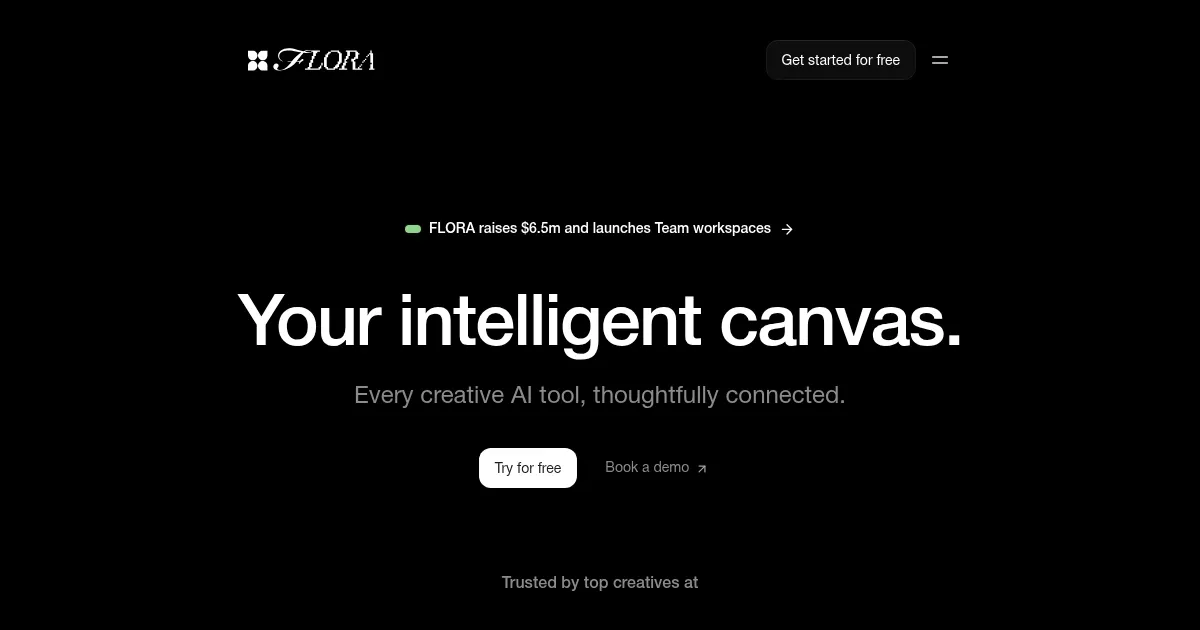
Homepage Screenshot 📸

FLORA screenshot

Video Overview 🎬

FLORA - Video Overview

What are the key features? ✨

  • Infinite canvas: FLORA's infinite canvas gives you one big open space to lay down all your ideas. You can zoom in, zoom out, and link things together like a story map.
  • Smart connections: Smart AI connections let you choose from top tools like OpenAI's GPT, Anthropic's Claude, Kling, Luma, and Runway. You pick the one that fits your creative goal.
  • Collaboration included: Live collaboration means your team can work together inside one project on FLORA. Users can comment, copy sections, or try new ideas without breaking the flow.
  • Prompt helpers & analysis nodes: These are meant to help you come up with better AI inputs. They scan your work and suggest smarter or more creative outputs.
  • Style training & templates: You can build a personal brand or use ready-made designs. This makes it perfect for staying consistent while saving time.

Who is it for? 🤔

FLORA is made for creative professionals looking to blend storytelling with design. That includes graphic designers, video makers, writers, content strategists, and educators. It can be especially useful for people who want to explore different styles and formats without learning lots of different apps. Lastly, FLORA also works well for remote teams that need a shared creative space to work faster and smoother.

Examples of what you can use it for 💡

  • A marketing team can draft campaign messages, create matching visuals, and produce demo videos
  • A teacher can build an interactive lesson with text, images, and animations that students can explore in class
  • A solo artist can develop a comic by writing storylines, adding character portraits, and turning scenes into moving clips
  • A product designer can pitch an idea by laying out copy, visuals, and UI mockups in a single view
  • A filmmaker can storyboard an entire short film by writing scripts, previewing shots, and generating reference clips

Pros & Cons ⚖️

  • Combines text, images, and video in one place
  • Works with many of the best AI models
  • Offers free credits to try most features
  • Node-style layout may feel tricky at first

FAQs 💬

What exactly does FLORA do?
FLORA provides an infinite canvas where creative professionals connect multiple AI models to generate and refine text, images, and videos in one workspace, making it easier to build and iterate on complex ideas.
Who is FLORA designed for?
It targets creative professionals and teams in design, advertising, fashion, VFX, branding, motion, and architecture who need more control and efficiency than basic prompt-based generators offer.
How many AI models can I access on FLORA?
Users get access to over 50 models for image, video, and text generation, including top options from Google, Stability AI, Black Forest Labs, and others, all through one platform.
Does FLORA support team collaboration?
Yes, it includes real-time team workspaces where multiple people can iterate together on the same canvas, share links, and maintain momentum during creative sessions.
What makes the canvas "intelligent" or different from other tools?
The node-based infinite canvas lets you visually link prompts, models, and outputs, so you can branch ideas, trace changes, and reuse workflows instead of starting from scratch every time.
Can I generate videos with FLORA?
Yes, it integrates video models like Veo, Kling, Pika, and Runway, allowing users to create and refine motion content directly on the canvas.
Is there a free way to try FLORA?
A free tier exists with limited credits for testing text, image, and video generation, so potential users can explore the interface before committing.
How does FLORA handle creative control compared to single-model tools?
It emphasizes precision through features like style consistency, character/background swaps, inpainting, and outpainting, giving users more influence over final results.
What kind of workflows can I build on FLORA?
You can create reusable processes for concepting campaigns, exploring character designs, scaling branded assets, storyboarding, or reimagining scenes across multiple variations.
Does FLORA require technical knowledge to use effectively?
While powerful for pros, it has a learning curve with the node system, but many reviews say it becomes intuitive once you understand the visual workflow approach.

Ready to try FLORA?

Build ideas using text, images, and video in a single visual space - with the help of AI

Visit FLORA ↗

FLORA alternatives 🔗

  1. ChatGPT ChatGPT All-round AI assistant generating human-like responses to user queries and tasks
  2. Grok Grok Delivers witty, real-time AI responses with advanced reasoning and image generation
  3. Imagen Imagen Generates photorealistic images from detailed text prompts
  4. Black Forest Labs Black Forest Labs Generates high-quality images from text prompts with precision and speed
  5. Kling AI Kling AI Generates cinematic videos from text or images with realistic motion
  6. Runway Runway Generates and edits AI-powered videos from text prompts
Share
FLORA screenshot enlarged
Promote FLORA
light badge
Copy Embed Code
dark badge
Copy Embed Code
neutral badge
Copy Embed Code
Best AI Tools

Discover the best AI tools for any use case

Explore
  • Tool Categories
  • AI Use Cases
  • AI Events
  • AI News
  • Saved Tools
Company
  • About Us
  • Contact Us
  • Media & Partnerships
  • Suggest a Tool
Legal
  • Privacy Policy
  • Terms of Service
Copyright © 2026 Best AI Tools 415 Mission Street, 37th Floor, San Francisco, CA 94105