Skip to content
logo-darklogo-darklogo-darklogo-dark
  • Tool Categories
    • 🎨Art & Creative Design505
    • 🏢Business Management644
    • 💻Coding & Development514
    • 👮Detection83
    • 🧠General Use728
    • 🏥Health & Wellness55
    • 📷Image & Photo Analysis100
    • 🖼️Image Generation & Editing618
    • 📐Interior & Architectural Design37
    • 🎓Learning & Education483
    • ⚖️Legal & Finance90
    • 🎭Lifestyle & Entertainment236
    • 📢Marketing & Advertising627
    • 🎧Music & Audio138
    • 👔Office & Workplace1,014
    • 🔬Research & Data Analysis373
    • 👥Social Media245
    • 🎥Video Generation & Editing426
    • 👧🏻Virtual Companion135
    • 🎤Voice Generation & Editing381
    • ✍️Writing & Editing808
    • All Categories
    • AI Use Cases
  • News
  • Events
    • Academic Conferences
    • Developer Conferences
    • Expos / Trade Shows
    • Industry Summits
    • Workshops / Training
    • All Events
    • Past Events
  • Saved Tools
  • Suggest a Tool
    ✕
    Home › Video Generation & Editing › Video Editing› fylm.ai
    fylm.ai

    fylm.ai

    Generates AI-assisted color grades and LUTs for images in the cloud

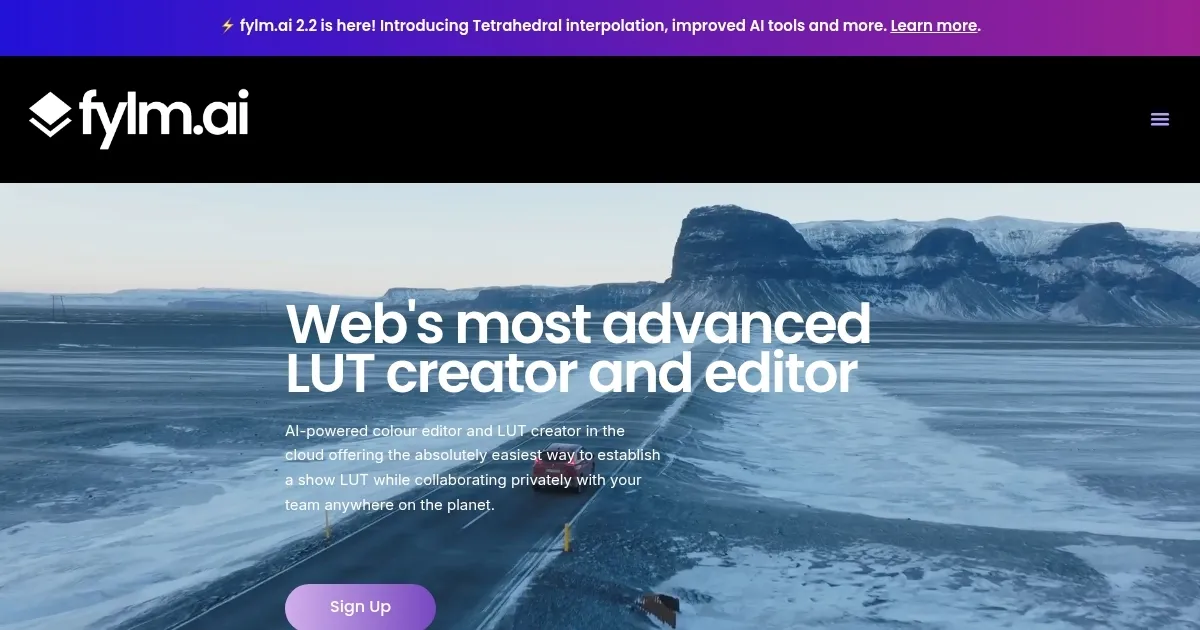
    fylm.ai is a cloud-based AI color grading platform for creating LUTs and editing images with tools like NeuralToneAI and NeuralFilmAI.

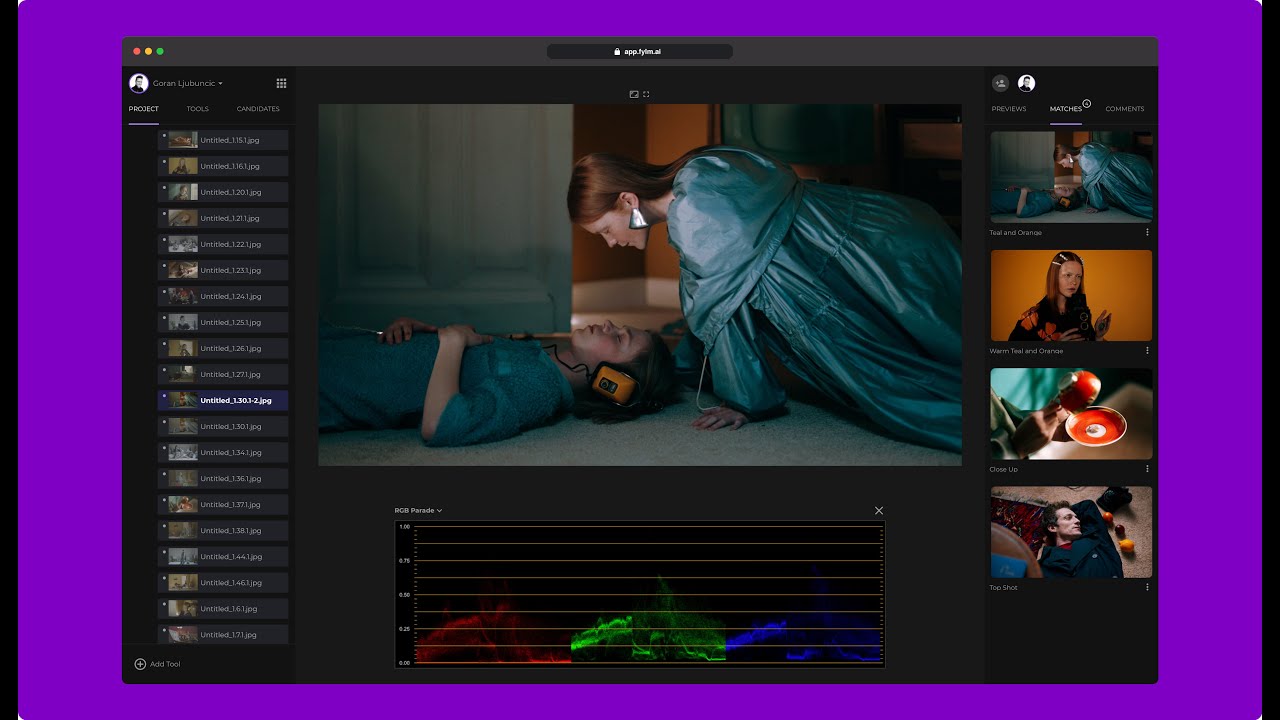
    The platform processes raw files from DSLRs, mirrorless cameras, and smartphones using ACEScct color management for consistent workflows. NeuralToneAI applies AI models to generate grades, match shots, and auto-correct colors based on image context. NeuralFilmAI delivers neural-network film emulations, exporting as LUTs, XMP profiles, or Capture One styles. Subtractive CMY model simulates film emulsion processing, increasing saturation in darker tones via a density slider.

    Primary controls include wheels and bars with GPU acceleration for instant adjustments. Curves support 4096-point precision in 32-bit processing to maintain highlight and shadow detail. Secondaries offer hue, saturation, and luminance controls per color range, plus luminance vs. saturation and saturation vs. saturation qualifiers. Scopes display RGB parades, waveforms, vectorscopes, and histograms. Blending modes such as overlay, soft light, and darken enable effects like bleach bypass.

    Asset management centralizes files with instant search and filtering. Collaboration supports private team access, comments, and simultaneous edits. Magic Mode provides a step-by-step LUT builder completing in 18 seconds. Version 2.2 adds tetrahedral interpolation for smoother AI interpolations.

    Competitors include color.io for web-based grading with basic AI matching, and Colourlab.ai for automated shot balancing in ACES space. fylm.ai offers broader browser collaboration and film-specific AI, with plans from free evaluation to team tiers adding users and storage, positioned as more affordable for remote workflows than desktop alternatives.

    Users report up to 10x faster on-set LUT creation and 90% time savings on show setups. Limitations involve internet dependency and free tier caps at 1GB storage and 2048px exports. AI handles 85% of primaries effectively but requires manual refinement for creative specifics.

    Test NeuralToneAI on a single frame to evaluate matching accuracy before scaling to projects.

    Visit fylm.ai ↗
    Categories
    🎥 Video
    ✏️ Video Editing ✨ Video Enhancing
    🎨 Art
    📷 Photography
    🖼️ Image
    🎞️ Photo Filtering ✏️ Photo Editing 🎨 Style Transferring

    Homepage Screenshot 📸

    fylm.ai screenshot

    Video Overview 🎬

    fylm.ai - Video Overview

    What are the key features? ✨

    • NeuralToneAI: Applies AI colorist models to generate grades, match shots, and auto-correct based on cinematic training data.
    • NeuralFilmAI: Delivers context-aware film emulations mimicking real stock for instant cinematic elevation.
    • Subtractive CMY Model: Emulates film emulsion by increasing saturation in darker tones for organic depth.
    • Magic Mode: Guides step-by-step LUT creation in under 20 seconds with skip options for quick workflows.
    • Collaboration Tools: Enables private team sharing, comments, and simultaneous edits on projects.

    Who is it for? 🤔

    Filmmakers, photographers, and video editors who juggle remote teams or need fast, pro-level color tweaks will find fylm.ai a solid fit, especially if you're tired of hardware-heavy software and want AI to handle initial balances while you refine creatively. Beginners get a gentle ramp-up with auto tools, pros appreciate the ACES precision and exports that slot into existing pipelines like Lightroom or Resolve, and small agencies love the private collab without extra logins or file shuffling.

    Examples of what you can use it for 💡

    • Cinematographer: Uses NeuralToneAI to match shots from a multi-camera setup, ensuring consistent looks across takes for quick on-set approvals.
    • Photographer: Applies NeuralFilmAI emulations to raw portraits, exporting XMP profiles to Lightroom for batch editing with film-like tones.
    • Video Editor: Employs Magic Mode to build a show LUT in seconds, sharing the project privately with directors for feedback before final DI.
    • Marketing Team: Leverages collaboration tools to grade campaign stills remotely, filtering assets and adding comments for client revisions.
    • Indie Filmmaker: Runs AI Color Extract on reference images to pull grades, applying them via curves for budget-friendly post-production.

    Pros & Cons ⚖️

    • AI speeds workflows
    • Cloud collab ease
    • Film emulation smarts
    • Free tier limits
    • AI needs tweaks

    FAQs 💬

    What file formats does fylm.ai support?
    It handles raw files from DSLRs, mirrorless cameras, smartphones, and digital backs, plus standard images for grading.
    Is fylm.ai compatible with other editing software?
    Yes, exports include .cube LUTs, XMP profiles for Lightroom/Adobe Camera Raw, and ICC profiles for Capture One.
    How does the free plan work?
    The free plan allows single-user evaluation with basic grading and limited exports up to 2048px resolution.
    Can teams collaborate in real-time?
    Collaboration supports private sharing, simultaneous edits, and comments for teams up to 10 users on higher plans.
    What makes NeuralToneAI different from manual grading?
    NeuralToneAI uses AI models trained on cinematic frames to auto-generate grades and match shots, saving up to 90% of setup time.
    Does it require powerful hardware?
    No, as a browser-based tool, it uses cloud processing with GPU acceleration for responsive controls.
    How accurate are the film emulations in NeuralFilmAI?
    Emulations analyze image context for smart application, closely mimicking real film stock with adjustable density.
    Is there a mobile app for fylm.ai?
    Access is browser-based, so it works on any device with internet, but optimized for desktop for full tool access.
    What is tetrahedral interpolation in version 2.2?
    This update improves AI smoothness in color interpolations for more precise gradients and matches.
    Can I use fylm.ai for video or just stills?
    Primarily for stills to create LUTs, but grades apply to video workflows via exports in post-production tools.

    Ready to try fylm.ai?

    Generates AI-assisted color grades and LUTs for images in the cloud

    Visit fylm.ai ↗

    fylm.ai alternatives 🔗

    1. Colourlab Ai Colourlab Ai Automates color grading for filmmakers, delivering professional results quickly
    2. Runway Runway Generates and edits AI-powered videos from text prompts
    3. Color.io Color.io The web-based app offers powerful tools to emulate analog film styles
    4. Adobe Firefly Adobe Firefly Generates images, videos, audio, and vectors using AI.
    5. Imagen Imagen Learns photographers' unique editing styles to automate batch photo editing and culling
    6. Fotor Fotor Enhances and edits photos with AI-powered tools and creative features
    Share
    fylm.ai screenshot enlarged
    Best AI Tools

    Discover the best AI tools for any use case

    Explore
    • Tool Categories
    • AI Use Cases
    • AI Events
    • AI News
    • Saved Tools
    Company
    • About Us
    • Contact Us
    • Media & Partnerships
    • Suggest a Tool
    Legal
    • Privacy Policy
    • Terms of Service
    Copyright © 2026 Best AI Tools 415 Mission Street, 37th Floor, San Francisco, CA 94105